
Best Web Scraping API for AI Agents in 2026
We put four scraping APIs through 800 requests against DataDome, Cloudflare and Akamai. Two of them never returned a single usable page from the DataDome target.



Most web scraping APIs for AI agents are evaluated based on output format, MCP integration, and JavaScript rendering. But they are rarely evaluated on what happens when Cloudflare, DataDome, or Akamai protect the agent's target.
These APIs focus on every possible piece of tooling an agent needs, while overlooking whether the agent can reliably access protected web data. This guide evaluates five web scraping APIs for AI agents, including Zenrows, Firecrawl, Jina AI Reader, CrawlForge, and Bright Data. You'll discover which ones cover both agent tooling and protected web access.
Why Web Scraping APIs for AI Agents Are Not All the Same
Most scraping APIs that AI agents rely on work great on public documentation, company blogs, news sites, and unprotected directories. But when targets expand to e-commerce pricing pages, job boards, or industry directories, data extraction becomes challenging. These targets start returning challenge pages, empty responses, or partial content, which limits what an agent can do with the data.
That's why it's important to evaluate these APIs first by their anti-bot success rate, because they don't all perform the same way on protected targets. For example, even Firecrawl's stealth mode can fail on heavily protected targets, while Jina AI Reader can perform inconsistently on protected targets despite its anti-bot handling. CrawlForge is limited when accessing protected sources, while Zenrows is designed to handle protected targets.
To properly evaluate each tool, we first ran a benchmark test of their anti-bot success rate before considering output format and rendering capabilities.
The Benchmark Methodology and Results
We benchmarked Zenrows (using its Fetch with mode=auto capability), Jina AI Reader, and CrawlForge on August 20, 2026, and Firecrawl on August 25, 2026 (using its proxy=auto mode, which starts in standard mode and retries in stealth mode). We sent 50 requests per target for each provider at a fixed rate of two requests per second, for 800 requests in total. The test targets were JobLookup (protected by DataDome), Chrono24 (protected by Cloudflare), Reuters (protected by Akamai), and Wikipedia (unprotected). We did not include Bright Data in the test because it requires enterprise KYC.
We evaluated each API based on success rate, response time, and observed resource consumption. We considered a request successful only if it returned both an HTTP 200 status code and a valid page title or meaningful data. You can find the benchmark repository here, including the raw per-request results every figure below is computed from. Every number in this article was recomputed from that dataset on 1 October 2026 rather than transcribed, so you can reproduce any of them yourself.
The Benchmark Results
| Provider | Target | Protection | Success rate | Avg. response time (ms) |
|---|---|---|---|---|
| Zenrows | JobLookup | DataDome | 100% | 10,053 |
| Zenrows | Chrono24 | Cloudflare | 100% | 4,590 |
| Zenrows | Reuters | Akamai | 100% | 4,103 |
| Zenrows | Wikipedia | Unprotected | 100% | 2,115 |
| Jina | JobLookup | DataDome | 98% | 1,029 |
| Jina | Chrono24 | Cloudflare | 100% | 1,417 |
| Jina | Reuters | Akamai | 100% | 1,242 |
| Jina | Wikipedia | Unprotected | 100% | 1,340 |
| Firecrawl | JobLookup | DataDome | 0% | 1,299 |
| Firecrawl | Chrono24 | Cloudflare | 100% | 1,688 |
| Firecrawl | Reuters | Akamai | 100% | 1,488 |
| Firecrawl | Wikipedia | Unprotected | 100% | 1,512 |
| CrawlForge | JobLookup | DataDome | 0% | 781 |
| CrawlForge | Chrono24 | Cloudflare | 0% | 709 |
| CrawlForge | Reuters | Akamai | 0% | 728 |
| CrawlForge | Wikipedia | Unprotected | 100% | 1,251 |
Zenrows consistently returned successful requests against all targets. Jina was the closest after Zenrows, performing consistently on all targets and failing once against JobLookup. Firecrawl returned no successful requests on JobLookup, where all 50 requests came back as a reCAPTCHA page, but achieved a 100 percent success rate on Chrono24, Reuters, and Wikipedia. CrawlForge failed to access all three protected targets and succeeded only on the unprotected target: 403s on JobLookup and Chrono24, and a 401 on Reuters.
All four APIs achieved a 100 percent success rate on the baseline unprotected Wikipedia website, confirming their ability to pull from easy targets. The three protected targets are where they separate. The table below summarizes the success rates across those three, along with the average response time and observed consumption for all four targets.
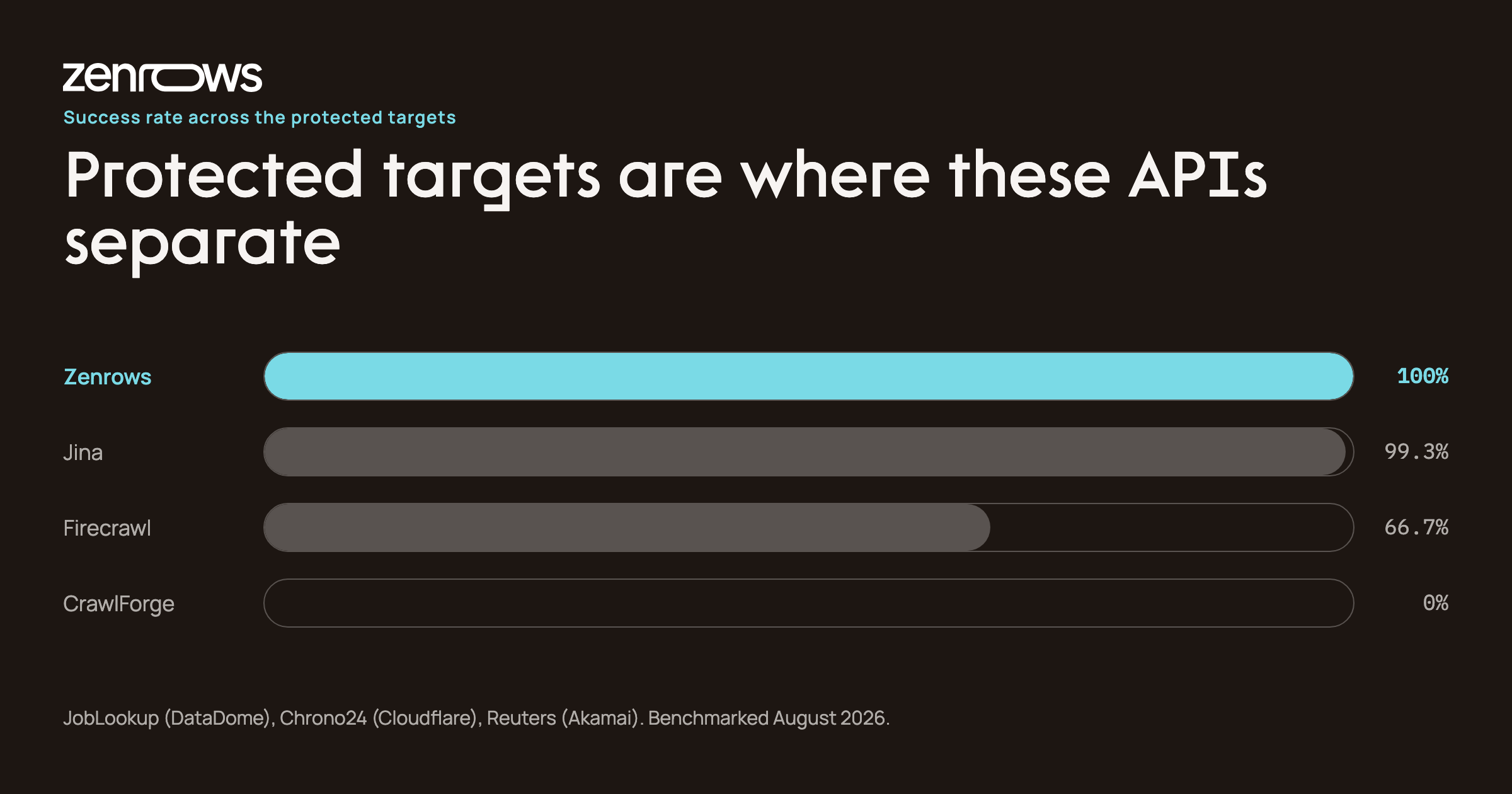
| Provider | Avg. success rate (3 protected targets) | Avg. response time (4 targets) | Observed consumption per request (4 targets) |
|---|---|---|---|
| Zenrows | 100.00% | 5,215 ms | 4.59 credits |
| Jina | 99.33% | 1,257 ms | 24,922.58 tokens |
| Firecrawl | 66.67% | 1,497 ms | 1 credit |
| CrawlForge | 0.00% | 867 ms | 1 credit |
Jina was the fastest of the APIs that actually returned content on the protected targets, while CrawlForge's lower average is the speed of being turned away. Zenrows was the only API to return a usable page on every request across the benchmark. Zenrows' average response time was higher, particularly on the protected targets where it consistently returned successful content rather than a challenge page.
Note that consumption values use each provider's native usage unit and are not directly comparable on a cost basis. They are dashboard readings taken before and after the run, divided by the 200 requests each provider served, and the balances are published in the repository alongside the raw data. Zenrows consumed an average of 4.59 credits per request, Jina 24,922.58 tokens, and Firecrawl and CrawlForge one credit each. These figures should be considered alongside the success rate, as a lower consumption figure does not necessarily indicate better value when requests fail.
Zenrows' credit figure also hides something worth seeing. It is an average of four very different requests, because mode=auto escalates only as far as the target forces it to:
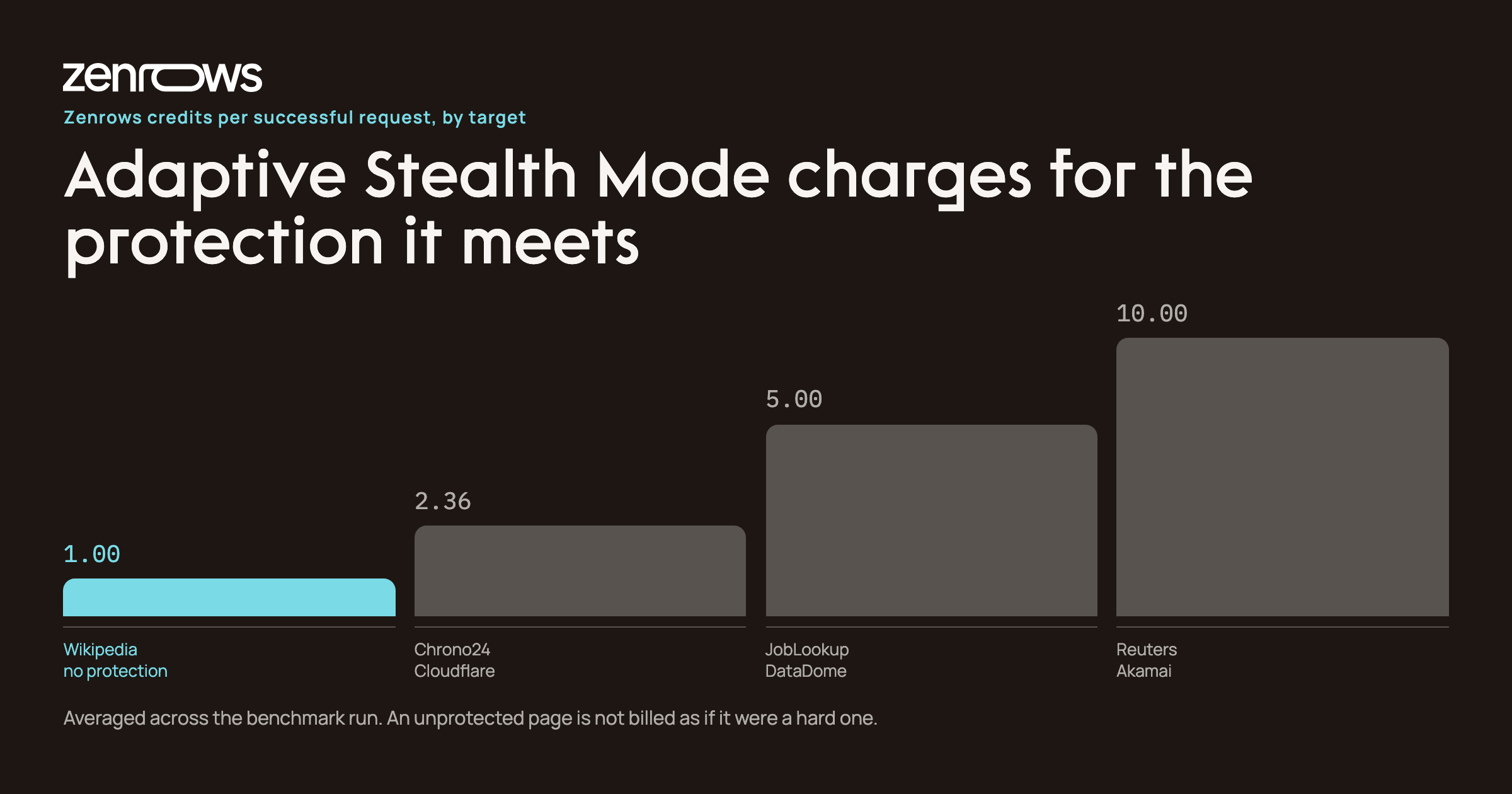
An unprotected Wikipedia page cost one credit. Reuters, behind Akamai, cost ten. Cloudflare-protected Chrono24 averaged 2.36, because not every request needed the full escalation. You pay for the protection you actually meet, which matters for an agent whose targets are a mix of easy and hard pages.
With the benchmark results showing how each tool performs against protected targets, we can now compare them against the remaining criteria.
Best Web Scraping APIs for AI Agents Compared
Zenrows
Zenrows is the primary recommendation for agents that need to access protected and dynamic web sources among the tools compared. Our benchmark results, showing a 100 percent average success rate across the protected targets, further support this, and Zenrows publishes a 99.93 percent success rate across its wider target set. Zenrows Fetch with Adaptive Stealth Mode handles Cloudflare, DataDome, Akamai, and PerimeterX, along with dynamic website support and protected network access, in a single API call.
It is also flexible with data output types. It returns pages as LLM-ready Markdown for AI pipelines, as plain text for NLP workloads, and as PDF where you need the rendered page. Zenrows Extract returns structured JSON straight from the page without needing pre-written CSS selectors.
Where Zenrows pulls ahead for agent work specifically is the Agent Toolkit, which ships on every plan rather than as an add-on.
An MCP server that every primitive is exposed through. Agents call scrape, extract and 30+ browser_* tools natively, with authentication and usage visibility built in. There are first-party setup guides for Claude Desktop, Claude Code, Cursor, Windsurf, VS Code, Zed, JetBrains IDEs, OpenCode and Google Antigravity, and for the Claude Agent SDK, OpenAI Agents SDK, Google ADK and Mastra. You can run it locally over npx or point at the hosted endpoint; either way the tool surface is identical, so a prototype in Cursor and a production agent share one integration.
A CLI for terminal-native agents. zenrows fetch and zenrows extract work in a shell, and zenrows mcp config --client claude-code writes the MCP configuration for a given client rather than leaving you to hand-edit JSON.
Agentic payments, so an agent can buy its own access. Zenrows publishes a machine-readable API catalogue with prices an agent can read without a login, wallet or card, and settles through x402, MPP or a card. An agent that hits a 402 challenge can complete the purchase itself and carry on, instead of stopping to ask a human for a key. For a team building autonomous agents, that is the difference between a run that finishes and a run that blocks overnight.
Beyond the agent surface, Zenrows Batch handles async job management, concurrency, retries, and webhook delivery. It allows agents to process up to 100,000 URLs asynchronously per job.
Zenrows has a free tier of 5,000 credits/month with no credit card required. For the paid tier, the lowest plan is the Build tier at $16/month (45,000 credits), scaling up to the Scale tier at $458/month (five million credits) and the Enterprise custom tier. Billing is pay per successful request, so a blocked request is not a charged one.
Firecrawl
Firecrawl is a good option for agents that only access unprotected or lightly protected sources. This was also reflected in our benchmark, where Firecrawl achieved an average success rate of 66.67 percent across the protected targets. Firecrawl's data output is structured specifically for LLMs. It supports Markdown, JSON Schema generation, and metadata extraction, all built for RAG and chunking. Firecrawl also has dedicated /agent and /interact endpoints for autonomous multi-page exploration and stateful browser control.
Its proxy=auto configuration, which retries in stealth mode, had no successful requests against JobLookup, which uses DataDome: all 50 responses were a reCAPTCHA page. Its advanced AI Extract feature requires a separate subscription in addition to the base plan. Firecrawl has a free plan with 1,000 credits per month and a starting plan of $19/month. It is best for RAG pipelines, LLM data ingestion, and autonomous research on mainstream unprotected or lightly protected sources.
Jina AI Reader
Jina is a zero-setup HTTP gateway that converts web URLs into LLM-ready Markdown via simple URL prefixing. It works by prepending r.jina.ai/ to a URL and has built-in image captioning and visual descriptions for multimodal agent workflows. Jina has anti-bot handling but can fail against heavily gated targets. It had the second-highest success rate in our benchmark, at 99.33 percent across the three protected targets.
However, based on our benchmark, Jina's token consumption varied with the amount of content returned, averaging 24,922.58 tokens per request. This can make billing less predictable than fixed-credit models for large crawls.
Jina has a limited free tier of 10 million tokens and a paid tier starting from $50, costing $0.050 per one million tokens. Jina is best for agents that need quick lookups of documentation, news, and public web content.
CrawlForge
CrawlForge is an MCP-native architecture providing 31 specialized scraping tools that an agent can discover and call without custom wrapper code. They include fetch_url, deep_research, map_site, and scrape_template. CrawlForge provides token-efficient Markdown output and supports running extraction schemas locally via Ollama at no cost. It also has predictable, transparent credit consumption per tool: usually one credit for a basic fetch and up to 10 for deep research.
However, CrawlForge's anti-bot coverage is limited on heavily protected targets. It returned a zero percent success rate across the three protected sites and a 100 percent success rate on the unprotected platform. CrawlForge has a free tier of 1,000 credits and a paid plan starting at $19/month (5,000 credits). It is best for agents built on MCP-native hosts (Claude Desktop, Cursor) that primarily access unprotected or lightly protected sources and need the widest tool surface without custom integration.
Bright Data
Bright Data is the enterprise-grade option for protected-site access. It has a pool of over 150 million IPs and is SOC 2 Type II and ISO 27001-certified. It is also suitable for dynamic content rendering and protected web access needs.
However, its Web Unlocker, Browser API, and Residential Proxies products each have $499/month Scale plans. This makes the full stack significantly more expensive than a typical self-service tool for individual developers or small teams. Bright Data is best for enterprise teams with five-figure monthly data budgets, compliance requirements, and dedicated data engineering staff using AI agents.
Based on each tool's capabilities and performance in our benchmark, each has areas where it is best suited.
When Zenrows Is the Right Choice
Zenrows is the right choice when:
- Your AI agent's targets are protected by Cloudflare, DataDome, Akamai, or PerimeterX.
- Your team needs a unified API that handles protected access, dynamic website support, and structured extraction without requiring site-specific configuration.
- You need pay-for-success billing for reliable protected-site access for AI agents without enterprise-grade infrastructure requirements.
- You want token-efficient Markdown or schema-driven structured JSON without managing complex headless browser pools.
The other tools in this comparison each have a shape of work they suit. Firecrawl fits agents whose targets are exclusively unprotected or lightly protected and whose primary requirement is LLM-native output format. CrawlForge fits agents that mainly need MCP-native tool discovery across 31 specialized tools. Bright Data fits teams that require verified ISP proxies or pre-built scrapers for specific platforms backed by custom SLAs. If you want a wider view of that landscape, we compare the best AI web scraping tools separately.
If Zenrows is the right choice for you, here is how to integrate it into your agents.
Integrating Zenrows Into Your Agent
You can give your agents access to live web data through the Zenrows Fetch API via the Zenrows MCP server or via frameworks that natively support MCP. Here are three common patterns to accomplish this.
Using Zenrows via an MCP Desktop Host
You can connect the Zenrows MCP server directly to Claude Desktop. Add the following configuration to claude_desktop_config.json:
{
  "mcpServers": {
    "zenrows": {
      "command": "npx",
      "args": ["-y", "@zenrows/mcp"],
      "env": {
        "ZENROWS_API_KEY": "YOUR_ZENROWS_API_KEY"
      }
    }
  }
}
After restarting Claude Desktop, the Zenrows tools become available to the agent. Claude can then call the scrape and browser_* tools based on the task you provide. For how this compares with the other MCP servers for web scraping, we tested seven of them separately.
Using Zenrows via the OpenAI Agents SDK
The OpenAI Agents SDK has native MCP support through HostedMCPTool, which allows you to connect the hosted Zenrows MCP server without building custom function-calling logic:
import asyncio
import os

from agents import Agent, HostedMCPTool, Runner

ZENROWS_API_KEY = os.environ["ZENROWS_API_KEY"]

agent = Agent(
    name="Web Research Assistant",
    instructions="Use live web data when you need current information.",
    tools=[
        HostedMCPTool(
            tool_config={
                "type": "mcp",
                "server_label": "zenrows",
                "server_description": "Web data access through Zenrows.",
                "server_url": "https://mcp.zenrows.com/mcp",
                "authorization": ZENROWS_API_KEY,
                "require_approval": "never",
            }
        )
    ],
)

async def main():
    result = await Runner.run(
        agent,
        "Visit https://news.ycombinator.com/ and summarize the three most recent posts.",
    )
    print(result.final_output)


if __name__ == "__main__":
    asyncio.run(main())
If you would rather register Fetch as a plain function tool than go through MCP, we walk through that in building a web-aware agent with the OpenAI Agents SDK.
Using Zenrows via the LangChain Integration
LangChain can use the langchain-zenrows package to expose Zenrows as an agent tool. The agent can then call Zenrows when it needs live web data and use the returned content in its workflow.
from langchain_zenrows import ZenRowsUniversalScraper
from langchain_openai import ChatOpenAI
from langgraph.prebuilt import create_react_agent

llm = ChatOpenAI(model="gpt-4o-mini")
zenrows_tool = ZenRowsUniversalScraper()

agent = create_react_agent(llm, [zenrows_tool])

result = agent.invoke({
    "messages": [
        {
            "role": "user",
            "content": "Scrape https://www.etsy.com/ in Markdown and return the four cheapest products in JSON."
        }
    ]
})
Set your ZENROWS_API_KEY as an environment variable before running the agent.
Comparing Zenrows, Firecrawl, Jina AI Reader, CrawlForge, and Bright Data at a Glance
| Criteria | Zenrows | Firecrawl | Jina AI Reader | CrawlForge | Bright Data |
|---|---|---|---|---|---|
| Best for | AI agents accessing protected and dynamic web sources | RAG, LLM data ingestion, and unprotected or lightly protected sources | Quick lookups of documentation, news, and public web content | MCP-native agents accessing primarily unprotected sources | Enterprise teams requiring protected web access |
| Protected-target success rate | 100% | 66.67% | 99.33% | 0% | Not tested (requires enterprise-level KYC) |
| Output formats | Markdown, plaintext, PDF, structured JSON with Extract | Markdown, JSON Schema, metadata | LLM-ready Markdown, visual descriptions | Markdown, extraction schemas | HTML, Markdown, structured data and other formats depending on product |
| MCP server | Yes | Yes | Yes, official + community | Yes | Yes |
| SDK support | Python, Node.js, Go | Python, Node.js and others | HTTP API | No dedicated SDK | Multiple SDK/API integrations |
| Free tier | 5,000 credits/month, no card | 1,000 credits/month | 10 million tokens | 1,000 credits | 5,000 credits/month |
| Entry price | $16/month | $19/month | $50 | $19/month | Product-dependent; Scale plans from $499/month |
| Success-billed only | Yes | Partial (only API-level failures are free) | No | No | Partial (only for Web Unlocker, SERP API, Web Scraper API products) |
| KYC required | No | No | No | No | Yes for Residential and Mobile IP networks |
| Benchmark source | Our benchmark | Our benchmark | Our benchmark | Our benchmark | Not tested |
What the Benchmark Settles
Output format and tool count are the easy part of this category, and every API here does them well. Protected access is the part that decides whether an agent returns an answer or a challenge page, and it is the part the five tools disagree on most.
Across 800 requests, Zenrows was the only API that returned a usable page every time, on DataDome, Cloudflare, Akamai and an unprotected baseline alike, and it did it while charging one credit for the page that needed nothing. Jina came closest and is faster when the target is open. Firecrawl and CrawlForge are reasonable choices for agents whose targets stay public, and both are honest about where their coverage ends.
Pick on the targets your agent will actually hit. If any of them sit behind an anti-bot system, start with 5,000 free credits and run your own list through Fetch before you commit.
FAQs
What Is the Best Web Scraping API for AI Agents in 2026?
Zenrows is the strongest choice when an AI agent needs reliable access to protected web sources. In our benchmark, Zenrows achieved a 100 percent success rate across Cloudflare, DataDome, and Akamai-protected targets while also providing MCP access and structured data extraction.
Can AI Agents Scrape Websites Protected by Cloudflare or DataDome?
Yes, but only through an API that handles the protection for them. In our benchmark, two of the four APIs tested returned nothing usable from a DataDome-protected target across 50 requests each, while Zenrows returned a valid page on every request to Cloudflare, DataDome, and Akamai targets.
Does Firecrawl Handle Cloudflare-Protected Sites?
Firecrawl can access some Cloudflare-protected sites in stealth mode, but performance varies by target. In our benchmark, it achieved a 100 percent success rate against Chrono24, which was protected by Cloudflare, and a zero percent success rate against the DataDome-protected target, where Zenrows cleared all three.
What Is the Difference Between a Web Scraping API and a Scraping MCP Server?
A web scraping API is the service that fetches the page; an MCP server is a way of handing that service to an agent as a callable tool. Zenrows offers both, so the same Fetch capability is available over REST, over the CLI, or as an MCP tool your agent discovers automatically.
Can I Use Zenrows With LangChain or CrewAI?
Yes. Zenrows provides a langchain-zenrows integration and can be exposed as a tool for LangChain agents. Zenrows can also be integrated with CrewAI and other agent frameworks through its MCP server.
What Is the Difference Between Zenrows MCP and Firecrawl MCP?
Both provide MCP access, allowing agents to use web scraping capabilities as tools. Zenrows focuses on reliable access to protected and dynamic sources, with structured extraction and Browser Sessions when a page needs interaction. Firecrawl focuses on LLM-ready crawling of unprotected and lightly protected sources.
Is There a Free Web Scraping API for AI Agents?
Yes. Zenrows offers 5,000 free credits per month with no credit card required, Firecrawl offers 1,000 credits, Jina AI Reader offers 10 million tokens, and CrawlForge offers 1,000 credits. Bright Data also offers 5,000 free credits per month, shared across several products.
How Much Does It Cost to Run an AI Agent That Scrapes Protected Sites?
The cost depends on the scraping API, target protection, and extraction method. Zenrows starts at $16/month and bills only successful requests, while Bright Data's enterprise-oriented products can require significantly higher commitments. In our benchmark a Zenrows request averaged 4.59 credits, ranging from one credit on an unprotected page to ten on an Akamai-protected one.
Does an AI Agent Need JavaScript Rendering to Scrape a Page?
It depends on the target. Pages that build their content in the browser return little usable text without it, which is why an agent calling a plain HTTP fetch often gets an empty result. Zenrows' mode=auto decides per request, so the agent does not have to.
What Is extract=auto and Can I Use It in My Agent Workflow?
extract=auto is Zenrows' automatic extraction capability that returns structured JSON from a page without requiring you to write CSS selectors. You can use it alongside AI agent workflows through the Fetch API.