# Web Scraping with cURL [Best Guide 2026]
> cURL is a powerful web scraping tool for those that know how to use it. Learn to extract data and win over blocking challenges in this step-by-step tutorial.
Source: https://www.zenrows.com/blog/curl-web-scraping
The command line is still a valuable asset for developers in 2024, and so is web scraping with cURL. Let's explore everything from first cURL requests to advanced scenarios.
## What Is cURL in Web Scraping?
cURL (Client for URLs) is an open-source command-line tool used to make requests to web servers and therefore get data. It's equipped to handle advanced tasks like **user authentication, [dynamic web crawling](/blog/dynamic-web-pages-scraping-python), and alternating proxy servers**, thanks to the support of a wide range of network protocols (e.g., HTTP, HTTPS).
## Prerequisites
To perform web scraping with cURL, you must first have it on your computer. The installation process varies based on your operating system:
**A) Linux:** open the terminal and run the following command:
```nginx
apt-get install curl
```
**B) Mac:** the OS comes with the tool installed, but use `homebrew` if you want the latest version:
```nginx
brew install curl
```
**C) Windows:** If you run your script on Windows 10 or higher, cURL comes pre-installed. But if you have an older version, go to [the official website](https://curl.se/windows/), download the latest release, and install it on your machine.
Once you've installed cURL, ensure everything is working properly by opening your terminal and typing `curl` to test it out. If all goes well, you'll receive this message:
```
curl: try 'curl --help' or 'curl --manual' for more information
```
## How to Use cURL for Web Scraping
Using cURL to send requests involves **typing the `curl` command and your target URL** to get started.
```nginx
curl https://httpbin.org/anything
```
You'll see how the HTML content of the requested webpage will instantly appear on your screen.
```json
{
"args": {},
"data": "",
"files": {},
"form": {},
"headers": {
"Accept": "*/*",
"Host": "httpbin.org",
"User-Agent": "curl/7.86.0",
"X-Amzn-Trace-Id": "Root=1-6409f056-52aa4d931d31997450c48daf"
},
"json": null,
"method": "GET",
"origin": "83.XX.YY.ZZ",
"url": "https://httpbin.org/anything"
}
```
This command tool allows you to perform more advanced requests adding extra parameters before your target page.
```nginx
curl [options] [URL]
```
One of your options is to perform **data transfer with a broad range of protocols**, including HTTP, HTTPS, FTP, SFTP, and many others.
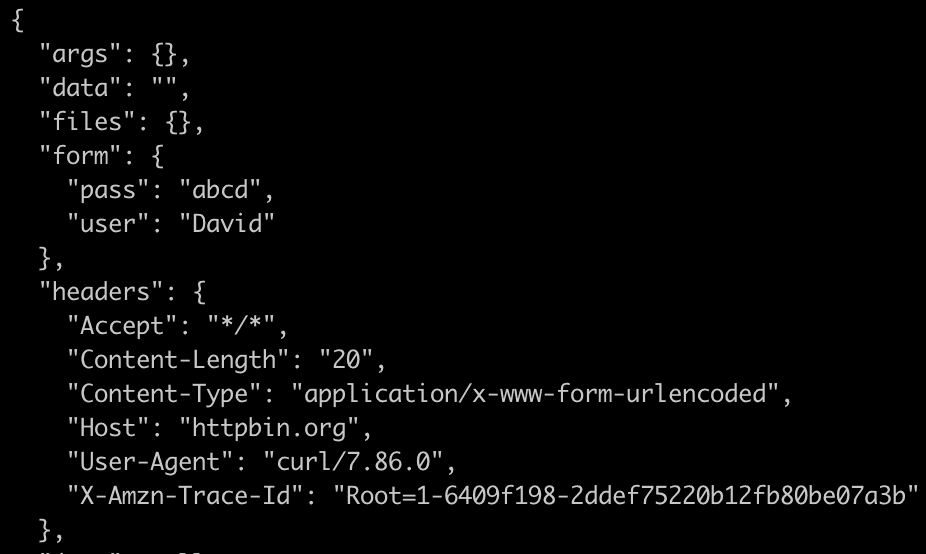
Another relevant consideration is that you need to **use the POST method, marked by the `-d` (data) attribute, to submit a form.** Here's how to enter user `David` using the password `abcd`:
```
curl -d "user=David&pass=abcd" https://httpbin.org/post
```
And here we go:
## Avoid Getting Blocked while Web Scraping with cURL
The biggest web scraping challenge is the ease of getting blocked. But, to avoid that, you'll learn to implement a couple of best practices for [bypassing anti-bots like Cloudflare with cURL](/blog/curl-bypass-cloudflare): rotating proxies and customizing headers.
### Use Rotating Proxies with cURL
Plenty of requests to the same website coming from the same IP address in no time look suspicious, putting you at risk of being detected as a bot and blocked. The solution? A proxy server: an intermediary that masks your IP by giving you a different one.
For example, we'll use one of the many freely available [proxy server lists](https://free-proxy-list.net/) online and select an IP address to include in our next request. As a target page, we'll use [the previous HTTP Request & Response Service](https://httpbin.org/anything). This is the syntax for cURL web scraping:
```nginx
curl --proxy :
```
You should replace `` with the IP address of the proxy and `` with the port number. Here's what it'll look like:
```
curl --proxy 198.199.86.11:8080 -k https://httpbin.org/anything\
```
Unfortunately, when we try to access the website using a free proxy, we receive an error message: `Received HTTP code 500 from proxy after CONNECT`. We also encounter the same error when we try to use another IP proxy from the list:
```
curl --proxy 8.209.198.247:80 https://httpbin.org/anything\
```
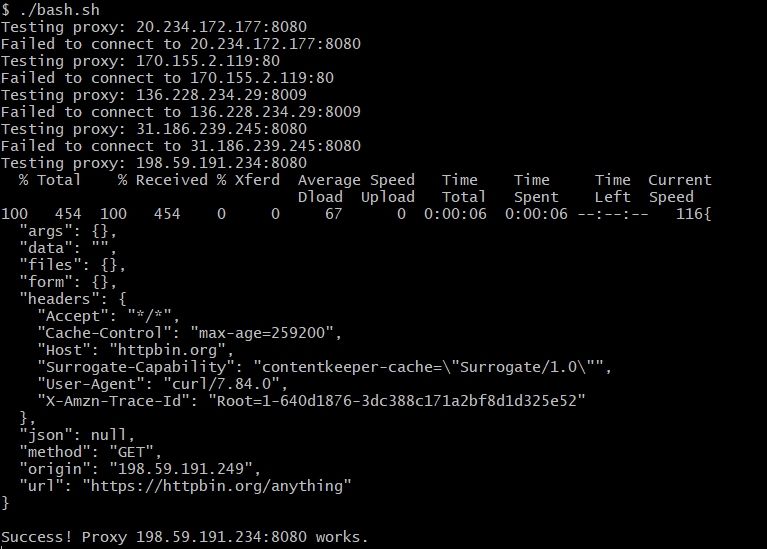
What you can do is store a list of proxies in a text file and use a Bash script, then automate the process of testing each proxy. Below, we start by iterating through each line in the `proxies.txt` file and set the current line as the proxy for a curl request.
```
#!/bin/bash
# Read the list of proxies from a text file
while read -r proxy; do
echo "Testing proxy: $proxy"
# Make a request through the proxy using cURL
if curl --proxy "$proxy" -k https://httpbin.org/anything
>/dev/null 2>&1; then
curl --proxy "$proxy" -k https://httpbin.org/anything
echo "Success! Proxy $proxy works."
else
echo "Failed to connect to $proxy"
fi
# Wait a bit before testing the next proxy
sleep 1
done < proxies.txt
```
If the request is successful and the website is accessible through the proxy, the script will display the website content and exit. Conversely, if the request fails, we'll automatically move on to the next proxy in the list until a successful connection is established.
However, **free proxy pools aren't reliable, and a better approach is getting a premium proxy with residential IPs**. Or you can make it easier and try [Zenrows](/) to get them and also the proxy management handled for you.
You can learn more about this topic by checking out our tutorial on [rotating proxies in Python](/blog/rotate-proxies-python).
> **Skip the blocks.** [Try Zenrows free](/) and get clean web data without the anti-bot fight.
### Add Custom Headers
When browsing the web, the HTTP headers serve as a digital signature and identify you on every page you visit. So even if you mask your IP, it'll be clear you're a bot unless you also rotate your headers.
The most important element for web scraping is the [User-Agent](/blog/user-agent-web-scraping#what-is-a-user-agent) string, which contains information about your browser and device. It looks like this:
```nginx
Mozilla/5.0 (Macintosh; Intel Mac OS X 13_2_1) AppleWebKit/605.1.15 (KHTML, like Gecko) Version/16.3 Safari/605.1.15
```
To change the User-Agent of your cURL scraper, add the `-A` option followed by your desired string using this syntax:
```nginx
curl -A "user-agent-name-here () () " [URL]
```
Here's an example using Google Chrome:
```nginx
curl -A "Mozilla/5.0 (X11; Linux x86_64; rv:60.0) AppleWebKit/537.36 (KHTML, like Gecko) Chrome/109.0.0.0 Safari/537.36" https://httpbin.org/headers
```
**Note:** It's likely that randomly altering the will get you blocked because not all data might match. Look at our [list of top user agents for web scraping](/blog/user-agent-web-scraping) with cURL.
## Dynamic Web Scraping with cURL
Many websites use AJAX or other client-side technologies to render entire pages or part of the content, which represents an additional challenge to extracting the data. But you're all covered in this tutorial! Here we go with cURL dynamic web scraping.
Head over to [ScrapingClub](https://scrapingclub.com/exercise/list_detail_infinite_scroll/90008-E/) with your browser and navigate to a product page.
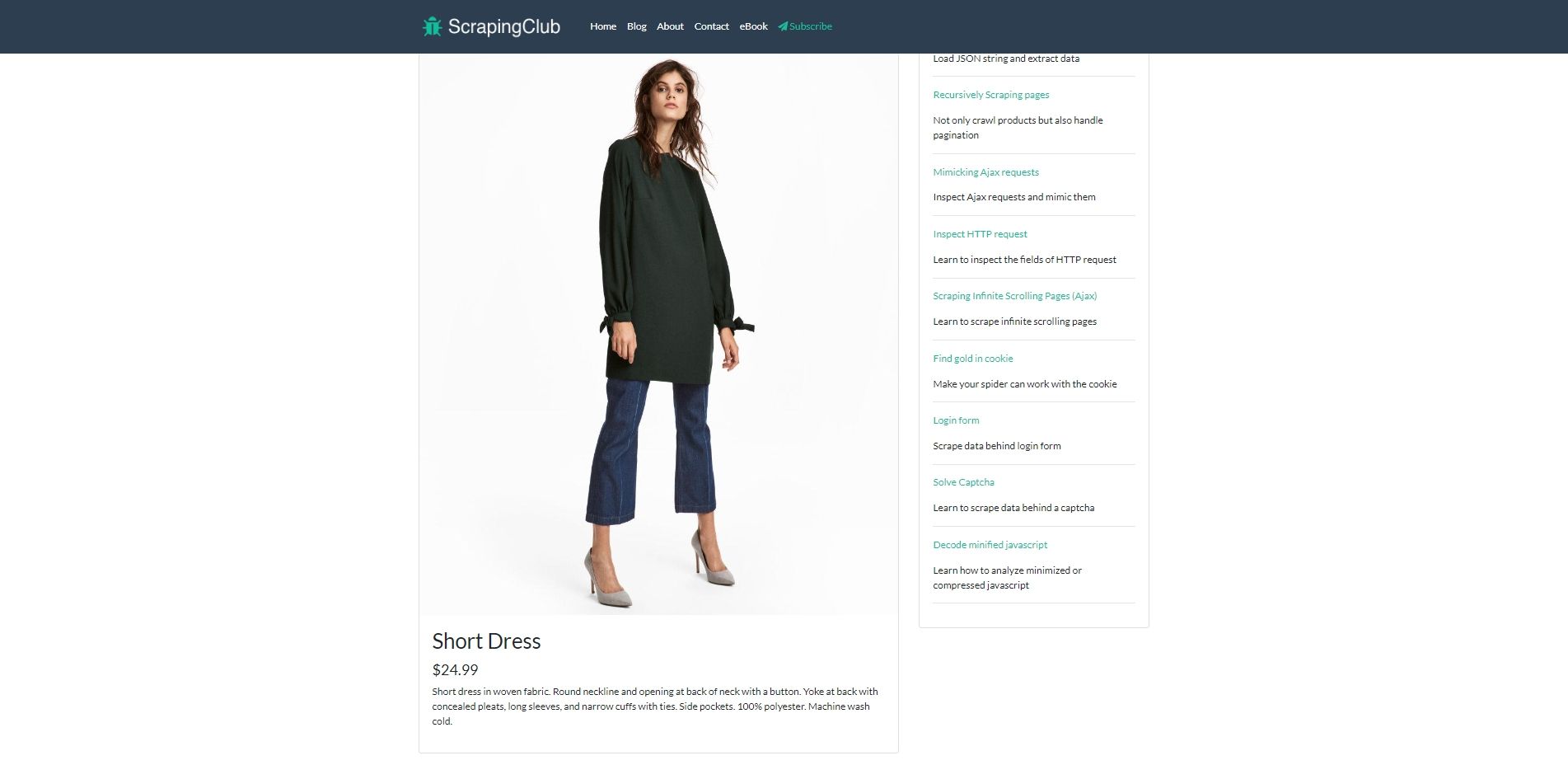
Once you're there, open up the DevTools by right-clicking anywhere and selecting "Inspect" to reveal the raw HTML structure.
Explore the source code, and pay close attention to see if any AJAX requests are made after the initial page load. Here it is! We found the following snippet that fetches some content from the server: product title, price, description, and image address.
```html
```
As seen on line four, the dynamic request lies in `/exercise/list_detail_ajax_infinite_scroll/90008-E/`.
Head to the "Network" tab in the DevTools, refresh the page and open `90008-E`, the XHR (XMLHttpRequest) element the source code revealed. Then, go to the "Response" sub-tab. What you see is the dynamic content generated by the AJAX script.
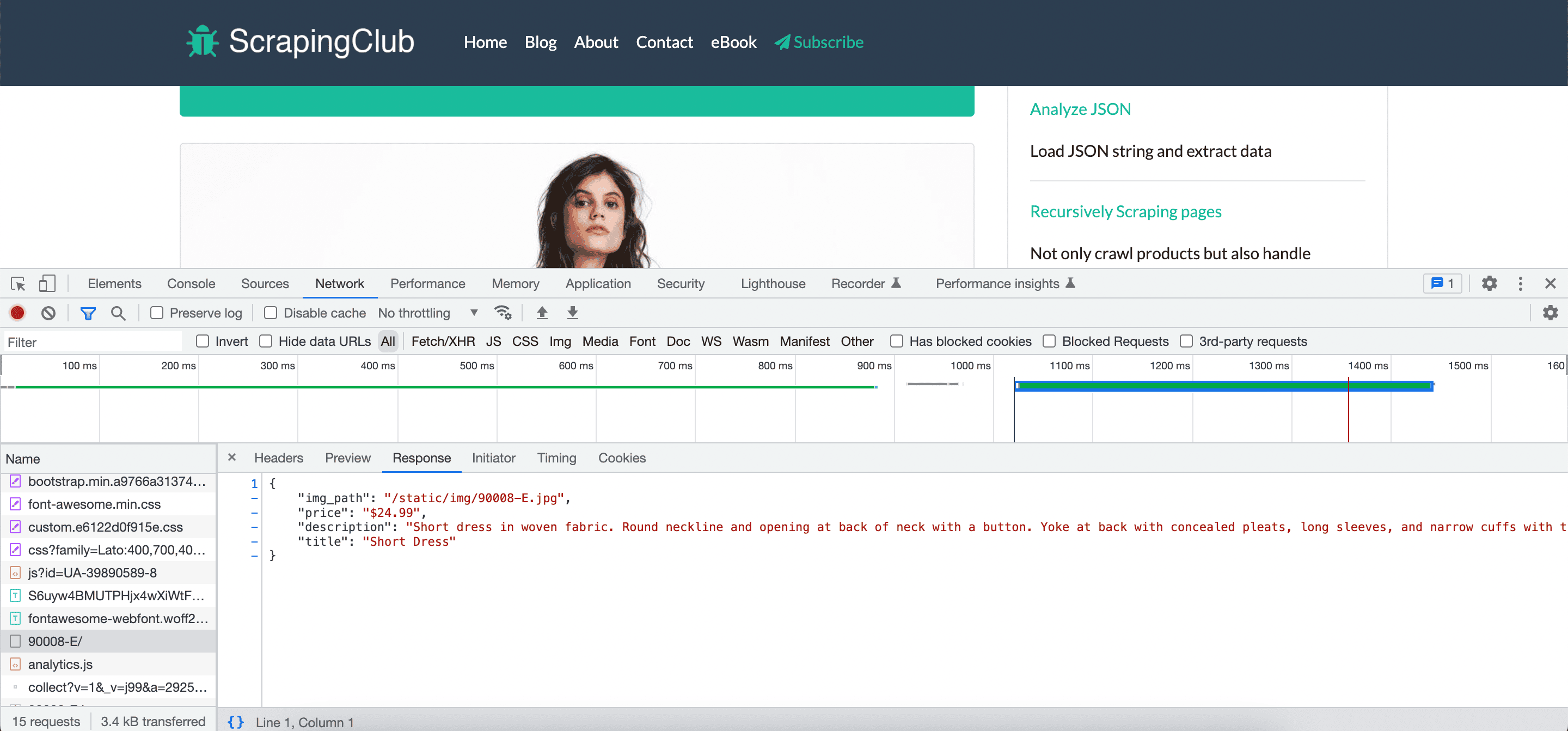
To extract it via cURL web scraping, make a request to `https://scrapingclub.com/exercise/list_detail_ajax_infinite_scroll/90008-E/`, adding the `x-requested-with` header with the `-H` option, and specifying `XMLHttpRequest` as the data to be retrieved.
Additionally, include the `'--compressed'` option to get a compressed response, which reduces the bandwidth.
```nginx
curl 'https://scrapingclub.com/exercise/list_detail_ajax_infinite_scroll/90008-E/' \
-H 'x-requested-with: XMLHttpRequest' \
--compressed
```
Here's the result:
```json
{
"img_path": "/static/img/90008-E.jpg",
"price": "$24.99",
"description": "Short dress in woven fabric. Round neckline and opening at back of neck with a button. Yoke at back with concealed pleats, long sleeves, and narrow cuffs with ties. Side pockets. 100% polyester. Machine wash cold.",
"title": "Short Dress"
}
```
However, you should bear in mind that cURL scripting may not be sufficient for pages with a complex structure, where the dynamic content is loaded into the page in more varied ways. In such cases, the AJAX endpoints aren't easily discoverable from the page source code, or they require complex JavaScript logic to be executed.
Thus, if your scraping project includes websites with dynamic content, interactions like a user would perform in a browser, or complex APIs that require JavaScript execution using cURL may not be enough. In such cases, it's necessary to integrate (or replace) cURL with a [headless browser](/blog/headless-browser-scraping) using Python, PHP or another language.
To get a first dive into how to do that, check out our guide on how to [scrape dynamic web pages](/blog/dynamic-web-pages-scraping-python) with Python.
## Conclusion
cURL is a versatile and valuable asset for web scraping, used for tasks of different complexity. However, anti-bot protections and WAFs get more advanced every day - check out our guide on [anti-bot detection](/blog/anti-bot) for more details. This means you might need to consider using a complementary tool to get the data you want.
Zenrows is a powerful add-on that provides you with premium rotating proxies and other features to help you avoid being blocked. [**Get your free API key**](/){:data-popup=true} in seconds and try it out with cURL. Use `amazon.com` as a target site to see the difference.
## Frequent Questions
### How Do I Scrape a Website Using cURL?
To scrape a website using cURL, follow these steps:
1. Identify the website you want to scrape and your target data.
2. Use the cURL command to send an HTTP request to the website's server.
3. Add parameters to simulate being a human user. One of the most common aspects here is customizing user agents with rotation and using proxies.
4. Parse the HTML content of the server's response;
5. Refine the cURL script to optimize the scraping process and handle website-specific challenges.