
How to Run Large-Scale Web Scraping Jobs With Zenrows Batch
Run 100,000 URLs as one managed job with Zenrows Batch. Submission, webhooks, HMAC verification, failures and reruns, CSV input, scheduling and a credit safety monitor, all in runnable Python.



Zenrows Batch is a batch scraping API: it runs large URL lists as a single managed job. This article shows you how to do web scraping at scale, from one Cloudflare-protected page to a 100,000-URL job, without building the queue, retry logic, and delivery pipeline yourself.
If you need to scrape thousands of URLs, or scrape a list of URLs you already have, this is the path that does not ask you to build the infrastructure around it first.
We ran every example against the live Batch API; the complete, runnable code is in the GitHub repo.
Let's start with where the DIY approach breaks down.
Why Large-Scale Web Scraping Breaks Your DIY Approach in 2026
Large-scale web scraping is any job where the infrastructure required to run it reliably (queuing, concurrency, retries, monitoring) competes with the value of the data it produces. The threshold varies by team, but most developers hit it somewhere between 10,000 and 100,000 URLs per job.
A scraper that works fine on 500 URLs starts breaking at 50,000. The target site starts rate-limiting you once your requests per second climb too high, and 429 Too Many Requests becomes the most common line in your logs. Thousands of open connections start eating memory.
Requests fail and just stay failed, because nothing was built to retry them. And by the time you notice, you often can't tell which URLs succeeded and which didn't.
asyncio and aiohttp solve concurrency well on a single machine, and so does Scrapy, but none of them solve the web scraping infrastructure problem underneath. Even a well-written async web scraping script still leaves you owning the queue, the retry logic, the failure tracking, and the result delivery. Scaling past one machine means building distributed web scraping yourself.
At scale, ownership is the real engineering cost. Semaphores and backoff in asyncio and aiohttp solve concurrency. The rest is still yours to build.
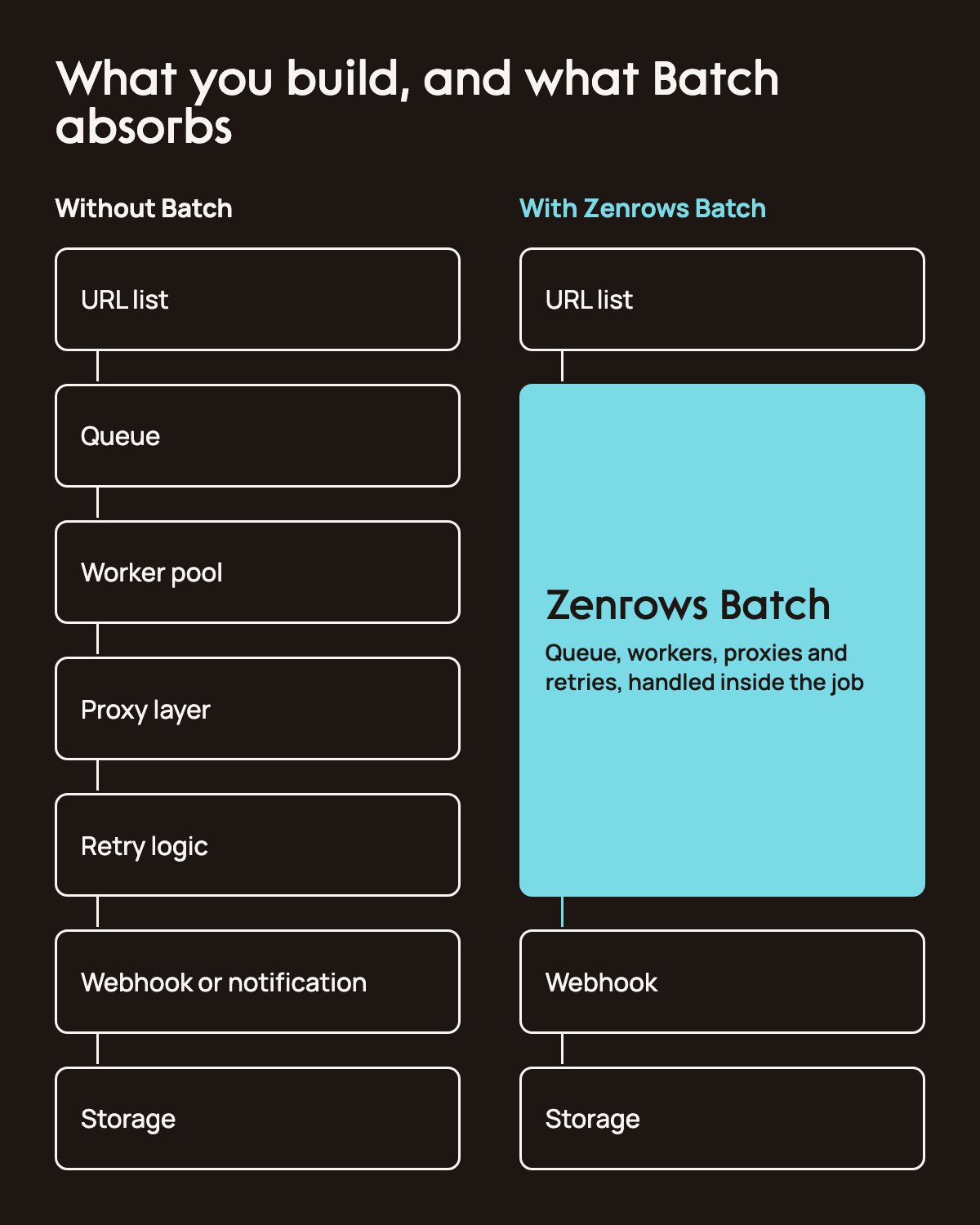
Every large-scale scraping system needs the same six pieces:
- A web scraping job queue that decouples discovery from fetching
- Concurrency management that keeps concurrent HTTP requests from overwhelming targets
- Proxy rotation that avoids IP bans
- Retry logic with backoff, so you can retry failed scraping requests without rerunning the whole list
- Monitoring that catches silent failures before they distort a dataset
- A result delivery mechanism that gets the data to where it's used
Each one is its own engineering project. Together they are the scraping job orchestration layer, and Batch replaces all six of them with a single API call.
How Zenrows Batch Works
Batch is an async scraping API. You submit a list of URLs and a scraping config in one request, and it returns a job ID you can check on later.
It queues each URL, handles protected access with mode=auto, and retries anything that fails for transient reasons. When a run finishes, you find out one of two ways. Zenrows calls your webhook automatically, or you poll the job's status endpoint yourself with repeated GET requests until it reports back as done.
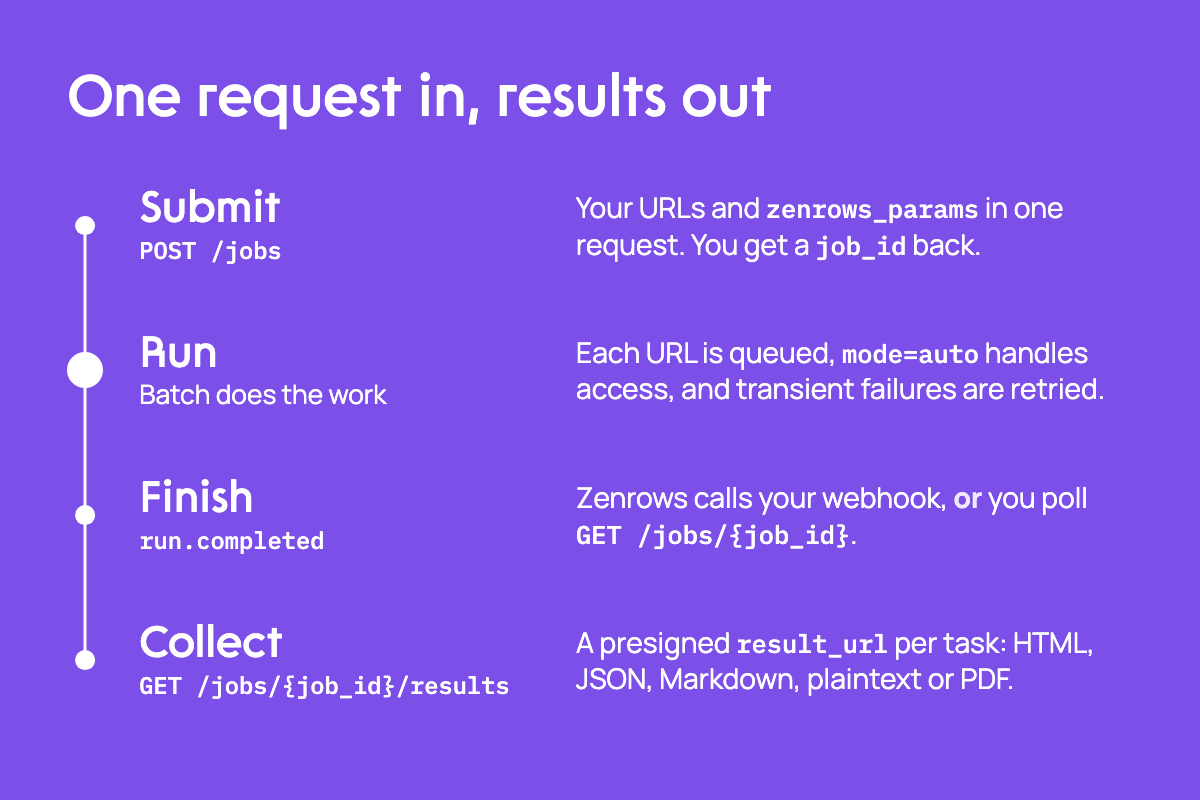
A submission needs a few things: whether the job is regular or scheduled, whether it's closed (all URLs known up front) or open (URLs added over time), and a list of URLs, each with an optional external_id for matching results back to your own records. Scraping options go in a separate zenrows_params object: mode: "auto" for anti-bot handling, response_type if you want Markdown or plaintext instead of HTML, and css_extractor for a specific structure, or Zenrows Extract (extract: "auto") if you want structured data back instead of raw pages. Set these once at the job level to apply them to every URL, or override them per task where a specific URL needs different handling.
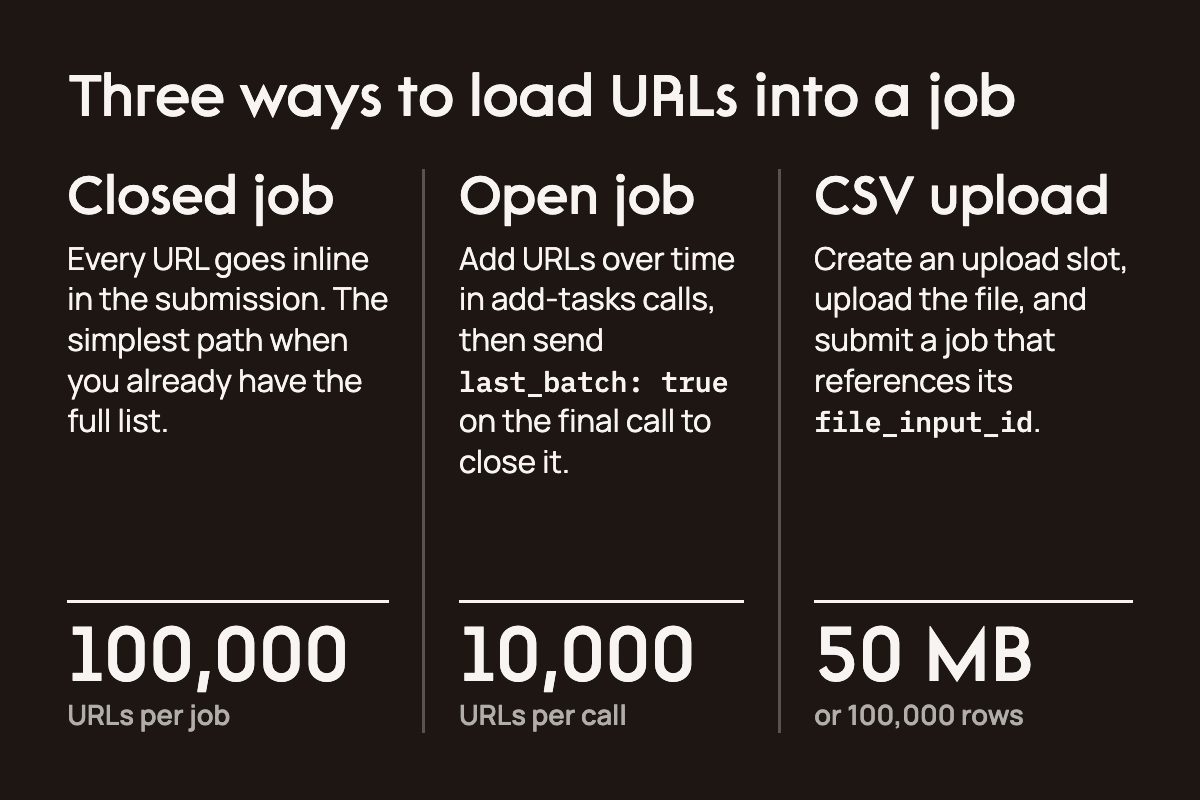
A job takes up to 100,000 URLs. An open job accepts up to 10,000 URLs per add-tasks call before you close it. There are three ways to scrape multiple URLs in a single job.
A closed job takes every URL inline in the submission, the simplest path when you already have the full list. An open job lets you add URLs in batches over time and close it when you're done, which is useful when your list builds up gradually rather than arriving all at once. We tested it directly and it works end to end. A CSV upload skips inlining URLs entirely. You can upload a file and reference it in the submission. It's the practical choice once a list gets too large to comfortably paste into a request body.
Getting results back works the same way regardless of how the job started. Each successful task gives you a pre-signed link to the content, HTML by default, or JSON, Markdown, plaintext, or PDF, depending on how you set response_type.
Beyond the REST API, Batch is also reachable through Zenrows' CLI and MCP server, so agentic workflows can submit and manage jobs without touching HTTP directly. Everything in this article uses the REST API to keep the examples explicit, but the same job you're about to build works through any of these paths.
zenrows batch estimate jobs.jsonl
zenrows batch create jobs.jsonl --wait
zenrows batch results <job-id> --out results.jsonl
With the Zenrows MCP server connected to your assistant, you can ask: "Use Zenrows Batch to submit the URLs in my product list as one job, then report how many succeeded and failed when the run finishes."
You'll need a Zenrows API key to follow along. Get one from the registration page if you don't already have one.
With that in hand, here's what submitting a job looks like.
Running Your First Batch Job
A Batch job is one request built from your URLs and a scraping config. Here's the simplest real example: submitting a Cloudflare-protected page with mode=auto.
Every example in this article calls into client.py, a small helper in the repo that wraps authentication, the Batch endpoints, job submission, polling, results, reruns, webhooks, HMAC verification, CSV uploads, and scheduling, so each script isn't repeating the same HTTP boilerplate.
# refer to 01_cloudflare_target.py in repo
import client

payload = {
    "type": "regular",
    "status": "closed",
    "zenrows_params": {"mode": "auto"},
    "tasks": [
        {"url": "https://www.scrapingcourse.com/cloudflare-challenge", "external_id": "cloudflare-challenge"}
    ],
}

submitted = client.submit_job(payload)
job_id = submitted["job_id"]
print(job_id, submitted["latest_run"]["status"])
We ran this against a real page. With mode=auto, the job used dynamic website support and advanced network access to retrieve the content, consuming 25 credits. The resulting content contains the page's own confirmation text: "You bypassed the Cloudflare challenge! :D"
In practice, a single target that's both Cloudflare-protected and a 1,000-page product catalog is rare. Purpose-built practice sites tend to have one property or the other, so the examples below split the two concerns: this page proves anti-bot handling, the next section proves volume, and either applies the same way to your own targets.
Getting Notified When a Job Finishes
Attaching a webhook means Zenrows pushes the scraped data to your server automatically: it POSTs to your endpoint the moment a run completes, instead of you polling for it.
We tested webhooks separately on a smaller job of three product pages, so the payload below comes from that run rather than the Cloudflare one.
Signed webhooks use an HMAC key on your account. Generate one before your first signed job.
# refer to 05_webhook.py in repo
key = client.rotate_hmac_key()
# store key["secret"] now, it's returned exactly once
With that in place, attach the webhook to the submission:
# ...
payload = {
    "type": "regular",
    "status": "closed",
    "zenrows_params": {"mode": "auto"},
    "tasks": [
        {"url": "https://www.scrapingcourse.com/ecommerce/product/abominable-hoodie/", "external_id": "good-1"},
        {"url": "https://www.scrapingcourse.com/ecommerce/product/adrienne-trek-jacket/", "external_id": "good-2"},
        {"url": "https://www.scrapingcourse.com/ecommerce/product/aeon-capri/", "external_id": "good-3"},
    ],
    "webhook": {"url": "https://your-app.com/webhooks/zenrows", "signature": True},
}
submitted = client.submit_job(payload)
Here's the actual completed run delivery we captured:
{
  "schema": "zenrows.webhook/v1",
  "event_id": "EVENT_ID",
  "event_type": "run.completed",
  "occurred_at": "2026-08-17T09:16:06.43901173Z",
  "job_id": "JOB_ID",
  "run_id": "RUN_ID",
  "run_sequence": 1,
  "stats": {"total": 3, "completed": 3, "successful": 3, "failed": 0, "spend": {"credits": 3, "cost": 0.00038997}}
}
Verify that the delivery came from Zenrows using the X-Signature header (t=<timestamp>,v1=<hex>,kid=<key_id>) and the secret from the HMAC step above:
import hmac
import hashlib
import base64

def verify(raw_body: bytes, t: str, v1: str, secret_b64: str) -> bool:
    secret = base64.b64decode(secret_b64)
    expected = hmac.new(secret, f"{t}.".encode() + raw_body, hashlib.sha256).hexdigest()
    return hmac.compare_digest(expected, v1)
Handling a Job With Real Failures
Some URLs fail, and Batch reports exactly why. We submitted a separate batch mixing five real product pages with three URLs built to fail on purpose: a nonexistent domain, a dead page, and an unroutable IP:
# refer to 03_failure_and_rerun.py in repo
payload = {
    "type": "regular",
    "status": "closed",
    "zenrows_params": {"mode": "auto"},
    "tasks": [
        {"url": "https://www.scrapingcourse.com/ecommerce/product/abominable-hoodie/", "external_id": "good-1"},
        {"url": "https://www.scrapingcourse.com/ecommerce/product/adrienne-trek-jacket/", "external_id": "good-2"},
        {"url": "https://www.scrapingcourse.com/ecommerce/product/aeon-capri/", "external_id": "good-3"},
        {"url": "https://www.scrapingcourse.com/ecommerce/product/artemis-running-short/", "external_id": "good-4"},
        {"url": "https://www.scrapingcourse.com/ecommerce/product/aero-daily-fitness-tee/", "external_id": "good-5"},
        {"url": "https://this-domain-should-not-exist-zenrows-example-9f31a2.com/", "external_id": "broken-1"},
        {"url": "https://www.scrapingcourse.com/ecommerce/product/this-product-does-not-exist-404/", "external_id": "broken-2"},
        {"url": "https://192.0.2.1/", "external_id": "broken-3"},
    ],
}
submitted = client.submit_job(payload)
job_id = submitted["job_id"]
Five succeeded and three failed. Once the run reaches a terminal state, query the results and filter for the failures:
# ...
results = client.list_results(job_id, status="all")
failed_rows = [r for r in results["results"] if r["status"] == "failed"]
for row in failed_rows:
    print(row["external_id"], row["url"], row["error"])
Two of the three failures carry a real error.detail string:
error.code=RESP002  detail="The requested URL page returned a 404 HTTP Status Code..."
error.code=RESP007  detail="The requested target domain could not be resolved..."
The third carries a title rather than a detail string, because the URL was rejected before the fetch as intended:
error.code=REQS004 title="No ip-based target URLs are allowed"
Resubmitting only the failures is one call, and it doesn't charge you for what already succeeded:
# ...
rerun = client.rerun_job(job_id, status="failed")
print(rerun["retried_tasks"], rerun["inherited_tasks"])
# 3 retried, 5 inherited
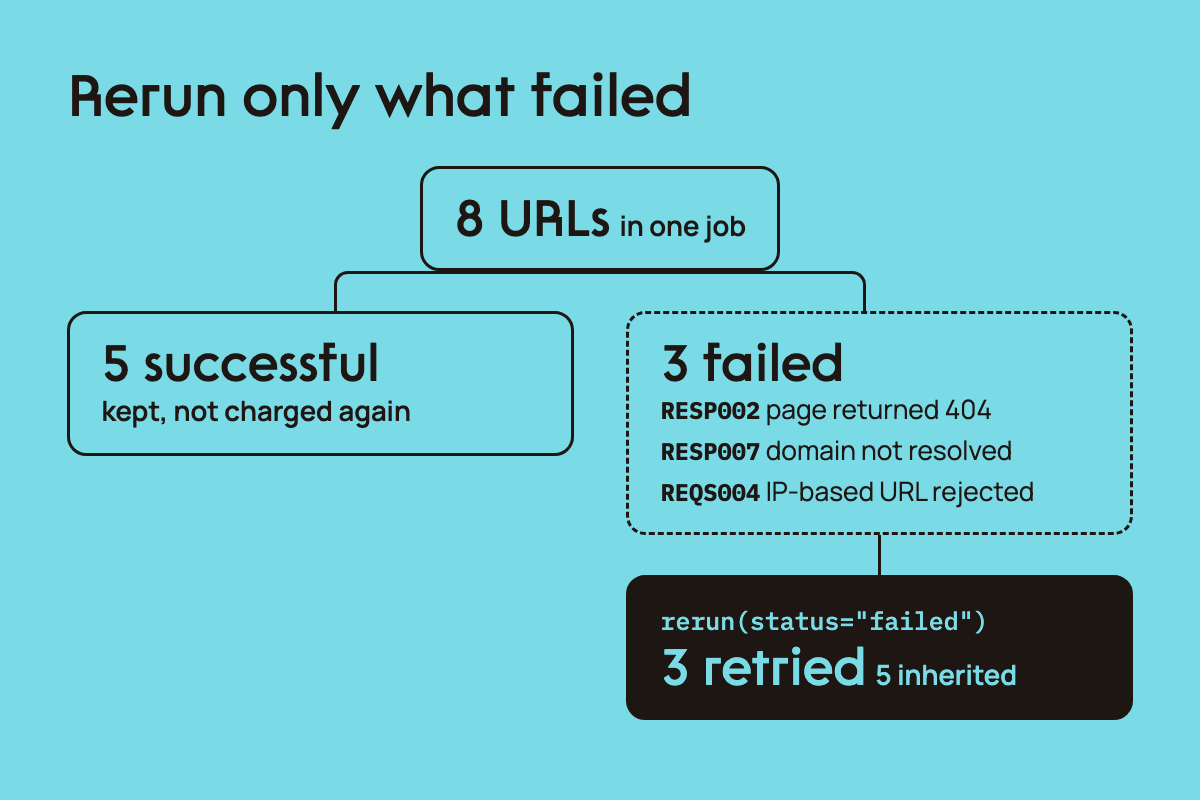
A URL that's malformed at the syntax level never becomes a per-task failure. It rejects the entire submission with a 400, and since no jobs were ever created, there's nothing to rerun; fix the malformed URL and resubmit the whole batch. Only URLs that are well-formed but fail at scrape time (a 404, an unresolvable domain, a blocked IP) show up as individual failed tasks that you can inspect and retry with rerun().
What This Replaces
For comparison, here's what reaching the Cloudflare result above requires with a plain asyncio/aiohttp scraper: a concurrency semaphore and retry logic, built and run against the same page.
# refer to 06_diy_comparison.py in repo
import asyncio
import pathlib
import time
from dataclasses import dataclass
from typing import List, Optional

import aiohttp

TARGET_URLS = [
    "https://www.scrapingcourse.com/cloudflare-challenge",
] * 5  # repeated so the concurrency/retry machinery gets exercised

MAX_CONCURRENCY = 3
MAX_RETRIES = 3
RETRY_BACKOFF_BASE = 1.5
REQUEST_TIMEOUT_S = 20

USER_AGENT = (
    "Mozilla/5.0 (Windows NT 10.0; Win64; x64) AppleWebKit/537.36 "
    "(KHTML, like Gecko) Chrome/124.0.0.0 Safari/537.36"
)


@dataclass
class FetchResult:
    url: str
    success: bool = False
    status_code: Optional[int] = None
    attempts: int = 0
    error: Optional[str] = None
    elapsed: float = 0.0


async def fetch_with_retries(session, url, semaphore, results):
    async with semaphore:
        started = time.time()
        last_exc = None
        for attempt in range(1, MAX_RETRIES + 1):
            try:
                async with session.get(
                    url,
                    headers={"User-Agent": USER_AGENT},
                    timeout=aiohttp.ClientTimeout(total=REQUEST_TIMEOUT_S),
                ) as resp:
                    await resp.text()
                    result = FetchResult(
                        url=url,
                        success=resp.status == 200,
                        status_code=resp.status,
                        attempts=attempt,
                        elapsed=time.time() - started,
                    )
                    if resp.status != 200:
                        result.error = f"non-200 status: {resp.status}"
                    results.append(result)
                    return
            except (aiohttp.ClientError, asyncio.TimeoutError) as exc:
                last_exc = exc
                if attempt < MAX_RETRIES:
                    await asyncio.sleep(RETRY_BACKOFF_BASE ** attempt)

        results.append(
            FetchResult(
                url=url,
                success=False,
                attempts=MAX_RETRIES,
                error=str(last_exc),
                elapsed=time.time() - started,
            )
        )


async def run():
    semaphore = asyncio.Semaphore(MAX_CONCURRENCY)
    results: List[FetchResult] = []
    async with aiohttp.ClientSession() as session:
        tasks = [fetch_with_retries(session, url, semaphore, results) for url in TARGET_URLS]
        await asyncio.gather(*tasks)
    return results


def main():
    started = time.time()
    results = asyncio.run(run())
    elapsed = time.time() - started

    successful = [r for r in results if r.success]
    failed = [r for r in results if not r.success]

    print(f"Fetched {len(results)} URLs in {elapsed:.1f}s")
    print(f"Successful: {len(successful)}  Failed: {len(failed)}")
    for r in failed:
        print(f"  FAILED url={r.url} attempts={r.attempts} status={r.status_code} error={r.error}")

    line_count = len(pathlib.Path(__file__).read_text(encoding="utf-8").splitlines())
    print(f"\n06_diy_comparison.py line count: {line_count}")


if __name__ == "__main__":
    main()
All five requests came back HTTP 403. Cloudflare's challenge is a normal HTTP response, not a connection error, so retry logic built to catch TimeoutError and ClientError never triggers. A workaround needs code that reads the response body or status code and reacts to what it finds, and Cloudflare's managed challenge resists that too. mode=auto cleared it by selecting the configuration the challenge required, at the same 25-credit tier.
This covers one protected page. Here's the same approach at 100,000 URLs.
Submitting a 100,000-URL Batch Job
We submitted a job with 100,000 URLs and monitored its credit use as it ran. The monitor stopped the job after 14,105 URLs had completed successfully, at a total of 300,787 credits. No real, safely testable site has 100,000 distinct product pages, so this job cycled the same ~188 real pages from ScrapingCourse's catalog repeatedly to reach the full count. Batch reports spend at the run level, which is the figure to use, with your account statement authoritative above it. Attach an external_id to each URL to correlate individual results back to your own records.
The cost climbed enough during our run to justify watching it as a job progresses. Here's a safety check that does exactly that:
# refer to 10_scale_run.py in repo
import time
import client

job_id = "YOUR_JOB_ID"
credit_ceiling = 300_000

while True:
    job = client.get_job(job_id)
    stats = job["latest_run"]["stats"]
    spend = stats.get("spend", {}).get("credits", 0)

    if spend >= credit_ceiling:
        client.stop_job(job_id)
        print(f"stopped at {spend} credits, {stats['completed']}/{stats['total']} completed")
        break

    if job["latest_run"]["status"] in {"completed", "stopped"}:
        break

    time.sleep(5)
It uses the same get_job and stop_job calls throughout this article, just wired into a loop that watches spend instead of just waiting for completion. 11_scale_monitor.py in the repo wraps the same check in retry logic. This means a transient network failure mid-poll won't crash the watch loop, which is useful if you're monitoring a job that'll run for hours unattended.
CSV Upload for Large URL Lists
Inline URLs work for small lists. For bulk URL extraction from a list you already maintain, or once a list gets too large to paste into a request body comfortably, a CSV upload takes over: create an upload slot, upload the file, then submit a job that references it instead.
# refer to 07_csv_upload.py in repo
import csv
import io

import client

urls = [
    "https://www.scrapingcourse.com/ecommerce/product/abominable-hoodie/",
    "https://www.scrapingcourse.com/ecommerce/product/adrienne-trek-jacket/",
    "https://www.scrapingcourse.com/ecommerce/product/aeon-capri/",
]

buf = io.StringIO()
writer = csv.writer(buf)
writer.writerow(["URL", "Customer Ref"])
for i, u in enumerate(urls, start=1):
    writer.writerow([u, f"csv-{i}"])
csv_bytes = buf.getvalue().encode("utf-8")

# step 1: create the upload slot
slot = client.create_csv_input_slot(fields={"url": "URL", "external_id": "Customer Ref"}, header=True)

# step 2: upload the file with the exact headers the slot specifies
client.upload_csv(slot, csv_bytes)

# step 3: submit, referencing the uploaded file instead of an inline list
payload = {
    "type": "regular",
    "status": "closed",
    "file_input_id": slot["file_input_id"],
    "zenrows_params": {"mode": "auto"},
}
submitted = client.submit_job(payload)
We ran this with nine real product URLs, and it worked exactly as documented. The presigned upload URL required exactly one header, Content-Type: text/csv, and every external_id came back unchanged on its matching result row.
CSV uploads cap at 50MB or 100,000 rows, the same ceiling as an inline submission, just in file form.
Scheduling Recurring Jobs
Price tracking, inventory monitoring, and content-change detection all need the same job to run repeatedly. A scheduled job stores your URLs and config as a template, and each firing creates a new run.
# refer to 08_scheduling.py in repo
import client

urls = [
    "https://www.scrapingcourse.com/ecommerce/product/abominable-hoodie/",
    "https://www.scrapingcourse.com/ecommerce/product/adrienne-trek-jacket/",
]

payload = {
    "type": "scheduled",
    "status": "closed",
    "schedule": {"rate": {"every": 24, "unit": "hour"}},
    "tasks": [{"url": u, "external_id": f"sched-{i}"} for i, u in enumerate(urls, start=1)],
}
submitted = client.submit_job(payload)
job_id = submitted["job_id"]
The create response for a scheduled job contains job_id, status, and accepted_tasks, but not the schedule details. Fetch the job separately to inspect schedule and schedule_state.
# ...continued from 08_scheduling.py
job = client.get_job(job_id)
print(job["schedule"], job["schedule_state"])
We tested pausing and replacing a schedule on a real job. Both worked as documented, and replacing a schedule doesn't reactivate it; a job we paused stayed paused through the replacement, confirmed on a follow-up GET.
Monitoring Progress and Detecting Data Quality Issues
GET /jobs/{job_id} gives you everything you need to track a run: latest_run.stats carries total, completed, successful, failed, and spend. This is the same endpoint that the safety check above polls.
On every job we ran, the response also included a stats.failure_reasons object and category counts like {"bad_target": 4}. It's a fast way to tell whether failures share a common cause (a target site that changed structure, for instance) before digging into individual error rows.
Structured Extraction Instead of Raw HTML
Batch can return structured JSON using css_extractor for fields you select. You can also use Zenrows Extract with Batch to get structured data without writing selectors; Extract works with Fetch too.
Pass css_extractor as a JSON-encoded string:
# refer to 04_extraction.py in repo
import json

import client

selectors = {"title": "h1", "price": ".price", "description": ".woocommerce-product-details__short-description"}

payload = {
    "type": "regular",
    "status": "closed",
    "zenrows_params": {
        "mode": "auto",
        "css_extractor": json.dumps(selectors),
    },
    "tasks": [
        {"url": "https://www.scrapingcourse.com/ecommerce/product/abominable-hoodie/", "external_id": "product-1"},
        {"url": "https://www.scrapingcourse.com/ecommerce/product/adrienne-trek-jacket/", "external_id": "product-2"},
    ],
}
submitted = client.submit_job(payload)
The result comes back as a flat object keyed by the field name:
{"title": "Abominable Hoodie", "price": ["$69.00", "$69.00", "$74.00", "$64.00"], "description": "This is a variable product called a Abominable Hoodie"}
The .price selector matches every price element on the page, including variant pricing. Narrow the selector when you want a single value.
The example above uses css_extractor to specify the fields and selectors. For automatic structured output, use Zenrows Extract with Batch; it returns fields without a selector map.
What Batch Doesn't Handle
Batch submits URLs and gets back results; it doesn't hold a browser session open between requests. If your target needs a login flow, clicking through steps, or filling out a form before the data you want becomes visible, Browser Sessions handles that.
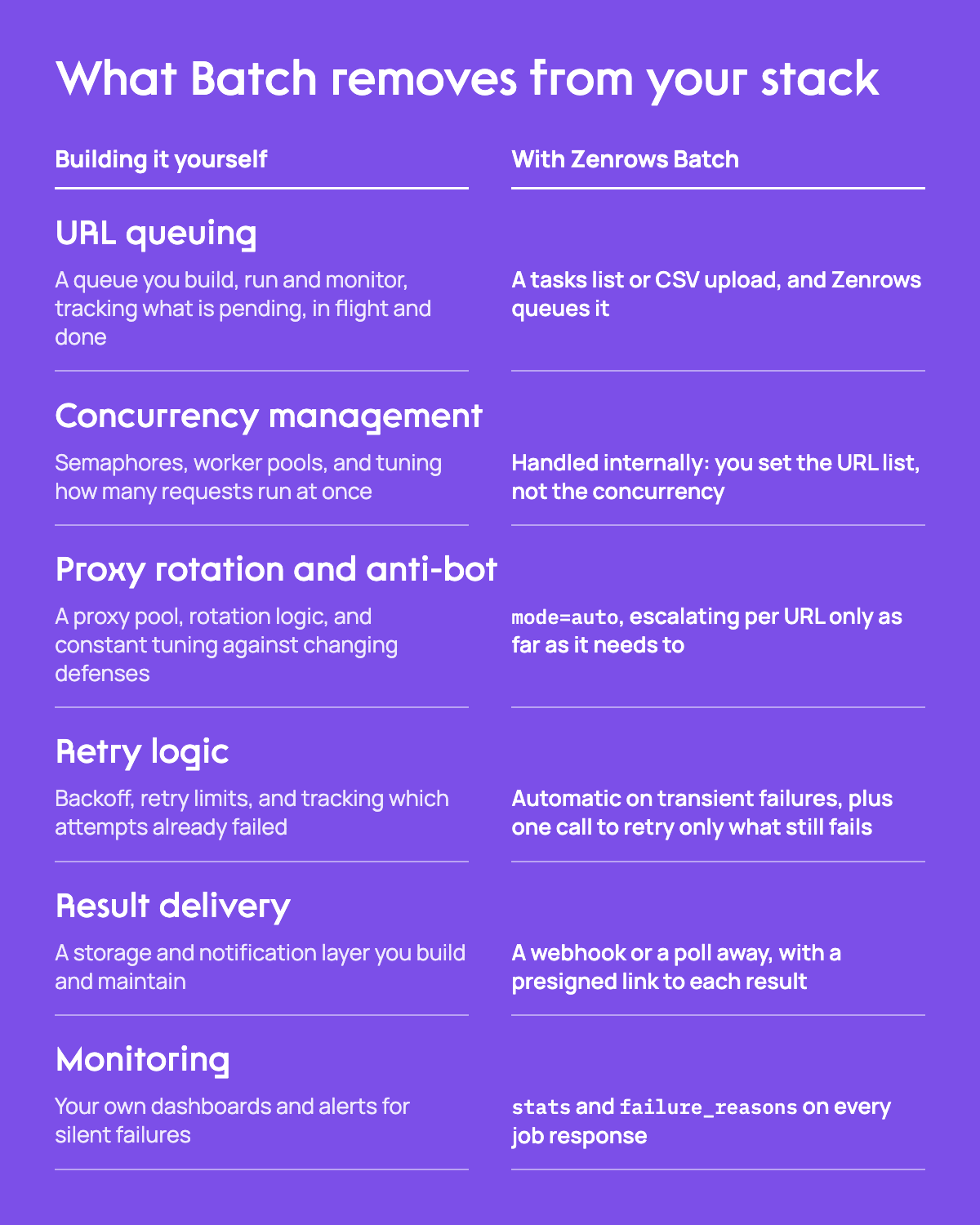
What's left is what should be left to you: choosing targets, setting zenrows_params for each job, and deciding what happens with the data once it's back, whether that is an ETL data pipeline, a price-monitoring table, or LLM dataset creation for fine-tuning.
FAQs and Debugging
Which Web Scraping API Handles Retries and Blocks Best for Large-Scale Projects?
Zenrows Batch handles both inside one job. mode=auto manages the blocks by selecting the access configuration each target needs, and Batch retries transient failures automatically. Anything that still fails ends the run with a per-URL error code you can inspect, and rerun(status="failed") resubmits only those URLs without recharging you for the ones that already succeeded. That is the difference between a batch scraping API and a script with a retry loop: the retries, the block handling, and the failure accounting are part of the job rather than code you maintain.
What Is the Difference Between a Batch Scraping API and a Bulk Web Scraping API?
They name the same thing: an API that takes many URLs in one submission and runs them as a managed job instead of one request at a time. Zenrows Batch is both. You submit up to 100,000 URLs, it queues and runs them, and you collect the results when the run finishes.
What Counts as Large-Scale Web Scraping?
Any job where the infrastructure needed to run it reliably, including queuing, concurrency, retries, and monitoring, competes with the value of the data it produces. Most developers hit that point somewhere between 10,000 and 100,000 URLs.
Should I Use Synchronous or Asynchronous Scraping at Scale?
Asynchronous. It lets requests overlap instead of waiting for each URL in turn. asyncio and aiohttp can handle that concurrency in your own code, but you still manage the queue, retries, and results. Zenrows Batch runs the URLs as a managed asynchronous job: submit the list, then check its status or receive a webhook when the run finishes.
Do I Always Need a Headless Browser for Large-Scale Scraping?
No, and forcing one on every URL wastes money. The Cloudflare-protected page in this article needed the top credit tier because the challenge required it. The ordinary product pages used throughout the rest of this article, in the webhook, extraction, and CSV examples, resolved at the standard rate. mode=auto only escalates for URLs that require it.
How Do I Handle Failures and Duplicates at Scale?
For failures: query the job's results, filter for status == "failed" in the response, and inspect each row's error.code and error.detail, then resubmit with rerun(status="failed"); it retries only what failed and doesn't charge you for what already succeeded. For duplicates: attach an external_id to each URL so you can correlate results back to your own records regardless of how Zenrows orders or batches them internally.
How Does Zenrows Batch Handle Anti-Bot Protection?
mode=auto on the job's zenrows_params. It starts each request at the minimum viable configuration and escalates only for URLs that need it. The same setting handled a Cloudflare challenge at the top credit tier in one job, and thousands of ordinary product pages at a fraction of that cost in the 100,000-URL run.
What Is the Difference Between Zenrows Fetch and Zenrows Batch?
Fetch scrapes one URL per request and returns the result in that same call. Batch takes a list of URLs (up to 100,000 in a job) and processes them as a managed job: you submit once, then poll or get a webhook when it's done. Both accept zenrows_params, including mode=auto.
What Are the Current Limits of Zenrows Batch?
100,000 URLs per job submission. 10,000 URLs per add-tasks call on an open job. CSV uploads cap at 50MB or 100,000 rows.
How Do I Monitor a Batch Job in Progress?
GET /jobs/{job_id} at any point during a run. latest_run.stats gives you total, completed, successful, and failed counts, and for every job we ran, the response also includes failure_reasons and category counts that help you spot whether failures cluster around one kind of problem rather than being scattered randomly.
Is Zenrows Batch Suitable for Scheduled Recurring Jobs?
Yes. A scheduled job stores your URLs and config as a template, then creates a new run each time it fires, on a one-shot, interval, or calendar schedule. We tested pausing and replacing a schedule on a real job; both worked as documented, and replacing a schedule doesn't quietly reactivate it if it was already paused.
How Do Open Batch Jobs Work?
An open Batch job lets you add tasks across multiple calls as your URL list grows. Set last_batch: true on the final add-tasks call. Once Batch accepts that call, the job changes from open to closed; you don't need a separate request to close it.