
Puppeteer Real Browser: A Guide to Avoid Detection with Puppeteer
Learn to optimize your Puppeteer scraper with Puppeteer Real Browser patches. Discover the best tactic to bypass anti-bot measures at scale.



Puppeteer exposes clear bot-like signals that get you blocked when scraping. Puppeteer Real Browser brings human-like browser patches to help you evade detection. But how far can it go against more advanced anti-bot measures?
In this article, you'll learn how to use Puppeteer Real Browser for web scraping, how it enhances the base Puppeteer version with stealth, and the singular tactic for scraping at scale without getting blocked.
What is Puppeteer Real Browser?
Puppeteer Real Browser is an improved version of Puppeteer designed to bypass anti-bot detection during web scraping by behaving like a real browser. While the library provides its own standard startup configurations, it uses Puppeteer's API for browser automation. This makes it a good drop-in replacement for your existing Puppeteer scraper.
Puppeteer Real Browser also features a realistic cursor event for automatic CAPTCHA clicking. And you can add custom configurations to launch the browser instance with Chrome's tooling flags.
All these allow you to spin up a close-to-real browser instance. Overall, Puppeteer Real Browser offers an improved stealth to evade site protections, including Cloudflare Turnstile.
Skip the blocks. Try Zenrows free and get clean web data without the anti-bot fight.
How Puppeteer Real Browser Enhances Stealth in Puppeteer
Puppeteer is originally designed for automation testing, not exactly for web scraping. So, it understandably exposes clear automation signals, such as obvious WebDriver usage, missing browser configurations, and more.
Some of these automation signals are revealed when the standard Puppeteer library is tested for basic fingerprint leaks on bot.sannysoft, a fingerprinting test website:
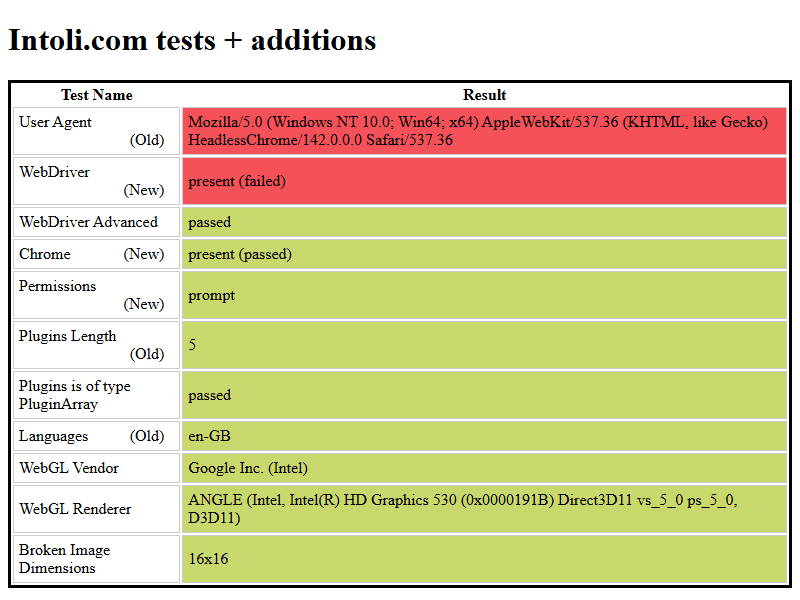
These automation identifiers are generally acceptable in regular automation testing. However, when it comes to web scraping with Puppeteer, these signals become loopholes that trigger anti-bot measures. If these automation flags aren't patched, anti-scraping measures will flag your scraper as a bot and block it.
Puppeteer Real Browser tries to prevent that by removing standard Puppeteer's automation flags that can lead to detection when scraping. Under the hood, it relies heavily on Rebrowser patches, a package that enhances Puppeteer and Playwright with evasion capabilities.
Puppeteer Real Browser fixes common leaks, such as hiding the presence of the WebDriver navigator field, replacing missing browser APIs and extensions, mimicking a real browser runtime environment, removing bot-like stack traces, and patching other relevant leakage points.
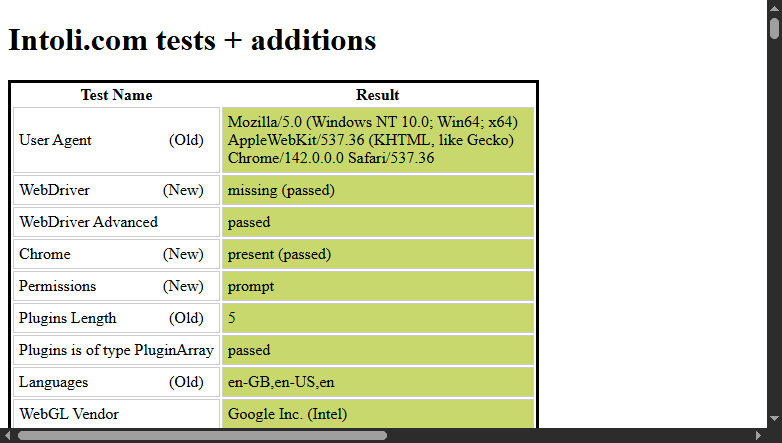
Conversely, when tested in headless mode with a custom User-Agent on bot.sannysoft, Puppeteer Real Browser passes all flags, as shown:
The library also includes API extensions for Ghost Cursor, a cursor emulator that generates realistic mouse movements, to help avoid anti-bot detection. By using this extension's API methods with Puppeteer Real Browser, you can simulate actual human-like mouse behavior, rather than relying on the standard interactive mouse API provided by Puppeteer. This feature can be helpful when automating CAPTCHA clicking.
To further mimic a real user and boost stealth, Puppeteer Real Browser lets you install specific third-party plugins from Puppeteer Extra.
The Rebrowser stealth patches, combined with realistic cursor features and other evasion methods, enhance Puppeteer Real Browser's ability to even bypass background bot checks, such as JavaScript challenges.
Note
According to the project owner, Puppeteer Real Browser has been discontinued and is no longer maintained.
Next, let's see how Puppeteer Real Browser works for web scraping and stealth.
How to Scrape with Puppeteer Real Browser
In this section, you'll see how to scrape with Puppeteer Real Browser by extracting product data from the Ecommerce Challenge page. Let's start with the installation steps.
Install the Required Tools and Libraries
Puppeteer Real Browser is available in Node.js. So, ensure you download and install the latest Node.js installer if you haven't already.
Next, install the Puppeteer Real Browser npm package:
npm install puppeteer-real-browser
Now, let's extract specific data with the tool.
Scrape Data Using Puppeteer Real Browser
Since Puppeteer Real Browser uses the same API as base Puppeteer, it's easier to use if you already have a working Puppeteer scraping script.
To begin, import the library, create a scraper function, and launch the browser instance. Open the target page and wait for the content to load:
// npm install puppeteer-real-browser
const { connect } = require('puppeteer-real-browser');

const scraper = async () => {
    // launch the browser instance
    const { browser, page } = await connect({});

    // open the target page
    await page.goto('https://www.scrapingcourse.com/ecommerce/');
    await new Promise((resolve) => setTimeout(resolve, 10000));
Then, loop through each product container (.product) to extract specific products using their CSS selectors. Finally, log the scraped data and execute the function:
// ...

const scraper = async () => {
    // ...
    // extract product data from all products
    const product_data = await page.$$eval('.product', (products) => {
        return products.map((product) => {
            const name =
                product.querySelector('.product-name')?.innerText || '';
            const price = product.querySelector('.price')?.innerText || '';
            return { name, price };
        });
    });

    console.log(product_data);

    await browser.close();
};

scraper();
Put the code snippets together, and you'll get the following complete code:
// npm install puppeteer-real-browser
const { connect } = require('puppeteer-real-browser');

const scraper = async () => {
    // launch the browser instance
    const { browser, page } = await connect({
        headless: true,
    });

    // open the target page
    await page.goto('https://www.scrapingcourse.com/ecommerce/');
    await new Promise((resolve) => setTimeout(resolve, 10000));

    // extract product data from all products
    const product_data = await page.$$eval('.product', (products) => {
        return products.map((product) => {
            const name =
                product.querySelector('.product-name')?.innerText || '';
            const price = product.querySelector('.price')?.innerText || '';
            return { name, price };
        });
    });

    console.log(product_data);

    await browser.close();
};

scraper();
The above code outputs the target data, as shown:
[
    { name: 'Abominable Hoodie', price: '$69.00' },
    // ...omitted for brevity,
    { name: 'Artemis Running Short', price: '$45.00' },
];
Nice! You've scraped with Puppeteer Real Browser. However, the above target is a basic website that doesn't use any anti-bot measures. To see the actual value of Puppeteer Real Browser, let's test it against a more challenging site with security measures in place.
CAPTCHA Bypass with Puppeteer Real Browser
To use Puppeteer Real Browser's stealth mode, you'll need to configure it to bypass or solve triggered CAPTCHA or any other anti-bot challenges. The library includes an automatic Turnstile solver feature. So, let's see how that works.
Let's use it to scrape the Antibot Challenge page, which uses the Cloudflare Turnstile challenge.
Note that Puppeteer Real Browser's stealth works best in non-headless (GUI) mode.
First, configure the browser instance to run in non-headless (GUI) mode. Set turnstile to true to activate automatic Turnstile CAPTCHA clicking. Then, set the default viewport to null to use the full browser window and use the args keyword to initiate the browser in full screen. These settings help mimic a real browser environment. Open the target site, wait for the CAPTCHA clicking event, and log its content:
// npm install puppeteer-real-browser
const { connect } = require('puppeteer-real-browser');

const scraper = async () => {
    // launch the browser instance
    const { browser, page } = await connect({
        headless: false,
        turnstile: true,
        connectOption: {
            defaultViewport: null,
        },
        args: ['--start-maximized'],
    });

    // open the target page
    await page.goto('https://www.scrapingcourse.com/antibot-challenge/');
    // wait for CAPTCHA clicking
    await new Promise((resolve) => setTimeout(resolve, 20000));

    // get the page content
    const content = await page.content();
    console.log(content);

    await browser.close();
};

scraper();
The above code launches the browser in GUI mode and opens the target website, as shown below. Unfortunately, it got stuck on the challenge page:
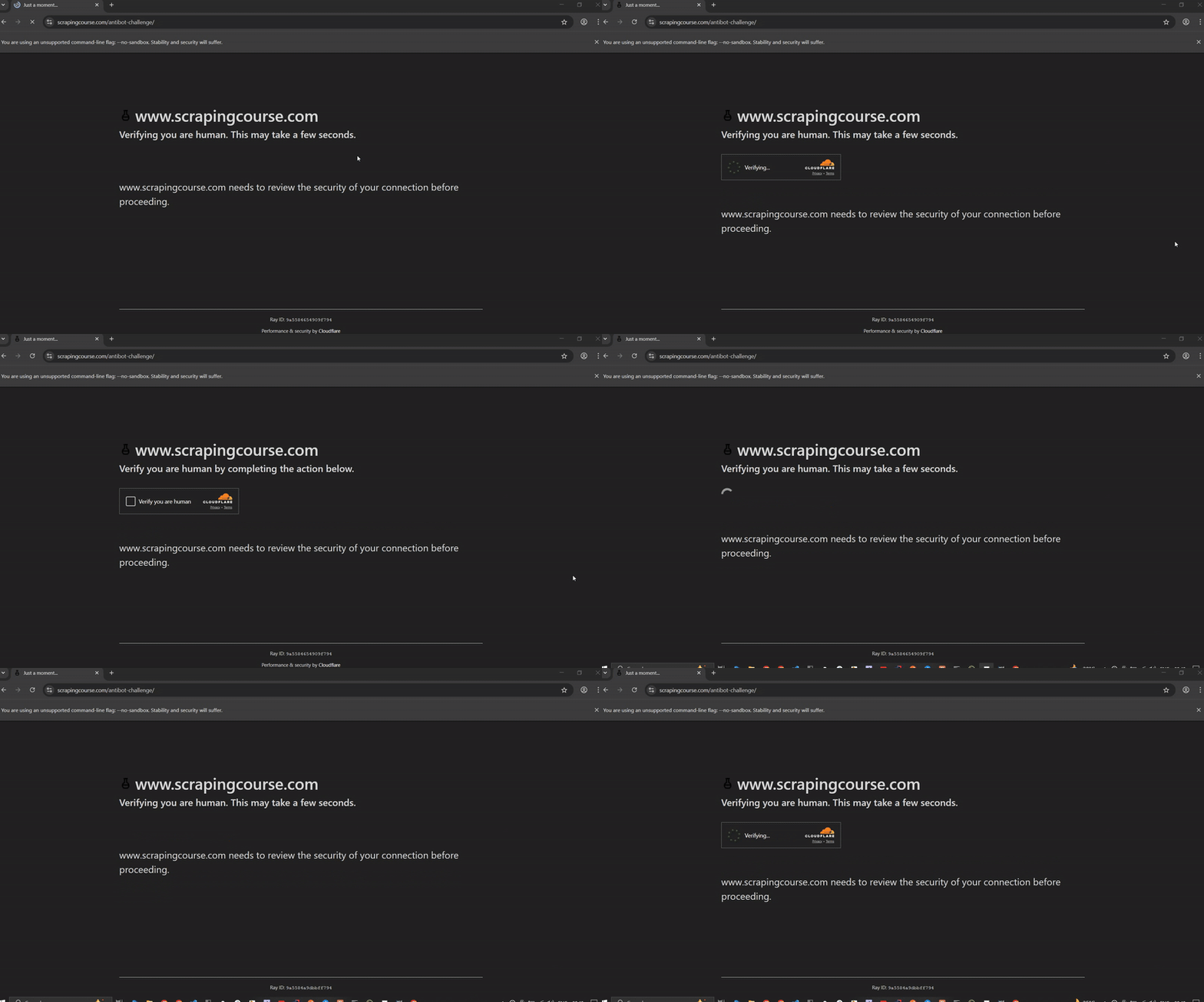
Despite all the patches and even passing fingerprinting tests, Puppeteer Real Browser still can't bypass anti-bot measures. Based on the above result, it's clear that Puppeteer Real Browser still leaks some bot-like signals despite extensive patching.
The Limitations of Puppeteer Real Browser
Anti-bot measures deploy many unpredictable security checks, making them increasingly difficult to bypass. In the case of Puppeteer Real Browser, getting stuck on the challenge page reveals its inability to evade background checks, such as JavaScript challenges.
Even though the library has been enhanced to mimic human behavior, it still reveals subtle clues that make it identifiable as a bot. Besides, anti-bot developers often clamp down on open-source stealth tools like Puppeteer Real Browser. Even if it worked in the past, there's no guarantee that it will remain effective against anti-bots.
Additionally, since the project has been discontinued, most of its evasion strategies are now outdated and can't keep up with more frequently updated anti-bot measures.
All these limitations can be overwhelming, especially when building a serious real-world project that requires continuous access to data. But no worries. You'll see the singular tactic that works all the time in the next section.
The Best Way to Bypass Blocks when Scraping
The best way to scrape any website without getting blocked is to use a web scraping solution, such as Zenrows Fetch. Zenrows automatically bypasses CAPTCHA and other anti-bot measures behind the scenes. This way, you can focus on core data refinement and decision-making rather than wasting time and resources on manual patching and constant debugging of scraping failures.
Zenrows adapts to frequent anti-bot updates, enabling you to extract data reliably without unforeseen intermittent scraper failures. Zenrows also has headless browser features for scraping dynamic websites. This makes it an excellent replacement for Puppeteer or Puppeteer Real Browser.
Let's see how it works by scraping the Antibot Challenge page that previously blocked your Puppeteer Real Browser scraper.
Sign up to open the Zenrows Request Builder. Paste the target URL in the link box, and activate Premium Proxies and JS Rendering.
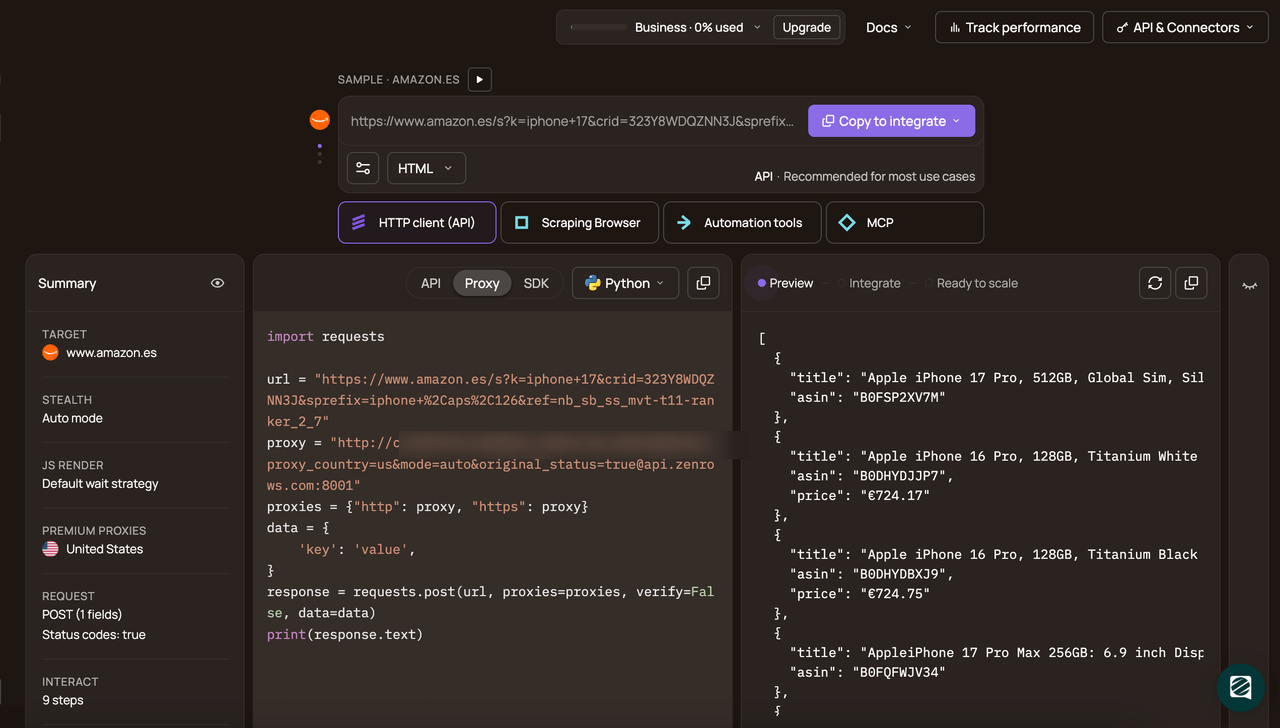
Choose Node.js as your programming language and select the API connection mode. Copy and paste the generated code into your scraper file:
Here's the generated code:
// npm install axios
const axios = require('axios');

const url = 'https://www.scrapingcourse.com/antibot-challenge/';
const apikey = '<YOUR_ZENROWS_API_KEY>';
axios({
    url: 'https://api.zenrows.com/v1/',
    method: 'GET',
    params: {
        url: url,
        apikey: apikey,
        js_render: 'true',
        premium_proxy: 'true',
    },
})
    .then((response) => console.log(response.data))
    .catch((error) => console.log(error));
print(response.text);
The above code outputs the protected site's HTML, as shown:
<html lang="en">
<head>
    <!-- ... -->
    <title>Antibot Challenge - ScrapingCourse.com</title>
    <!-- ... -->
</head>
<body>
    <!-- ... -->
    <h2>
        You bypassed the Antibot challenge! :D
    </h2>
    <!-- other content omitted for brevity -->
</body>
</html>
Congratulations! 🎉You just scraped a heavily protected website using Zenrows. You're now set to scrape any website at scale without worrying about getting blocked.
Conclusion
You've learned how to use Puppeteer Real Browser for web scraping and also seen how it works, including its strengths and limitations. Reliable anti-bot evasion requires continuous maintenance and high technical expertise, which can only be handled by specialized services.
To avoid wasting time and resources on constant stealth patches and frequent anti-bot blocks, we recommend using a web scraping solution, such as Zenrows. It's the all-in-one web scraping toolkit you need to scrape any website at scale without limitations.
Try Zenrows for free now or speak with sales!
FAQ
What are Puppeteer Real Browser alternatives?
Popular open-source alternatives to Puppeteer Real Browser include Puppeteer Stealth, Camoufox, Patchright, and SeleniumBase. These tools have stealth capabilities and can be suitable for small-scale projects with simple anti-bot bypass requirements.
However, for large-scale, serious projects, dedicated scraping solutions like Zenrows are the most reliable option. A service like Zenrows guarantees continuous scraping success with unbroken access to the data you need.
Can Puppeteer Real Browser bypass anti-bot measures?
Puppeteer Real Browser can be suitable for bypassing simple anti-bot measures, but it doesn't guarantee success against more advanced blocks.
Since the Puppeteer Real Browser project is discontinued and no longer maintained, it's unsuitable for building real-life projects unless you have the technical skills and resources to sustain manual patches. To execute large-scale web scraping, it's best to use a dedicated service, such as Zenrows. It provides auto-scaled, auto-managed infrastructure that continuously bypasses anti-bot measures with zero manual tweaking.
Can I scrape dynamic websites with Puppeteer Real Browser?
Absolutely! Puppeteer Real Browser extends the base Puppeteer automation APIs, allowing it to interact with web pages using standard Puppeteer's syntax. It supports JavaScript execution for user actions, including clicks, scrolls, hovers, drag-and-drops, typing, and more. In fact, with extensions like Ghost Cursor, Puppeteer Real Browser offers more realistic mouse movements than the base Puppeteer. This increases its ability to evade anti-bot detection while executing JavaScript to scrape dynamic content.