# Rust Web Scraping in 2026
> Get started with web scraping in Rust following this step-by-step tutorial! Learn how to scrape a site and how to tackle the main challenges.
Source: https://www.zenrows.com/blog/rust-web-scraping
Interested in learning how to do web scraping in Rust, which offers efficient performance for data extraction?
Let's get started and use the `reqwest` and `scraper` libraries.
## Is Rust Good for Web Scraping?
Rust is a great language for efficient web scraping because it compiles native code. That makes it ideal for handling large-scale tasks involving a lot of pages or data. It can also boast some great libraries to extract information from the web.
At the same time, it's not the easiest to use. It requires advanced techniques, and its syntax is a bit complex. That's why beginners tend to prefer other languages, such as [Python](/blog/python-web-scraping-library) or [JavaScript](/blog/javascript-nodejs-web-scraping-libraries).
However, you should consider Rust when performance is critical. Its concurrent nature will make the difference, turning your scraper into a lightning-fast application.
## Prerequisites
Here are the prerequisites you need to meet to follow this Rust scraping guide:
- [**Rust**](https://www.rust-lang.org/tools/install): Download the installer and follow the wizard to set up the tool-chain manager rustup. That will also install [cargo](https://doc.rust-lang.org/cargo), the Rust package manager.
- **An IDE for coding in Rust**: [Visual Studio Code](https://code.visualstudio.com/) with the [rust-analyzer extension](https://marketplace.visualstudio.com/items?itemName=rust-lang.rust-analyzer) is a free and reliable option.
It's time to get started with Rust. Initialize a new project with the cargo command below:
```nginx
cargo new rust_web_scraper
```
The `rust-web-scraper` directory will now contain this:
- `Cargo.toml`: A [manifest](https://doc.rust-lang.org/cargo/appendix/glossary.html#manifest) that describes the project and lists its dependencies.
- `src/`: The folder to place your Rust files.
You'll notice this `main.rs` file inside `src`:
```nginx
fn main() {
println!("Hello, world!");
}
```
That's the simplest Rust script possible, but it'll soon involve some scraping logic.
Compile your app:
```nginx
cargo build
```
That will produce a binary file in the `target` folder.
Run it:
```nginx
cargo run
```
It'll print in the terminal:
```nginx
Hello, World!
```
Great, you now have a working Rust project!
To perform Rust web scraping, you'll need two libraries:
- [`reqwest`](https://docs.rs/reqwest/latest/reqwest/): An HTTP client that makes it easy to perform web requests in Rust. It supports proxies, cookies, and custom headers.
- [`scraper`](https://docs.rs/scraper/latest/scraper/): A parser that offers a complete API for traversing and manipulating HTML documents.
Add these dependencies to your project with the Cargo command below:
```nginx
cargo add scraper reqwest --features "reqwest/blocking"
```
`Cargo.toml` will now contain the libraries:
```nginx
[dependencies]
reqwest = {version = "0.11.18", features = ["blocking"]}
scraper = "0.16"
```
Open the project folder in your IDE, and you're ready to go!
## How to Do Web Scraping in Rust
To do web scraping with Rust, you have to:
1. Download the target page with `reqwest`.
2. Parse its HTML document and get data from it with scraper.
3. Export the scraped data to a CSV file.
For this example, we'll use [ScrapinCourse.com](https://www.scrapingcourse.com/ecommerce/), a demo website with e-commerce features.
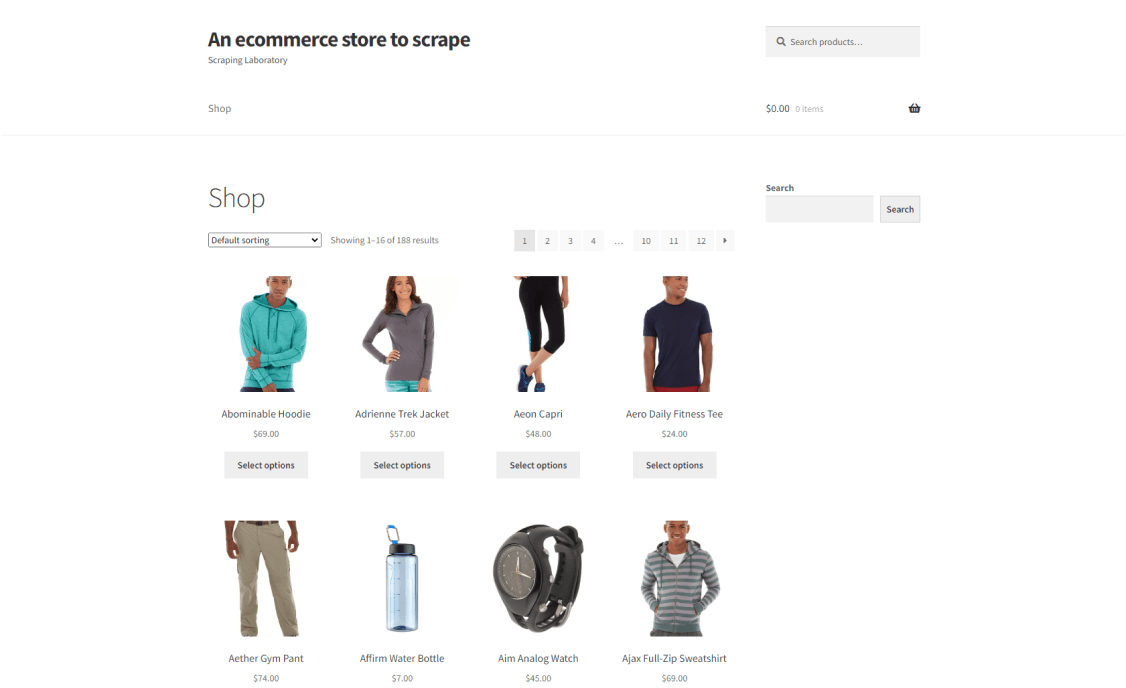
The Rust spider you're about to craft will be able to retrieve all product data from one page.
Let's web scrape with Rust!
### 1\. Get Your Target Webpage
Use reqwest's [`get()`](https://docs.rs/reqwest/latest/reqwest/fn.get.html) function to get the HTML from a URL:
```nginx
let response = reqwest::blocking::get("https://www.scrapingcourse.com/ecommerce/");
let html_content = response.unwrap().text().unwrap();
```
Behind the scene, `reqwest` sends an HTTP GET to the URL passed as a parameter. [`blocking`](https://docs.rs/reqwest/latest/reqwest/blocking/index.html) ensures that `get()` blocks the execution until you get a response from the server. Without it, the request would be asynchronous.
Then, the script extracts the HTML from the response by calling [`unwrap()`](https://doc.rust-lang.org/rust-by-example/error/option_unwrap.html) twice. That unwraps the `Result` type stored in the variable. If the request is successful, it returns the underlying value. Otherwise, it causes a panic.
Use the below logic in the `main()` function of `scraper.rb` to get the target HTML document in a string:
```nginx
fn main() {
// download the target HTML document
let response = reqwest::blocking::get("https://www.scrapingcourse.com/ecommerce/");
// get the HTML content from the request response
// and print it
let html_content = response.unwrap().text().unwrap();
println!("{html_content}");
}
```
Launch it, and it'll print the HTML code of the target page:
```html
Ecommerce Test Site to Learn Web Scraping – ScrapingCourse.com
Showing 1–16 of 188 results
```
Well done!
### 2\. Extract the HTML Data You Need
To extract the HTML data, feed the HTML string retrieved before to scraper. There, [`parse_document`](https://docs.rs/scraper/latest/scraper/html/struct.Html.html#method.parse_document)[()](https://docs.rs/scraper/latest/scraper/html/struct.Html.html#method.parse_document) will parse the content and return an HTML tree object.
```nginx
let document = scraper::Html::parse_document(&html_content);
```
The scraper library is one of several options for parsing HTML in Rust. Each parser has its own trade-offs in terms of performance, memory usage, and API design. For an in-depth comparison of Rust HTML parsers to help you choose the best one for your project, check out our [Rust HTML parser comparison](/blog/rust-html-parser).
You need an effective selector strategy to find HTML elements in the tree to extract information from them.
First, open the page in the browser, right-click on a product HTML node, and select the "Inspect" option. The DevTools section will open:
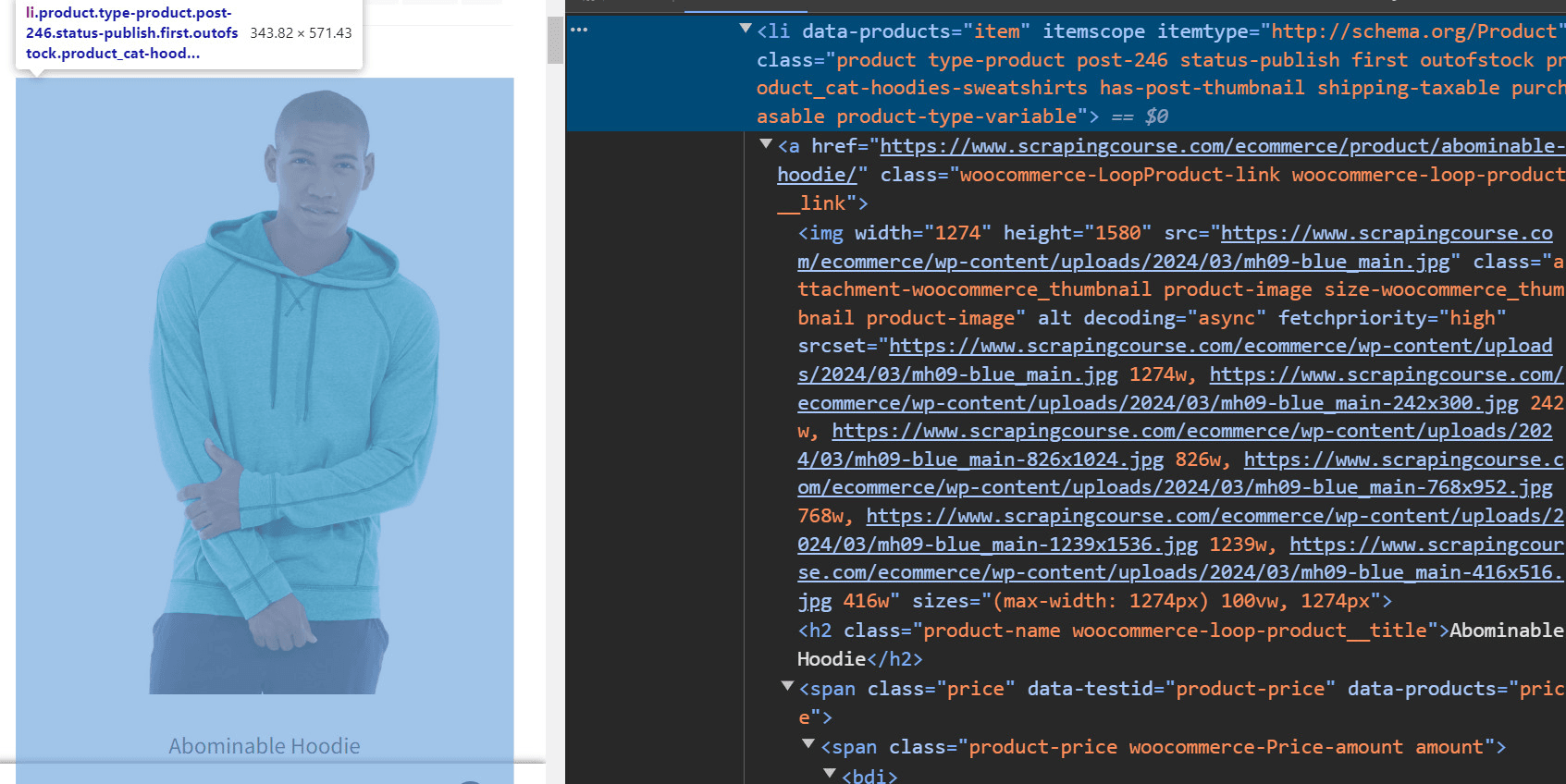
Then, take a look at the HTML code and note that you can get all product elements with this CSS selector:
```nginx
li.product
```
Apply it in the HTML tree object:
```nginx
let html_product_selector = scraper::Selector::parse("li.product").unwrap();
let html_products = document.select(&html_product_selector);
```
[`parse()`](https://docs.rs/scraper/latest/scraper/selector/struct.Selector.html#method.parse) from `Selector` defines a Scraper selector object. Pass it to [`select()`](https://docs.rs/scraper/latest/scraper/html/struct.Html.html#method.select) to use it and select the desired elements.
Given a product node, the useful information to extract is:
- The product URL in the ``.
- The product image in the `![]() `.
- The product name in the `
`.
- The product name in the ``.
- The product price in the ``.
You'll need a custom data structure to store that information:
```nginx
struct Product {
url: Option,
image: Option,
name: Option,
price: Option,
}
```
> **Note**
>
> In Rust, a [`struct`](https://doc.rust-lang.org/book/ch05-01-defining-structs.html) is a named tuple of different data fields.
Since the page contains several products, define a dynamic array of `Products`:
```nginx
let mut products: Vec = Vec::new();
```
Time to iterate over the list of the product elements and scrape the data of interest:
```nginx
for html_product in html_products {
// scraping logic to retrieve the info
// of interest
let url = html_product
.select(&scraper::Selector::parse("a").unwrap())
.next()
.and_then(|a| a.value().attr("href"))
.map(str::to_owned);
let image = html_product
.select(&scraper::Selector::parse("img").unwrap())
.next()
.and_then(|img| img.value().attr("src"))
.map(str::to_owned);
let name = html_product
.select(&scraper::Selector::parse("h2").unwrap())
.next()
.map(|h2| h2.text().collect::());
let price = html_product
.select(&scraper::Selector::parse(".price").unwrap())
.next()
.map(|price| price.text().collect::());
// instantiate a new product
// with the scraped data and add it to the list
let product = Product {
url,
image,
name,
price,
};
products.push(product);
}
```
Good job! `products` will contain all product data as planned!
> **Skip the blocks.** [Try Zenrows free](/) and get clean web data without the anti-bot fight.
### 3. Export to CSV
Now that you can extract the desired data, all that remains is to collect it in a more useful format.
To achieve that, install the [csv](https://docs.rs/csv/latest/csv/) library:
```nginx
cargo add csv
```
Converting `products` to CSV only takes a few lines of code:
```nginx
// create the CSV output file
let path = std::path::Path::new("products.csv");
let mut writer = csv::Writer::from_path(path).unwrap();
// append the header to the CSV
writer
.write_record(&["url", "image", "name", "price"])
.unwrap();
// populate the output file
for product in products {
let url = product.url.unwrap();
let image = product.image.unwrap();
let name = product.name.unwrap();
let price = product.price.unwrap();
writer.write_record(&[url, image, name, price]).unwrap();
}
// free up the resources
writer.flush().unwrap();
```
This the final code for your Rust scraper:
```nginx
// define a custom data structure
// to store the scraped data
struct Product {
url: Option,
image: Option,
name: Option,
price: Option,
}
fn main() {
// initialize the vector that will store the scraped data
let mut products: Vec = Vec::new();
// download the target HTML document
let response = reqwest::blocking::get("https://www.scrapingcourse.com/ecommerce/");
// get the HTML content from the request response
let html_content = response.unwrap().text().unwrap();
// parse the HTML document
let document = scraper::Html::parse_document(&html_content);
// define the CSS selector to get all product
// on the page
let html_product_selector = scraper::Selector::parse("li.product").unwrap();
// apply the CSS selector to get all products
let html_products = document.select(&html_product_selector);
// iterate over each HTML product to extract data
// from it
for html_product in html_products {
// scraping logic to retrieve the info
// of interest
let url = html_product
.select(&scraper::Selector::parse("a").unwrap())
.next()
.and_then(|a| a.value().attr("href"))
.map(str::to_owned);
let image = html_product
.select(&scraper::Selector::parse("img").unwrap())
.next()
.and_then(|img| img.value().attr("src"))
.map(str::to_owned);
let name = html_product
.select(&scraper::Selector::parse("h2").unwrap())
.next()
.map(|h2| h2.text().collect::());
let price = html_product
.select(&scraper::Selector::parse(".price").unwrap())
.next()
.map(|price| price.text().collect::());
// instanciate a new product
// with the scraped data and add it to the list
let product = Product {
url,
image,
name,
price,
};
products.push(product);
}
// create the CSV output file
let path = std::path::Path::new("products.csv");
let mut writer = csv::Writer::from_path(path).unwrap();
// append the header to the CSV
writer
.write_record(&["url", "image", "name", "price"])
.unwrap();
// populate the output file
for product in products {
let url = product.url.unwrap();
let image = product.image.unwrap();
let name = product.name.unwrap();
let price = product.price.unwrap();
writer.write_record(&[url, image, name, price]).unwrap();
}
// free up the writer resources
writer.flush().unwrap();
}
```
Launch the web scraping Rust script with `cargo build` and then `cargo run`. A new `products.csv` file will appear in the root folder of your project. Open it, and you'll get this output:
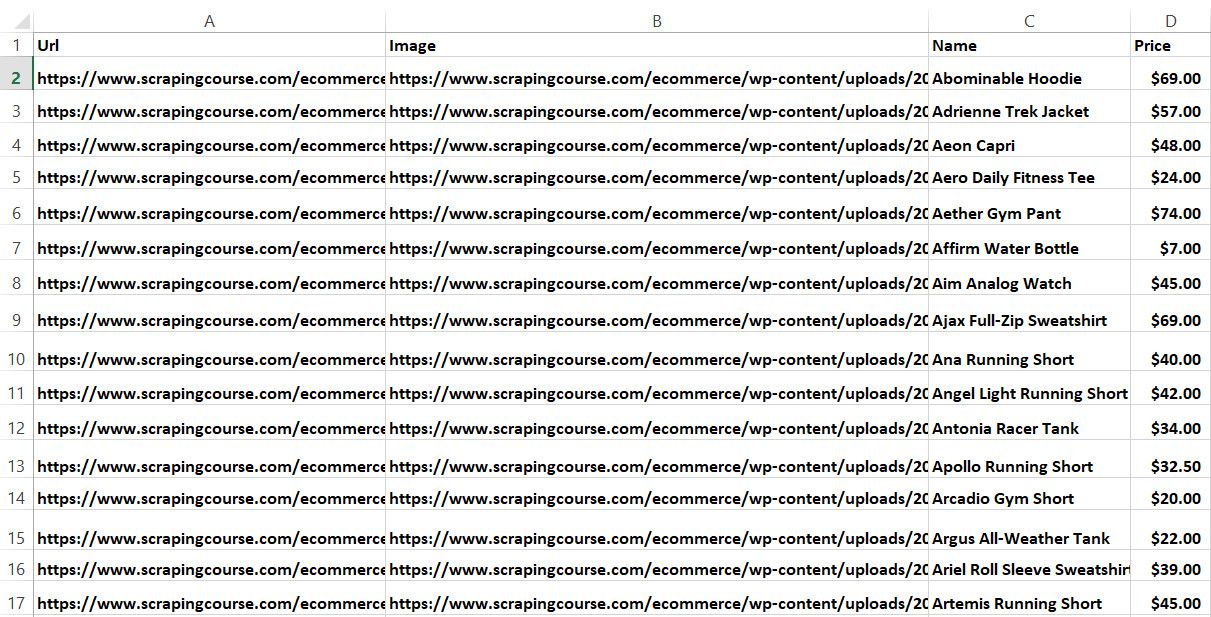
Wonderful! Scraping goal achieved!
## Web Crawling with Rust
Don't forget that the target website involves several product pages. To scrape them all, you have to discover all pages and apply the data extraction logic on each. In other words, you need to perform web crawling.
These are the steps to implement it:
1. Visit a page.
2. Select the pagination link elements.
3. Extract the new URLs to explore and add them to a queue.
4. Repeat the loop with a new page.
To do all that, first, you need to **inspect an HTML element of the pagination number** with DevTools:
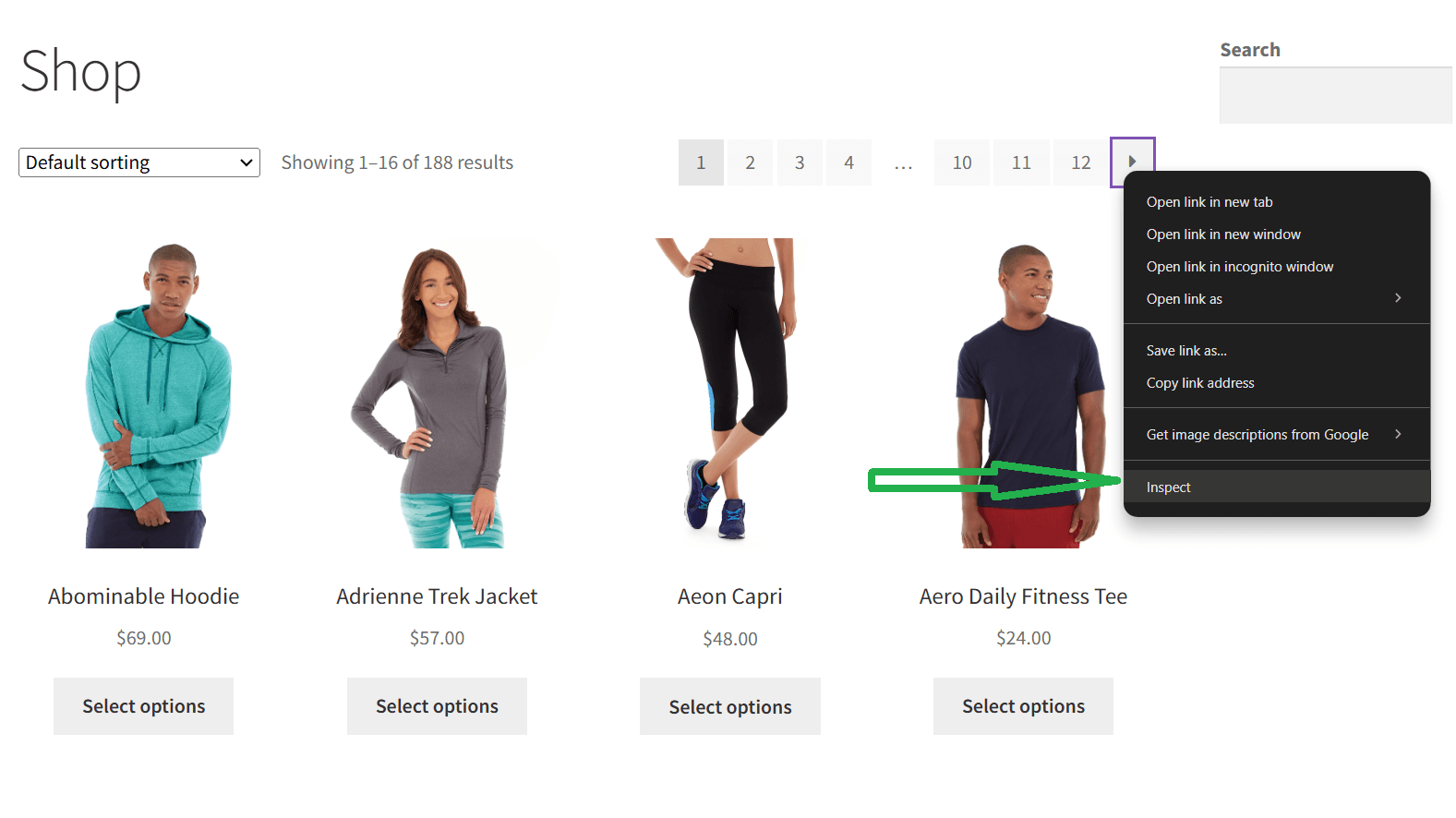
This screen will open:
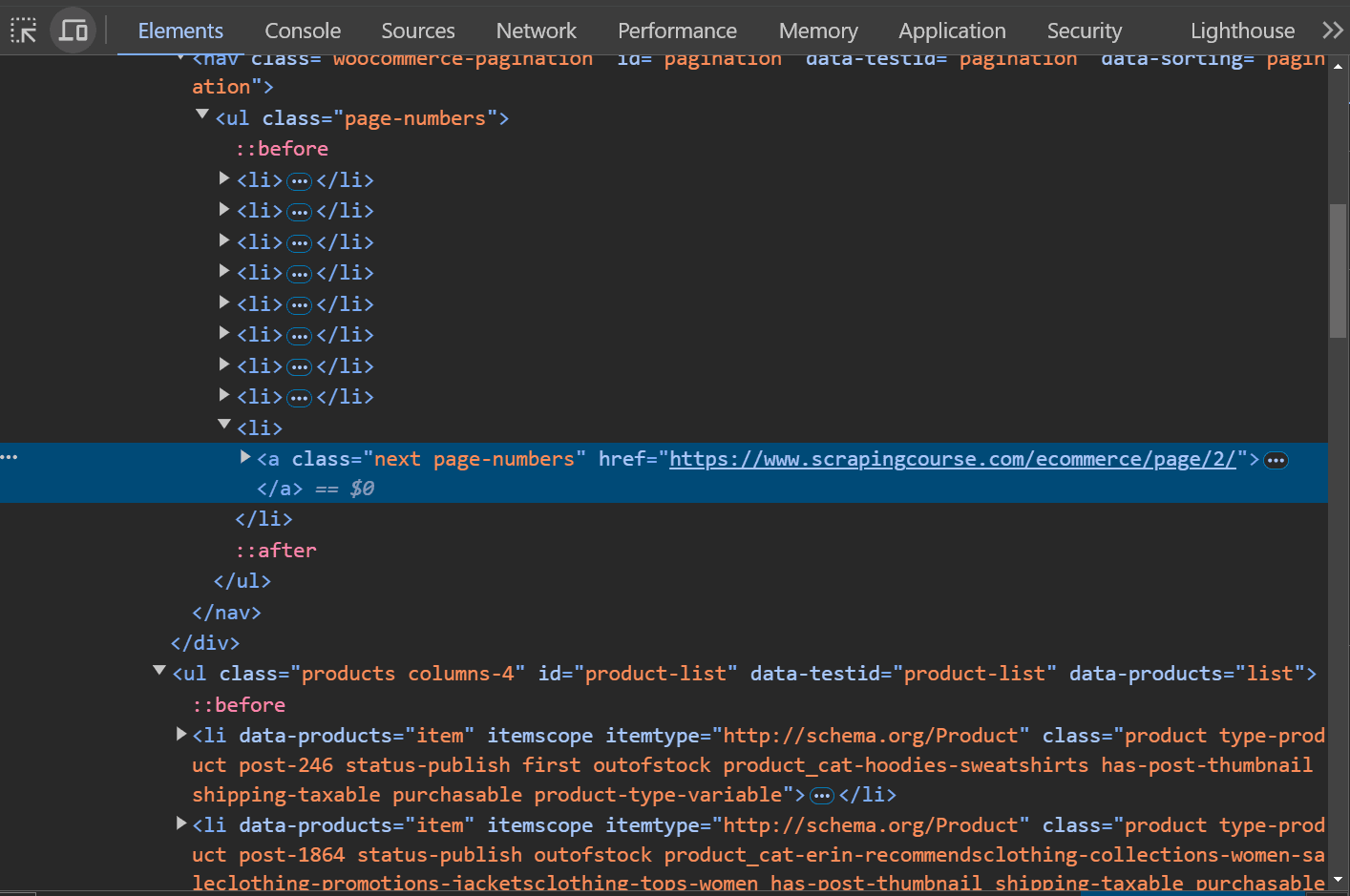
Note that all pagination links share the `page-numbers` CSS class. Get them all with the following CSS selector:
```nginx
a.page-numbers
```
To avoid scraping a page twice, you'll need a couple of extra data structures:
- **`pages_discovered`**: An [`HashSet`](https://doc.rust-lang.org/std/collections/struct.HashSet.html) to keep track of the URLs discovered by the crawler.
- **`pages_to_scrape`**: A `Vec` uses a logic queue that contains the list of pages the spider will visit soon.
Also, a `limit` variable will prevent the script from crawling pages forever.
Put it all together to achieve the desired Rust web crawling goal:
```nginx
// define Product ...
fn main() {
// initialize the vector that will store the scraped data
let mut products: Vec = Vec::new();
// pagination page to start from
let first_page = "https://www.scrapingcourse.com/ecommerce/page/1/";
// define the supporting data structures
let mut pages_to_scrape: Vec = vec![first_page.to_owned()];
let mut pages_discovered: std::collections::HashSet = std::collections::HashSet::new();
// current iteration
let mut i = 1;
// max number of iterations allowed
let max_iterations = 5;
while !pages_to_scrape.is_empty() && i <= max_iterations {
// get the first element from the queue
let page_to_scrape = pages_to_scrape.remove(0);
// retrieve and parse the HTML document
let response = reqwest::blocking::get(page_to_scrape);
let html_content = response.unwrap().text().unwrap();
let document = scraper::Html::parse_document(&html_content);
// scraping logic...
// get all pagination link elements
let html_pagination_link_selector = scraper::Selector::parse("a.page-numbers").unwrap();
let html_pagination_links = document.select(&html_pagination_link_selector);
// iterate over them to find new pages to scrape
for html_pagination_link in html_pagination_links {
// get the pagination link URL
let pagination_url = html_pagination_link
.value()
.attr("href")
.unwrap()
.to_owned();
// if the page discovered is new
if !pages_discovered.contains(&pagination_url) {
pages_discovered.insert(pagination_url.clone());
// if the page discovered should be scraped
if !pages_to_scrape.contains(&pagination_url) {
pages_to_scrape.push(pagination_url.clone());
}
}
}
// increment the iteration counter
i += 1;
}
// export logic...
}
```
This Rust data scraping snippet visits a page, scrapes it, and gets the URLs to crawl. If these links are unknown, it inserts them into the crawling queue. It repeats this logic until the queue is empty or hits the `max_iterations` boundary.
After the `while` loop, `products` stores all products collected from the visited pages visited.
Great news, you just crawled ScrapingCourse.com!
## Headless Browser Scraping in Rust
Some sites use JavaScript for retrieving data or rendering pages. In such a case, you can't use an HTML parser, and you'll need a tool that can render pages in a browser. That's what a [web scraping](/blog/headless-browser-scraping) [headless browser](/blog/headless-browser-scraping) is all about!
[`headless_chrome`](https://docs.rs/headless_chrome/latest/headless_chrome/) is the most popular library for Rust with headless browser capabilities. Install it:
```nginx
cargo add headless_chrome
```
This tool allows you to control and instruct a Chrome instance to run specific actions. Use `headless_chrome` to extract data from the target site with the following script. It's a translation of the web scraping Rust logic defined earlier. And the `wait_for_element()` and `wait_for_elements()` methods enable you to wait for HTML elements and select them.
```nginx
// define a custom data structure
// to store the scraped data
struct Product {
url: String,
image: String,
name: String,
price: String,
}
fn main() {
let mut products: Vec = Vec::new();
let browser = headless_chrome::Browser::default().unwrap();
let tab = browser.new_tab().unwrap();
tab.navigate_to("https://www.scrapingcourse.com/ecommerce/").unwrap();
let html_products = tab.wait_for_elements("li.product").unwrap();
for html_product in html_products {
// scraping logic...
let url = html_product
.wait_for_element("a")
.unwrap()
.get_attributes()
.unwrap()
.unwrap()
.get(1)
.unwrap()
.to_owned();
let image = html_product
.wait_for_element("img")
.unwrap()
.get_attributes()
.unwrap()
.unwrap()
.get(5)
.unwrap()
.to_owned();
let name = html_product
.wait_for_element("h2")
.unwrap()
.get_inner_text()
.unwrap();
let price = html_product
.wait_for_element(".price")
.unwrap()
.get_inner_text()
.unwrap();
let product = Product {
url,
image,
name,
price,
};
products.push(product);
}
// CSV export
let path = std::path::Path::new("products.csv");
let mut writer = csv::Writer::from_path(path).unwrap();
writer
.write_record(&["url", "image", "name", "price"])
.unwrap();
// populate the output file
for product in products {
let url = product.url;
let image = product.image;
let name = product.name;
let price = product.price;
writer.write_record(&[url, image, name, price]).unwrap();
}
writer.flush().unwrap();
}
```
A headless browser can interact with a web page like a human user. Plus, it can do much more than HTML parsers. For example, you can use `headless_chrome` to take a screenshot of the current viewport:
```nginx
let browser = headless_chrome::Browser::default().unwrap();
let tab = browser.new_tab().unwrap();
tab.navigate_to("https://www.scrapingcourse.com/ecommerce/").unwrap();
let screenshot_data = tab
.capture_screenshot(headless_chrome::protocol::cdp::Page::CaptureScreenshotFormatOption::Png, None, None, true)
.unwrap();
// write the screenshot data to the output file
std::fs::write("screenshot.png", &screenshot_data).unwrap();
```
`screenshot.png` would contain the image below:
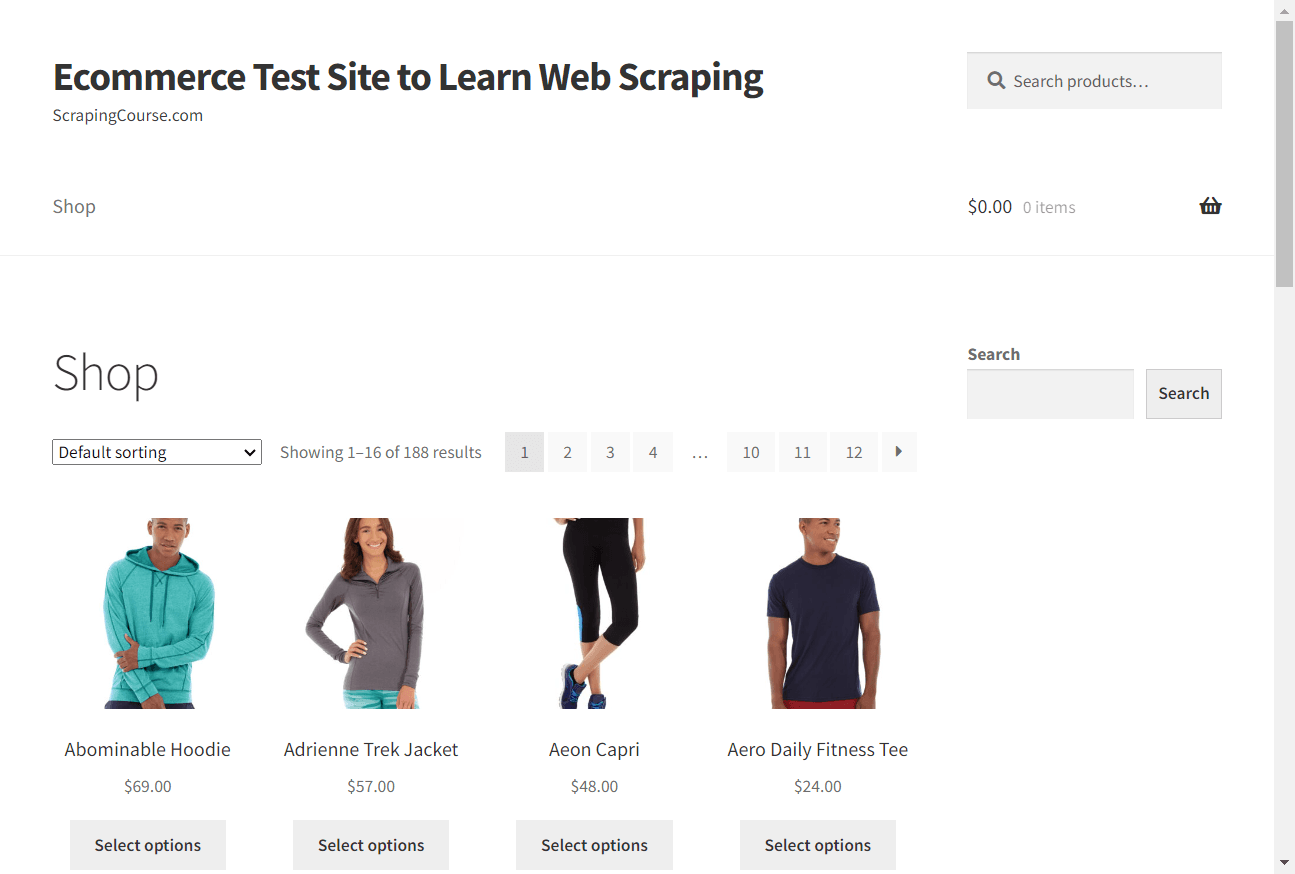
Congrats! You now know how to do web scraping using Rust on dynamic sites.
**Related:** [Selenium in Rust: Complete Tutorial 2026](/blog/rust-selenium)
## Challenges of Web Scraping in Rust
Rust web scraping is efficient and straightforward but not flawless. That's because many sites protect their data with anti-scraping solutions. Those techniques can **detect your requests coming from a bot and stop them**.
That's the biggest challenge automated data extraction scripts have to face. As with any other problem, there is, of course, a solution. Check out our complete guide on [web scraping without getting blocked](/blog/web-scraping-without-getting-blocked).
Most of those approaches are workarounds that work in limited situations or just for a while. A better alternative is [Zenrows](/), a full-featured Rust web scraping API that can bypass any anti-scraping measures for you.
## Conclusion
This step-by-step tutorial walked you through how to perform web scraping with Rust. You started with the basics, saw the more complex concepts, and you learned:
- Why Rust is great for performant in scraping.
- The basics of scraping in Rust.
- How to web crawl in Rust.
- How to use a headless browser in Rust with JavaScript-rendered sites.
Unfortunately, anti-bot technologies can block you anytime. But you can get around them all with [Zenrows,](/){:data-popup=true} a scraping tool with the best built-in anti-scraping bypass features. Make a single API call and get data from any online site!