# Scala Web Scraping: Step-by-Step Tutorial 2026

> Scala Web Scraping Simplified: Learn to set up, parse, and extract data effectively with this detailed step-by-step guide.

Source: https://www.zenrows.com/blog/scala-web-scraping

Web scraping in Scala is a viable option. Why? Because of Java interoperability, simplicity, and extensive functional programming support of the language.

In this guided tutorial, you'll see how to do web scraping in Scala with `scala-scraper` and Selenium. Let's dive in!

## Can You Scrape Websites with Scala?
Yes, Scala is a good choice for web scraping. The reason is that syntax is simple and concise, making it great for beginners. Also, it supports Java libraries because of its interoperability with the JVM. However, Scala is not the most popular language for online data scraping.

[Python web scraping](/blog/web-scraping-python) is much more common for its vast community. JavaScript with Node.js is popular too, just like Java and Go.

Scala emerges for its simplicity, JVM interoperability, and functional programming capabilities. Regarding scraping, those features have made it much more than a Java alternative.

## Prerequisites
Prepare your Scala environment for web scraping.

### Set Up the Environment
Scala requires Java, so make sure you have a JDK installed on your computer. Otherwise, [download the latest LTS version of the Java JDK](https://www.oracle.com/java/technologies/downloads/).

Next, download the [Scala 3.x installer powered by Coursier](https://www.scala-lang.org/download/). Extract the archive and run the installer. Follow the wizard and wait until the installation of Scala is complete. This will also set up [`sbt`](https://www.scala-sbt.org/), a built tool for Scala and Java projects.

Great, your Scala environment is good to go!

### Set Up a Scala Project
Navigate to the folder you want your Scala web scraping project to be in and launch:

```nginx
sbt new scala/scala3.g8
```

That will initialize a new Scala project using the [`scala3`](https://github.com/scala/scala3.g8) template retrieved from GitHub. During the creation process, `sbt` will ask you for the name of the project:

```nginx
name [Scala 3 Project Template]:
```

Type "scala-scraper" or the name you want to give your project and press ENTER.

The `scala-scraper` folder will now contain a Scala 3 project containing a demo “Hello, World!” application. Import it folder into your favorite IDE. For instance, Visual Studio Code with the [Scala extension](https://marketplace.visualstudio.com/items?itemName=scalameta.metals) will do.

Specifically, take a look at the `src/main/scala/Main.scala` file:

<!-- main.scala -->
```
@main def hello: Unit =
  println("Hello world!")
  println(msg)

def msg = "I was compiled by Scala 3. :)"
```

This is the main file of your Scala project that will contain soon the scraping logic.

Verify that the application works with the following steps. 

Enter the project folder:

```nginx
cd scala-scraper
```

Open the `sbt` console:

```nginx
sbt
```

In the `sbt` console, run the project:

```nginx
run
```

This will take a while, as it will first install the dependencies specified in the `build.sbt` file. Then, it'll print the message below as expected:

```nginx
Hello world!
I was compiled by Scala 3. :)
```

Excellent, the Scala project works like a charm! Time to turn this sample project into a web scraping Scala project.

## Tutorial: How to Do Web Scraping with Scala
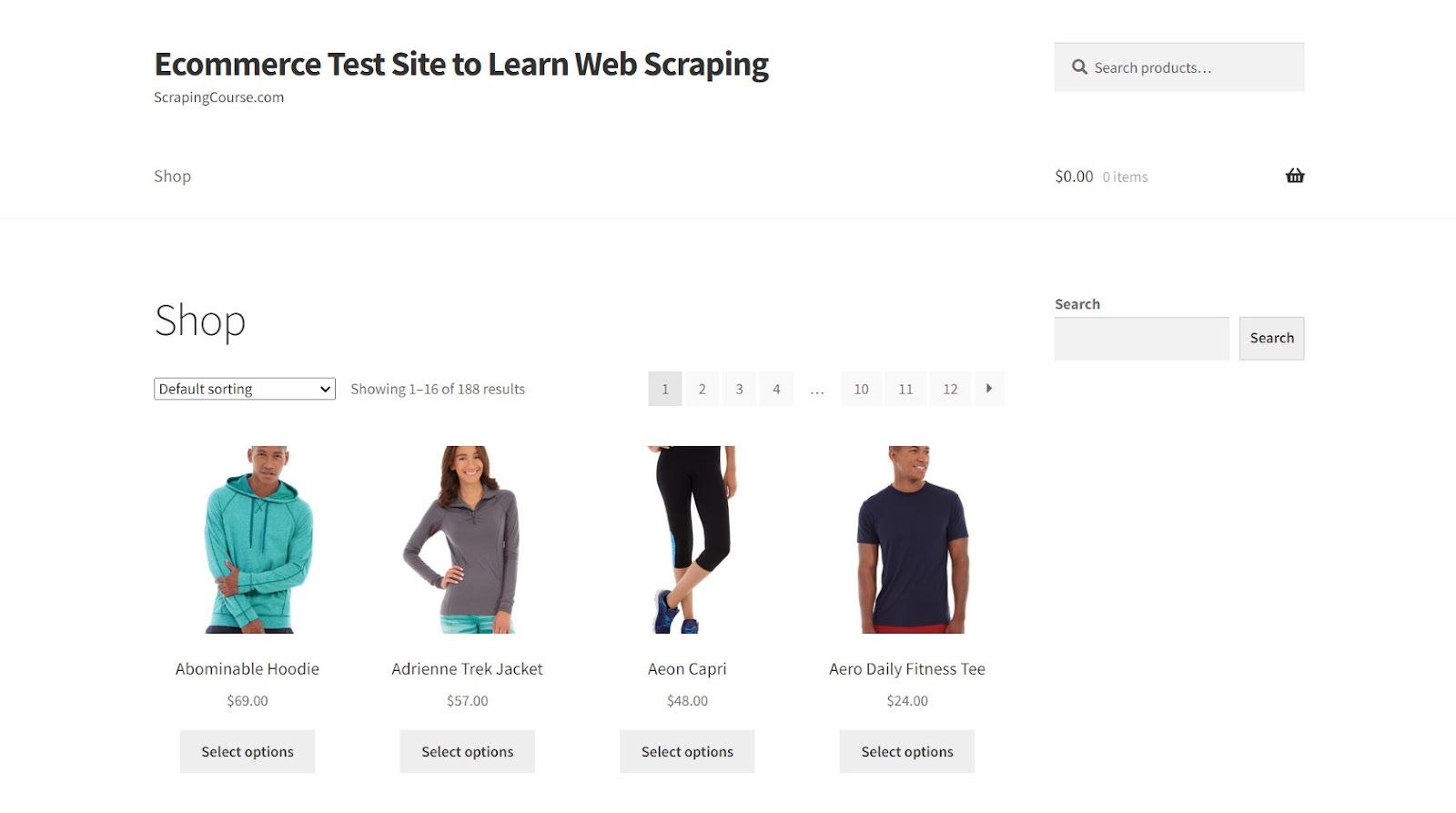
The target site will be [Scrapingcourse.com](https://www.scrapingcourse.com/ecommerce/), a demo e-commerce website with a paginated list of products. The goal of the Scala scraper you're about to build is to extract all product data on that site.
![Scrapingcourse Ecommerce Page ](https://static.zenrows.com/content/scrapingcourse_e_commerce_page_42d72850f0.jpg)

Brace yourself to write some code!

### Step 1: Get the HTML of Your Target Page
The best way to retrieve the HTML of a web page in Scala is to use an external library. [`scala-scraper`](https://github.com/ruippeixotog/scala-scraper) is Scala's most popular web scraping library, providing a DSL for downloading and parsing HTML pages.

Add it to your project's dependencies with the following line in `build.sbt`:

<!-- build.sbt -->
```
libraryDependencies += "net.ruippeixotog" %% "scala-scraper" % "3.1.1"
```

That's what your new `build.sbt` will look like:

<!-- build.sbt -->
```
val scala3Version = "3.3.1"

lazy val root = project
  .in(file("."))
  .settings(
    name := "scala-scraper",
    version := "0.1.0-SNAPSHOT",

    scalaVersion := scala3Version,

    libraryDependencies += "org.scalameta" %% "munit" % "0.7.29" % Test,
    libraryDependencies += "net.ruippeixotog" %% "scala-scraper" % "3.1.1"
  )
```

Then, install the library by launching this command:

```nginx
sbt update
```

If you're already in the `sbt` console, simply run:

```nginx
update
```

`scala-scraper` provides an API to load and extract content from HTML pages through the `Browser` object. There are two built-in implementations of `Browser`:

- [`JsoupBrowser`](https://github.com/ruippeixotog/scala-scraper/blob/master/core/src/main/scala/net/ruippeixotog/scalascraper/browser/JsoupBrowser.scala): Backed by [jsoup](http://jsoup.org/), the Java HTML parser library. It offers efficient document querying for pages that don't use JavaScript. For more information about `jsoup`, read our complete guide on [Java web scraping](/blog/web-scraping-java).
- [`HtmlUnitBrowser`](https://github.com/ruippeixotog/scala-scraper/blob/master/core/src/main/scala/net/ruippeixotog/scalascraper/browser/HtmlUnitBrowser.scala): Based on [HtmlUnit](http://htmlunit.sourceforge.net/), a GUI-less browser for Java. It controls a GUI-less web browser, allowing the execution of JavaScript code on the pages.

Since the target site doesn't use JavaScript and `JsoupBrowser` is the recommended option, we'll opt for it.

Add this line on top of your `Main.scala` file to import `JsoupBrowser`:

<!-- main.scala -->
```
import net.ruippeixotog.scalascraper.browser.JsoupBrowser
```

Next, initialize a `JsoupBrowser` instance and use it to connect to the target site with the `get()` method:

<!-- main.scala -->
```
val browser = JsoupBrowser()
val doc = browser.get("https://www.scrapingcourse.com/ecommerce/")
```

The returned object is a `Document`, which provides methods for querying HTML nodes on the page. Access its `toHtml` attribute, and you'll get access to the source HTML of the page:

<!-- main.scala -->
```
val html = doc.toHtml
```

Create a `ScalaScraper` object and put it all together to get the target page, extract its HTML, and print it:

<!-- main.scala -->
```
import net.ruippeixotog.scalascraper.browser.JsoupBrowser

object ScalaScraper {
  def main(args: Array[String]): Unit = {
    // initialize the Jsoup-backed browser
    val browser = JsoupBrowser()
    // download the target page
    val doc = browser.get("https://www.scrapingcourse.com/ecommerce/")

    // extract its source HTML and print it
    val html = doc.toHtml
    println(html)
  }
}
```

Execute it, and it'll print:

```html
<!DOCTYPE html>
<html lang="en-US">
<head>
    <!--- ... --->
  
    <title>Ecommerce Test Site to Learn Web Scraping – ScrapingCourse.com</title>
    
  <!--- ... --->
</head>
<body class="home archive ...">
    <p class="woocommerce-result-count">Showing 1–16 of 188 results</p>
    <ul class="products columns-4">

        <!--- ... --->

    </ul>
</body>
</html>
```

Well done! Your scraping script Scala connects to the target page as desired. It's time to extract some data from its HTML elements.

### Step 2: Extract Specific Data from the Scraped Page
Before getting started with HTML parsing in `scala-scraping`, you must first add these imports:

<!-- main.scala -->
```
import net.ruippeixotog.scalascraper.dsl.DSL._
import net.ruippeixotog.scalascraper.dsl.DSL.Extract._
import net.ruippeixotog.scalascraper.dsl.DSL.Parse._
```

You can now extract content using the `>>` operator with [CSS Selectors](https://developer.mozilla.org/en-US/docs/Web/CSS/CSS_selectors). If you aren't familiar with them, they are a popular way to select nodes on a page. Thus, the first step is to study the HTML to define an effective node selection strategy. 

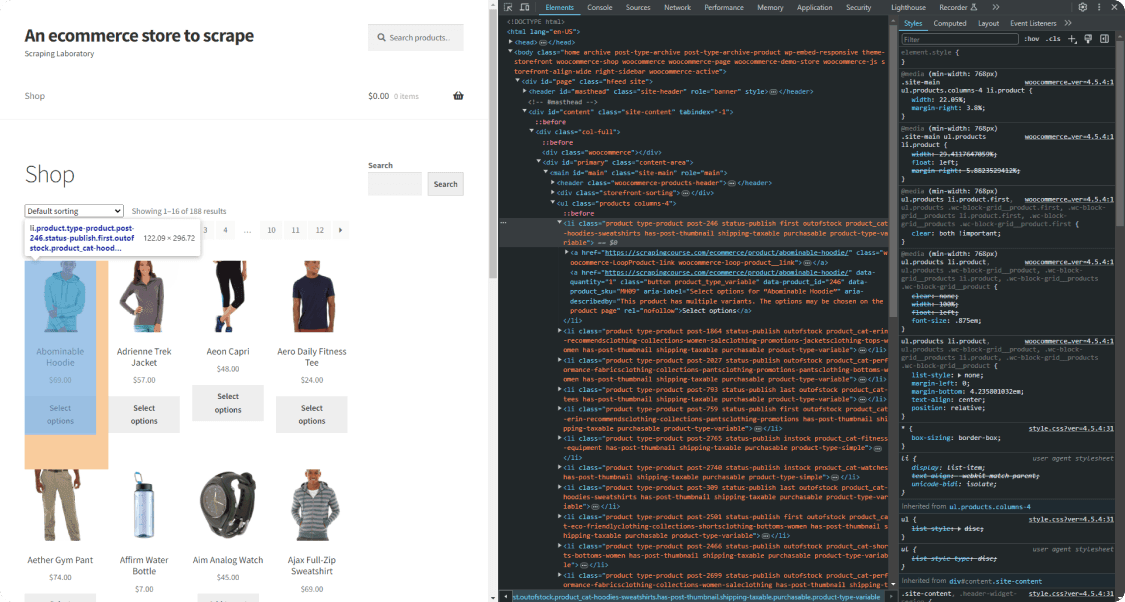
Open the target page in your browser and inspect a product HTML element in the DevTools:
![Scrapingcourse Ecommerce Homepage Inspect First Page ](https://static.zenrows.com/content/scrapingcourse_ecommerce_homepage_inspect_first_product_li_dfbd3055ad.png)

Explore the HTML code and see how you can select a product with this CSS selector:

```
li.product
```

> **Info**
>
> `li` is the HTML tag of the element, while `product` is the value of its `class` attribute.

Given a product node, you can extract this information:

- The name in the `<h2>` node.
- The URL in the `<a>` node.
- The image in the `<img>` node.
- The price in the `<span>` node.

Put that knowledge into practice by implementing the following parsing logic:

<!-- main.scala -->
```
// get the first HTML product on the page
val htmlProductElement = doc >> element("li.product")

// extract the desired data from it
val name = htmlProductElement >> text("h2")
val url = htmlProductElement >> element("a") >> attr("href")
val image = htmlProductElement >> element("img") >> attr("src")
val price = htmlProductElement >> text("span")
```

The `element()` method enables you to select an HTML element via a CSS selector. `text()` returns the text contained in the specific element, while `attr()` gets the content of the specified HTML attribute. With only three methods, you can implement Scala scraping logic.

Log the scraped data in the console with:

<!-- main.scala -->
```
println("Name: " + name)
println("URL: " + url)
println("Image: " + image)
println("Price: " + price)
```

`src/main/scala/Main.scala` will now be:

<!-- main.scala -->
```
import net.ruippeixotog.scalascraper.browser.JsoupBrowser
import net.ruippeixotog.scalascraper.dsl.DSL._
import net.ruippeixotog.scalascraper.dsl.DSL.Extract._
import net.ruippeixotog.scalascraper.dsl.DSL.Parse._

object ScalaScraper {
  def main(args: Array[String]): Unit = {
    // initialize the Jsoup-backed browser
    val browser = JsoupBrowser()
    // download the target page
    val doc = browser.get("https://www.scrapingcourse.com/ecommerce/")

    // get the first HTML product on the page
    val htmlProductElement = doc >> element("li.product")

    // extract the desired data from it
    val name = htmlProductElement >> text("h2")
    val url = htmlProductElement >> element("a") >> attr("href")
    val image = htmlProductElement >> element("img") >> attr("src")
    val price = htmlProductElement >> text("span")

    // print the scraped data
    println("Name: " + name)
    println("URL: " + url)
    println("Image: " + image)
    println("Price: " + price)
  }
}
```

Launch it, and it'll print:

```nginx
Name: Abominable Hoodie
URL: https://www.scrapingcourse.com/ecommerce/product/abominable-hoodie/
Image: https://www.scrapingcourse.com/ecommerce/wp-content/uploads/2024/03/mh09-blue_main-324x324.jpg
Price: $69.00
```

Amazing! However, the page contains many elements, and you want to scrape them all. Learn how in the next step.

### Step 3: Extract Multiple Products
Before scraping all products on the target page, you need a data structure where to store that data. So, define a [case class](https://docs.scala-lang.org/tour/case-classes.html) called `Product` as below:

<!-- main.scala -->
```
case class Product(name: String, url: String, image: String, price: String)
```

In the `main()` method, use `elementList()` instead of `element()` to get all products on the page. Iterate over them with `map()`, retrieve the desired data, and transform them into `Product` objects:

<!-- main.scala -->
```
val products: List[Product] = htmlProductElements.map(htmlProductElement => {
  // extract the desired data from it
val name = htmlProductElement >> text("h2")
val url = htmlProductElement >> element("a") >> attr("href")
val image = htmlProductElement >> element("img") >> attr("src")
val price = htmlProductElement >> text("span")

// return a new Product instance
Product(name, url, image, price)
})
`
```

Cycle over `products` and log the scraped data to verify that the Scala web scraping logic works:

<!-- main.scala -->
```
for (product <- products) {
  println("Name: " + product.name)
  println("URL: " + product.url)
  println("Image: " + product.image)
  println("Price: " + product.price)
  println()
}
```

This is the current `Main.scala`:

<!-- main.scala -->
```
import net.ruippeixotog.scalascraper.browser.JsoupBrowser
import net.ruippeixotog.scalascraper.dsl.DSL._
import net.ruippeixotog.scalascraper.dsl.DSL.Extract._
import net.ruippeixotog.scalascraper.dsl.DSL.Parse._

// define a custom class to store the elements to scrape
case class Product(name: String, url: String, image: String, price: String)

object ScalaScraper {
  def main(args: Array[String]): Unit = {
    // initialize the Jsoup-backed browser
    val browser = JsoupBrowser()
    // download the target page
    val doc = browser.get("https://www.scrapingcourse.com/ecommerce/")

    // get the first HTML product on the page
    val htmlProductElements = doc >> elementList("li.product")

    // trasform the HTML product elements into a list
    // of Product instances
    val products: List[Product] = htmlProductElements.map(htmlProductElement => {
      // extract the desired data from it
      val name = htmlProductElement >> text("h2")
      val url = htmlProductElement >> element("a") >> attr("href")
      val image = htmlProductElement >> element("img") >> attr("src")
      val price = htmlProductElement >> text("span")

      // return a new Product instance
      Product(name, url, image, price)
    })

    // print the scrape data
    for (product <- products) {
      println("Name: " + product.name)
      println("URL: " + product.url)
      println("Image: " + product.image)
      println("Price: " + product.price)
      println()
    }
  }
}
```

Run it, and it'll produce this output:

```nginx
Name: Abominable Hoodie
URL: https://www.scrapingcourse.com/ecommerce/product/abominable-hoodie/
Image: https://www.scrapingcourse.com/ecommerce/wp-content/uploads/2024/03/mh09-blue_main-324x324.jpg
Price: $69.00

// omitted for brevity...

Name: Artemis Running Short
URL: https://www.scrapingcourse.com/ecommerce/product/artemis-running-short/
Image: https://www.scrapingcourse.com/ecommerce/wp-content/uploads/2024/03/wsh04-black_main-324x324.jpg
Price: $45.00
```

Perfect! The scraped objects contain the desired data!

### Step 4: Convert Scraped Data Into a CSV File
You must convert the retrieved data to a more usable format to make sharing easier. The Scala standard library offers the tool required to export some data to CSV. However, doing that with a library is the easiest and preferable approach.

[`scala-csv`](https://github.com/tototoshi/scala-csv) is the most popular Scala library for reading and writing CSV files. Add it to your project's dependencies with this line in `build.sbt`:

<!-- build.sbt -->
```
libraryDependencies += "com.github.tototoshi" %% "scala-csv" % "1.3.10"
```

Import the library in `Main.scala` along with the `File` class from Java:

<!-- main.scala -->
```
import com.github.tototoshi.csv._
import java.io.File
```

Next, use them to initialize and populate a file with the CSV writer exposed by `scala-csv`. This offers a `writeAll()` method that accepts a `List` of `List[String]`. Convert products to the desired format and pass it to that function to populate the output file:

<!-- main.scala -->
```
// create the output file
val outpuFile = new File("products.csv")

// initialize the CSV writer
val writer = CSVWriter.open(outpuFile)
// transform the products in the format required by the
// writer and populate the CSV output file
writer.writeAll(products.map(product => List(product.name, product.url, product.image, product.price)))

// release the writer resources
writer.close()
```

Put it all together, and you'll get:

<!-- main.scala -->
```
import net.ruippeixotog.scalascraper.browser.JsoupBrowser
import net.ruippeixotog.scalascraper.dsl.DSL._
import net.ruippeixotog.scalascraper.dsl.DSL.Extract._
import net.ruippeixotog.scalascraper.dsl.DSL.Parse._
import com.github.tototoshi.csv._
import java.io.File

// define a custom class to store the elements to scrape
case class Product(name: String, url: String, image: String, price: String)

object ScalaScraper {
  def main(args: Array[String]): Unit = {
    // initialize the Jsoup-backed browser
    val browser = JsoupBrowser()
    // download the target page
    val doc = browser.get("https://www.scrapingcourse.com/ecommerce/")

    // get the first HTML product on the page
    val htmlProductElements = doc >> elementList("li.product")

    // trasform the HTML product elements into a list
    // of Product instances
    val products: List[Product] = htmlProductElements.map(htmlProductElement => {
      // extract the desired data from it
      val name = htmlProductElement >> text("h2")
      val url = htmlProductElement >> element("a") >> attr("href")
      val image = htmlProductElement >> element("img") >> attr("src")
      val price = htmlProductElement >> text("span")

      // return a new Product instance
      Product(name, url, image, price)
    })

    // create the output file
    val outpuFile = new File("products.csv")
    // initialize the CSV writer
    val writer = CSVWriter.open(outpuFile)
    // transform the products in the format required by the
    // writer and populate the CSV output file
    writer.writeAll(products.map(product => List(product.name, product.url, product.image, product.price)))
    // release the writer resources
    writer.close()
  }
}
```

Execute the web scraping Scala script with this command:

```nginx
sbt run
```

Wait for the script to complete, and a `products.csv` file below will appear in the project's root folder. Open it, and you'll see:

![ScrapingCourse csv output with lower case headings](https://static.zenrows.com/content/scrapingcourse_csv_output_lower_case_headings_b6eda535a8.jpg)

Et voilà! You just performed web scraping with Scala!

## Advanced Web Scraping Techniques with Scala
Now that you know the basics, it's time to dig into more advanced Scala web scraping techniques.

### Web Crawling in Scala: Scrape Multiple Pages
The current output only stores the product data from the first page. Since the target site has many pages, you want to scrape them all. Perform web crawling to visit more pages and scrape all products. Don't know what that is? Read our guide on [web crawling vs web scraping](/blog/web-crawling-vs-web-scraping).

What you need to do is:

1. Visit a page.
2. Select the pagination link elements.
3. Extract the new URLs to explore and add them to a queue.
4. Repeat the loop with a new page.

As a first step, inspect the pagination element on the page to figure out how to extract the URLs from it:

![ScrapingCourse next page inspection](https://static.zenrows.com/content/scrapingcourse_next_page_original_234cd48cc0.jpg)

This CSS selector help you select each pagination link node:

```
a.page-numbers
```

As you do not want to visit the same page twice, the crawling logic may become tricky. Here's why you should use:

- `pagesDiscovered`: A mutable `Set` to keep track of the URLs discovered by the crawler.
- `pagesToScrape`: A mutable `Queue` to store the list of pages the spider will visit soon.

`products` will also have to become a mutable list you can add elements to at each iteration. To avoid crawling pages forever, you should also add a `limit` variable.

Add the required import to `Main.scala`:

<!-- main.scala -->
```
import scala.collection.mutable._
```

Then, use its structures and a `while` loop to implement the crawling logic:

<!-- main.scala -->
```
// support data structures for web crawling
val pagesToScrape = Queue(firstPage)
val pagesDiscovered = Set(firstPage)

// to store the scraped products
val products: ListBuffer[Product] = ListBuffer()

// current iteration
var i = 1
// max number of iterations allowed
val maxIterations = 5

while (pagesToScrape.nonEmpty && i <= maxIterations) {
  // Get the first element from the queue
  val pageToScrape = pagesToScrape.dequeue()

  // connect to the current target page
  val doc = browser.get(pageToScrape)

  // get the first HTML product on the page
  val htmlProductElements = doc >> elementList("li.product")

  // scraping logic...

  // get all pagination link elements
  val htmlPaginationLinks = doc >> elementList("a.page-numbers")

  // iterate over them to find new pages to scrape
  for (htmlPaginationLink <- htmlPaginationLinks) {
    // get the pagination link URL
    val paginationUrl = htmlPaginationLink >> attr("href")

    // if the page discovered is new
    if (!pagesDiscovered.contains(paginationUrl)) {
      pagesDiscovered += paginationUrl

      // if the page discovered should be scraped
      if (!pagesToScrape.contains(paginationUrl)) {
        pagesToScrape.enqueue(paginationUrl)
      }
    }
  }

  // increment the iteration counter
  i += 1
}
```

Integrate this snippet into `Main.scala`, adapt the scraping and export logic to the new types, and you'll get:

<!-- main.scala -->
```
import net.ruippeixotog.scalascraper.browser.JsoupBrowser
import net.ruippeixotog.scalascraper.dsl.DSL._
import net.ruippeixotog.scalascraper.dsl.DSL.Extract._
import net.ruippeixotog.scalascraper.dsl.DSL.Parse._
import com.github.tototoshi.csv._
import java.io.File
import scala.collection.mutable._

// define a custom class to store the elements to scrape
case class Product(name: String, url: String, image: String, price: String)

object ScalaScraper {
  def main(args: Array[String]): Unit = {
    // initialize the Jsoup-backed browser
    val browser = JsoupBrowser()
    // download the target page
   // val doc = browser.get("https://www.scrapingcourse.com/ecommerce/")

    // pagination page to start from
    val firstPage = "https://www.scrapingcourse.com/ecommerce/page/1/";

    // support data structures for web crawling
    val pagesToScrape = Queue(firstPage)
    val pagesDiscovered = Set(firstPage)

    // to store the scraped products
    val products: ListBuffer[Product] = ListBuffer()

    // current iteration
    var i = 1
    // max number of iterations allowed
    val maxIterations = 5

    while (pagesToScrape.nonEmpty && i <= maxIterations) {
      // Get the first element from the queue
      val pageToScrape = pagesToScrape.dequeue()

      // connect to the current target page
      val doc = browser.get(pageToScrape)

      // get the first HTML product on the page
      val htmlProductElements = doc >> elementList("li.product")

      // trasform the HTML product elements into a list
      // of Product instances
      htmlProductElements.foreach(htmlProductElement => {
        // extract the desired data from it
        val name = htmlProductElement >> text("h2")
        val url = htmlProductElement >> element("a") >> attr("href")
        val image = htmlProductElement >> element("img") >> attr("src")
        val price = htmlProductElement >> text("span")

        // create a new Product instance
        // and add it to the list
        val product = Product(name, url, image, price)
        products += product
      })

      // get all pagination link elements
      val htmlPaginationLinks = doc >> elementList("a.page-numbers")

      // iterate over them to find new pages to scrape
      for (htmlPaginationLink <- htmlPaginationLinks) {
        // get the pagination link URL
        val paginationUrl = htmlPaginationLink >> attr("href")

        // if the page discovered is new
        if (!pagesDiscovered.contains(paginationUrl)) {
          pagesDiscovered += paginationUrl

          // if the page discovered should be scraped
          if (!pagesToScrape.contains(paginationUrl)) {
            pagesToScrape.enqueue(paginationUrl)
          }
        }
      }

      // increment the iteration counter
      i += 1
    }

    // create the output file
    val outpuFile = new File("products.csv")

    // initialize the CSV writer
    val writer = CSVWriter.open(outpuFile)
    // transform the products in the format required by the
    // writer and populate the CSV output file
    writer.writeAll(products.toList.map(product => List(product.name, product.url, product.image, product.price)))

    // release the writer resources
    writer.close()
  }
}
```

Fantastic! Run the spider again:

```nginx
sbt run
```

This time, the script will scrape all through 5 pagination pages. The output CSV will now store more than the first 16 elements:

![ScrapingCourse full product csv output with lower-case headings](https://static.zenrows.com/content/scrapingcourse_full_product_csv_lower_case_headings_897fd0dc1e.jpg)

Congratulations! You just learn how to perform Scala web crawling!

### Avoid Getting Blocked When Scraping with Scala
Sites know how valuable their data is, even if publicly available on their site. Thus, they protect their pages with anti-bot technologies to block automated scripts. Those solutions are the biggest challenges to web scraping in Scala as they can stop your script.

Two tips for performing [web scraping without getting blocked](/blog/web-scraping-without-getting-blocked) are:

1. Set a real-world User-Agent.
2. Use a proxy to hide your IP.

See how to implement them in `scala-scraper`.

Get the string of a real-world User-Agent string and the URL of a free proxy from a site like [Free Proxy List](https://free-proxy-list.net/). Configure them in your `Browser` instance by passing them to its constructor:

<!-- main.scala -->
```
val userAgent = "Mozilla/5.0 (Windows NT 10.0; Win64; x64) AppleWebKit/537.36 (KHTML, like Gecko) Chrome/120.0.0.0 Safari/537.36"
val proxy = Proxy("212.34.5.21", 7652, Proxy.HTTP)
val browser = JsoupBrowser(userAgent, proxy)
```

> **Info**
>
> Free proxies are short-lived and unreliable. By the time you read this tutorial, the chosen proxy server will no longer work. Using them is only good for learning purposes but avoid them in production!

Those two tips are helpful but just baby steps to bypass anti-bot measures. They won't be enough against advanced solutions such as [Cloudflare](/blog/bypass-cloudflare), [Akamai](/blog/bypass-akamai), [PerimeterX](/blog/perimeterx-bypass) and other WAFs. These Web Application Firewalls can still easily detect your Scala web scraping script as a bot. 

Verify that by targeting a Cloudflare-protected site, such as G2:

<!-- main.scala -->
```
import net.ruippeixotog.scalascraper.browser.JsoupBrowser

object ScalaScraper {
  def main(args: Array[String]): Unit = {
    // initialize the Jsoup-backed browser
    val browser = JsoupBrowser()
    // download the target page
    val doc = browser.get("https://www.g2.com/products/notion/reviews")

    // extract its source HTML and print it
    val html = doc.toHtml
    println(html)
  }
}
```

The Scala scraper will fail with the following `403 Forbidden` error:

```nginx
org.jsoup.HttpStatusException: HTTP error fetching URL. Status=403, URL=[https://www.g2.com/products/notion/reviews]
```

What can you do to avoid that? Use [Zenrows](/)! This scraping API offers the best anti-bot toolkit to avoid any blocks while supporting User-Agent and IP rotation. These are only some of the advanced features offered by the tool.

Boost `scala-scraper` capabilities with the power of Zenrows! [Sign up for free](/) to get your first 1,000 credits. You'll reach the Request Builder page below:

![building a scraper with zenrows](/blog/_img/zenrows-playground.png)

Suppose you want to scrape the [protected G2.com page seen earlier](https://www.g2.com/products/airtable/reviews). To do that, follow the instructions below:

1. Paste the target URL (`https://www.g2.com/products/airtable/reviews`) into the "URL to Scrape" input. 
2. Toggle the "Premium Proxy" check to get rotating IPs.
3. Enable the "JS Rendering" feature (the User-Agent rotation and AI-powered anti-bot toolkit are always included by default). 
4. Select “cURL” and then the “API” mode to get the complete URL of the Zenrows API.

Use the generated URL in the `get()` method:

<!-- main.scala -->
```
import net.ruippeixotog.scalascraper.browser.JsoupBrowser

object ScalaScraper {
  def main(args: Array[String]): Unit = {
    // initialize the Jsoup-backed browser
    val browser = JsoupBrowser()
    // download the target page
    val doc = browser.get("https://api.zenrows.com/v1/?apikey=<YOUR_ZENROWS_API_KEY>&url=https%3A%2F%2Fwww.g2.com%2Fproducts%2Fnotion%2Freviews&js_render=true&premium_proxy=true")

    // extract its source HTML and print it
    val html = doc.toHtml
    println(html)
  }
}
```

Launch your script again, and this time it'll log the source HTML of the target G2 page:

```nginx
<!DOCTYPE html>
<head>
  <meta charset="utf-8" />
  <link href="https://www.g2.com/assets/favicon-fdacc4208a68e8ae57a80bf869d155829f2400fa7dd128b9c9e60f07795c4915.ico" rel="shortcut icon" type="image/x-icon" />
  <title>Notion Reviews 2024: Details, Pricing, &amp; Features | G2</title>
  <!-- omitted for brevity ... -->
```

Wow! Bye-bye 403 errors. You just learned how to use Zenrows for web scraping with Scala.

### Use a Headless Browser with Scala
As an HTML parser, `scala_scraper` is great for scraping static pages. However, it's not the best tool for pages that use JavaScript for rendering or data retrieval. Sure, it provides the `HtmlUnitBrowser`. Nevertheless, most of its features are still in beta.

You need a more reliable tool that can render pages in a browser, and the most popular [headless browser](/blog/headless-browser-scraping) library is Selenium. There isn't a direct Scala port of Selenium, but you can still use it thanks to the Java interoperability.

To show the power of Selenium, you have to change the target page. You should target a web page that needs JavaScript execution, such as the [Infinite Scrolling demo](https://scrapingclub.com/exercise/list_infinite_scroll/). This dynamically loads new data as the user scrolls down. So, it's a great example of a dynamic content page:

![Dynamic content demo](https://static.zenrows.com/content/dynamic_page_demo_8729900888.gif)

Follow the instructions below to learn how to scrape that page in Scala!

Import it in `Main.Java`, initialize a new `WebDriver` instance, and use it to extract data from the dynamic page:

<!-- main.java -->
```java
import org.openqa.selenium.By
import org.openqa.selenium.chrome.ChromeDriver
import org.openqa.selenium.chrome.ChromeOptions
import scala.jdk.CollectionConverters._

object ScalaSeleniumScraper {
  def main(args: Array[String]): Unit = {
    // define the options to run Chrome in headless mode
    val options = ChromeOptions()
    options.addArguments("--headless=new")

    // initialize a Chrome driver
    val driver = new ChromeDriver(options)

    // maxime the window to avoid the response rendering
    driver.manage.window.maximize()

    // visit the target page
    driver.get("https://scrapingclub.com/exercise/list_infinite_scroll/")

    // select the product elements
    val htmlProductElements = driver.findElements(By.cssSelector(".post")).asScala.toList

    // iterate over them and scrape the data of interest
    for (htmlProductElement <- htmlProductElements) {
      // scraping logic
      val name = htmlProductElement.findElement(By.cssSelector("h4")).getText()
      val url = htmlProductElement.findElement(By.cssSelector("a")).getAttribute("href")
      val image = htmlProductElement.findElement(By.cssSelector("img")).getAttribute("src")
      val price = htmlProductElement.findElement(By.cssSelector("h5")).getText()

      // log the scraped data
      println("Name: " + name)
      println("URL: " + url)
      println("Image: " + image)
      println("Price: " + price)
      println()
    }

    // close the browser and release its resources
    driver.quit()
  }
}
```

Execute your new script:

```nginx
Name: Short Dress
URL: https://scrapingclub.com/exercise/list_basic_detail/90008-E/
Image: https://scrapingclub.com/static/img/90008-E.jpg
Price: $24.99

// omitted for brevity...

Name: Fitted Dress
URL: https://scrapingclub.com/exercise/list_basic_detail/94766-A/
Image: https://scrapingclub.com/static/img/94766-A.jpg
Price: $34.99
```

That will produce:

```
Name: Short Dress
URL: https://scrapingclub.com/exercise/list_basic_detail/90008-E/
Image: https://scrapingclub.com/static/img/90008-E.jpg
Price: $24.99

// omitted for brevity...

Name: Fitted Dress
URL: https://scrapingclub.com/exercise/list_basic_detail/94766-A/
Image: https://scrapingclub.com/static/img/94766-A.jpg
Price: $34.99
```

Yes! You're now a Scala web scraping master!

## Conclusion
This step-by-step guide has taken you through the process of doing web scraping in Scala. You started with the fundamentals and then explored more complex aspects to become a web scraping Scala enthusiast!

You now know why Scala excels in multi-platform, efficient, reliable scraping. Likewise, you can apply the essentials of web scraping and crawling using `scala-scraper`. Plus, you know how to use Selenium in Scala to extract data from sites that need JavaScript.

The problem? No matter how good and advanced your Scala scraper is, anti-scraping tools will still be able to stop it. Bypass them all with [Zenrows](/), a scraping API with the most effective built-in anti-bot bypass features. Extracting online data from any site is only one API call away!
