# Infinite Scroll Scraping with Scrapy [Tutorial 2026]
> Learn how to add headless browsing to Scrapy and effectively scrape dynamic content from infinite scroll pages in this tutorial.”
Source: https://www.zenrows.com/blog/scrapy-infinite-scroll
Ready to take your [Scrapy web scraping](/blog/scrapy-python) to the next level with infinite scroll? Implementing Scrapy infinite scroll with Splash makes it a breeze!
This article will teach you how to add Splash headless browsing functionality to Scrapy and scrape dynamically loaded content from infinite scroll.
## How to Scrape Infinite Scrolling Content with Scrapy
In this tutorial, you'll scrape product information from [ScrapingClub](https://scrapingclub.com/exercise/list_infinite_scroll/), a demo website that uses infinite scroll. Since the content is dynamic, we'll add headless browsing support using Scrapy Splash.
Let's get started!
### Step 1: Set Up a Scrapy Scraper with Splash
To start [using Splash with Scrapy](/blog/scrapy-splash), install `scrapy-splash` using `pip`:
```nginx
pip install scrapy-splash
```
The standard **way to run the Splash server is via a Docker daemon**. So, ensure you start Docker on your machine.
Next, run the following command to pull the Splash repository:
```nginx
docker pull scrapinghub/splash
```
> **Info**
>
> **Tip for Windows Users**: If Docker fails to pull the image, try uninstalling and re-installing Docker Desktop. Then restart your computer and reopen Docker.
After pulling Splash, start the Splash server on port 8050, as shown:
```nginx
docker run -it -p 8050:8050 --rm scrapinghub/splash
```
Great! Your Scrapy project is now JavaScript-enabled. How can you use this functionality to extract dynamic content from an infinite scroll?
### Step 2: Implement Scroll and Wait Mechanism
So, we'll implement a logic for our scraper to scroll down and wait for more content to load. Here's how the target website loads content as you scroll:
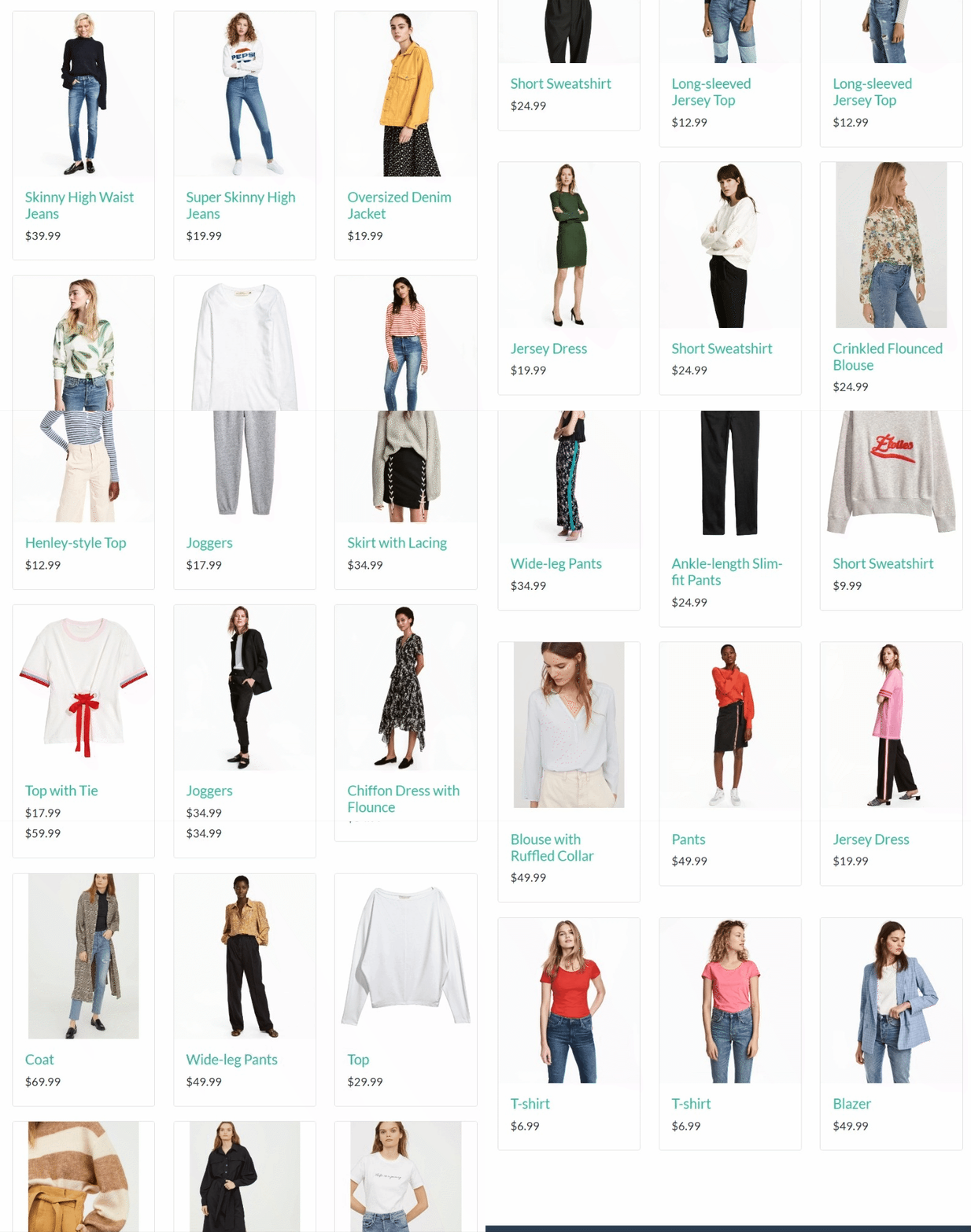
We'll add the scrolling action using the lua_script, a Splash script for writing JavaScript in Scrapy. Let's break down the script to see how the scrolling logic works.
The main function in the script starts by visiting the target URL and waiting for elements to load using a wait. It then scrolls the page vertically based on a specified value.
```javascript
function main(splash, args)
splash:go(args.url)
splash:wait(args.wait)
```
The code then obtains the current scroll height and passes this value to the scroll function inside the `for` loop. It further implements a delay after scrolling and tracks the number of scrolls per request:
```javascript
local scroll_to = splash:jsfunc('window.scrollTo')
local get_body_height = splash:jsfunc([[
function() {
return document.body.scrollHeight;
}
]])
local scroll_count = 0
for _ = 1, args.max_scrolls do
scroll_count = scroll_count + 1
scroll_to(0, get_body_height())
splash:wait(args.scroll_delay)
end
```
Finally, the lua_script parses the HTML content (`splash:html()`), and the `scroll_count` via the `return` function:
```javascript
return {
html = splash:html(),
scroll_count = scroll_count
}
```
Now, let's wrap everything inside a multi-line comment. The complete `lua_script` should look like this in your spider file.
```python
# import the required libraries
import scrapy
from scrapy_splash import SplashRequest
lua_script = """
function main(splash, args)
splash:go(args.url)
splash:wait(args.wait)
local scroll_to = splash:jsfunc('window.scrollTo')
local get_body_height = splash:jsfunc([[
function() {
return document.body.scrollHeight;
}
]])
local scroll_count = 0
for _ = 1, args.max_scrolls do
scroll_count = scroll_count + 1
scroll_to(0, get_body_height())
splash:wait(args.scroll_delay)
end
return {
html = splash:html(),
scroll_count = scroll_count
}
end
"""
```
Next, we'll see how to add the script using Scrapy Splash.
### Step 3: Extract Data From Infinite Scroll Pages
The data extraction phase involves making continuous Splash requests until we reach the last element. Let's first inspect the target elements: the product name, price, URL, and image source.
The target element container has a `.post` class attribute, as shown. This is where you'll take the other items from.
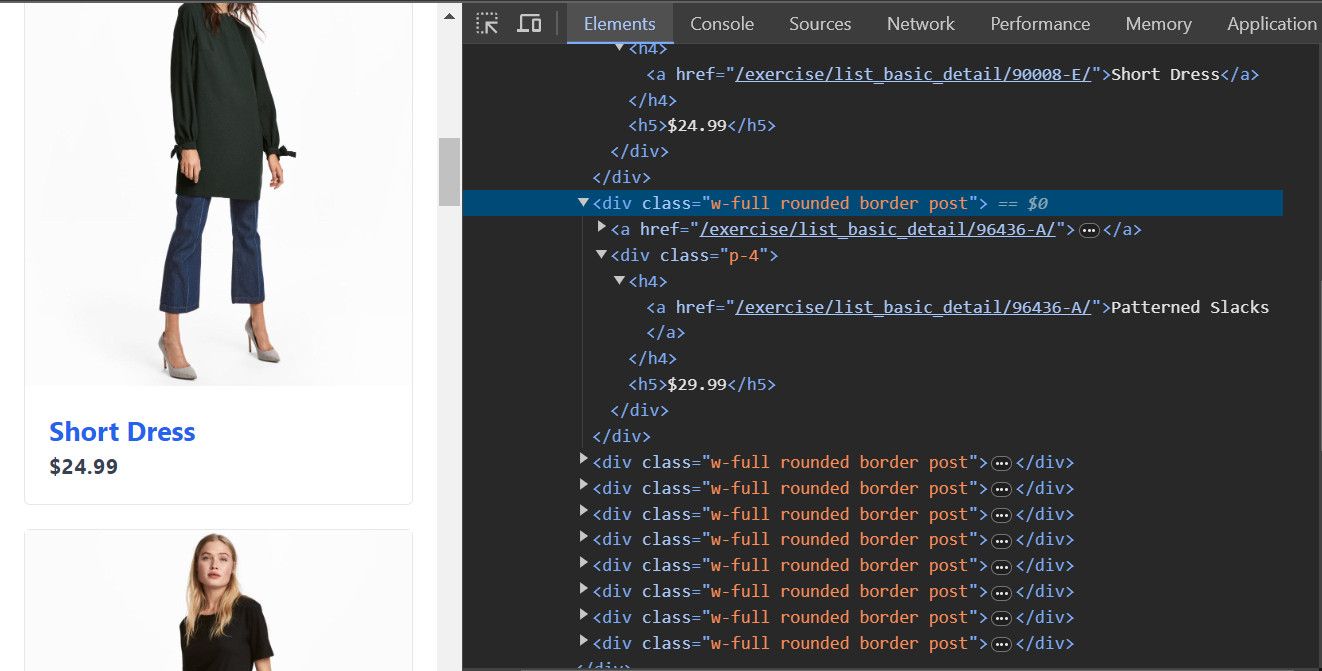
Start your spider class, as shown below. Notably, the Splash request accepts a URL, the parsed HTML, and an endpoint, which allows Splash to run the JavaScript in the Lua script.
The `args` parameter points to the Lua script and specifies the delays and maximum scrolls as earlier specified in the Lua script.
```python
# import the required libraries
import scrapy
from scrapy_splash import SplashRequest
class ScrapingClubSpider(scrapy.Spider):
name = 'scraping_test'
allowed_domains = ['scrapingclub.com']
max_scrolls = 8
def start_requests(self):
url = 'https://scrapingclub.com/exercise/list_infinite_scroll/'
yield SplashRequest(
url,
self.parse,
endpoint='execute',
args={
'lua_source': lua_script,
'wait': 2,
'scroll_delay': 1,
'max_scrolls': self.max_scrolls
},
)
```
Then, the `parse` function checks if the response returns `scroll_count` before pointing to the elements and extracting data.
```python
#...
class ScrapingClubSpider(scrapy.Spider):
def parse(self, response):
if 'scroll_count' in response.data:
# max_scrolls = 8
scroll_count = response.data['scroll_count']
self.logger.info(f'Scrolled {scroll_count} times.')
# extract data from the initial page
for product in response.css('.post'):
url = product.css('a').attrib['href']
image = product.css('.card-img-top').attrib['src']
name = product.css('h4 a::text').get()
price = product.css('h5::text').get()
yield {
'url': url,
'image': image,
'name': name,
'price': price
}
```
Next, we implement the logic to confirm if there are more elements in the DOM and continue scraping if true. However, we need to understand how the target website implements its infinite scroll to achieve that.
So, the website loads elements dynamically by executing a Fetch request each time a user scrolls to a hidden `span.next` element.
See the hidden navigation element in the developer console:
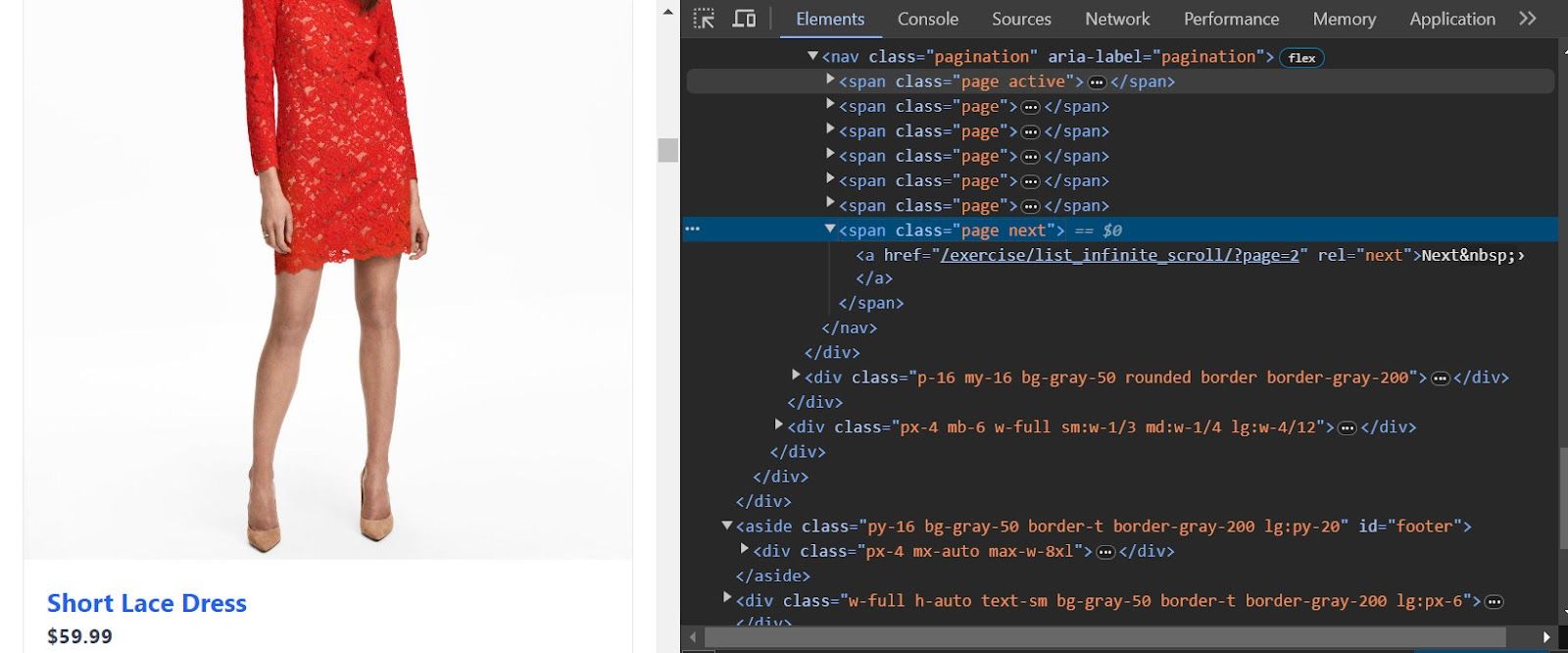
Take a closer look at the element layout:
```python
Next ›
```
The next code checks if the scroll count is less than the specified maximum scroll and confirms the presence of the hidden element on the page. If true, it continues scraping. Otherwise, it stops:
```python
def parse(self, response):
# ...
# continue scrolling if until maximum scrolls
next_page = response.css('span.page.next a[rel='next']::attr(href)').get()
if (scroll_count <= self.max_scrolls and next_page!=None):
next_page_url = response.urljoin(next_page)
yield SplashRequest(
next_page_url,
self.parse,
endpoint='execute',
args={
'lua_source': lua_script,
'wait': 1,
'scroll_delay': 1,
'max_scrolls': self.max_scrolls
},
)
```
Let's put it all in one piece:
```python
# import the required libraries
import scrapy
from scrapy_splash import SplashRequest
lua_script = """
function main(splash, args)
splash:go(args.url)
splash:wait(args.wait)
local scroll_to = splash:jsfunc('window.scrollTo')
local get_body_height = splash:jsfunc([[
function() {
return document.body.scrollHeight;
}
]])
local scroll_count = 0
-- implement scroll and delay for each request
for _ = 1, args.max_scrolls do
scroll_count = scroll_count + 1
scroll_to(0, get_body_height())
splash:wait(args.scroll_delay)
end
return {
html = splash:html(),
scroll_count = scroll_count
}
end
"""
class ScrapingClubSpider(scrapy.Spider):
name = 'scraping_test'
allowed_domains = ['scrapingclub.com']
max_scrolls = 8
def start_requests(self):
url = 'https://scrapingclub.com/exercise/list_infinite_scroll/'
yield SplashRequest(
url,
self.parse,
endpoint='execute',
args={
'lua_source': lua_script,
'wait': 2,
'scroll_delay': 1,
'max_scrolls': self.max_scrolls
},
)
def parse(self, response):
if 'scroll_count' in response.data:
# max_scrolls = 8
scroll_count = response.data['scroll_count']
self.logger.info(f'Scrolled {scroll_count} times.')
# extract data from the initial page
for product in response.css('.post'):
url = product.css('a').attrib['href']
image = product.css('.card-img-top').attrib['src']
name = product.css('h4 a::text').get()
price = product.css('h5::text').get()
yield {
'url': url,
'image': image,
'name': name,
'price': price
}
# continue scrolling if not reached the maximum scrolls
next_page = response.css('span.page.next a[rel="next"]::attr(href)').get()
if (scroll_count <= self.max_scrolls and next_page != None):
next_page_url = response.urljoin(next_page)
yield SplashRequest(
next_page_url,
self.parse,
endpoint='execute',
args={
'lua_source': lua_script,
'wait': 1,
'scroll_delay': 1,
'max_scrolls': self.max_scrolls
},
)
```
As shown, the code implements a wait between requests and scrapes the data as it scrolls through the page:
```nginx
{'url': '/exercise/list_basic_detail/90008-E/', 'image': '/static/img/90008-E.jpg', 'name': 'Short Dress', 'price': '$24.99'}
{'url': '/exercise/list_basic_detail/96436-A/', 'image': '/static/img/96436-A.jpg', 'name': 'Patterned Slacks', 'price': '$29.99'}
{'url': '/exercise/list_basic_detail/93926-B/', 'image': '/static/img/93926-B.jpg', 'name': 'Short Chiffon Dress', 'price': '$49.99'}
#... other products omitted for brevity
{'url': '/exercise/list_basic_detail/96771-B/', 'image': '/static/img/96771-B.jpg', 'name': 'T-shirt', 'price': '$6.99'}
{'url': '/exercise/list_basic_detail/96771-A/', 'image': '/static/img/96771-A.jpg', 'name': 'T-shirt', 'price': '$6.99'}
{'url': '/exercise/list_basic_detail/93086-B/', 'image': '/static/img/93086-B.jpg', 'name': 'Blazer', 'price': '$49.99'}
```
Congratulations! You just applied Scrapy infinite scroll and now own a Scrapy spider that scrapes all products from a website that uses infinite scroll.
However, **you can still get blocked** despite your achievement. You'll see how to deal with this in the next section.
> **Skip the blocks.** [Try Zenrows free](/) and get clean web data without the anti-bot fight.
## Avoid Getting Blocked While Infinite Scrolling with Scrapy
Many websites block scrapers with anti-bots, including CAPTCHAs, rate limiting, IP bans, and similar security measures.
No worries, [Zenrows](/), an all-in-one scraping API, handles all that behind the scenes while you focus on the data you need instead. Additionally, it integrates well with Scrapy and **gives you all the functionalities of Splash**.
Let's see an example by scraping review information from [Capterra](https://www.capterra.com/p/186596/Notion/reviews/), a website with infinite scroll and anti-bot protection.
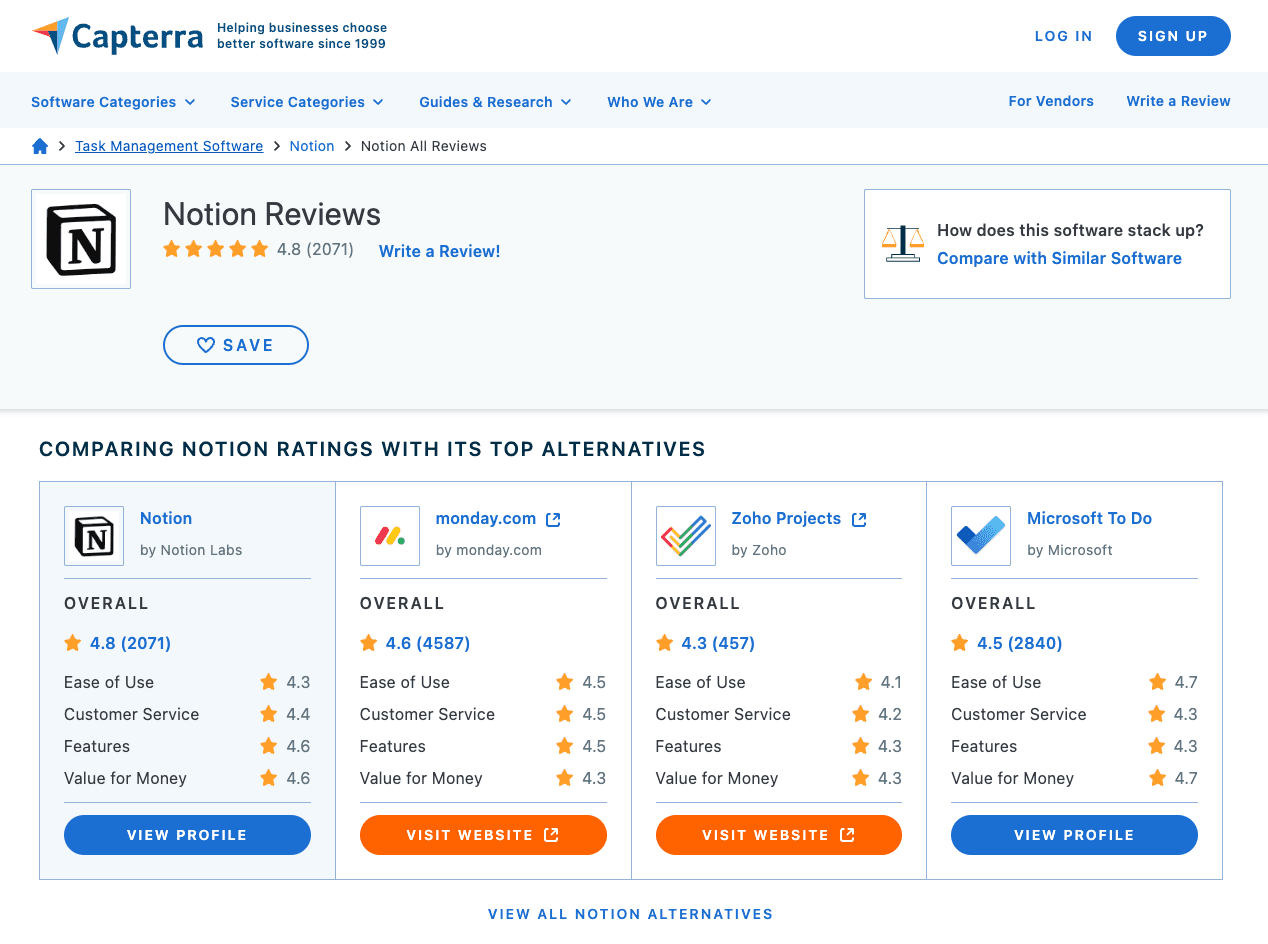
First, we'll see what happens when you try to scrape this website with Scrapy Splash only using the following code:
```python
# import the required libraries
import scrapy
from scrapy_splash import SplashRequest
# define a lua script for JavaScript scrolling and clicking
lua_script = """
function main(splash, args)
splash:go(args.url)
local num_scrolls = 3
local wait_after_scroll = 1.0
local wait_after_click = 1.0
local scroll_to = splash:jsfunc('window.scrollTo')
local get_body_height = splash:jsfunc(
'function() { return document.body.scrollHeight; }'
)
-- Scroll to the end and click 'Load More' for 'num_scrolls' times
for _ = 1, num_scrolls do
scroll_to(0, get_body_height())
splash:wait(wait_after_scroll)
-- Click the 'Load More' button
local load_more_button = splash:select('.nb-button.nb-button-standard.nb-button-secondary')
if load_more_button then
load_more_button:mouse_click()
splash:wait(wait_after_click)
end
end
return splash:html()
end
"""
# start a spider class
class ScrapingClubSpider(scrapy.Spider):
name = 'scraper'
allowed_domains = ['www.capterra.com']
# start the request
def start_requests(self):
url = 'https://www.capterra.com/p/186596/Notion/reviews/'
# make a Splash request and pass lua_script
yield SplashRequest(url, callback=self.parse, endpoint='execute', args={'lua_source': lua_script})
# parse the response
def parse(self, response):
# locate the parent element
review_box = response.css('div.nb-p-xl.nb-break-words')
# loop through the parent element to get the required data
for review in review_box:
reviewier_headline = review.css('div.nb-text-gray-300::text').get()
review_title = review.css('div.nb-type-lg-bold::text').get()
# obtain the required data
yield {
'Reviewier headline': reviewier_headline,
'Review title': review_title
}
```
The request fails with an [error 403 in Scrapy](/blog/scrapy-403), indicating that the website has blocked your spider. This is common with sites using anti-bot systems and [WAFs](/blog/waf-bypass) that detect and block automated traffic:
```nginx
(403)
```
To solve this problem with Zenrows, [sign up](/) for free and grab your API key from the Request Builder.
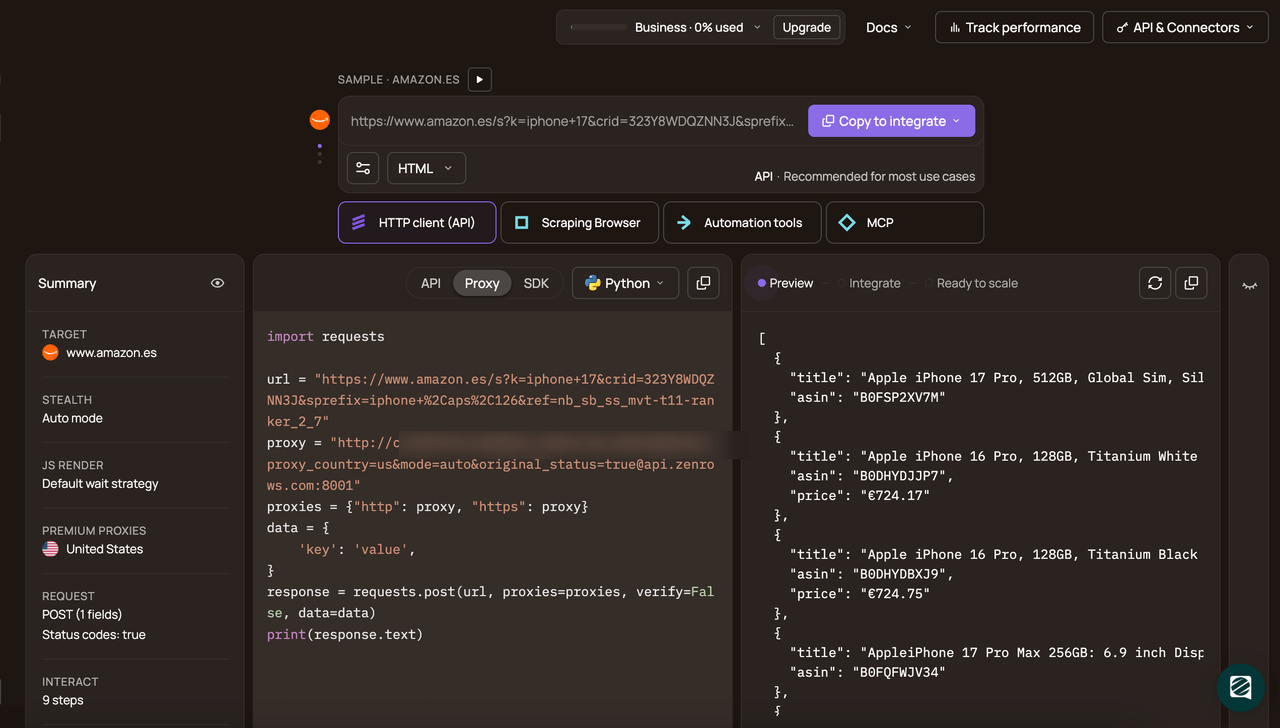
Then implement Zenrows [proxy in Scrapy](/blog/scrapy-proxy):
```python
# import the required modules
import scrapy
from urllib.parse import urlencode
# define a spider class
class NotionRevsSpider(scrapy.Spider):
name = 'review_scraper'
allowed_domains = ['www.capterra.com']
# start your requeuest
def start_requests(self):
# specify Zenrows proxy URL
proxy = (
f'http://:'
'js_render=true&'
'premium_proxy=true'
'@api.zenrows.com:8001'
)
url = 'https://www.capterra.com/p/186596/Notion/reviews/'
# pass the proxy URL into Scrapy Request
yield scrapy.Request(url, callback=self.parse, meta={'proxy': proxy})
# write the parse function
def parse(self, response):
# obtain the parent element
review_box = response.css('div.nb-p-xl.nb-break-words')
# iterate through the parent element and extract data
for review in review_box:
reviewier_headline = review.css('div.nb-text-gray-300::text').get()
review_title = review.css('div.nb-type-lg-bold::text').get()
# get the extracted data
yield {
'Reviewier headline': reviewier_headline,
'Review title': review_title
}
```
Our spider scrapes the required data from the target website without getting blocked.
```nginx
{'Reviewier headline': 'Social Media Solopreneur', 'Review title': '"The Tool I Didn\'t Know I Needed as a Solopreneur"'}
{'Reviewier headline': 'Designer', 'Review title': '"Notion help organise chaos"'}
{'Reviewier headline': 'Intake Coordinator', 'Review title': '"Good for Document Generation"'}
#... other reviews omitted for brevity
{'Reviewier headline': 'Co-Founder', 'Review title': '"Notion is our lifeblood"'}
{'Reviewier headline': 'CEO', 'Review title': '"My testimony and avaluation of Notion"'}
{'Reviewier headline': 'Owner', 'Review title': '"Notion is a powerful all-in-one workspace that offers an impressive range of features"'}
```
There you go! You've just used Zenrows to bypass an anti-bot in Scrapy. You can also use [Zenrows JavaScript instructions](https://docs.zenrows.com/fetch/features/js-instructions) with your spider and implement Splash-like functionalities with Zenrows.
With Zenrows, you can add capabilities like click, wait, and scroll to your request parameter. You can even include explicit waits to pause for a specific element to load before scraping.
Try [Zenrows](/) for free!
## Conclusion
This tutorial has taught you how to implement infinite scroll using Scrapy Splash and [bypass anti-bots like Cloudflare in Scrapy](/blog/scrapy-cloudflare) using Zenrows.
You now know:
* How to add headless browser functionality to Scrapy.
* How to scroll an infinite loop and scrape all the data you need.
* The best way to bypass anti-bots and scrape without getting blocked in Scrapy.
Complement your scraper with [Zenrows](/) and scrape any website without getting blocked.