
Web data for LLM fine-tuning, a practical 2026 guide
A fine-tuning seed is a few hundred rows, so one bad extraction is a measurable share of the training signal. Collect it from sources that block standard crawlers.



A fine-tuned model degrades after a few retraining cycles when it learns more from synthetic data than from real, human-generated knowledge.
The fix is to start from a small set of authoritative data pulled from actual domain sources, a real-data seed, before expanding the dataset with synthetic examples. The seed stays small so it stays trustworthy: its job is to anchor the synthetic expansion, not to carry the training volume. Small enough also means you can verify it by hand, or spot-check it after an automated pass, which is why it is usually a few hundred examples.
Our ebook Real data vs synthetic data: which is better for AI? covers why that matters when building reliable models. This guide is the practical half: how to collect data from sources that block standard crawlers, and turn it into a dataset you can train on. All the code is on GitHub.
Why the real-data seed is not optional
Fine-tuning starts with a small, high-quality real-world dataset. Teams expand it with synthetic examples, apply model-based quality filtering, then fine-tune. The seed is the hardest part to get right, because it means extracting high-quality content from authoritative sources that are usually well protected.
Without that seed, the generator amplifies teacher-model biases and the judge model filters against those same biases rather than against domain truth. The fine-tuned model drifts away from the knowledge it is supposed to learn, and each cycle compounds the last. By the time you fine-tune, those mistakes are part of the training signal.
Fine-tuning follows different statistical dynamics than pretraining. Pretraining spreads noise across billions of tokens, so one bad paragraph vanishes into the average. In a fine-tuning set of a few hundred rows, one mislabeled extraction is a measurable percentage of your entire training signal, and the model takes it as a rule.
That is why the seed has to come from sources you actually trust. For the wider picture on collecting training data, start with how to extract web data for AI training.
Choosing your domain sources
Before writing any scraping code, decide what goes into the seed. The quality of the fine-tuned model depends more on the quality of these examples than on how many you collect.
Start with sources that are authoritative, structured, current, and relevant to your domain. Authoritative means trusted by domain experts and practitioners: official documentation, regulatory filings, expert-reviewed publications. Since this is a seed, you do not need millions of examples. A few hundred high-quality records is usually enough to anchor the synthetic expansion. Just as important, skip SEO-driven content farms, AI-generated content, and anything from a source you cannot vouch for.
Use case matters too. An ecommerce model gets more from product catalogs and verified customer reviews than a financial model would. A medical model needs clinical practice guidelines, drug labels, and peer-reviewed research. The catch is that authoritative sources are usually the hardest to retrieve, because they sit behind access controls.
Prerequisites
- Python 3.9 or later.
- A Zenrows API key, from your Zenrows dashboard.
Install requests and python-dotenv:
python3 -m pip install requests python-dotenv
Create a .env file in your project root with your key, and add .env to .gitignore so the credential never reaches version control:
ZENROWS_API_KEY=your_zenrows_api_key_here
Then load it in your script:
from dotenv import load_dotenv

load_dotenv()
Collecting clean Markdown from protected sources
A plain requests.get() sends a bare TLS fingerprint and no browser headers, so it gets flagged immediately. If the source renders content with JavaScript, you get an empty shell back. This guide uses Zenrows Fetch, which handles rendering, access, and Markdown conversion in a single call.
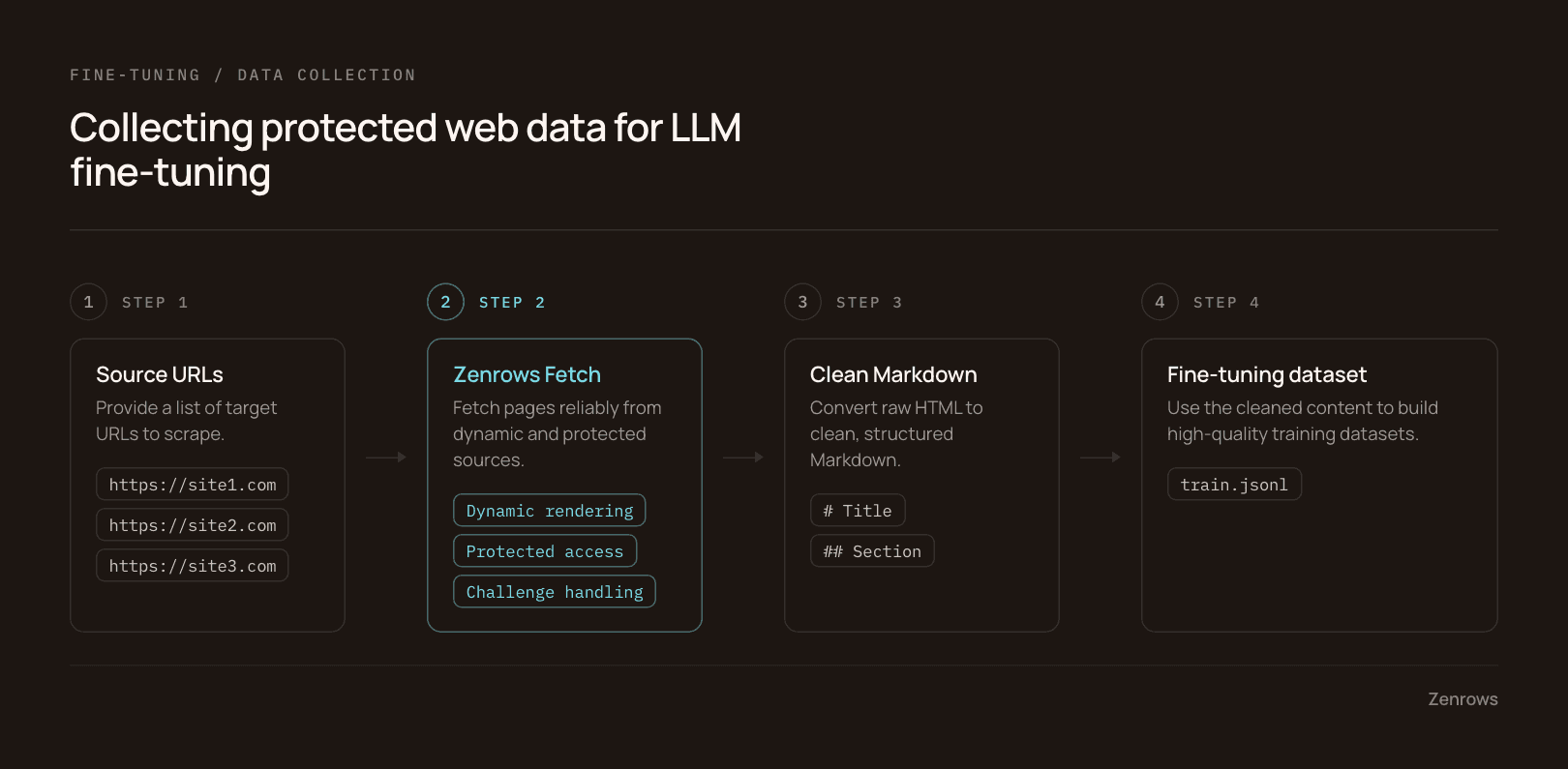
The script below points Fetch at a target and asks for Markdown:
import os

import requests
from dotenv import load_dotenv

# load your api key from the .env file
load_dotenv()

apikey = os.getenv("ZENROWS_API_KEY")
url = "https://www.scrapingcourse.com/ecommerce/"

params = {
    "url": url,
    "apikey": apikey,
    "mode": "auto",
    # clean Markdown instead of raw HTML
    "response_type": "markdown",
}

response = requests.get("https://api.zenrows.com/v1/", params=params)
print(response.text)
The output is a much smaller payload than raw HTML, with most navigation, footer, and boilerplate stripped:
# output truncated
$ python3 basic.py
[Skip to navigation](http://www.scrapingcourse.com#site-navigation) [Skip to content](http://www.scrapingcourse.com#content)

[Ecommerce Test Site to Learn Web Scraping](https://www.scrapingcourse.com/ecommerce/)
(c) Ecommerce Test Site to Learn Web Scraping 2026
[Built with WooCommerce](https://woo.com "WooCommerce - The Best eCommerce Platform for WordPress").

- [My Account](https://www.scrapingcourse.com/ecommerce/my-account/)
- [Search](http://www.scrapingcourse.com)
- [Cart 0](https://www.scrapingcourse.com/ecommerce/cart/)
mode=auto is Adaptive Stealth Mode: Zenrows alternates JavaScript rendering and proxy escalation per request and picks the configuration the target actually needs.
Handling PDFs and other non-HTML sources
Some of the best sources are not web pages. For those, use response_type=pdf rather than markdown, which returns raw PDF bytes because there is no HTML to convert. js_render=true is required for PDF responses, so include it explicitly.
The example below uses the World Health Organization's 2024 guidance for best practices for clinical trials:
import os

import requests
from dotenv import load_dotenv

load_dotenv()

apikey = os.getenv("ZENROWS_API_KEY")
url = "https://iris.who.int/server/api/core/bitstreams/dbe6d97c-b659-4e7b-8070-b4a3c667d6e5/content"

params = {
    "url": url,
    "apikey": apikey,
    # required for response_type=pdf
    "js_render": "true",
    # fetches the raw PDF file, not extracted text
    "response_type": "pdf",
}

response = requests.get("https://api.zenrows.com/v1/", params=params)

with open("who-clinical-trials-guidance.pdf", "wb") as f:
    # raw bytes, not text
    f.write(response.content)

print("Saved to who-clinical-trials-guidance.pdf")
Zenrows retrieves the file but does not extract the text inside it. You need a PDF text extractor such as pypdf or pdfplumber before the content becomes a training example:
python3 -m pip install pypdf
import io
import os
import time

import requests
from dotenv import load_dotenv
from pypdf import PdfReader

load_dotenv()

apikey = os.getenv("ZENROWS_API_KEY")
url = "https://iris.who.int/server/api/core/bitstreams/dbe6d97c-b659-4e7b-8070-b4a3c667d6e5/content"

params = {
    "url": url,
    "apikey": apikey,
    "js_render": "true",
    "response_type": "pdf",
}

response = None
for attempt in range(3):
    try:
        response = requests.get(
            "https://api.zenrows.com/v1/", params=params, timeout=90
        )
        break
    except requests.exceptions.ConnectionError as e:
        print(f"Attempt {attempt + 1} failed: {e}")
        time.sleep(2)

if response is None:
    print("All attempts failed, the connection kept dropping before any response.")
else:
    print("Status:", response.status_code)
    print("Bytes received:", len(response.content))

    if response.status_code != 200:
        print("Response body:", response.text)
    else:
        with open("public-health-references.pdf", "wb") as f:
            f.write(response.content)
        print("Saved to public-health-references.pdf")

        reader = PdfReader(io.BytesIO(response.content))
        print("Pages:", len(reader.pages))
$ python3 pdf_2.py
Status: 200
Bytes received: 6123951
Saved to public-health-references.pdf
Pages: 76
In a real pipeline, a regulatory filing can run to tens of thousands of tokens, so the PDF has to be split into chunks that fit your model's context window. Split on structure, not on a fixed character count, so each chunk keeps its context. The document's own boundaries, headings and sections, are the natural place to cut:
# extract text from the PDF you just saved
reader = PdfReader(io.BytesIO(response.content))
print("Pages:", len(reader.pages))


def chunk_by_page(reader, max_chars=6000):
    chunks = []
    for page in reader.pages:
        text = page.extract_text()
        if not text or not text.strip():
            # skip blank or image-only pages
            continue
        if len(text) <= max_chars:
            chunks.append(text)
        else:
            for i in range(0, len(text), max_chars):
                chunks.append(text[i:i + max_chars])
    return chunks


chunks = chunk_by_page(reader)
print(f"Produced {len(chunks)} chunks from {len(reader.pages)} pages")
print(chunks[0][:300])
$ python3 pdf_chunking.py
Pages: 76
Produced 73 chunks from 76 pages
Guidance for
best practices
for clinical trials
Tracking metadata and provenance
For an authoritative seed you need to know where each row came from. A metadata field holding the source URL, the retrieval date, and the license keeps the data auditable:
import io
import os
from datetime import date

import requests
from dotenv import load_dotenv
from pypdf import PdfReader

load_dotenv()
apikey = os.getenv("ZENROWS_API_KEY")

pdf_url = "https://iris.who.int/server/api/core/bitstreams/dbe6d97c-b659-4e7b-8070-b4a3c667d6e5/content"
landing_page_url = "https://www.who.int/publications/i/item/9789240097711"

# step 1: get the license from the landing page
license_params = {
    "url": landing_page_url,
    "apikey": apikey,
    "js_render": "true",
    "css_extractor": '{"license_url": "a[href*=\\"creativecommons.org\\"] @href"}',
}
license_resp = requests.get("https://api.zenrows.com/v1/", params=license_params)
print("License lookup status:", license_resp.status_code)

try:
    license_data = license_resp.json()
except ValueError:
    license_data = {}

license_url = license_data.get("license_url", "unknown")

# step 2: fetch the actual PDF
pdf_params = {
    "url": pdf_url,
    "apikey": apikey,
    "js_render": "true",
    "response_type": "pdf",
}
pdf_resp = requests.get("https://api.zenrows.com/v1/", params=pdf_params)

with open("who-clinical-trials-guidance.pdf", "wb") as f:
    f.write(pdf_resp.content)

reader = PdfReader(io.BytesIO(pdf_resp.content))

# step 3: assemble the metadata
source = {
    "url": pdf_url,
    "retrieved": date.today().isoformat(),
    "license": license_url,
}
print("Source metadata:", source)
$ python3 pdf_metadata.py
License lookup status: 200
License data: {'license_url': 'https://creativecommons.org/licenses/by-nc-sa/3.0/igo/deed.en'}
PDF fetch status: 200
Bytes received: 6123951
Pages: 76
Source metadata: {'url': 'https://iris.who.int/server/api/core/bitstreams/dbe6d97c-b659-4e7b-8070-b4a3c667d6e5/content', 'retrieved': '2026-08-07', 'license': 'https://creativecommons.org/licenses/by-nc-sa/3.0/igo/deed.en'}
Batch collection that respects your rate limits
Match your concurrent requests to your plan and space out the rest, and the pipeline stays predictable. For a seed-sized run, a short fixed pause between requests is enough.
This example needs only requests from the prerequisites; time and concurrent.futures are standard library:
import os
import time

import requests
from dotenv import load_dotenv
from concurrent.futures import ThreadPoolExecutor

load_dotenv()

apikey = os.getenv("ZENROWS_API_KEY")

# check your Zenrows dashboard for your plan's actual limit
MAX_CONCURRENT = 50


def fetch(url):
    params = {
        "url": url,
        "apikey": apikey,
        "response_type": "markdown",
        "mode": "auto",
        "wait": 3000,
    }

    response = requests.get("https://api.zenrows.com/v1/", params=params)

    # small pause between requests in the same worker
    time.sleep(0.5)

    if response.status_code != 200:
        return {"url": url, "status": response.status_code, "content": None}

    return {"url": url, "status": response.status_code, "content": response.text}


urls = [
    "https://playboard.co",
    "https://www.samsung.com",
    "https://www.selogerneuf.com",
    "https://www.societe.com",
    "https://www.kickstarter.com",
    "https://www.comparis.ch",
]

with ThreadPoolExecutor(max_workers=MAX_CONCURRENT) as executor:
    results = list(executor.map(fetch, urls))

for result in results:
    print(f"URL: {result['url']}")
    print(f"Status: {result['status']}")

    content = result["content"]

    if content is None:
        print("Request failed, no content returned.")
    elif len(content.strip()) == 0:
        print("Got a 200 but the body is empty. Check wait, wait_for, or a consent wall.")
    else:
        print(f"Extracted {len(content):,} characters")
        print(content[:500])

    print("-" * 80)
# truncated output
URL: https://www.comparis.ch
Status: 200
Extracted 32,181 characters
[Comparis logo](http://www.comparis.ch/ "Comparis logo")

1. [Versicherungen](http://www.comparis.ch/versicherung)
2. [Finanzen](http://www.comparis.ch/finanzen)
3. [Immobilien](http://www.comparis.ch/immobilien/default)
4. [Mobilität](http://www.comparis.ch/mobilitaet)
--------------------------------------------------------------------------------
Formatting scraped content as fine-tuning pairs
For extraction tasks, the Markdown has to be shaped to the fine-tuning method's expectations. There are three.
1. Instruction-output pairs
This is the standard for supervised fine-tuning. Each example is an instruction or input plus the expected output. The model learns from many examples of page content paired with the correct structured result, which is what teaches it to extract information from web pages.
The training input is the page content, the Markdown you pulled with Zenrows. The training output is a JSON object with the schema fields filled in. That pairing is seed_examples:
import json


def to_training_example(instruction, markdown_content, extracted_json):
    return {
        "messages": [
            {"role": "system", "content": instruction},
            {"role": "user", "content": markdown_content},
            {"role": "assistant", "content": json.dumps(extracted_json)},
        ]
    }


instruction = "Extract the product name, price, and availability as JSON."

with open("training_data.jsonl", "w") as f:
    for markdown_content, extracted_json in seed_examples:
        example = to_training_example(instruction, markdown_content, extracted_json)
        # one JSON object per line = JSONL
        f.write(json.dumps(example) + "\n")
Not every scraped page belongs in the dataset. Drop examples whose output fails schema validation, whose extraction is empty, and anything duplicate or near-duplicate, because they teach the model to infer from noise. For a single extraction task, a few hundred high-quality examples is usually enough. More complex schemas need more examples to cover the extra fields; simpler ones need fewer. Past that point, improving quality beats collecting more.
Here is the validation:
import hashlib
import json
import os
import time

import requests
from dotenv import load_dotenv
from jsonschema import validate, ValidationError

load_dotenv()
apikey = os.getenv("ZENROWS_API_KEY")

schema = {
    "type": "object",
    "properties": {
        "name": {"type": "string", "minLength": 1},
        "price": {"type": "string", "minLength": 1},
    },
    "required": ["name", "price"],
}


def build_seed_example(url, css_schema):
    markdown_params = {
        "url": url,
        "apikey": apikey,
        "response_type": "markdown",
        "mode": "auto",
    }
    markdown_content = requests.get(
        "https://api.zenrows.com/v1/", params=markdown_params
    ).text
    time.sleep(0.5)

    extractor_params = {
        "url": url,
        "apikey": apikey,
        "mode": "auto",
        "css_extractor": css_schema,
    }
    extractor_resp = requests.get("https://api.zenrows.com/v1/", params=extractor_params)
    time.sleep(0.5)

    try:
        extracted_json = extractor_resp.json()
    except ValueError:
        extracted_json = {}

    return url, markdown_content, extracted_json


seen = set()


def keep(markdown, extracted):
    # empty extraction
    if len(markdown.strip()) < 200:
        return False
    try:
        # schema mismatch
        validate(instance=extracted, schema=schema)
    except ValidationError:
        return False
    h = hashlib.sha256(" ".join(markdown.lower().split()).encode()).hexdigest()
    # duplicate or near-duplicate
    if h in seen:
        return False
    seen.add(h)
    return True


css_schema = '{"name": "meta[property=\\"og:title\\"] @content", "price": ".summary-price:not(.line-through)"}'
urls = ["https://priceoye.pk/smart-watches/samsung/samsung-watch-8-classic-46mm"]

seed_examples = [build_seed_example(url, css_schema) for url in urls]
clean_examples = [(url, md, js) for url, md, js in seed_examples if keep(md, js)]

print(f"Collected {len(seed_examples)} pages, {len(clean_examples)} passed validation")
$ python3 validate.py
Collected 1 pages, 1 passed validation

URL: https://priceoye.pk/smart-watches/samsung/samsung-watch-8-classic-46mm
Markdown length: 2741
Extracted JSON: {'name': 'Samsung Watch 8 Classic 46mm', 'price': 'Rs 76,999'}
Wrote 1 examples to training_data.jsonl
keep() runs three checks: length, schema, and duplicate hash. Length filters out pages that render to almost nothing. The schema catches wrong types and empty values. The hash catches exact and formatting-only repeats. A page has to clear all three before it reaches clean_examples.
2. Preference pairs
Used in Direct Preference Optimization and Reinforcement Learning from Human Feedback. Two possible outputs for the same input, one marked preferred. This is the method for when you already have decent outputs and want to nudge the model toward better ones.
def to_preference_pair(prompt, chosen, rejected):
    return {
        "prompt": prompt,
        # the preferred answer
        "chosen": chosen,
        # the not-preferred answer to the same prompt
        "rejected": rejected,
    }
3. Domain text continuation
Raw domain text with no input-output split. It familiarizes the model with a domain's vocabulary, style, and concepts, but it is weak for extraction tasks because the model is never shown what should be extracted.
# add this to the end of your instruction-output pairs script
def to_continuation_example(markdown_content):
    return {"text": markdown_content}


# reuses seed_examples from earlier, no new collection needed
url, markdown_content, extracted_json = seed_examples[0]

continuation_example = to_continuation_example(markdown_content)
print(continuation_example)
The three shapes differ in structure. Instruction-output has three parts (instruction, input, output). A preference pair has three too (prompt, chosen, rejected). Continuation has one: you give it text and let it learn by predicting what comes next.
That last one is why cleanup matters. The raw Markdown still carries markup noise and boilerplate. For extraction that is harmless, since the CSS selectors pull out name and price and ignore the rest. For continuation the model learns from every word, so strip the noise first.
Measuring whether the seed worked
The only way to know whether your fine-tune learned the domain is to hold out real data before you train and check against it after. Set aside 10 to 20 percent of the seed as a holdout before any synthetic expansion, and never let those examples into training. This is standard practice, and Microsoft documents the same split.
import random

# reproducible split
random.seed(42)
random.shuffle(seed_examples)

split = int(len(seed_examples) * 0.85)
train_examples = seed_examples[:split]

# never used in training or expansion
holdout_examples = seed_examples[split:]
Once you have a fine-tuned model, run it against the holdout and measure how many outputs match the expected result. That gives you one accuracy number on real, unseen data. Run the same check after each retrain and record it over time. A good seed keeps the score stable or improving. A declining score is an early sign of drift.
Scaling collection for ongoing fine-tuning
Pace requests per domain, not just against your overall concurrency setting. Queue by domain and spread them out. Zenrows Batch manages concurrency and retries across large URL lists for you.
Then set up an automated refresh. Schedule recurring collection based on how often your domain changes, and compare newly collected Markdown against the existing version before reprocessing. Hashing the Markdown for each URL is a simple way to spot unchanged pages, so you skip relabeling and retraining on content that has not moved.
And keep mode=auto on, so Zenrows escalates to JavaScript rendering or premium proxies only when the page needs it, and you are billed for what succeeds rather than for a guess.
Conclusion
A real-data seed keeps the model anchored to domain truth, and Zenrows collects that seed from protected sources before you expand it into a full fine-tuning dataset. Once you can pull clean Markdown from authoritative sources, you can anchor the seed, reduce drift, and expand from a dataset that still reflects the domain. Zenrows runs at a 99.93% success rate across supported targets, which is what stops a collection run quietly narrowing your seed to the easy sources.
FAQ and debugging
My Zenrows response returns partial content on some pages
Add wait_for with a CSS selector that only appears once the main content has loaded. That tells Zenrows to wait for the element rather than returning the initial HTML shell. The wait_for documentation covers it in detail.
My dataset has noise from navigation menus, footers, and ads
The Markdown output strips most of this already. Add a post-processing filter, such as dropping blocks under 100 words, to catch the rest.
How many pages do I need for a fine-tuning seed?
A few hundred high-quality examples is usually enough for a single extraction task. Domain relevance and accuracy matter more than volume.
How do I know my fine-tune actually improved?
Hold out 10 to 20 percent of the real seed before any synthetic expansion and keep those examples out of training. Measure task accuracy against that holdout after fine-tuning.
My source documents are longer than my model's context window
Split them into chunks before formatting, on structure rather than a fixed character count, so each chunk stays coherent.
Can I use Zenrows to collect data for commercial fine-tuning projects?
Zenrows works on publicly available web content. Check each source's robots.txt and terms of service before collecting at scale, since requirements vary by site and reachable does not mean free to reuse.