
How to Give Your AI Agent Real Web Access with Zenrows MCP
Connect your AI agents to the live web with Zenrows MCP. Bypass anti-bots, render JavaScript, and deliver LLM-ready data to any MCP-compatible tool.



Copy-pasting data into your AI assistant is an outdated workflow. Asking your AI tool to fetch it directly isn't any better. The sources worth pulling data from, such as Amazon deals, competitor pages, and live pricing, are locked behind anti-bot protection that generic web searches can't touch.
For example, ask Claude to find you the best current deal on a product from Amazon with this exact prompt:
Scrape https://www.amazon.com/s?k=headphones and summarize the best deal for me
You'll most likely get the following result:
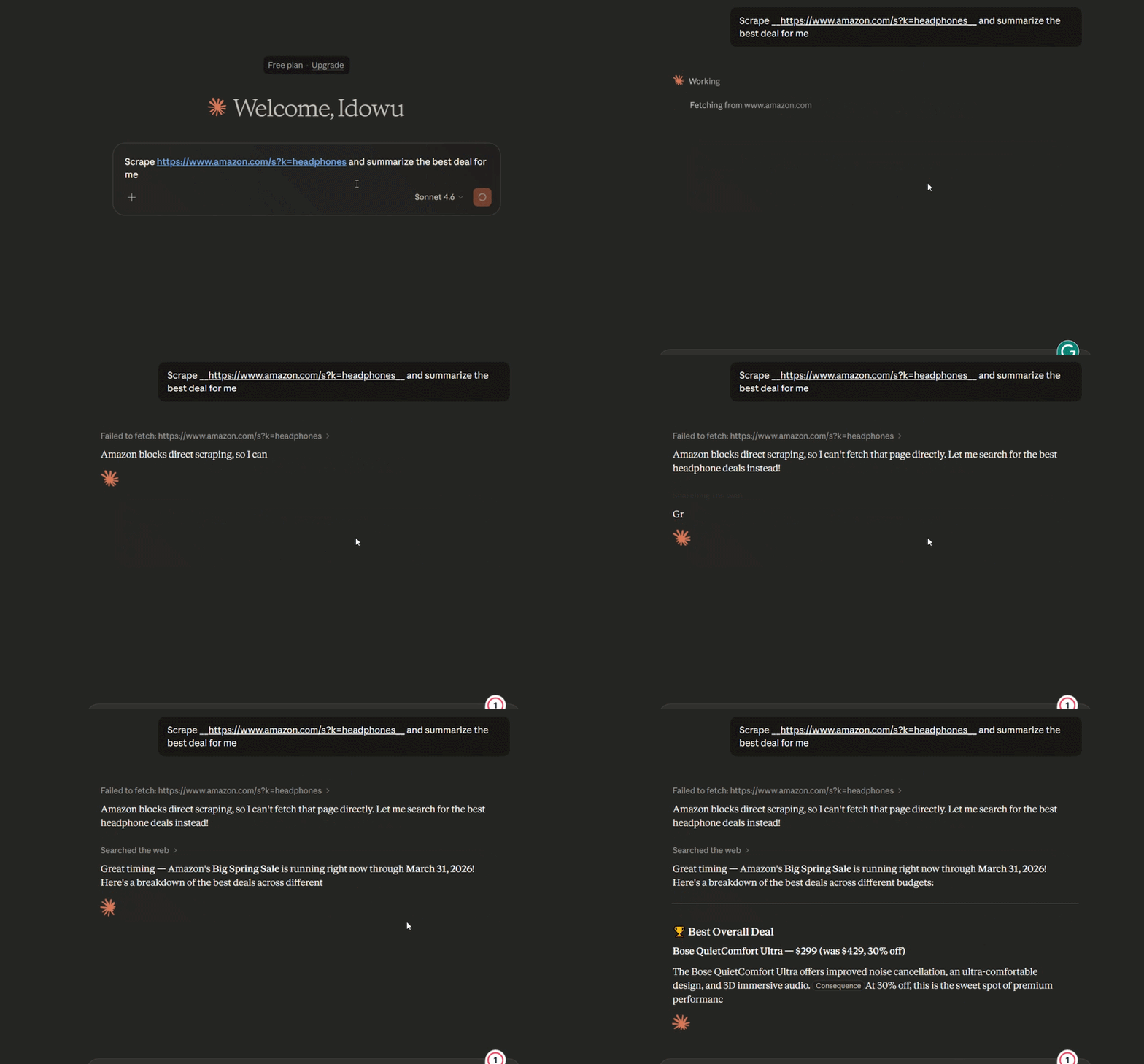
The result is almost always the same: it either refuses your request, hallucinates, pulls from its training data, or gives you a confident answer that's months out of date. The site's bot protection blocks it before it gets anywhere near live data.
The Zenrows MCP closes that gap. Connect it once, and your AI tool can scrape any website, including heavily protected pages, without leaving the conversation or your IDE.
Here's what happens when you integrate the Zenrows MCP:
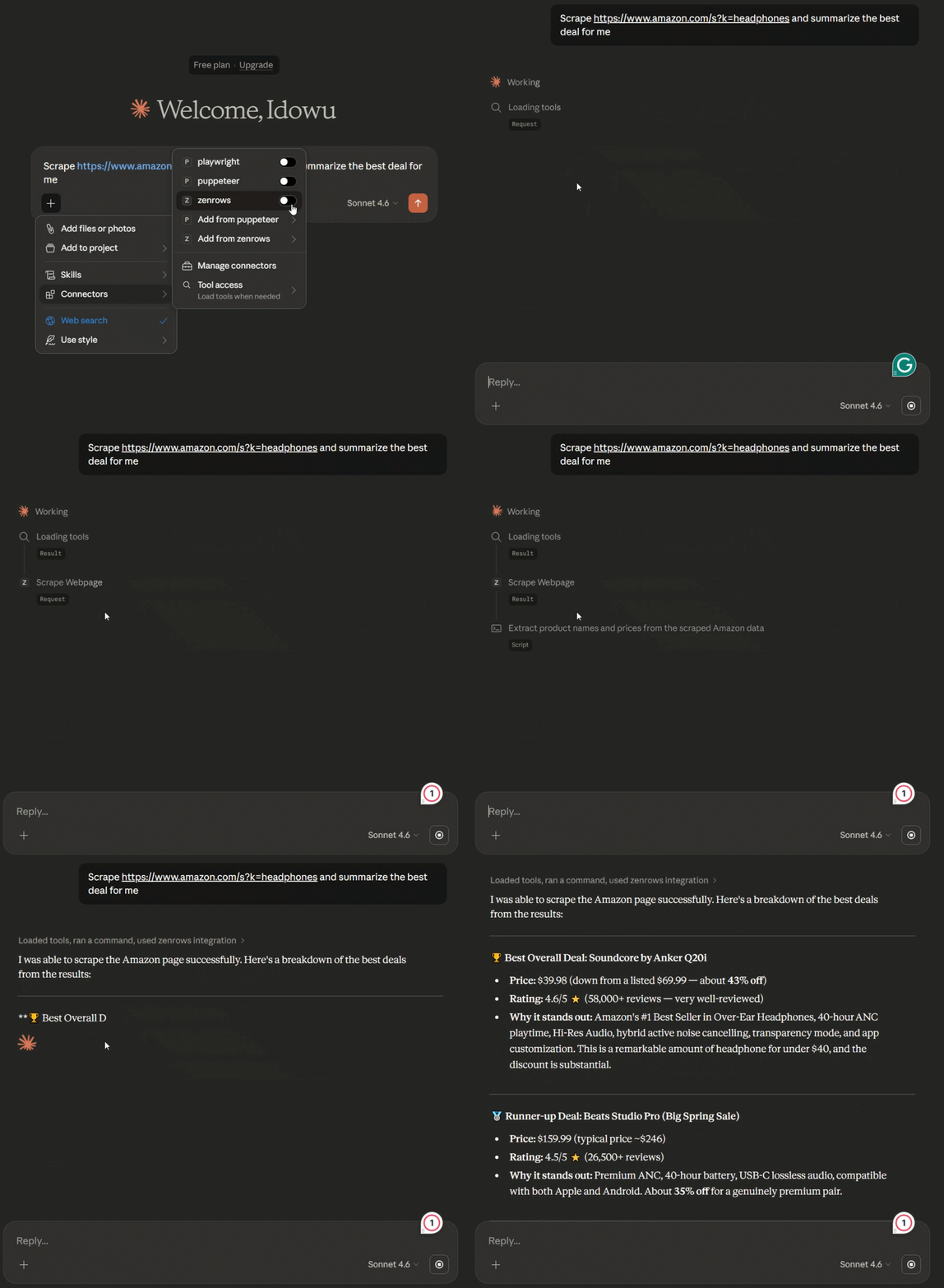
In the next sections, you'll learn to connect Zenrows MCP and give your AI tool the same access.
Skip the blocks. Try Zenrows free and get clean web data without the anti-bot fight.
The Web Access Problem Every AI Tool Has
To understand the value of the Zenrows MCP, you first need to have a true picture of the structural blind spot built into every modern LLM.
Ask Claude for a competitor's current pricing on Amazon or a specific technical specification from a protected documentation site. You’ll most likely hit a wall immediately. And that isn't because the AI lacks intelligence; it's just that it doesn't yet have the capabilities to access the data source.
Four specific failure modes prevent your AI tools from being truly useful assistants:
1. The Stale Data Trap
LLM tools are trained on historical data, not current data. For instance, if you ask about a Best Buy deal happening today, the AI is forced to rely on stale information that is months or even years old. Without a live connection, your AI tool relies on historical data rather than real-time trends.
2. The Cached Search Limitation
You've probably caught your AI assistant searching the web with a basic web search plugin. The result of the search is actually usually a cached, indexed snippet from search engines rather than the live page content. If a price changed ten minutes ago, a generic search tool won't see it. It only returns what the search crawler saw days ago.
3. JavaScript-Rendered Ghost Pages
Most modern websites render content dynamically with JavaScript and only present data on demand. This means they're essentially empty markups until a browser executes their JavaScript. Standard AI web-search tools often only see the initial HTML, which contains no data. When visiting a dynamic site, your AI only sees a blank document.
4. Anti-Bot Wall
Hitting the anti-bot firewall is where most AI web access tools fail. High-value data is almost always protected by sophisticated Web Application Firewalls (WAFs) like Cloudflare, Akamai, or DataDome.
When a generic AI tool tries to read a protected site, it's immediately flagged as automated traffic. The AI is served a 403 Forbidden page or a CAPTCHA, and the conversation ends with an apology.
If your AI assistant can't get past an anti-bot block screen, it can't help you with competitive intelligence, market research, or real-time monitoring.
That's what the Zenrows MCP is built to solve. Behind the scenes, it uses Fetch as its engine to get your AI assistant through every one of these blocks.
What is MCP and How Does it Work?
MCP (Model Context Protocol) is the standardized way for LLMs to connect to external tools and data sources, including scrapers, databases, CRMs, and more.
Think of it like equipping a new employee with the right tools for the job. Each tool comes with a manual that tells them what it does and how to use it. Once they've read it, they can pick up the right tool and apply it without being told to. MCP works the same way. It gives your AI assistant a description of what each connected tool can do, and the AI takes it from there, autonomously calling the right tool at the right time.
The Zenrows MCP is what puts Zenrows in your AI assistant's hands. Once connected, your AI assistant knows what Zenrows can do and calls it autonomously whenever a task requires live web data.
The Core Components of the MCP Connection
To use Zenrows MCP, you only need to understand four simple roles in the exchange:
| Component | What it is | Example |
|---|---|---|
| Host | The AI tool where the conversation happens. | Claude Desktop, Cursor, n8n |
| MCP Client | The "receiver" built into the host. | The internal MCP connector |
| MCP Server | The service providing the data. | Zenrows MCP |
| Tool | The specific action the AI performs. | Scrape Webpage |
See how the request flows in the next section.
How the Zenrows MCP Request Flows
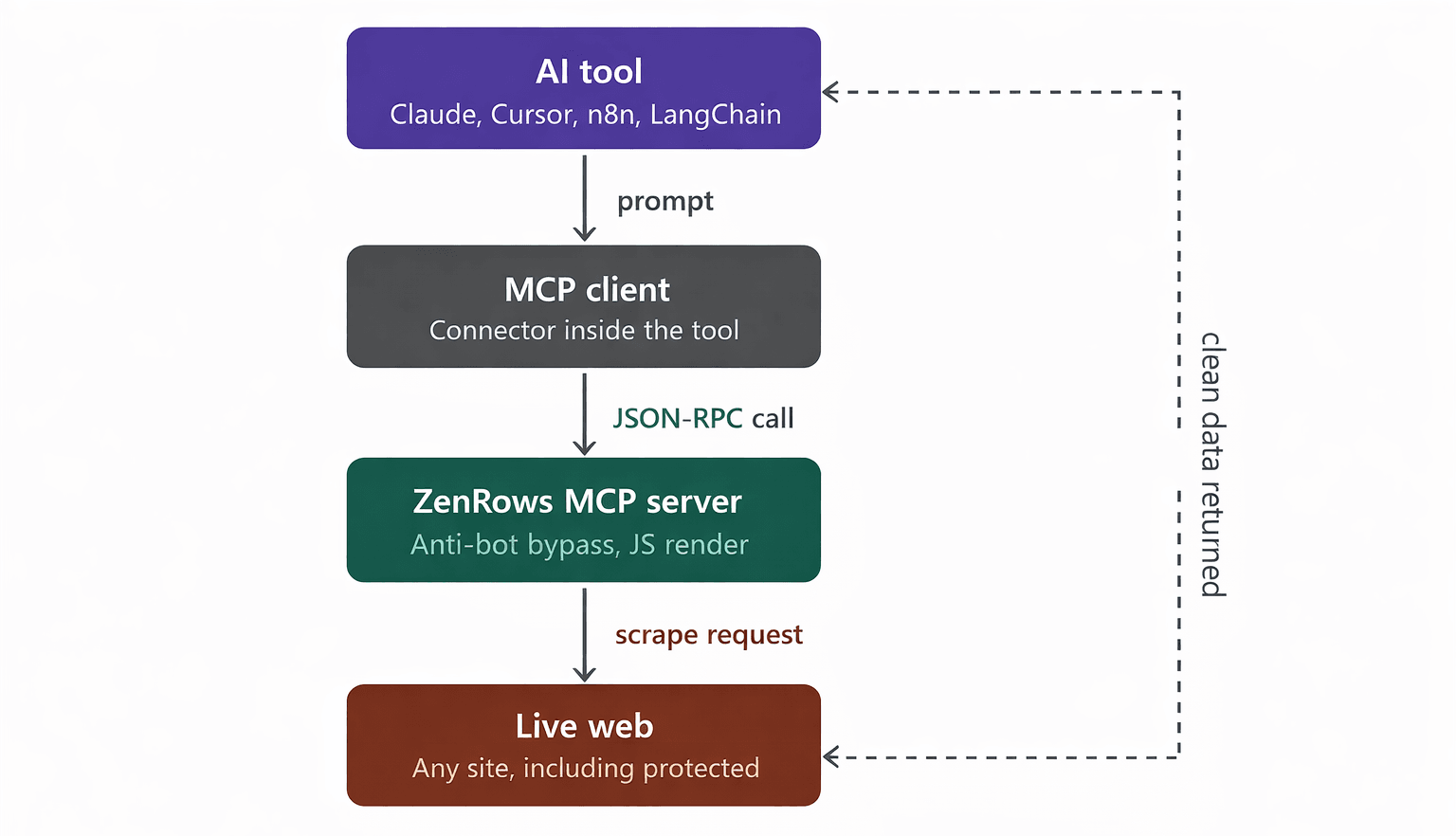
The Zenrows MCP enables your AI agent to get live web data. But the complexity happens behind the scenes. From your side, it's three steps:
- The Prompt: You give your AI tool a prompt that requires live data (e.g., "Scrape this competitor's pricing page").
- The Call: The AI identifies that it needs an external tool and calls the Zenrows MCP Server with the target URL.
- The Delivery: Zenrows executes the request, bypasses all bot protection (Cloudflare, Akamai, etc), renders the JavaScript, and returns clean, structured data directly to your AI assistant. Your AI assistant then acts on instructions to use the data.
What Zenrows MCP Gives Your AI Tool
The Zenrows MCP is a full-scale scraping infrastructure living inside your AI tool. When you call the MCP, you're deploying a suite of advanced scraping technologies optimized for AI context.
With one MCP connection, an API key, and zero infrastructure to manage, here's what your AI assistant can now do:
Automatic Anti-Bot Bypass
Every request routes through Zenrows Fetch. Sophisticated systems, such as Cloudflare, Akamai, DataDome, and PerimeterX, are handled automatically, with no manual configuration required on your end.
For example, Claude can scrape a Cloudflare-protected competitor pricing page directly from the chat without a VPN, extra proxy setup, or manual CAPTCHA solving.
Full JavaScript Rendering
A headless browser is included in every request by default. This ensures that JavaScript-heavy pages and Single-Page Applications (SPAs) are fully rendered before the data is passed to the AI.
With Zenrows MCP, a React-based dashboard that returns empty HTML to a basic scraper returns fully populated data to your AI, as you see in a real browser.
Cost-Efficiency: Adaptive Stealth Mode
The Zenrows MCP applies the Adaptive Stealth Mode to automatically select the cheapest, lightest and most effective bypass configuration for each specific request. It handles complex logic such as retries, waits, proxy assignment, and more under the hood with zero effort on your part.
This means you don't pay for premium proxy costs or heavy browser rendering on a simple static page. Still, the system automatically scales up to advanced configurations when you hit a high-security target.
LLM-Ready Markdown Output
Instead of overwhelming your AI with 100,000 lines of raw, messy HTML, Zenrows MCP returns clean, structured Markdown, optimized for AI consumption. Your model receives a clear hierarchy of headings and tables, preserving the data's signal while using fewer tokens than raw HTML.
Zero Infrastructure Maintenance
Proxy rotation, browser fingerprints, session handling, and other fingerprint drift are all managed under the hood by Zenrows. When a website updates its anti-bot security, your AI agent doesn't break. Zenrows updates its evasion strategy in the background, so your connection remains seamless.
Connect Zenrows MCP to Your AI Tool
The Zenrows MCP is designed to be plug-and-play with the industry's leading AI environments. Because it follows the open Model Context Protocol standard, it works with any MCP-compatible host.
Sign up to get your free API key. Then, pick your tool below for the setup guide:
| Tool | Best For |
|---|---|
| Claude Desktop | Research, competitive intel, and non-developer workflows. |
| Cursor | In-IDE coding with live web data and real-time documentation. |
| Claude Code | Agentic CLI workflows and automated terminal tasks. |
| Windsurf | Advanced IDE-based development and agentic coding. |
| VS Code | An advanced IDE for writing application code and managing code base architecture. |
| Zed | High-performance code editing with low-latency AI assistance. |
| JetBrains IDEs | Enterprise Java, Python, and web development across IntelliJ, PyCharm, and WebStorm. |
Using a different MCP-compatible tool? Most connect using the same configuration snippet below:
{
    "mcpServers": {
        "zenrows": {
            "command": "npx",
            "args": ["-y", "@zenrows/mcp"],
            "env": {
                "ZENROWS_API_KEY": "<YOUR_ZENROWS_API_KEY>"
            }
        }
    }
}
See the Zenrows MCP Documentation for detailed setup instructions.
What You Can Build Once It's Connected
The Zenrows MCP transforms your workflow with on-demand, reliable access to live web data. By removing anti-bot walls and dynamic-content limitations, your AI assistant becomes a real-time, autonomous research-and-execution agent.
Here are some high-value use cases you can implement with this connection:
Real-Time Competitive Research
Standard AI tools struggle to stay current, often quoting outdated prices or features. With Zenrows MCP, your assistant can read a competitor’s live web page, extract pricing tables, feature announcements, or change logs, and provide an instant analysis based on the live data.
Zenrows automatically bypasses WAFs and renders JavaScript behind the scenes, allowing the AI to see the live version of the page.
Example prompt
Scrape <competitor URL> and summarize their current pricing tiers. Highlight what has changed since last month and how they're currently positioning their Pro plan against ours.
Live RAG Pipeline Feeding
For developers building Retrieval-Augmented Generation (RAG) systems, keeping a vector store fresh is a constant battle against content decay. The Zenrows MCP now enables your AI agent to fetch the latest industry news, documentation, or blog posts, even those behind sophisticated protection.
Zenrows' markdown output ensures the model receives clean, structured text ready for immediate chunking and embedding.
Example prompt:
Scrape the latest 5 articles from https://react.dev/learn and return them in clean Markdown format, optimized for chunking into my knowledge base.
Autonomous AI Agent Web Access
If you're using frameworks like LangChain or CrewAI, your agents often need to browse the web to complete a multi-step task. Zenrows MCP provides the reliable capabilities these agents need to navigate the public web without getting trapped by CAPTCHAs.
Example prompt:
Scrape https://www.indeed.com/jobs?q=software-engineer&l=USA for any new job postings or Career updates added in the last 7 days. Format the results as a structured JSON list.
On-Demand Market Data and Monitoring
E-commerce platforms are notorious for aggressive anti-scraping measures. Zenrows MCP allows you to pull live pricing, best deals, stock levels, or product reviews from retail giants without managing a complex proxy infrastructure.
Additionally, JavaScript rendering ensures that dynamic pricing and stock status, which are often hidden in the initial HTML, are fully captured.
Sample prompt:
Scrape https://www.amazon.com/s?k=headphones and summarize the best deal for me, including the vendor with the lowest price and the best features.
Zenrows MCP vs. Building Your Own Scraping MCP
You might want to build a custom MCP server using a local Playwright or Puppeteer instance. However, while a DIY approach is great for learning, it won't serve your demand for reliability.
Before starting your own custom scraping MCP server project, the table below gives you a breakdown of what you need to know:
| Feature | Zenrows MCP | DIY MCP Server |
|---|---|---|
| Setup Time | ~5 Minutes | Hours to Days |
| Anti-Bot Bypass | Built-in (Cloudflare, Akamai, etc.) | Must build and maintain manually |
| JavaScript Rendering | Included by default | Requires local headless browser setup |
| Proxy Management | Handled automatically, including auto-rotation and geo-targeting (Residential/Premium) | You source proxies and rotate them yourself |
| Maintenance | None (Auto-updates) | Ongoing as websites evolve daily |
| Cost Model | Pay per successful request | Infrastructure and engineering time |
That said, if your goal is to build a custom MCP server for a proprietary internal data source, a DIY approach is ideal. However, if your goal is to give your AI tool reliable, unrestricted access to the public web data, Zenrows MCP is the fastest and most cost-effective path.
Conclusion
Your AI assistant is only as good as the data it can access. Stop settling for stale information and "Access Denied" apologies. With Zenrows MCP, your AI tool can access any website, including those that block all other automated access.
Start with 1,000 free URLs; no credit card required.
Need custom requirements or any further questions? Feel free to speak with our Sales Team.
FAQ
What is the Zenrows MCP?
The Zenrows MCP is a Model Context Protocol server that connects MCP-compatible AI tools, such as Claude, Cursor, Claude code, and LangChain, directly to Zenrows' web-scraping infrastructure. Once connected, your AI tool can fetch live, real-time data from any website, including those behind aggressive anti-bot walls, without leaving the conversation or IDE.
Do I need a paid plan to use Zenrows MCP?
No. Every new Zenrows account includes a free trial with 1,000 basic URLs and 40 protected URLs, and no credit card is required. That's enough to connect the MCP and test it against your real targets before committing to a paid plan.
Which AI tools currently support Zenrows MCP?
The Zenrows MCP follows the open MCP standard, so any MCP-compatible tool can connect, including Claude Desktop, Cursor, Claude Code, Windsurf, LangChain, CrewAI, n8n, and others.
Can Zenrows MCP really handle anti-bot-protected sites?
Yes. Every request made through the MCP automatically routes through Zenrows Fetch infrastructure. It bypasses Cloudflare, Akamai, DataDome, PerimeterX, and similar services without requiring you to write a single line of bypass logic or manually configure infrastructure.
How is Zenrows MCP different from calling the Zenrows API directly?
Both use the same underlying engine. The difference is the workflow. A direct API call requires you to leave your AI tool, write integration code, and manually send the data back. The MCP keeps everything inside the conversation or IDE, allowing the AI to decide when to use the Zenrows scrape tool to browse the web and extract data to answer your prompt.
What format does Zenrows MCP return data in?
The returns clean Markdown by default or structured JSON on demand. This is a major advantage over raw HTML, as it allows the LLM to understand the page structure (headings, tables, lists) immediately while consuming fewer tokens.