
Integrating Zenrows into smolagents for production web access
smolagents' VisitWebpageTool fetches with plain requests, so protected pages return a bot check your agent cannot tell from real data. Replace it with a Zenrows @tool.



Building a web-capable agent with Hugging Face smolagents is straightforward. The trouble starts when the agent hits a page that renders in the browser, or one that returns a fragment to a plain HTTP fetch.
The built-in VisitWebpageTool is fine for experimenting on static HTML. It does not hold up in production workflows that need consistent access to JavaScript-rendered and protected targets.
This tutorial replaces VisitWebpageTool with a custom Zenrows tool that returns full Markdown from dynamic pages, registered directly in your CodeAgent's tools list. All the code is in this GitHub repository.
Why VisitWebpageTool is not production ready
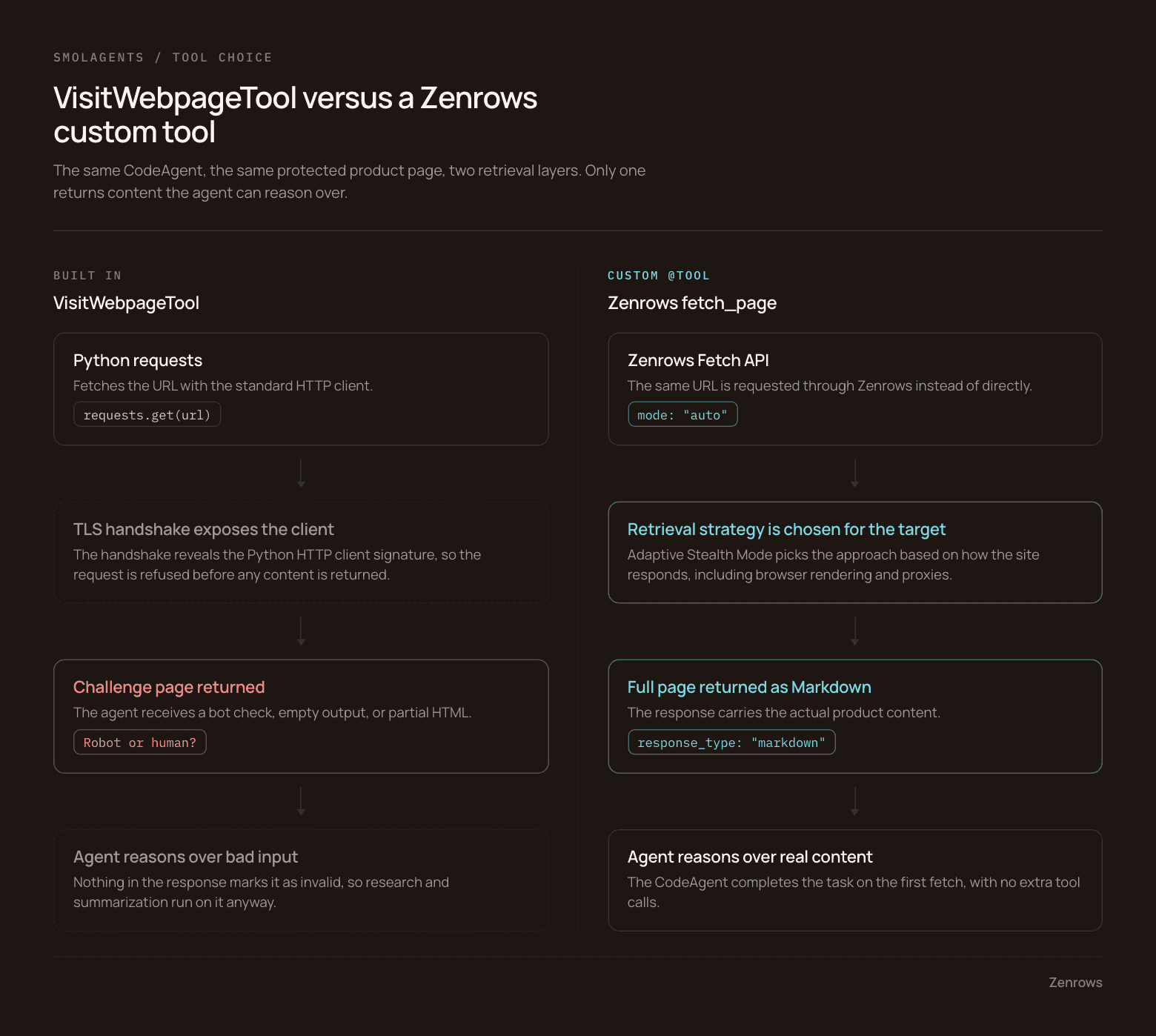
VisitWebpageTool fetches a URL with Python's requests library, converts the returned HTML to Markdown with markdownify, and truncates the result to a configurable maximum before handing it to your agent.
That pipeline works on static pages. On protected or JavaScript-heavy sites, the TLS handshake exposes the Python HTTP client signature. The request is refused, and your agent receives a challenge page, empty output, or partial HTML instead of content.
Here is what VisitWebpageTool returned when we ran it against a protected Walmart product page:
Robot or human?
===============

Activate and hold the button to confirm that you're human. Thank You

---

[Terms of Use](https://help.walmart.com/app/answers/detail/a_id/8)
[Privacy Policy](https://corporate.walmart.com/privacy-security)
[Do Not Sell My Personal Information](/account/api/ccpa-intake?native=false&type=sod)
[Request My Personal Information](/account/api/ccpa-intake?native=false&type=access)

(c) Walmart Stores, Inc.
It retrieved Walmart's bot verification page, not the AirPods product information. That is the part that matters: without a validation check of your own, the agent cannot tell that response apart from real data. It reasons over whatever it receives, so research, summarization, and classification tasks all run on bad input and still return something.
The rest of this tutorial swaps in a Zenrows fetch tool built with the smolagents @tool decorator. Zenrows renders JavaScript, retrieves content from protected pages, and returns full Markdown to your CodeAgent. Your agent keeps the same architecture, with a retrieval layer built for the job.
Build a Zenrows fetch tool with the @tool decorator
You replace VisitWebpageTool by wrapping a Zenrows call in the @tool decorator. The fetch_page tool below takes a URL and returns the full page as Markdown.
Prerequisites
- Python 3.10 or later.
- A Zenrows account for your API key.
- A Hugging Face account for the user access token the
CodeAgentneeds later. You can swap in whichever model you prefer.
Step 1: Install the packages
pip install smolagents requests python-dotenv
Step 2: Add your Zenrows API key
Create a .env file in your project root with the key from your Zenrows dashboard:
ZENROWS_API_KEY=your_zenrows_api_key_here
Step 3: Create the Zenrows fetch tool
Create zenrows_tool.py. It defines one decorated function that sends a URL to Zenrows Fetch with mode=auto and returns the page as Markdown. Adaptive Stealth Mode picks the retrieval strategy from how the target responds, so you do not configure browser rendering or proxies by hand. The @tool decorator is what makes the function visible to your CodeAgent.
import os

import requests
from dotenv import load_dotenv
from smolagents import tool

load_dotenv()

ZENROWS_API_KEY = os.getenv("ZENROWS_API_KEY")


@tool
def fetch_page(url: str) -> str:
    """
    Fetches webpage content and returns it as clean Markdown, including
    JavaScript-rendered and protected pages.

    Use this tool whenever you need to read a specific URL and retrieve
    webpage content for research, summarization, or analysis.

    Args:
        url: The webpage URL to fetch.
    """
    try:
        response = requests.get(
            "https://api.zenrows.com/v1/",
            params={
                "url": url,
                "apikey": ZENROWS_API_KEY,
                "mode": "auto",
                "response_type": "markdown",
            },
            timeout=30,
        )
        response.raise_for_status()
        return response.text

    except requests.RequestException as exc:
        raise RuntimeError(f"Failed to retrieve content from {url}") from exc
Notice the docstring carries more than a one-line description. smolagents builds the tool description the model sees at runtime from the function signature and the docstring, so what you write there shapes every decision the agent makes about calling it. The next section covers why.
Step 4: Test the fetch tool
Before wiring the tool to an agent, check that it returns usable content. Add this to the bottom of zenrows_tool.py and run it against the same protected Walmart page:
# ...
if __name__ == "__main__":
    result = fetch_page("https://www.walmart.com/ip/AirPods-Pro-3/17835006350")

    # print a snippet of the product details
    print(result[1500:2500])
python zenrows_tool.py
You should see a slice of the product page as Markdown:


Unlike the VisitWebpageTool output, this response carries content from the Walmart AirPods page rather than a bot check.
Write a docstring the model will actually use
A vague docstring means the model will not call fetch_page even when it is the right tool. smolagents builds the tool description from your function name, type hints, and docstring at runtime.
Say you want an agent to visit https://www.scrapingcourse.com/ecommerce/ and summarize the products on the first page. Here is the vague version:
@tool
def fetch_page(url: str) -> str:
    """
    Fetches webpage content.

    Args:
        url: The webpage URL.
    """
And the version from zenrows_tool.py:
@tool
def fetch_page(url: str) -> str:
    """
    Fetches webpage content and returns it as clean Markdown, including
    JavaScript-rendered and protected pages.

    Use this tool whenever you need to read a specific URL and retrieve
    webpage content for research, summarization, or analysis.

    Args:
        url: The webpage URL to fetch.
    """
The difference is specificity. The detailed docstring tells the model what fetch_page returns, when to use it, and which kinds of pages it handles, which is what lets the agent match the tool to a retrieval task and call it with the right argument. Given the vague one, the model either skips the tool, guesses wrong about what it returns, or writes its own fetch code.
Run a CodeAgent with the Zenrows tool
Now connect fetch_page to a CodeAgent. The agent below retrieves a TechCrunch article and returns a structured breakdown of it.
Step 1: Add the Hugging Face access token
This tutorial uses Qwen2.5-7B-Instruct through Hugging Face Inference Providers. Follow the user access tokens guide to create a fine-grained token with permission to call Inference Providers, then add it to .env:
ZENROWS_API_KEY=your_zenrows_api_key_here
HF_TOKEN=your_hugging_face_token_here
Step 2: Initialize the CodeAgent
Create agent.py and register fetch_page. During the run the agent uses Qwen to plan, and calls fetch_page whenever it needs page content.
import os

from dotenv import load_dotenv
from smolagents import CodeAgent, InferenceClientModel

from zenrows_tool import fetch_page

# load environment variables
load_dotenv()

# initialize the model
model = InferenceClientModel(
    model_id="Qwen/Qwen2.5-7B-Instruct",
    token=os.getenv("HF_TOKEN"),
)

# register the zenrows fetch tool
agent = CodeAgent(
    tools=[fetch_page],
    model=model,
)

response = agent.run(
    """
    Go to https://techcrunch.com/2026/07/23/amd-takes-on-nvidia-with-its-helios-ai-rack-scale-system/

    Read the article and identify:
    - the company involved,
    - the main announcement,
    - the news category,
    - why it matters.
    """,
    max_steps=8,
)

print(response)
max_steps=8 caps the agent's reasoning steps. A higher value can spend tokens on unnecessary steps up to the default of 20; a lower one can stop the agent before it finishes.
If you would rather not maintain a wrapper, the Zenrows MCP server is the other route. smolagents supports loading tools from an MCP server directly.
Step 3: Run the agent
python agent.py
The run finished in three steps. The agent recognized that the task needed a page and called fetch_page:
╭──────────────────────────── New run ────────────────────────────╮
│                                                                 │
│ Go to https://techcrunch.com/2026/07/23/amd-takes-on-nvidia-    │
│ with-its-helios-ai-rack-scale-system/                           │
│                                                                 │
│     Read the article and identify:                              │
│     - the company involved,                                     │
│     - the main announcement,                                    │
│     - the news category,                                        │
│     - why it matters.                                           │
│                                                                 │
╰─ InferenceClientModel - Qwen/Qwen2.5-7B-Instruct ───────────────╯
━━━━━━━━━━━━━━━━━━━━━━━━━━━━━ Step 1 ━━━━━━━━━━━━━━━━━━━━━━━━━━━━━
 ─ Executing parsed code: ────────────────────────────────────────
  url = "https://techcrunch.com/2026/07/23/amd-takes-on-nvidia-with-its-helios-ai-rack-scale-system/"
  page_content = fetch_page(url)
  print(page_content)
Zenrows returned valid content on the first fetch:
# output truncated for brevity
Chipmaker AMD is taking aim at competitor Nvidia with its latest hardware
release: a rack-scale system designed to power computing needs of the world's
largest AI labs.

At the company's sold-out Advancing AI conference in San Francisco on Thursday,
AMD Chair and CEO Dr. Lisa Su promoted the new AI rack system known as Helios,
along with its growing list of customers, including Microsoft, as the company
prepares to ship it later this year.
And the agent completed the task from it:
[Step 3: Duration 2.15 seconds | Input tokens: 18,700 | Output tokens: 376]
{'company': 'AMD',
 'main_announcement': 'AMD has launched the Helios AI rack-scale system, challenging Nvidia in the AI rack-scale system market.',
 'news_category': 'AI',
 'why_it_matters': 'AMD is challenging Nvidia in the AI rack-scale system market, which is a significant move as Nvidia has historically dominated this market.'}
No extra tool calls, and no fetch code of its own, because the docstring was clear and the content came back usable. To extend this into a multi-agent workflow, the web research multi-agent system guide walks through the AG2 version.
Handling concurrent Hugging Face Spaces deployments
Shared Hugging Face Spaces get IP-blocked under concurrent use, because all outbound requests leave through a shared pool of Hugging Face-managed IP addresses with no per-user isolation. Sites that enforce IP-based rate limits see the traffic as one source and answer with slower responses, temporary blocks, or extra verification.
fetch_page routes requests through Zenrows rather than sending them straight from your Space to the target, which takes the shared IP out of the path. You already set this up in step 3, with mode=auto:
params = {
    "url": url,
    "apikey": ZENROWS_API_KEY,
    "mode": "auto",
    "response_type": "markdown",
}
The agent keeps retrieving live content under concurrent traffic with no proxy configuration of your own.
Wrapping up
You built a Zenrows fetch_page tool, registered it with a smolagents CodeAgent, and used it to research live AI news. Instead of reasoning over challenge pages or partial HTML, the agent gets live web data as Markdown, with Zenrows adapting its retrieval strategy to each target.
You now know how to:
- Replace
VisitWebpageToolwith a retrieval tool built on Zenrows Fetch. - Write a docstring the model will actually use to pick the tool.
- Work with JavaScript-rendered and protected pages without changing your
CodeAgentworkflow.
The complete project is in our GitHub repository.
The same pattern applies in other frameworks. The OpenAI Agents SDK uses @function_tool in place of @tool, and AG2 uses a typed Tool registered on two agents. If you are building retrieval-augmented generation pipelines on live web data, our LlamaIndex and Zenrows guide indexes and queries web content the same way.
FAQ and debugging
How do I raise max_output_length on VisitWebpageTool rather than replacing it?
Pass max_output_length=999_999 to the VisitWebpageTool constructor. That raises the default 40,000-character limit, but it does not change how the tool retrieves pages, so dynamic and protected sites can still return partial content or get blocked.
Why is the CodeAgent not calling fetch_page?
Check the docstring. It needs to say what the tool returns and when to use it. Given a vague one, the agent picks another tool or writes its own fetch code.
Can I use fetch_page with ToolCallingAgent?
Yes. The same decorator and function definition register with both ToolCallingAgent and CodeAgent. Only the way each agent plans and executes differs.