
How to Fix Error 499 "Client Closed Request" When Scraping
Learn what error 499 "Client Closed Request" is, why you encounter it, and how to bypass it when scraping.



Is your scraper burning through retries and still timing out with an HTTP error 499 "client closed request" message? You may encounter this error due to a poor network, short timeouts, or when you hit heavy pages behind anti-bot measures like Cloudflare.
You're seeing the error 499 because your client closed the connection before the server could respond to your request. Let's find out what error 499 is, why it occurs during scraping, and how to bypass it.
What Is Error 499
Error 499 is an Nginx-specific, non-standard status code that can appear in server and Content Delivery Network (CDN) Logs, including those from anti-bots like Cloudflare. It means the client closed the connection while the server or a CDN like Cloudflare was still processing the request.
You usually won’t see a literal 499 response in your scraper because the connection is already closed. Instead, you’ll get a read timeout, a socket hangup, a cancelled request, or a "client closed request" message.
Why Does Error 499 Occur When Scraping
Error 499 during scraping usually comes from these causes:
- Client timeout or cancellation: When your scraper times out or cancels a request, it closes the connection before the server finishes the response. The server then logs a client disconnect with error 499.
- Interstitial challenge triggered by WAF or bot rules: A challenge page can be placed in front of a URL when your scraper triggers a WAF rule or any other anti-bot rule. If your client can’t complete the challenge before its timeout, and closes the connection while the edge is still processing, the event is logged as error 499.
- Origin TCP handshake delays: The edge, for example, an Nginx gateway, must open a TCP connection to the origin server before it can begin returning data. If the origin is slow to accept the connection, your client can time out and close the request first, which gets logged as error 499.
- Slow origin or long-running responses: If the origin is slow under load, more requests run past your client timeout. Your client disconnects, and error 499 gets logged.
- Network or proxy drops mid-response: If the network drops or a proxy resets the socket while the response is streaming, the upstream side detects the client has disconnected and logs error 499.
If error 499 keeps showing up, treat it as a warning. Your timeout and retry settings are shorter than the time this target actually needs to return a response under your current load. If you keep pushing the same pattern, you increase wasted retries, and you raise the odds of rate limiting and IP-based bans.
Skip the blocks. Try Zenrows free and get clean web data without the anti-bot fight.
Solving Cloudflare Error 499 When Scraping
The best way to resolve error 499 is to make the target site trust your requests by bypassing anti-bot checks. That reduces the number of challenge and verification steps your requests encounter, lowering latency and reducing the risk of client timeouts or 499 client closed request errors.
The methods below can reduce the risk of hitting error 499 and make your scraper more stable.
Method 1: Increase Your Client Timeouts
Set separate connect and read timeouts, then raise them above the slow tail you see on the protected target site. The connect timeout covers DNS, TCP, and TLS setup. Keep it relatively short so dead connections fail fast. The read timeout covers waiting for the first byte and the rest of the response. Set it higher because this is where bot checks, origin delays, and proxy latency show up.
Also, avoid client timeouts under 30 seconds on protected targets. If you terminate early, you increase the number of client-closed requests, which can later appear as error 499 in the logs.
Method 2. Retry Timeouts With Backoff
Add retries with exponential backoff for safe requests, so a single timeout doesn’t force you to drop that URL from your crawl queue. Timeouts are often transient. They can come from a proxy disconnect, a short latency spike, or the target taking longer than usual to respond. Exponential backoff and jitter space retries out. That keeps retries from stacking during a slowdown and reduces repeat timeouts.
Limit retries so that a single timeout doesn’t trigger a retry loop against the same endpoint. Extra attempts add load and can trigger another challenge. After the last retry, log the failure and continue the crawl. Handle retries in one layer only. If the HTTP client, the job runner, and the proxy layer all retry, a single failure can result in many requests and overload the target.
If timeouts occur because your scraper can’t pass an anti-bot challenge, retries won’t fix the root cause. Your IP or proxy pool might have been flagged, causing the site to repeatedly challenge your requests. In that case, switch to rotating IPs or a cleaner proxy pool before you spend more time tuning retries.
Method 3. Use Rotating And Premium Proxies
When too many requests come from the same IP, you usually see more challenges, more throttling, and slower responses. That extra latency increases the likelihood that your client times out, resulting in HTTP error 499. IP rotation helps by switching the IP address per request, preventing rate limits or bot checks.
Use premium residential proxies with geo-targeting to reduce the frequency of anti-bot challenges on your requests. Unlike free shared proxies, premium residential proxies distribute traffic across real residential IPs, so the same request pattern triggers fewer checks. Geo-targeting is useful when a site expects traffic from specific countries and helps avoid obvious location mismatches that can raise suspicion, allowing you to access content faster.
Finally, rotate proxies per request when fetching public, stateless pages whose data is not tied to a session. That often improves success rates because no single IP builds up enough volume to trigger throttling or extra challenges. Use sticky sessions only when the site ties access to cookies or a session, such as login flows, carts, or multi-step pages. In those cases, keep one IP for the session, then rotate between sessions and spread concurrency across the pool.
Bypass Error 499 Completely With A Web Scraping API
Manually tuning timeouts, retries, and proxy rotation across many Cloudflare targets is hard to maintain at scale because an anti-bot challenge behavior can change without warning.
Additionally, a setup that works for one site can fail on another. If you want to scrape reliably at scale, a web scraping API, such as Zenrows Fetch, is the best option.
Zenrows handles those moving parts behind a single endpoint. It handles JavaScript rendering, IP rotation, fingerprint handling, and automatic retries behind the scenes. Zenrows applies the optimal configuration to bypass anti-bot measures at the lowest cost, enabling you to extract the data you need without tuning anti-bot evasion per site or dealing with 499 errors.
Let's find out how Zenrows works by scraping the Antibot Challenge page.
Sign up for Zenrows, open the Request Builder, and paste the target URL into the URL field. Set the mode to Adaptive Stealth Mode.
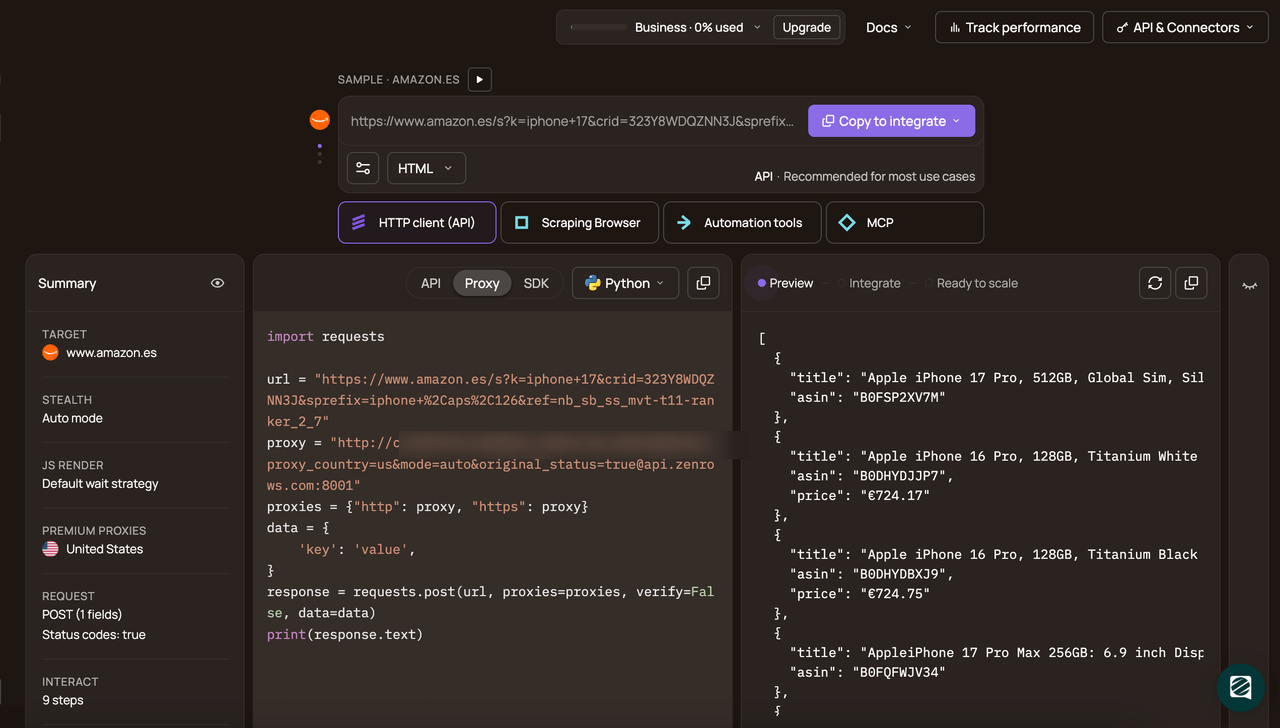
Choose your programming language (e.g., Python) and API as the connection mode. Then copy and run the generated code.
# pip install requests
import requests

url = 'https://www.scrapingcourse.com/antibot-challenge/'
apikey = '<YOUR_ZENROWS_API_KEY>'
params = {
    'url': url,
    'apikey': apikey,
    'mode': 'auto',
}
response = requests.get('https://api.zenrows.com/v1/', params=params)
print(response.text)
When you run the code, Zenrows returns the following output.
<html lang="en">
<head>
  <!-- ... -->
  <title>Antibot Challenge - ScrapingCourse.com</title>
  <!-- ... -->
</head>
<body>
  <!-- ... -->
  <h2>
    You bypassed the Antibot challenge! :D
  </h2>
  <!-- other content omitted for brevity -->
</body>
</html>
Congratulations 🎉 You’ve bypassed the anti-bot checks, and the target returned full HTML before your client timed out.
Conclusion
In this article, you’ve learned what error 499 means and why it shows up during scraping. You also learned how to reduce it by tuning client timeouts, using retries with backoff, and rotating proxies in a controlled way.
If you’re scraping at scale across many anti-bot-protected targets, manually tuning retry logic, concurrency, timeouts, and proxy rotation won’t stay stable for long because targets keep updating their anti-bot systems. A web scraping API like Zenrows is the better option because it handles anti-bot bypass and retries behind a single endpoint. It also evolves as anti-bot tactics change, so you spend more time collecting the data you need rather than dealing with 499 errors and anti-bot failures.
Try Zenrows for free now or speak with sales!
FAQ
Is error 499 a block or a timeout?
Error 499 isn’t a block. It’s an nginx status that gets logged when the client closes the connection before the response can finish. In scraping, it usually occurs due to a client-side read timeout or a cancelled request.
Is error 499 a server error or a client error?
Error 499 is a client-initiated disconnect. It is caused by your scraper terminating the connection while the server-side process is still running. Nginx records that disconnect as status 499 in its access logs.
Why do I see only timeouts in my code, not a 499 status?
You're seeing timeouts and not the 499 status because your client disconnects before an HTTP response can be completed. Your code reports a read timeout, a connection reset, a socket hangup, or a cancellation. Status 499 is visible in Cloudflare analytics and logs because it’s logged at the edge when the client disappears.