
Web Scraping with Scrapling: 2026 Tutorial
Learn to use Scrapling's adaptive selector feature and stealth mode for web scraping. Discover the best strategies to bypass scraping blocks at scale.



Website structural changes and anti-bot blocks can break your entire web scraping flow. Scrapling, an adaptive web scraping library, can relieve the pain of selector updates with its adaptive selector feature. Its stealth mode can also help avoid basic anti-bot challenges.
You'll learn how to use Scrapling for web scraping using its adaptive selector feature, including its stealth capability and the technique that ensures continuous scraping success at scale.
What Is Scrapling?
Scrapling is an open-source Python web scraping library designed to simplify data collection. It features tools for fetching and parsing HTML content from web pages using chainable selectors. When you parse HTML with Scrapling, it traverses the DOM tree to extract all the elements matching your selector, removing the complexities of manually looping through elements.
The library also boasts in its ability to adapt to changing HTML structures and bypass basic anti-bot measures. Scrapling supports dynamic web scraping by leveraging Playwright for browser automation and JavaScript rendering.
Key Features of Scrapling
Here are the key features of Scrapling that make it ideal for web scraping:
- Adaptive parsing: When a website updates a selector you've previously targeted, Scrapling auto-updates the selector using a similarity algorithm. This eliminates the need to manually update selectors each time a website's structure changes.
- Stealth mode: Scrapling features a stealth mode for bypassing basic anti-bot measures, specifically Cloudflare Turnstile.
- Session management: You can persist a single session across multiple scraping requests. This is specifically useful for maintaining login state and reusing bypassed sessions for subsequent requests.
- Dynamic content scraping: The library supports dynamic scraping by using a headless browser instance via Playwright.
- Selector chaining: Parse just one selector, and Scrapling extracts the rest without the need to loop through elements manually.
- Command-line tool: Scrapling features terminal commands for scraping and storing data directly into files via the command line interface.
- Built-in regex: Built-in regular expression (regex) gives you the flexibility to parse specific content directly from elements using matching patterns.
Skip the blocks. Try Zenrows free and get clean web data without the anti-bot fight.
Web Scraping with Scrapling
In this Scrapling web scraping section, you'll extract product data, including names, prices, and image URLs, from the E-commerce Challenge page.
Before you begin, let's go through the prerequisites.
Prerequisites
Here's all you need to start using Scrapling:
- Python 3.10 or later: Scrapling supports Python versions 3.10 and later. Ensure you download and install the latest version if you haven't already done so.
- Scrapling: For HTTP requests and HTML parsing.
Install the required libraries using pip3:
pip3 install "scrapling[all]"
Once you've installed the required tools, you're ready to start scraping with Scrapling.
Step 1: Get the Page HTML
The most basic way to use Scrapling is to extract the page's raw HTML. This step is essential, as it tests whether Scrapling can access the target page.
To begin, import the Fethcher class from Scrapling's fetchers module. Request the target site by calling Fetcher.get and extract its raw HTML:
# pip3 install "scrapling[all]"
from scrapling.fetchers import Fetcher

# fetch the webpage
page = Fetcher.get("https://www.scrapingcourse.com/ecommerce/")

# extract raw HTML
print(page.html_content)
The above code outputs the website's HTML content as expected:
<!DOCTYPE html>
<html lang="en-US">
<head>
    <!--- ... --->

    <title>Ecommerce Test Site to Learn Web Scraping - ScrapingCourse.com</title>

  <!--- ... --->
</head>
<body class="home archive ...">
    <p class="woocommerce-result-count">Showing 1-16 of 188 results</p>
    <ul class="products columns-4">

        <!--- ... --->

    </ul>
</body>
</html>
Great! Your Scrapling scraper works. Next, you'll extract specific product data from the target site.
Step 2: Extract the Required Data with Scrapling's Adaptive Feature
Let's now scrape product data from the target site using the relevant CSS selectors. Scrapling supports various selectors, including CSS, XPath, text-based, and regex pattern matching. We'll use the CSS selector in this tutorial.
Related: XPath vs. CSS Selectors: The Difference and Winner (2026)
When you inspect the target website using DevTools, you’ll notice that:
- The product name is inside an element with the class name
.product-name. - The price appears inside an element with the class
.price. - The product image is displayed in an
<img>tag (with a class.product-image).
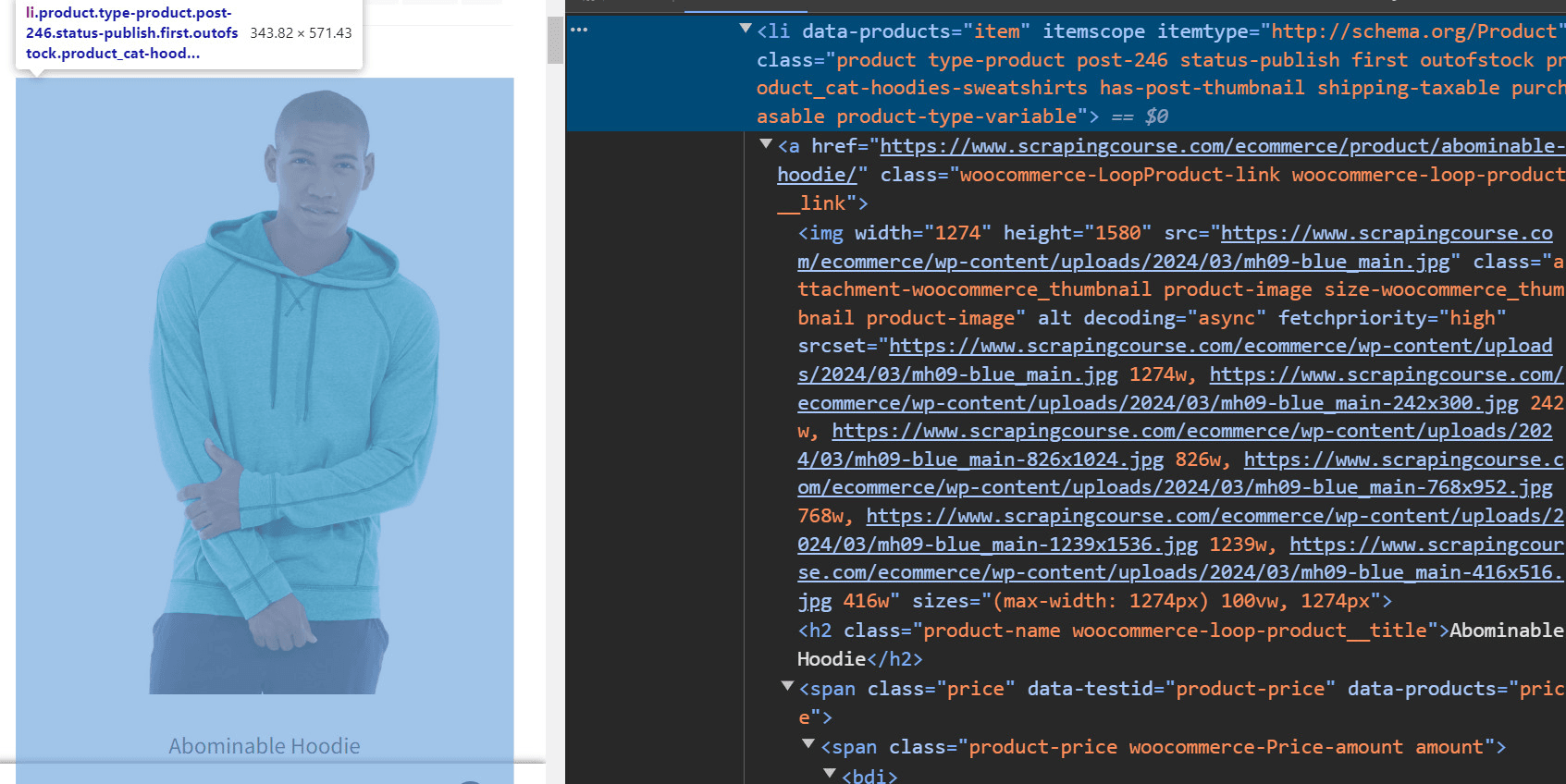
Update your scraper to scrape each element using its CSS selector and Scrapling's CSS adaptive feature by passing an auto_save parameter into the page.css function. Each selector returns a list of elements.
# ...
# select product elements with their CSS selectors
names = page.css(".product-name", auto_save=True)
prices = page.css(".price", auto_save=True)
images = page.css(".woocommerce-LoopProduct-link img", auto_save=True)
Next, define an empty list to collect the scraped data. Loop through each selected element to extract its text. Note that in this case, we've used Scrapling's built-in regex to search for matching price patterns, as the library was unable to access the price element directly. Finally, append the scraped data to the empty list and print it:
#...

# empty list to store product data
product_date = []

# extracting product details
for name, price, image in zip(names, prices, images):
    # extract price using regex to get only the numeric part
    price_matches = price.html_content.re(r"</span>([\d.,]+)")

    # construct product data dictionary
    data = {
        "name": name.text,
        "price": f"${price_matches[0]}",
        "image": image.attrib["src"],
    }
    product_date.append(data)

print(product_date)
Here's the complete code:
# pip3 install scrapling
from scrapling.fetchers import Fetcher

# fetch the webpage
page = Fetcher.get("https://www.scrapingcourse.com/ecommerce/")

# select product elements with their CSS selectors
names = page.css(".product-name", auto_save=True)
prices = page.css(".price", auto_save=True)
images = page.css(".woocommerce-LoopProduct-link img", auto_save=True)

# empty list to store product data
product_date = []

# extracting product details
for name, price, image in zip(names, prices, images):
    # extract price using regex to get only the numeric part
    price_matches = price.html_content.re(r"</span>([\d.,]+)")

    # construct product data dictionary
    data = {
        "name": name.text,
        "price": f"${price_matches[0]}",
        "image": image.attrib["src"],
    }
    product_date.append(data)

print(product_date)
The above scraper outputs the following product data:
[
    {
        "name": "Abominable Hoodie",
        "price": "$69.00",
        "image": "https://www.scrapingcourse.com/ecommerce/wp-content/uploads/2024/03/mh09-blue_main.jpg",
    },
    # ... omitted for brevity,
    {
        "name": "Artemis Running Short",
        "price": "$45.00",
        "image": "https://www.scrapingcourse.com/ecommerce/wp-content/uploads/2024/03/wsh04-black_main.jpg",
    },
]
Great job! You've just scraped a website with Scrapling. Let's see how its stealth mode works in the next section.
Scrapling Stealth Mode: A Good Start for Cloudflare Bypass
Scrapling's stealth mode can be useful when trying to bypass Cloudflare. While the stealth mode may not be reliable for large-scale operations, it can be ideal during small-scale data collection.
To test its stealth capabilities, we'll scrape HTML content from the Cloudflare Challenge page.
Import the StealthySession class from Scrapling's fetchers package and use it to instantiate a browser session. Request the target page within this session and scrape its content:
# pip3 install "scrapling[all]"
from scrapling.fetchers import StealthySession

# create a stealthy session with Cloudflare solving enabled
session = StealthySession(headless=True, solve_cloudflare=True)

# fetch the webpage within the session context
with session:
    page = session.fetch(
        "https://www.scrapingcourse.com/cloudflare-challenge/",
    )
    print(page.html_content)
If the request is successful, you should see the following HTML response:
<html lang="en">
<head>
    <!-- ... -->
    <title>Cloudflare Challenge - ScrapingCourse.com</title>
    <!-- ... -->
</head>
<body>
    <!-- ... -->
    <h2>
        You bypassed the Cloudflare challenge! :D
    </h2>
    <!-- other content omitted for brevity -->
</body>
</html>
However, despite its powerful features, Scrapling has limitations that make it less suitable for teams aiming to build robust and reliable scraping systems.
The Limitations of Scrapling
Teams looking for long-term, large-scale scraping solutions should carefully consider these constraints before choosing Scrapling:
- No infrastructure for scale: Scrapling maintains a Do-it-Yourself (DIY) architecture and lacks the auto-managed scraping infrastructure required by serious teams.
- Resource-intensive: A heavy browser instance is required for scraping JavaScript-rendered content, straining available system resources. This makes it less suitable for large-scale scraping.
- Limited stealth capability: Although Scrapling features a stealth mode, its coverage is limited to basic Cloudflare protection and doesn't bypass more sophisticated anti-bot measures. Even with Cloudflare-protected sites, high request rates can still lead to blocking.
- Vulnerability to anti-bot updates: Since Scrapling is open-source, anti-bot solutions will eventually clamp down on it, as seen with most similar tools, which struggle to keep up with frequent anti-bot updates.
- Lack of proxy infrastructure: Scrapling lacks built-in proxy rotation and geo-targeting features, making it prone to IP bans and geo-blocking.
Don't fret. You'll see a future-proof solution that guarantees consistent success in the next section.
Avoid Getting Blocked
The best way to avoid Scrapling's limitations and secure your scraper against potential failures is to use a web scraping API, such as Zenrows Fetch. Zenrows provides all the tools your team needs to scrape any website at scale without getting blocked. With Zenrows, you equip your team with the following benefits:
- Auto-scaled, auto-managed infrastructure that lets you focus on building rather than wasting time and resources debugging scraper failures.
- Light-weight architecture that doesn't strain system resources. Simply set up your API request and let Zenrows handle resource management at scale.
- Bypass any anti-bot measure at any scale, regardless of its complexity and avoid surprises with sudden security updates. Zenrows handles anti-bot updates, so you don't have to worry about it.
- Headless browser capabilities to automate user actions and scrape JavaScript-rendering sites at scale.
- An extensive network of premium residential proxies with auto-rotation and geo-targeting to prevent IP bans and rate limiting.
Let's see how Zenrows works by scraping this heavily-protected Anti-bot Challenge page.
Sign up to open the Zenrows Request Builder. Paste the target URL in the link box, and activate Premium Proxies and JS Rendering.
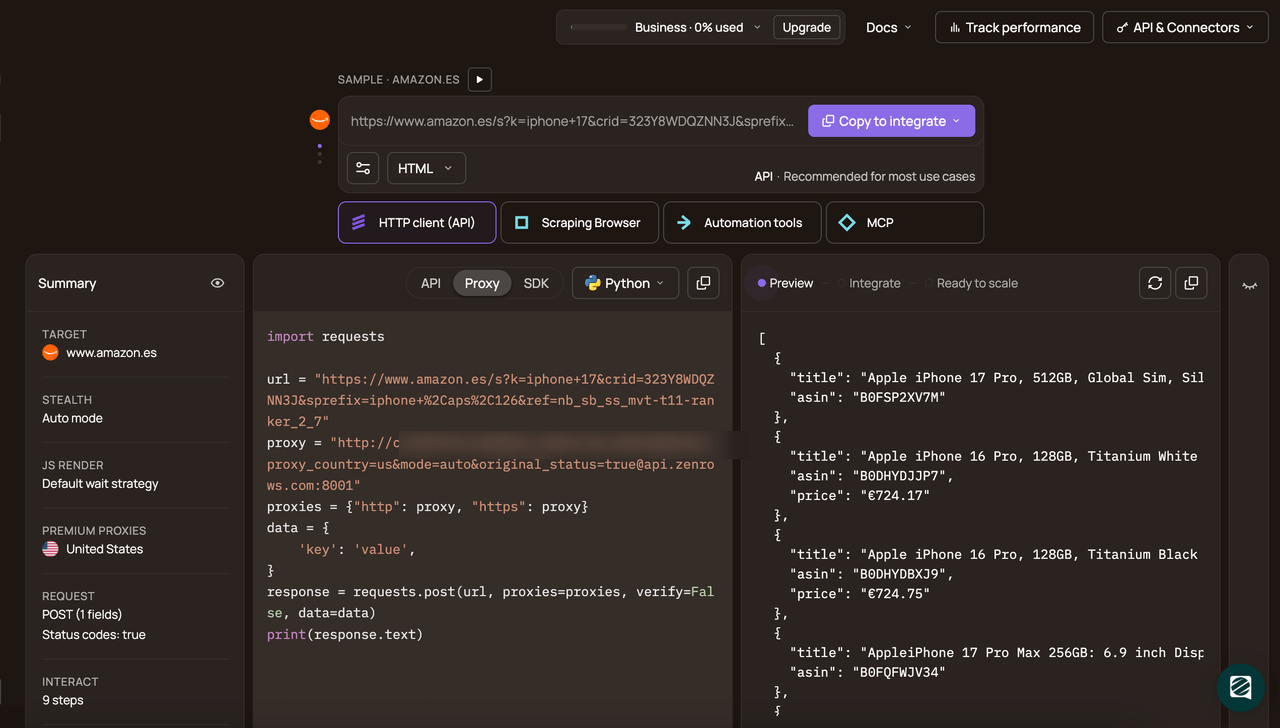
Choose Python as your programming language and select the API connection mode. Copy and paste the generated code into your scraper file:
Here's the generated code:
# pip3 install requests
import requests

url = "https://httpbin.io/anything"
apikey = "<YOUR_ZENROWS_API_KEY>"
params = {
    "url": url,
    "apikey": apikey,
    "js_render": "true",
    "premium_proxy": "true",
}
response = requests.get("https://api.zenrows.com/v1/", params=params)
print(response.text)
The above code outputs the protected site's HTML, as shown:
<html lang="en">
<head>
    <!-- ... -->
    <title>Antibot Challenge - ScrapingCourse.com</title>
    <!-- ... -->
</head>
<body>
    <!-- ... -->
    <h2>
        You bypassed the Antibot challenge! :D
    </h2>
    <!-- other content omitted for brevity -->
</body>
</html>
Congratulations! 🎉 Zenrows now helps you handle all scraping complexities behind the scenes, including providing a scalable infrastructure that bypasses even the most advanced anti-bot measures. You've now set up your scraper for consistent success.
Conclusion
You've learned to use Scrapling for web scraping, including key features and tactics for reliably avoiding blocks. While Scrapling is a resourceful web scraping tool with stealth mode, it doesn't guarantee continuous success.
To avoid abrupt scraping failures and extract data from any site without worrying about blocks or scalability limitations, we recommend using Zenrows. It's an all-in-one web scraping solution that guarantees continuous success.
Try Zenrows for free now or speak with sales!
FAQ
Is Scrapling enough to bypass Cloudflare?
No, Scrapling is not enough to reliably bypass Cloudflare. While Scrapling offers a basic stealth mode that can sometimes get past Cloudflare’s initial protections, it's limited to simple scenarios. Cloudflare frequently updates its anti-bot measures, and Scrapling’s stealth mode does not handle more advanced protections, such as JavaScript challenges, behavioral analysis, or sophisticated bot detection. For sites with robust Cloudflare defenses, Scrapling may work for occasional, low-volume requests. However, it's likely to be blocked if you attempt to scrape at scale or send a large number of requests within a short period.
Teams requiring consistent, large-scale access to anti-bot-protected sites should consider more advanced tools or commercial solutions, such as Zenrows, which are specifically designed to bypass these protections.
For more on the subject, our blog outlines the best methods to bypass Cloudflare.
Can I scrape dynamic websites at scale with Scrapling?
Although Scrapling can handle JavaScript-rendered content by launching a browser instance, this approach is resource-intensive and quickly strains system memory and CPU. This makes the library impractical for large-scale operations, where you need to scrape hundreds or thousands of pages efficiently.
What is the best alternative to Scrapling for teams?
For teams building reliable, scalable scraping systems, some of the best alternatives to Scrapling include libraries like Scrapy, Playwright, and Selenium.
Scrapy is a powerful, open-source crawling framework designed for large-scale web scraping. Scrapy also integrates easily with Zenrows and offers built-in support for distributed crawling, and is highly customizable for complex projects. Playwright and Selenium are browser automation tools capable of scraping dynamic, JavaScript-heavy websites. While they're also resource-intensive, Playwright and Selenium offer more flexible browser automation capabilities than Scrapling and support multiple programming languages.
For large-scale needs, commercial solutions like Zenrows offer auto-managed, auto-scaled infrastructure, advanced anti-bot bypass, and reliable support.