
How to Build a Reliable Contact Scraper for B2B Lead Generation
Learn real-world code and no-code techniques for scraping contact details for B2B lead generation. Extract quality leads at scale without limitations.



Manually sourcing lead contacts slows down your lead generation process. And purchasing them is risky, resulting in poor lead quality, misfit, and wasted resources. Scraping contacts for B2B lead generation bridges that gap, offering quality, automation, and scalability. But for success, you have to approach it with the right tools.
In this article, you'll learn how to scrape contacts reliably using real-life examples, including relevant data sources, the challenges involved, and how to navigate them.
Data Sources for Contact Scraping
Choosing contact scraping over manual sourcing lets you automate and scale lead generation while you focus on other tasks.
However, before scraping contacts for lead generation, it's essential to determine the best data source that suits your team's narratives. Choosing the right source improves lead quality and saves both time and resources.
Depending on your requirements, using a lead generation scraper can help you scrape contact data from social media, review sites, company directories, and more. Although there are many platforms you can scrape contacts from, here are some common ones for B2B, based on lead data requirements:
| Data Source | Best for | Example Data Available |
|---|---|---|
| Crunchbase | Identifying key decision-makers (CXOs, VPs) at fast-growing tech startups and venture capital firms for B2B sales/investor outreach | Company details, team information, and emails |
| AngelList | Sourcing early-stage startup founders and high-growth companies for recruitment, seed investment, or partnerships | Startups' information, team details, social links |
| B2B and B2C sales teams targeting specific job titles, roles, or company types across industries, with a deep professional network | Employees, job titles, and contact details like emails and phone numbers | |
| Glassdoor | HR professionals and recruitment agencies looking for companies with high turnover or specific employer sentiment insights | Company reviews, reviewers' job titles, and names |
| Trustpilot | Teams finding businesses based on customer reputation | Company names and addresses, reviewers' information |
| Yelp | Geographically targeted marketing and Small to Midsize Businesses (SMBs) outreach. | Business names, phones, addresses, open hours, services offered, and reviewers' details |
| Yellow Pages | Sourcing traditional local trades and service-based contacts | Business names, reviewers' information, phones, addresses, business category, open hours |
These websites typically feature company directories and customer reviews that contain valuable data for building a contact scraper for lead generation. That said, most of these data sources deploy anti-bot measures to block automated requests, preventing scrapers from accessing the desired contacts.
Skip the blocks. Try Zenrows free and get clean web data without the anti-bot fight.
Why Traditional Lead Scrapers Break
Traditional scrapers that use regular libraries and tools often encounter anti-bot barriers, such as Web Application Firewalls (WAFs) and CAPTCHA challenges. Most targets also render content dynamically with JavaScript, requiring heavy browser automation, which is often costly and resource-intensive.
Since traditional scrapers often rely on static IPs, limited access to content due to geographical restrictions can make it harder to target leads from desired regions.
Related: How to Scrape Social Media Data in 2026
These barriers make standard or in-house scraping tools less reliable for generating high-quality lead contacts, especially when comprehensive and accurate data is needed.
But how can you overcome these limitations and reliably scrape high-quality contacts at scale? You'll see a practical guide in the next section.
Real-World Demo: Contact Scraping From Yellow Pages
This section demonstrates how to scrape leads using Zenrows with both code-based (Python) and no-code (Clay) approaches. Using Yellow Pages as the target site, your contact scraper will extract company names, emails, phone numbers, and addresses from directories.
Zenrows provides all the toolkits you need to scrape any website at scale without getting blocked. It's auto-scaled and auto-managed, allowing you to focus on building solutions with data rather than wasting time and resources on debugging failed scraping requests.
Before we begin, sign up on Zenrows for free and get your API key.
Code Option: Using Python with Zenrows Fetch
To start with the code method, ensure you've downloaded and installed the latest stable version of Python if you haven't already.
We'll also use Python's Requests library. So, ensure you install it using pip:
pip3 install requests
Now, let's start by extracting company URLs from the target page. Your contact scraper will request each company's URL to scrape the desired contact information.
Step 1: Define Your Scraping Parameters
First, build your request parameters by going to the Zenrows Fetch Request Builder. Paste the target URL in the link box. Then, activate Premium Proxies and JS Rendering for a high success rate.
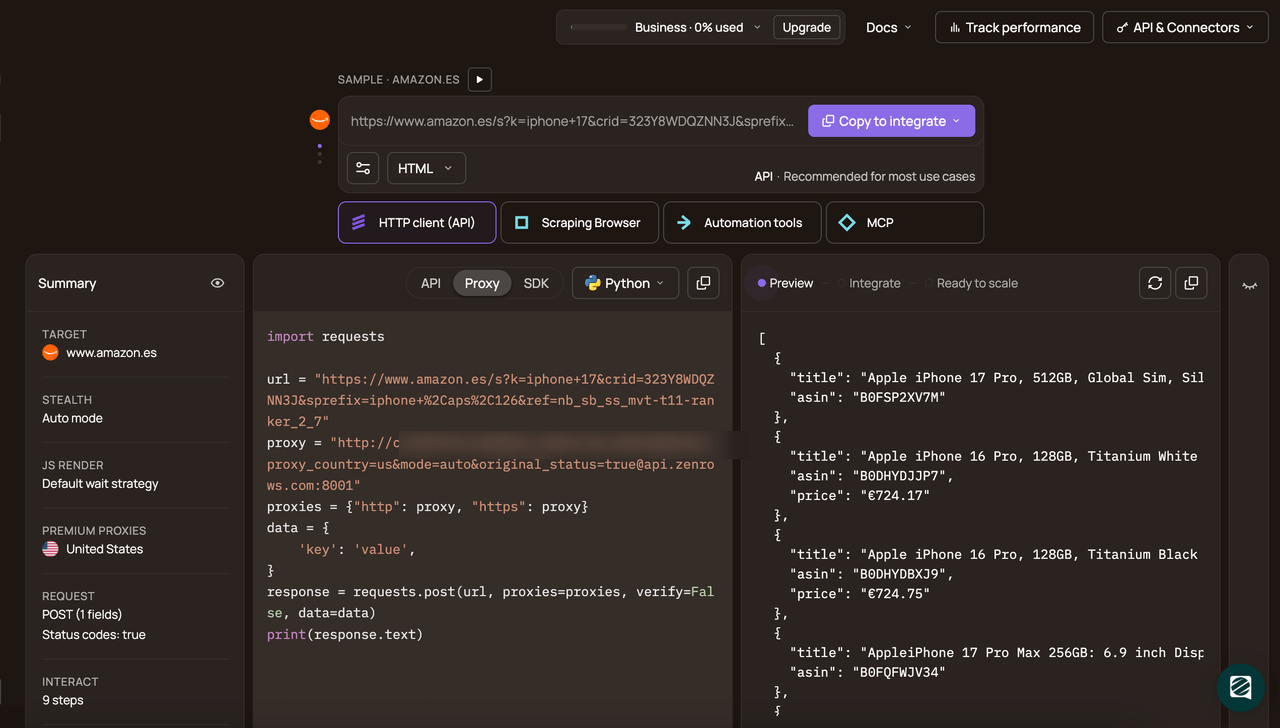
Select Python as your programming language and choose the API connection mode. Copy and paste the generated code into your scraper script.
Add Python's built-in json package to your imports. Then, modify the generated code by placing it in a scraper function as shown below. The function accepts the url and css_selectors parameters. We've used Zenrows' css-extractor feature to parse and extract the required data from the target site using CSS selectors. This function returns the scraped contact data in JSON format:
# pip3 install requests
import requests
import json

# define your API key
apikey = "<YOUR_ZENROWS_API_KEY>"

# scrape a URL with given CSS selectors
def scraper(url, css_selectors):
    params = {
        "url": url,
        "apikey": apikey,
        "js_render": "true",
        "premium_proxy": "true",
        "css_extractor": css_selectors,
    }
    response = requests.get("https://api.zenrows.com/v1/", params=params)
    return response.json()
Next, let's apply this function to scrape specific elements, starting with the company listing URLs.
Step 2: Scrape Listing URLs
The target Yellow Pages site is a company listing page. Clicking each company's name loads its directory, where you'll find the company's contact details.
Define the target URL and specify the company URL's CSS selector (in this case, .business-name @href) as a JSON-formatted string. Define a scrape_urls function to scrape URLs from the listing page. Finally, execute the function and pass the scraped URLs as a set to handle duplicate entries:
#...

# define the listing URL
listing_url = "https://www.yellowpages.com/san-francisco-ca/electricians"

# define CSS selector to extract each business URL
url_css_selector = json.dumps({"url": ".business-name @href"})

#...

# scrape URLs from the listing page
def scrape_urls(listing_url):
    return scraper(listing_url, url_css_selector)

# scrape company URLs
company_urls = scrape_urls(listing_url)

# handle duplicate URLs with set
unique_urls = list(set(company_urls.get("url", [])))
The above returns the company listing URLs, as shown:
[
    "/san-francisco-ca/mip/aaa-electric-co-465235394",
    "/san-francisco-ca/mip/lucchesi-electric-485588352",
    # ... omitted for brevity ...,
    "/san-francisco-ca/mip/mcclure-electric-inc-532765131",
]
Note that the URLs are currently relative. You'll make them absolute later by merging them with the base URL.
Step 3: Scrape Emails
The next step is to build the email scraper functionality into your code. The email address is a .mail-business class.
To point your css_extractor to the email address, obtain the href attribute from the .mail-business class. Specify this selector in a JSON-formatted dictionary:
#...

# define CSS selectors to extract email, name, phone, and address
page_css_selectors = json.dumps(
    {
        "email": "a.email-business @href",
    }
)
#...
Note that, for this data source, Cloudflare's encoding obfuscates emails, causing the email scraper layer to return encrypted text rather than the actual email address. To resolve this challenge and scrape the email address as desired, define a new cf_decode_email function to decode the obfuscated email:
# function to decode Cloudflare email protection
def cf_decode_email(encoded_str):
    # handle if encoded_str is a list
    if isinstance(encoded_str, list):
        if not encoded_str:
            return ""
        encoded_str = encoded_str[0]
    if not isinstance(encoded_str, str) or len(encoded_str) < 4:
        return ""
    key = int(encoded_str[:2], 16)
    email = "".join(
        chr(int(encoded_str[i : i + 2], 16) ^ key)
        for i in range(2, len(encoded_str), 2)
    )
    return email
Note
Email obfuscation is only applied on this specific target site. On most targets, you won't get obfuscated emails.
Next, prepare your contact scraper to extract other information, including phone numbers, addresses, and company names.
Step 4: Scrape Phone Numbers, Address, and Company Names
Create the phone number scraper layer by adding its class (a.phone) to the css_selector dictionary. Additionally, include the company address (span.address) and name (h1.business-name):
#...

page_css_selectors = json.dumps(
    {
        #...,
        "phone": "a.phone",
        "address": "span.address",
        "name": "h1.business-name",
    }
)
#...
Step 5: Decode Emails and Extract Contact Details
The final step is to request each URL and scrape the specified elements.
Specify an empty list to collect the scraped data. Define the website's base URL. Loop through the unique_urls and merge each with the base URL to make an absolute path:
#...
# extract contact details from each URL
for company_url in unique_urls:
    # construct full URL
    url = f"{base_url}{company_url}"
    # scrape company page
    data = scraper(url, page_css_selectors)
To implement email deobfuscation, extract the email field from each data point and apply the email-decoding function. Finally, append the scraped data to the empty list, and print it:
#...
# extract contact details from each URL
for company_url in unique_urls:
    #...

    # apply email decoding
    email = data.get("email", "")

    # handle if email is a list
    if isinstance(email, list):
        email = email[0] if email else ""

    if "#" in email:
        encoded = email.split("#")[1]
        data["email"] = cf_decode_email(encoded)
    else:
        data["email"] = email

    lead_data.append(data)

print(lead_data)
Combine all the snippets. Here's an organized, complete code:
# pip3 install requests
import requests
import json

# define CSS selector to extract each business URL
url_css_selector = json.dumps({"url": ".business-name @href"})

# define CSS selectors to extract email, name, phone, and address
page_css_selectors = json.dumps(
    {
        "email": "a.email-business @href",
        "name": "h1.business-name",
        "phone": "a.phone",
        "address": "span.address",
    }
)

listing_url = "https://www.yellowpages.com/san-francisco-ca/electricians"

# define your API key
apikey = "<YOUR_ZENROWS_API_KEY>"

# scrape a URL with given CSS selectors
def scraper(url, css_selectors):
    params = {
        "url": url,
        "apikey": apikey,
        "js_render": "true",
        "premium_proxy": "true",
        "proxy_country": "us",
        "css_extractor": css_selectors,
    }
    response = requests.get("https://api.zenrows.com/v1/", params=params)
    return response.json()

def scrape_urls(listing_url):
    return scraper(listing_url, url_css_selector)

# function to decode Cloudflare email protection
def cf_decode_email(encoded_str):
    # handle if encoded_str is a list
    if isinstance(encoded_str, list):
        if not encoded_str:
            return ""
        encoded_str = encoded_str[0]
    if not isinstance(encoded_str, str) or len(encoded_str) < 4:
        return ""
    key = int(encoded_str[:2], 16)
    email = "".join(
        chr(int(encoded_str[i : i + 2], 16) ^ key)
        for i in range(2, len(encoded_str), 2)
    )
    return email

# scrape company URLs
company_urls = scrape_urls(listing_url)

# handle duplicate URLs with set
unique_urls = list(set(company_urls.get("url", [])))

# empty list to collect lead data
lead_data = []

# specify the base URL for constructing full company URLs
base_url = "https://www.yellowpages.com"


# extract contact details from each URL
for company_url in unique_urls:
    # construct full URL
    url = f"{base_url}{company_url}"
    # scrape company page
    data = scraper(url, page_css_selectors)

    # apply email decoding
    email = data.get("email", "")

    # handle if email is a list
    if isinstance(email, list):
        email = email[0] if email else ""

    if "#" in email:
        encoded = email.split("#")[1]
        data["email"] = cf_decode_email(encoded)
    else:
        data["email"] = email

    lead_data.append(data)

print(lead_data)
The above code visits each company's directory on Yellow Pages and returns its contact details, as shown:
[
    {
        "address": "617 Moraga StSan Francisco, CA 94122",
        "email": "billdelao@sbcglobal.net",
        "name": "DeLao Electric Inc.",
        "phone": "(415) 681-7011",
    },
    # ...omitted for brevity...,
    {
        "address": "1408 California StSan Francisco, CA 94109",
        "email": "aaaelectrician@yahoo.com",
        "name": "AAA electric co",
        "phone": "(415) 570-1014",
    },
]
Congratulations! 🎉 You just scraped contact details using Python and Zenrows. You're now ready to generate quality leads at scale.
No-Code Option: Zero-Maintenance Workflow with Clay and Zenrows
Zenrows integrates seamlessly with Clay to simplify scalable data enrichment from protected targets.
Related: How Clay Bypassed Anti-Bot Measures at Scale with Zenrows (A Hands-On Guide)
For this demonstration, you'll enrich your Clay workflow with the following company directory URLs from Yellow Pages:
https://www.yellowpages.com/san-francisco-ca/mip/sierra-electric-6084658
https://www.yellowpages.com/san-francisco-ca/mip/aaa-electric-co-465235394
https://www.yellowpages.com/san-francisco-ca/mip/a-24-electric-co-531249680
https://www.yellowpages.com/san-francisco-ca/mip/fs-electric-576520562
https://www.yellowpages.com/san-francisco-ca/mip/cosmos-electric-co-1573568https://www.yellowpages.com/san-francisco-ca/mip/wgc-electric-465183749
Keep those URLs safe, and let's get started with Clay and Zenrows integration:
Step 1: Create a Clay Workflow
Set up your workflow with the following instructions:
- Sign in to your Clay account to get started.
- In your dashboard, click "+New" and select "Workbook."
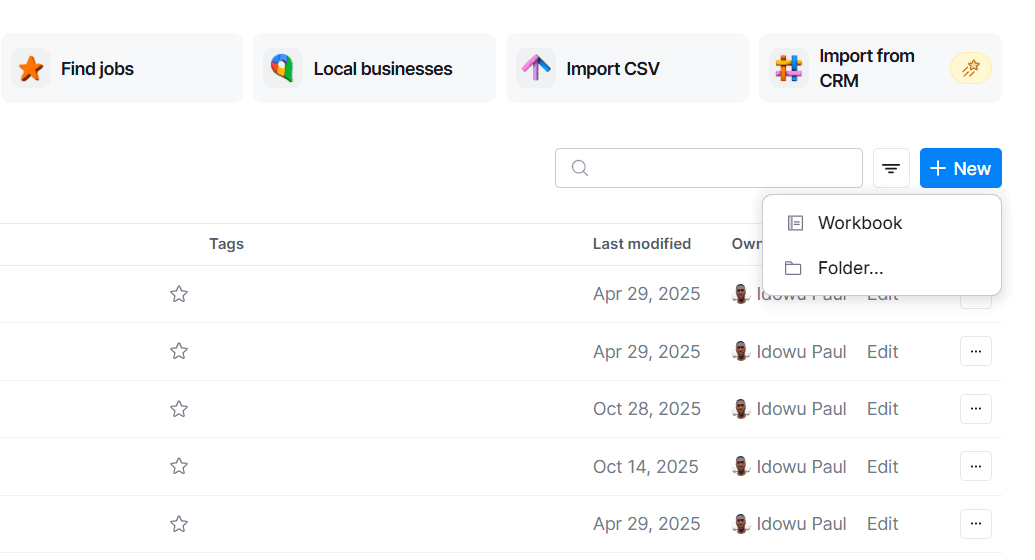
- Next, rename your workbook by clicking the field at the top-left. Then, click "Blank table".
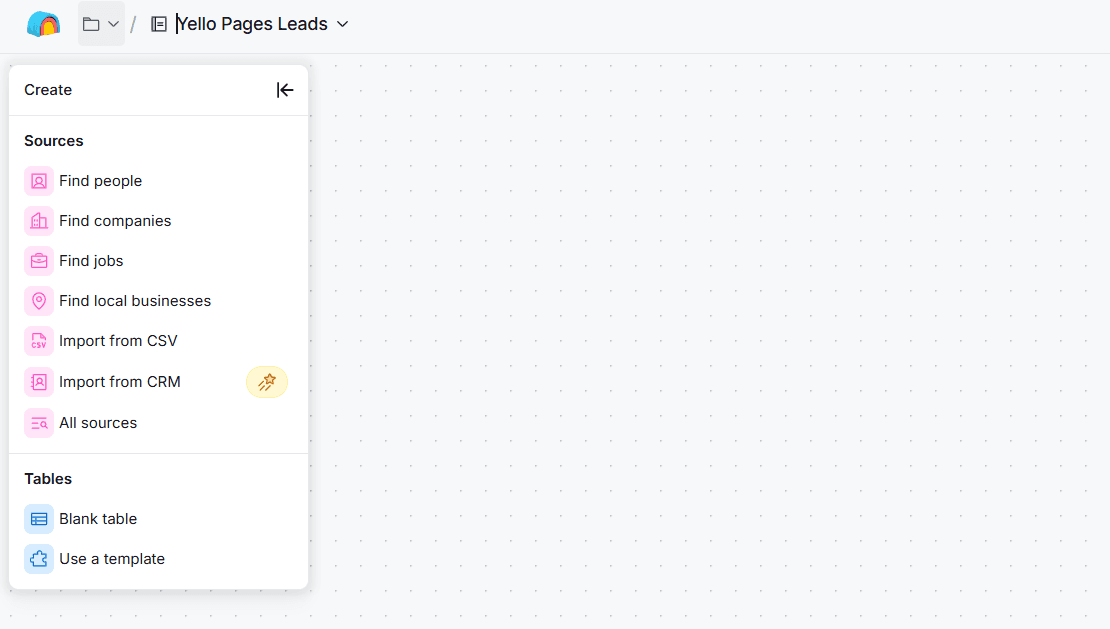
- Click "Add column."
- Select the "Text" option.
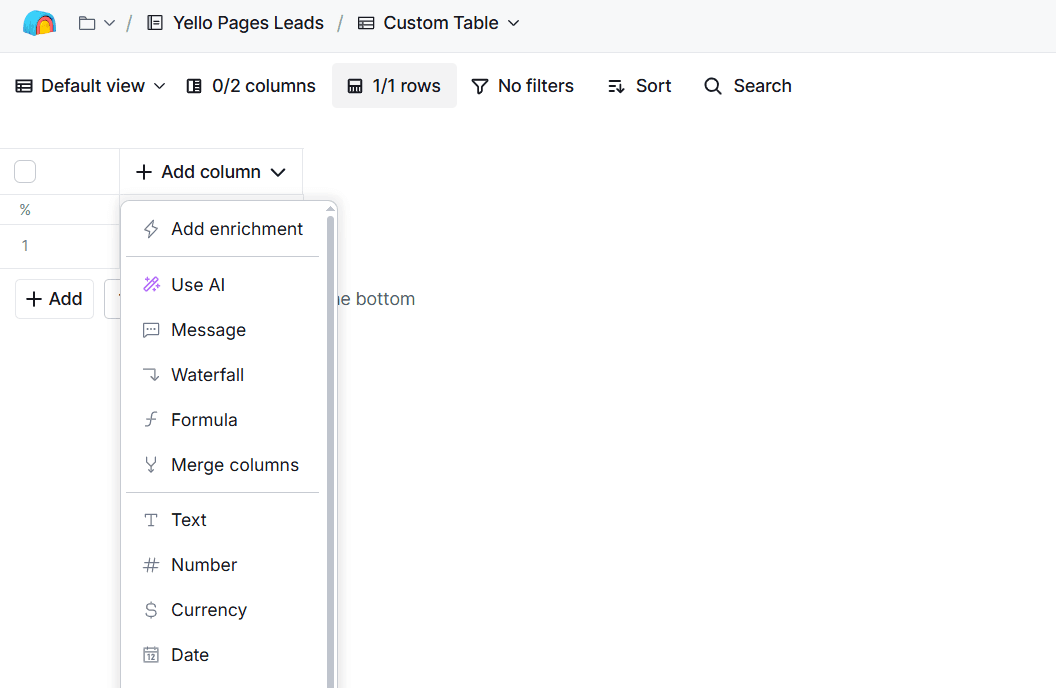
- Click "New Column," then rename it "Company URL."
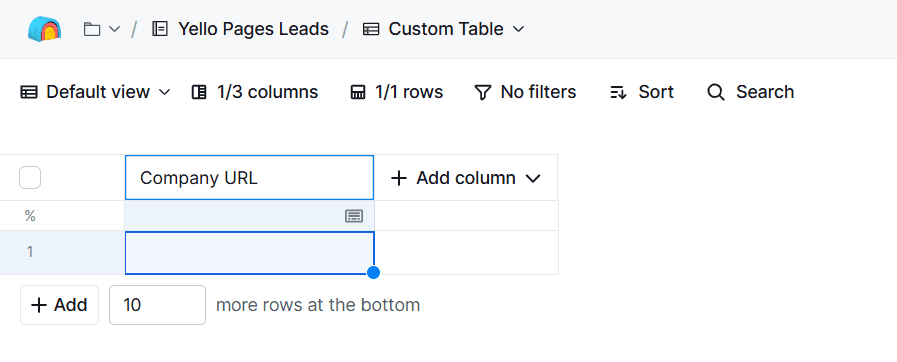
- Click "+Add" at the bottom-left of the table to expand the rows.
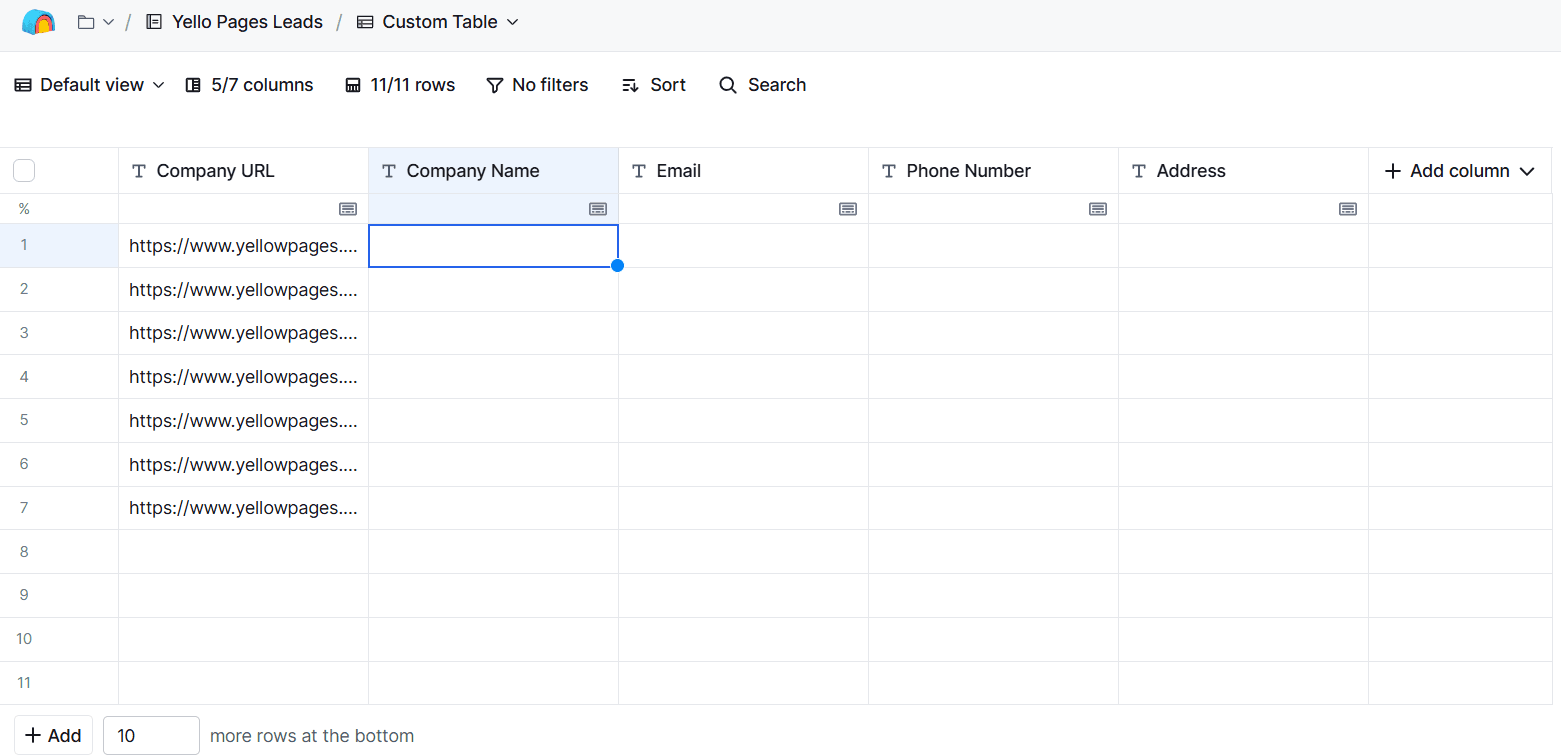
- Add the previously specified URLs to the cells under the "Company URL" column.
- Click "Add column" and include the Company Name, Email, Phone Number, and Address fields.
Step 2: Add Zenrows Scrape Action
Next, integrate Zenrows into your Clay workflow using the following steps:
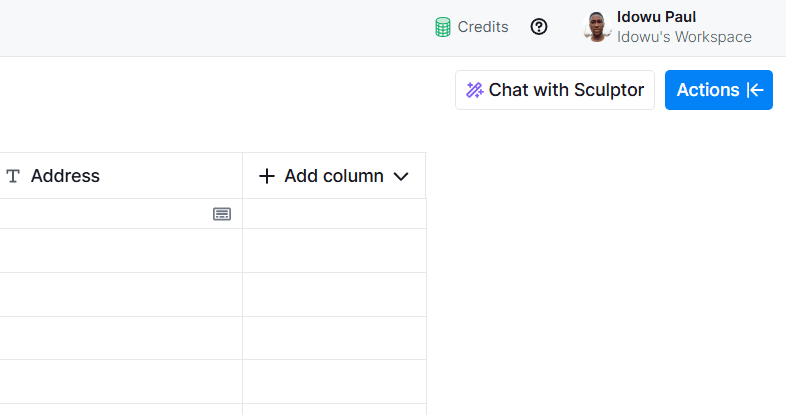
- Click "Actions" at the top-right.
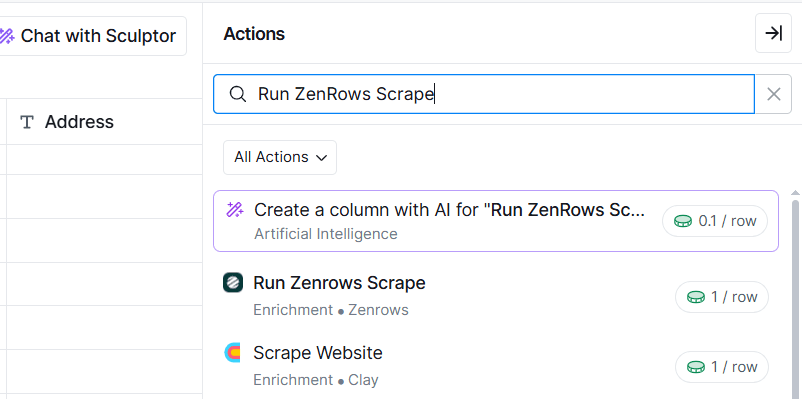
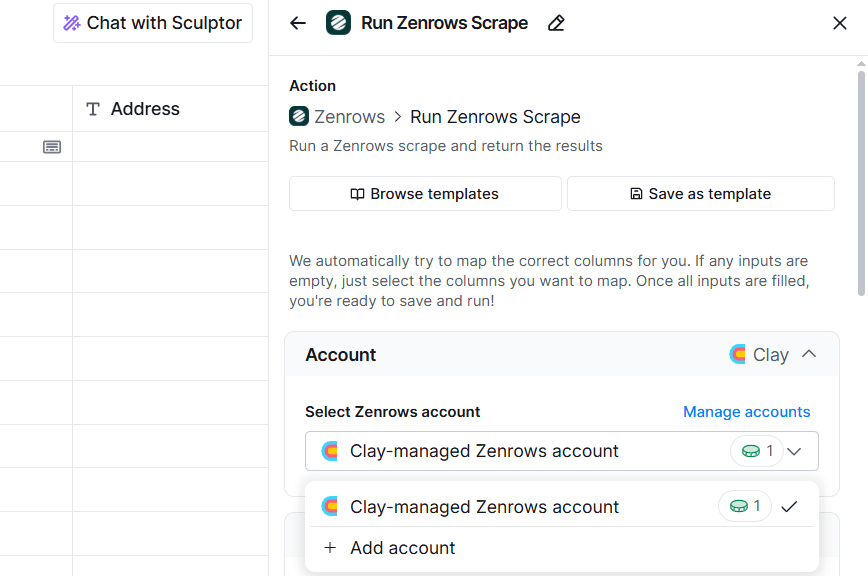
- Search for and select "Run Zenrows Scrape."
- The "Clay-managed Zenrows account" option will be selected by default. Click "Add Account" to set up with your own Zenrows account.
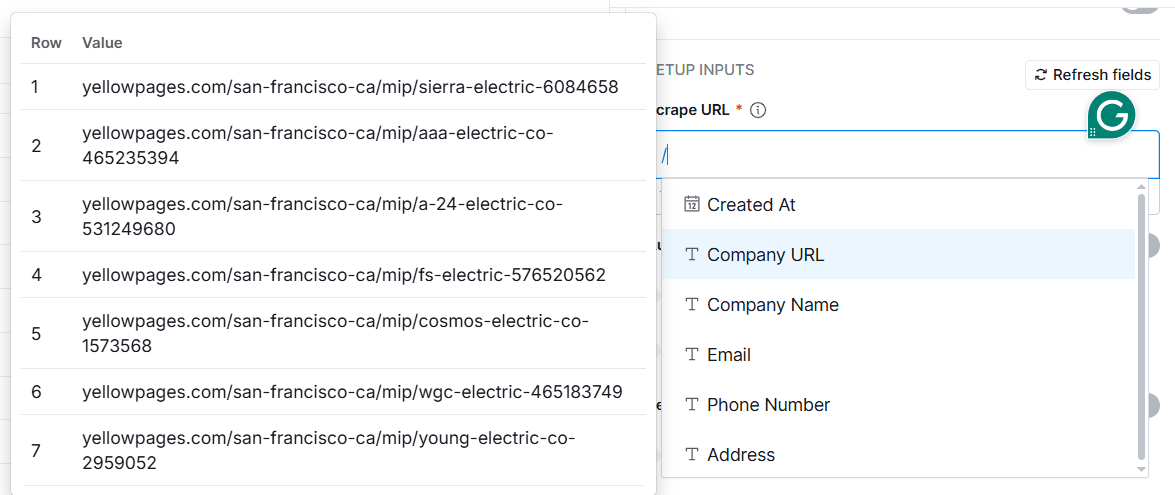
- Under the "Scrape URL" field, type
/and select the "Company URL" column to pick the URLs from that column.
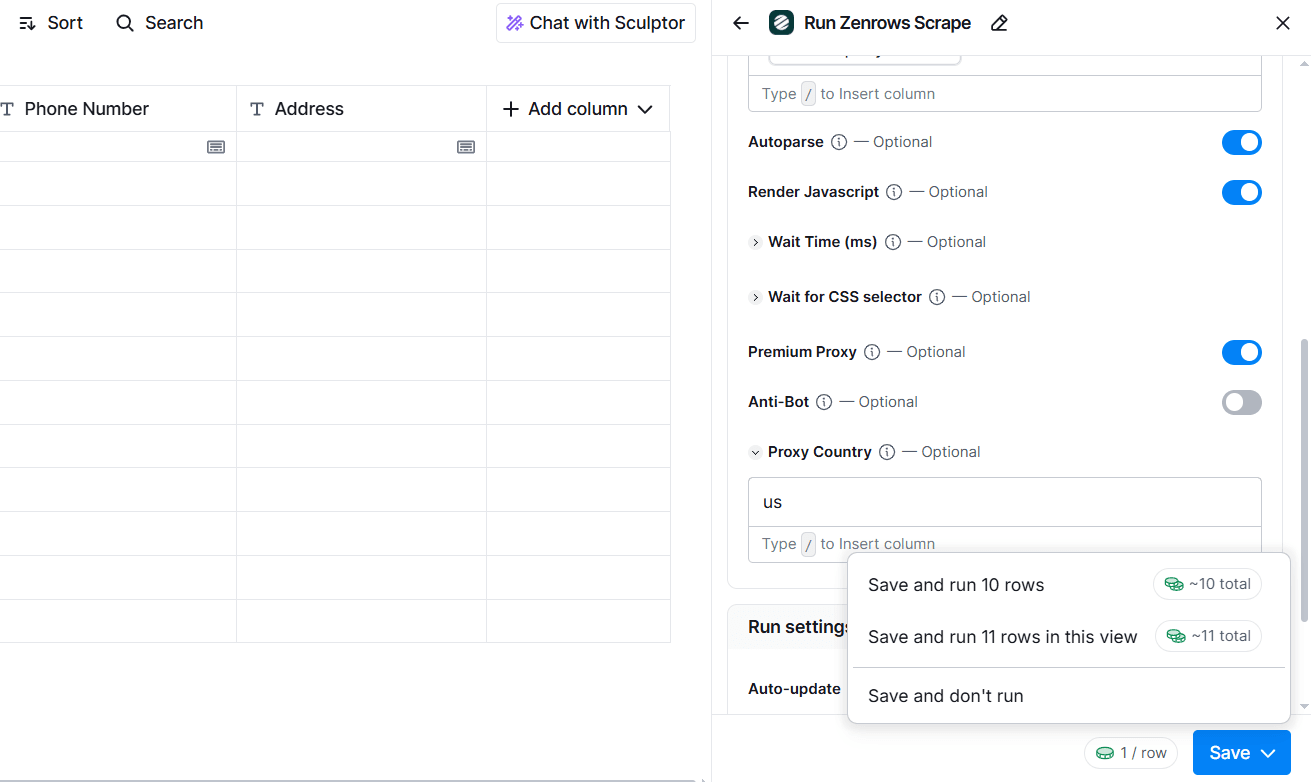
- Activate Autoparse, Render JavaScript, Premium Proxy, and type "us" in the Proxy Country field.
- Click "Save" and select "Save and Run" to execute the enrichment.
Step 3: Enrich Each Column with the Contact Data
The above actions execute Clay's data enrichment with Zenrows. You'll see a new Run Zenrows Scrape column with success messages, as shown:
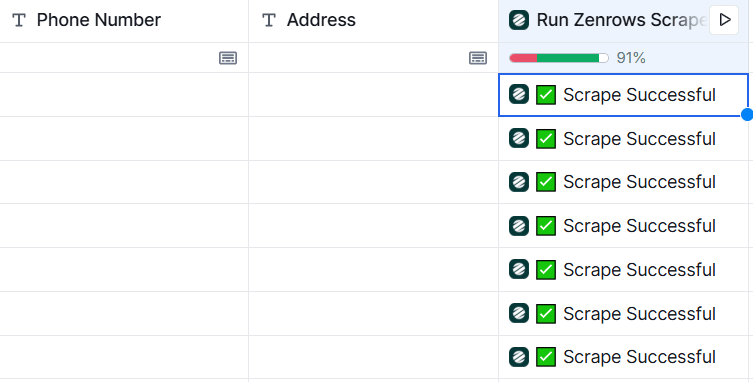
To enrich each column with the scraped data, click the first row under the new "Run Zenrows Scrape" column to view the extracted contacts.
Click the first JSON field, then map the desired data to the appropriate columns. For instance, to map the Company Name, click "Name" => "Add as column", and select "Company Name."
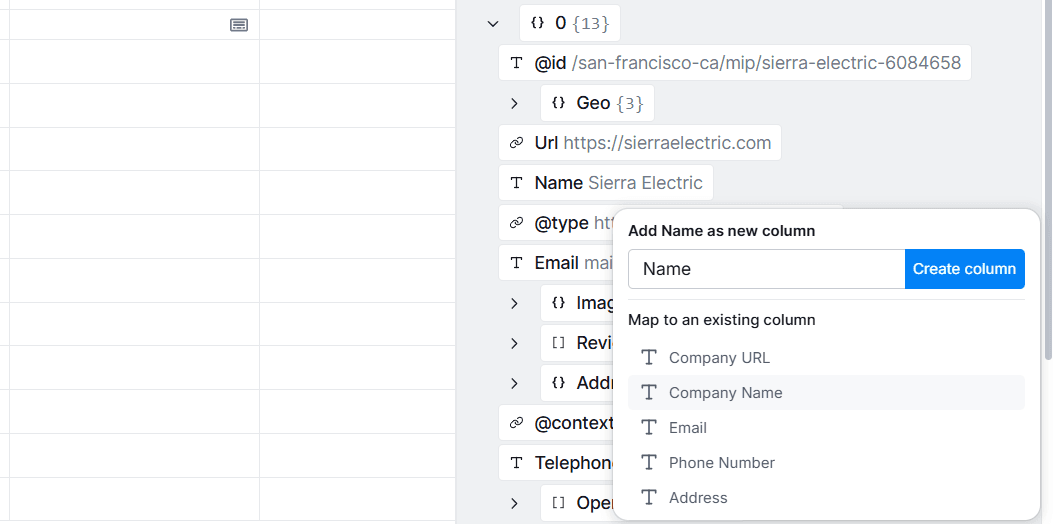
Repeat this process for other columns to map the data with your Clay table.
Here's a sample final table after enrichment and mapping:
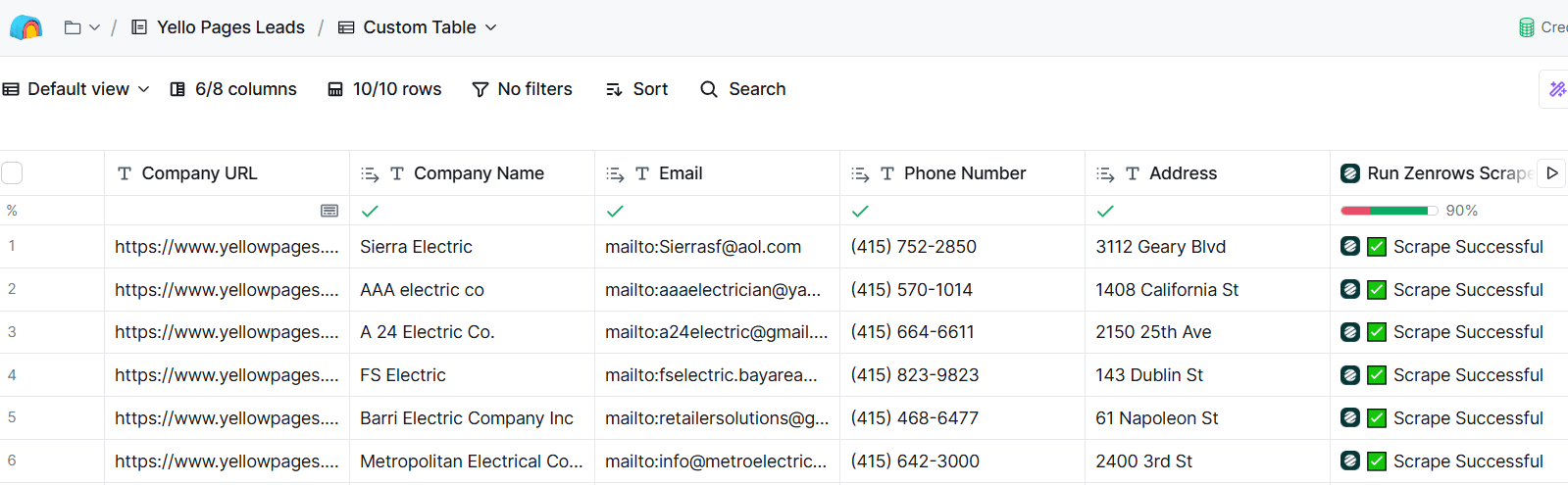
Bravo! 🎉 Your Clay table is now enriched with lead contacts using Zenrows.
Conclusion
You've learned the practical steps to scrape contact details for lead generation, including the solution to avoid getting blocked. You've also seen some relevant data sources for scraping leads for your B2B marketing efforts.
Always keep in mind that most quality lead contacts are hidden behind anti-bot walls, which can disrupt lead contact scraping. To build a reliable contact scraper that scales effortlessly without limitations, we recommend using Zenrows, an all-in-one scraping solution that fits your scraping needs.
Try Zenrows for free now or speak with sales!
FAQ
Is scraping business directories for contacts legal?
Scraping business directories for generating lead contacts is legal as long as you only extract public data and don't misuse it. Always check a site's terms of use before scraping it, and ensure you abide by relevant data privacy laws.
How can I find and scrape contact information for a website?
To find and scrape contact information from a website, start by identifying the pages where contact details are typically listed, such as "Contact Us," "About," team pages, or company directories. Use a web scraping tool to extract relevant data such as emails, phone numbers, or social media links by targeting the appropriate HTML elements or CSS selectors. Since most websites will likely block basic scrapers, using a robust API like Zenrows helps you avoid detection and access the information you need reliably.
What's the best platform for scraping contacts for lead generation?
The best platform for scraping contacts for lead generation depends on your specific needs and the scale of your project. For instance, if your team's outreach is focused on, say, tech startups, Crunchbase or AngelList might be better than Yellow Pages. For local services, Yelp or Yellow Pages could be ideal.
Why do I need to scrape lead contacts?
Scraping lead contacts lets you quickly and efficiently gather large volumes of potential customer information from multiple sources. This enables your team to scale outreach far beyond what manual research can. By automating the process, you free up valuable time and resources, allowing your team to focus on higher-value tasks, like closing deals, rather than repetitive data collection. This scalability and automation give your business a competitive edge in identifying, reaching, and converting new leads.