
7 Ways to Find All the URLs on a Domain or Website
Learn 7 different techniques to find and extract all the URLs on a domain. Pick the best method for your use case based on our verdicts.



URL discovery often determines how much data your scraper actually collects. A scraping task can look successful, but key sections, deeper pages, or links that appear only after interactions or JavaScript rendering often never make it into the crawl queue.
In this article, you’ll see why a complete URL list matters and learn seven ways to find all URLs on a site or domain so you don’t miss data when scraping.
Why Get All URLs From a Website
Getting a complete list of URLs has many uses. Here are the main ones.
- Build a complete crawl queue. A full URL list works as a to-do list for your scraper. You line up every product page, category, article, etc., before you start sending requests, rather than discovering URLs on the fly. This gives you a concrete checklist to verify against, so you can confirm that every target page was actually scraped.
- Audit a site for broken links, redirects, and orphan pages. You can only audit what you know exists. Having all URLs lets you test them in bulk to identify and remove 404s, redirect chains, and pages with no inbound links.
- Plan migrations and create redirect maps. During a domain change, HTTPS rollout, or CMS migration, a complete list of current URLs helps you map old paths to new ones, design redirect rules, and confirm that no important pages disappear after the switch.
- Define clear inclusion and exclusion rules for your scraper. With all URLs in front of you, patterns stand out: category paths, pagination markers, filter parameters, and unwanted paths like login or cart pages. You can turn those patterns into allow and deny rules, so your scraper spends time only on URLs that carry the required content.
- Monitor content and structure changes over time. If you save URL lists from each crawl, you can compare them to see what changed between runs. New sections, retired areas, or different URL schemes appearing may indicate that you need to update your scraper to align with downstream datasets for the target site.
- Control costs and performance on large scraping jobs. Scraping at scale is expensive when you repeatedly encounter duplicate URLs, infinite filter paths, or redirect loops. A clean URL inventory lets you deduplicate and trim deep, low-value paths before you start, so each request is more likely to hit a valid page without duplicating data.
Skip the blocks. Try Zenrows free and get clean web data without the anti-bot fight.
Method Selection Matrix
Choosing a URL discovery method depends on how much technical effort you can invest, how much control you need over crawl scope and filters, and how complete your URL list needs to be. This table gives a quick snapshot of all seven methods we'll cover in this article.
| Method | Technical Effort | Best For | URL Discovery Coverage |
|---|---|---|---|
| Use Sitemaps and robots.txt | Low | Finding URLs for important pages (products, categories, articles) when the site has an up-to-date XML sitemap | Medium |
| Use Google Search to Find URLs | Low | Finding URLs for indexed pages and URL patterns (sections, paths, parameters) from search results | Medium |
| Use an Online Website Crawler | Low | Finding URLs across a small or mid-size site or domain | High |
| Use Your Browser’s Built-In Tools | Medium | Finding URLs on a single page or a small group of pages while inspecting the rendered DOM | Low |
| Use a Browser Extension | Low | Finding URLs on a few related pages directly in the browser without using DevTools or code | Medium |
| Using a Custom Link Extractor | High | Finding URLs across a domain or site with full control over crawl scope, filters, and output | High |
| Use a Web Scraping API to Find all URLs | Medium | Finding URLs on JavaScript-heavy and protected domains or sites at scale | Maximum |
Now, let’s look closer at each method.
How To Find All the URLs on a Domain or Website
In this section, you’ll learn the most reliable ways to extract all URLs from a domain or website.
1. Use Sitemaps and robots.txt
Sitemaps and robots.txt are the two files websites publish specifically for crawlers. A sitemap is an XML file that lists URLs the site wants indexed. robots.txt tells crawlers which paths are allowed or disallowed and often points to the sitemap location.
Most small sites have a single sitemap containing <url> entries with a <loc> tag for each URL. For larger sites, a sitemap index usually points to multiple child sitemaps. Once you load a sitemap or sitemap index, you can extract every loc value and treat that list as an initial URL inventory.
For example, for Mozilla, you can find their sitemap at https://developer.mozilla.org/sitemap.xml. Here is what it looks like:
<sitemapindex xmlns="http://www.sitemaps.org/schemas/sitemap/0.9">
  <sitemap>
    <loc>https://developer.mozilla.org/sitemaps/en-us/sitemap.xml.gz</loc>
    <lastmod>2026-02-09</lastmod>
  </sitemap>

  <sitemap>
    <loc>https://developer.mozilla.org/sitemaps/es/sitemap.xml.gz</loc>
    <lastmod>2026-02-09</lastmod>
  </sitemap>

  <sitemap>
    <loc>https://developer.mozilla.org/sitemaps/fr/sitemap.xml.gz</loc>
    <lastmod>2026-02-09</lastmod>
  </sitemap>

  <!-- other sitemap entries omitted for brevity -->
</sitemapindex>
It contains a <sitemapindex> with one <sitemap> block per language. Each block has a location (<loc>) plus a last modified (<lastmod>) date. To turn this into URLs, download each sitemap.xml.gz by right-clicking the page and choosing "Save as", decompress it, and then read the inner sitemap, which contains <url> entries with <loc> tags for individual pages. That way, you skip straight to a complete, structured list instead of discovering those pages one click at a time.
When a sitemap.xml is missing or incomplete, check /robots.txt. It often contains one or more Sitemap: lines that reveal extra sitemap locations. robots.txt also lists Disallow paths, which tell you which sections exist but should not be crawled. You can use those paths to understand the site structure and to set clear include and exclude rules for later discovery steps.
This method works well when you want to find URLs for key sections the site already lists in XML sitemaps, such as products, categories, articles, etc. However, it does not help when the site lacks a sitemap, the sitemap is incomplete or outdated, or you need every internal or parameterized URL instead of a curated set.
Ensure you follow best practices for web scraping when crawling a site for URLs.
2. Use Google Search to Find URLs
Google Search is useful for finding URLs already indexed for a domain. It helps you find specific sections, such as /blog/ or /ecommerce/, and concrete URL formats, such as ?page= or category paths, that you can then add to your own URL list.
Start with the site: operator to keep results on one domain. For example, site:scrapingcourse.com shows pages Google has indexed for ScrapingCourse.
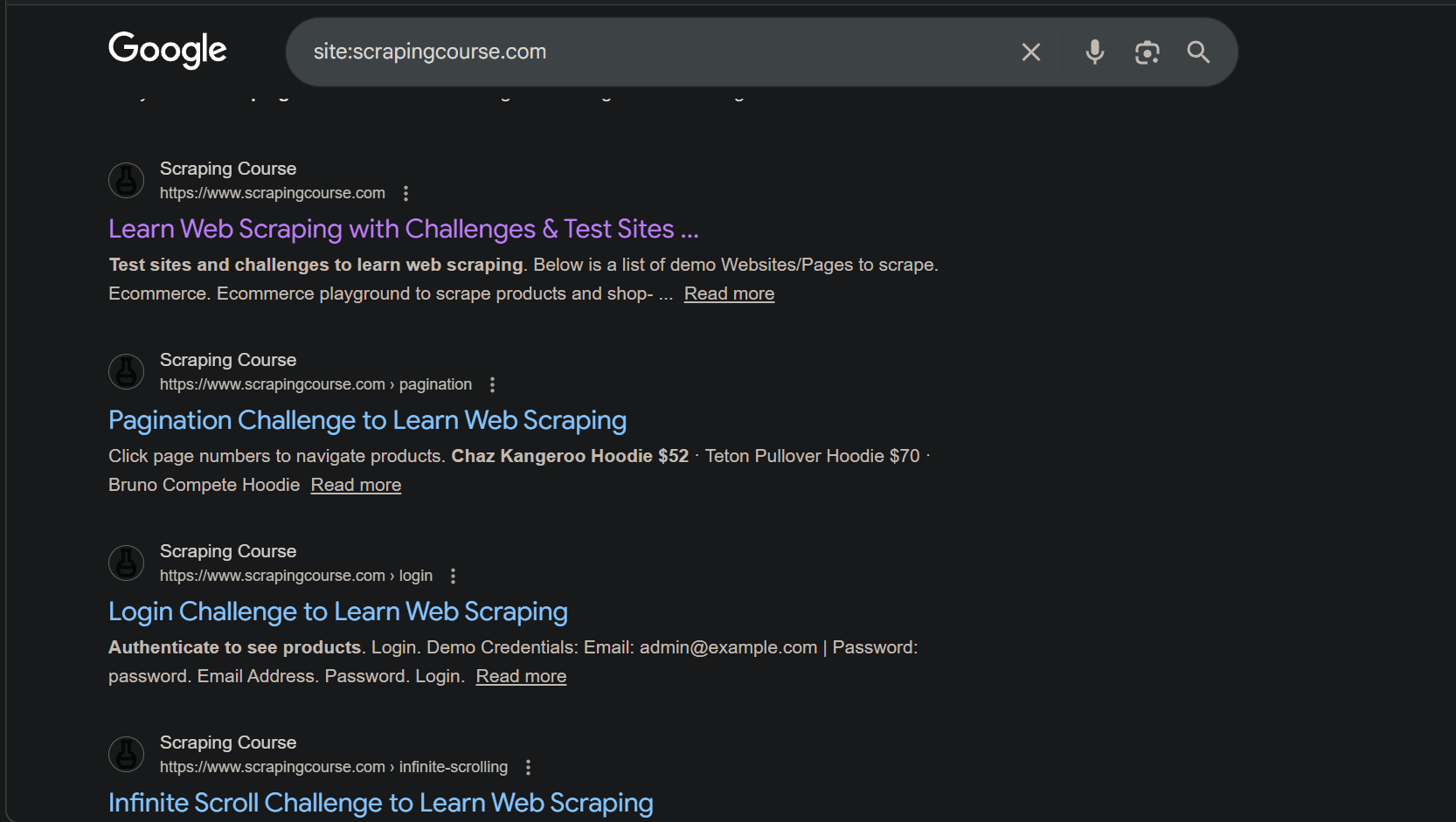
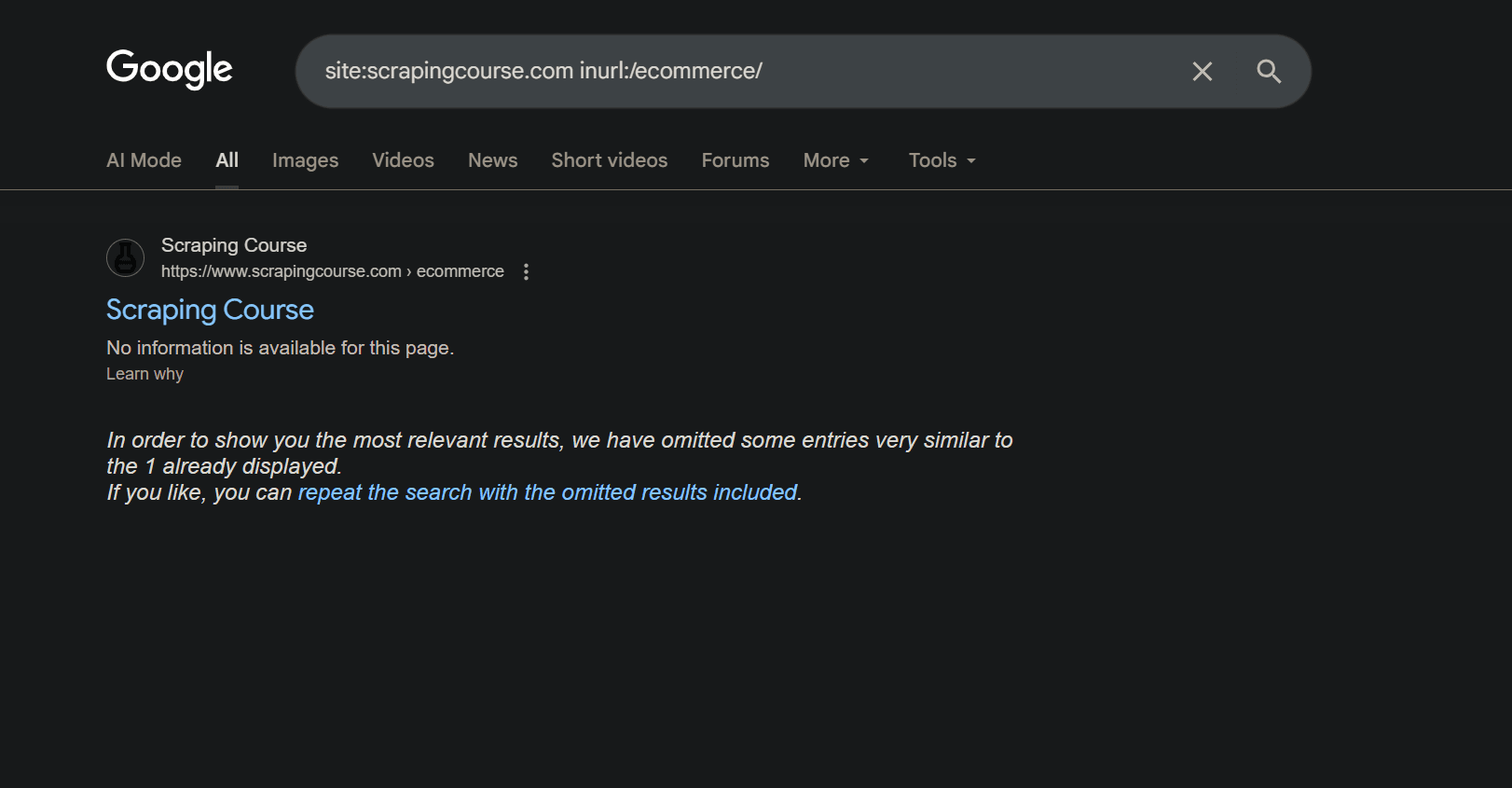
You can also narrow results with inurl, such as site:scrapingcourse.com inurl:/ecommerce/, to return only URLs under certain paths.
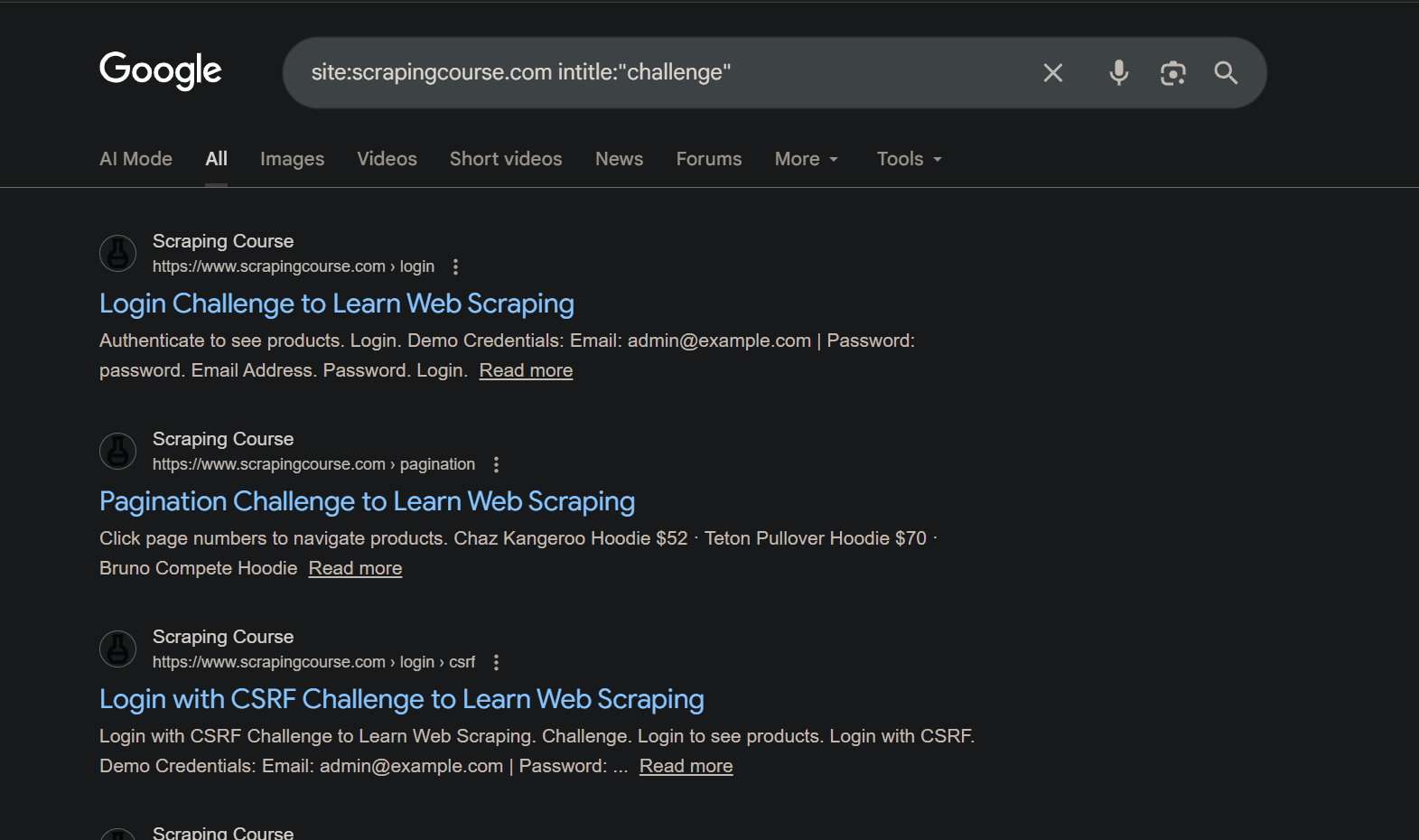
Another way to discover URLs is using the intitle: operator. It's useful when you want to find pages with a certain phrase in the title. For example, site:scrapingcourse.com intitle: "challenge" returns only the pages that contain the word challenge in their title.
Note
Google will not return every URL on the site. It only shows pages that are indexed and selected for display, and it can include outdated URLs that now redirect or return errors. Treat these queries as a discovery tool to add candidates to your URL list, not as a complete inventory.
3. Use an Online Website Crawler
Online website crawlers give you a way to discover a site's or domain URLs without writing code. They behave like search-engine crawlers: follow internal links on a domain, collect page-level data, and let you export a URL list for further use.
An example is WebsiteCrawler. You open the site, enter your base URL (the crawl's starting point), set how many pages you want to crawl, and start the scan. The crawler follows internal links from that starting point and returns all the links it finds. Here are sample results of crawling https://www.scrapingcourse.com/.
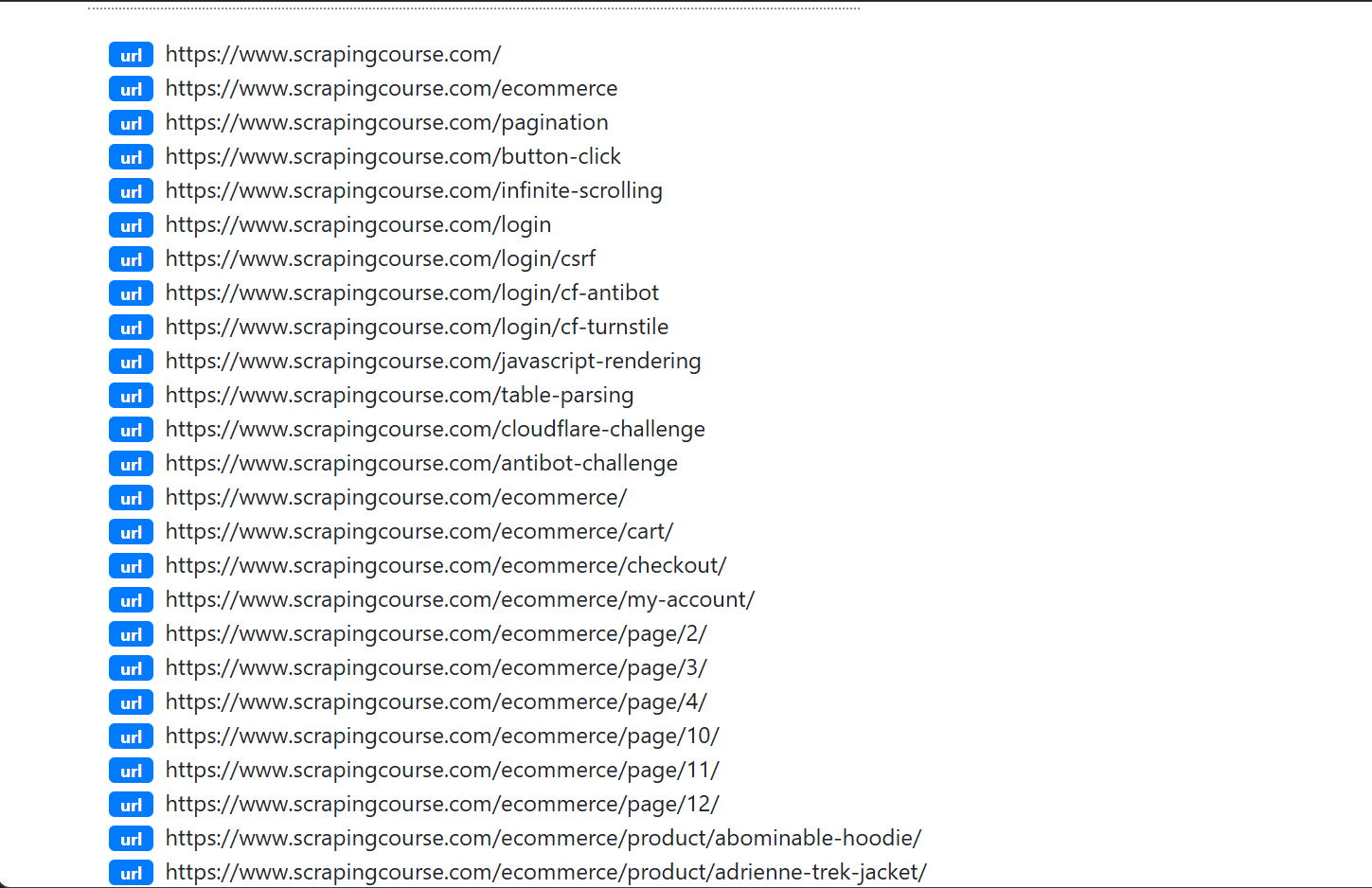
The trade-off with this method is that most tools limit the number of URLs you can crawl on a free plan. They also move finer controls and advanced features, such as JavaScript rendering and custom extraction, into paid tiers.
You also have less control because you must work within the URL filters, depth limits, and JS settings exposed by the UI, which can be a constraint for large or highly protected sites.
Online website crawlers are useful when you want to crawl small or mid-sized sites. However, they do not scale well for large crawling projects or frequent automated runs across many sites, where crawl limits, pricing, deeper crawl depths, or JavaScript settings become bottlenecks.
4. Use Your Browser’s Built-In Tools
If you need to find URLs on a single page, your browser’s DevTools are usually enough. Right-click anywhere on the page, choose "Inspect", then switch to the Console tab. In the Console, run the following JavaScript to collect every anchor href on the page.
[...document.querySelectorAll('a[href]')].forEach(a => console.log(a.href))
Let's test it on the Ecommerce Challenge page. When you run the code, the browser lists all links present on the page as shown:
https://www.scrapingcourse.com/ecommerce/#site-navigation
https://www.scrapingcourse.com/ecommerce/#content
https://www.scrapingcourse.com/ecommerce/
https://www.scrapingcourse.com/ecommerce/cart/
<!-- other URLs omitted for brevity -->
This method only works on what is currently visible to the browser. If the page loads more content with JavaScript, you need to scroll, click "Load more", or wait for the new content to appear, then run the code again to include those extra links.
Using a browser’s built-in tools is handy for finding URLs on a single page or a small group of pages if you’re comfortable with DevTools. However, it offers little value when you need to find URLs at scale or run URL discovery on a repeatable schedule.
5. Use a Browser Extension
Browser extensions help when you want to find URLs using the regular browser interface instead of writing code or interacting with the developer console. Many extensions can extract all URLs from the current page in your browser. In this section, we'll use Link Grabber, a Chrome extension that extracts URLs from the current page and displays them in a separate tab.
Install Link Grabber from the Chrome Web Store, open your target page (the ScrapingCourse e-commerce page in this case), click the extension icon, and the extension lists all the URLs it finds on that page. You should see results similar to this:
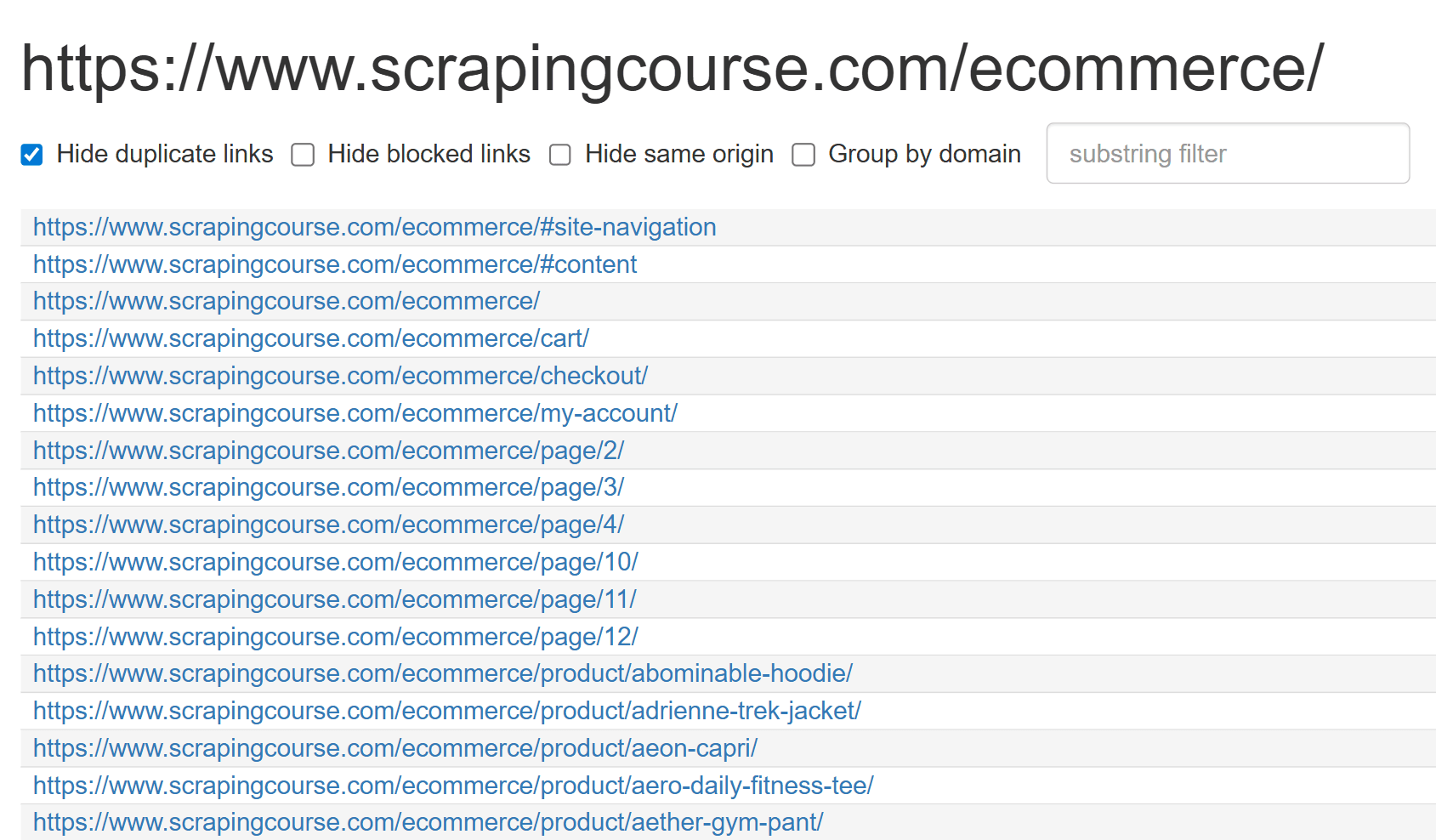
Some extensions extract URLs from multiple pages and have an option to copy or download the list as text or CSV. They let you define simple rules such as "follow the next page link" or "run on every open tab", then repeat the same link collection step on each page they visit. That gives you a lightweight way to collect URLs from a set of related pages without leaving the browser.
The trade-off is that these tools run inside your browser and are not designed for large-scale crawling. They work well for quick, small tasks, but they hit browser performance limits fast and struggle on JavaScript-heavy pages.
6. Using a Custom Link Extractor
If you want full control over which URLs you collect and how you crawl them, and you're comfortable working with code, you need to create a custom link extractor. Let’s see how you can create one using scrapingcourse.com as the target domain.
Related: How to Build a Web Crawler in Python
Step 1: Install the Required Libraries
Start by installing requests and BeautifulSoup.
pip3 install requests beautifulsoup4
You'll use requests to handle HTTP requests so you can download HTML pages and BeautifulSoup to parse the HTML.
Step 2: Import Libraries and Set Base Crawl Settings
Next, import the libraries you just installed together with a few standard modules that support the crawl. You'll need csv to write the final URL list to a file, time to add short delays between requests, deque from collections to hold the crawl queue, and URL helpers from urllib.parse to join, parse, and normalize URLs during discovery.
import csv
import time
from collections import deque
from urllib.parse import urljoin, urlparse, urlunparse

import requests
from bs4 import BeautifulSoup

# set the first page to crawl.
start_url = "https://www.scrapingcourse.com/"
# set crawl limits.
max_pages = 200
max_depth = 4
# add a short pause between requests.
delay = 0.1
timeout = 20
# print progress every n fetched pages.
log_every = 10
output_csv = "all_urls.csv"
user_agent = "Mozilla/5.0 (Windows NT 10.0; Win64; x64) AppleWebKit/537.36 (KHTML, like Gecko) Chrome/145.0.7632.46 Safari/537.36"

# keep crawl within the start path when true.
restrict_to_start_path = True
The configurations define the crawler’s scope and limits. They set the base URL where crawling starts, how many links away from that page the crawler is allowed to go, how many pages it can visit in total, and whether it should stay under the same path as the start page or scan the whole domain.
Step 3: Create Helper Functions
You’ll need helper functions that will normalize URLs, keep the crawl in scope, and write the discovered URLs to disk.
Create the first helper that will turn raw href values into absolute URLs. It resolves relative links against the current page, keeps only http and https, drops fragments so each page has one canonical URL, and normalizes empty paths to /.
# ...
def normalize_link(raw_link: str, page_url: str) -> str | None:
    # skip empty href values.
    if not raw_link:
        return None
    # convert relative links to absolute links.
    parsed = urlparse(urljoin(page_url, raw_link.strip()))
    # keep only http/https links.
    if parsed.scheme not in {"http", "https"} or not parsed.netloc:
        return None
    # drop fragments so one page has one canonical URL.
    parsed = parsed._replace(fragment="")
    # normalize empty paths to root.
    clean_path = parsed.path or "/"
    return urlunparse((parsed.scheme, parsed.netloc, clean_path, parsed.params, parsed.query, ""))
Next, add two helpers that handle domains and paths. The first normalizes hosts so a domain like www.scrapingcourse.com and scrapingcourse.com are treated as the same domain. The second checks whether a URL stays under the starting path or not, which is what lets you restrict the crawl to a section such as /blog/.
# ...
def canonical_host(host: str) -> str:
    # normalize www and non-www hosts to the same form.
    h = (host or "").lower()
    return h[4:] if h.startswith("www.") else h


def is_in_start_scope(url: str, scope_path: str) -> bool:
    # allow full-domain crawl when scope is root.
    if scope_path == "/":
        return True
    # otherwise allow only same path or child paths.
    path = (urlparse(url).path or "/").rstrip("/")
    base = scope_path.rstrip("/")
    return path == base or path.startswith(base + "/")
Finally, add a helper that writes the discovered URLs to a CSV file.
# ...
def save_csv(urls: list[str], path: str) -> None:
    # write discovered URLs as one row per URL.
    with open(path, "w", newline="", encoding="utf-8") as file:
        writer = csv.writer(file)
        writer.writerow(["url"])
        writer.writerows([[url] for url in urls])
It creates a single url column and stores one URL per row, so you can reuse the output as a crawl queue.
Step 4: Crawl the Domain and Extract Links
Create a function where the main crawl logic will live. It sets up a reusable HTTP session, seeds a queue with the start URL at depth 0, and then runs a breadth-first crawl. Each loop iteration fetches one page, checks that the response is HTML and successful, parses links with BeautifulSoup, normalizes them, filters to same-domain URLs within your path scope, and enqueues new URLs as long as they are within the depth and page limits.
# ...
def main() -> None:
    # build canonical domain once for same-domain checks.
    domain = canonical_host(urlparse(start_url).hostname or "")
    # reuse one session for faster repeated requests.
    session = requests.Session()
    session.headers.update({"User-Agent": user_agent})

    # normalize the seed URL before enqueuing.
    seed_url = normalize_link(start_url, start_url)
    if not seed_url:
        raise ValueError(f"Invalid start_url: {start_url}")
    # compute scope path once for optional path restriction.
    scope_path = (urlparse(seed_url).path or "/").rstrip("/") or "/"

    # store items as (url, depth) for breadth-first crawl.
    queue: deque[tuple[str, int]] = deque([(seed_url, 0)])
    # prevent duplicate queue entries.
    seen_or_queued: set[str] = {seed_url}
    # track all accepted URLs for output.
    discovered: set[str] = {seed_url}
    pages_fetched = 0
    started_at = time.time()

    print(f"Domain: {domain}")
    print(f"Limits: max_pages={max_pages}, max_depth={max_depth}, delay={delay}s")

    while queue and pages_fetched < max_pages:
        # pop oldest queued URL (breadth-first order).
        current_url, depth = queue.popleft()
        if depth > max_depth:
            continue

        if pages_fetched % log_every == 0:
            elapsed = time.time() - started_at
            rate = pages_fetched / elapsed if elapsed > 0 else 0.0
            print(f"Progress: fetched={pages_fetched}, queued={len(queue)}, discovered={len(discovered)}, rate={rate:.2f} pages/s")

        print(f"GET depth={depth} {current_url}")
        try:
            # follow redirects so extracted links come from the final page.
            response = session.get(current_url, timeout=timeout, allow_redirects=True)
        except requests.RequestException as exc:
            pages_fetched += 1
            print(f"ERROR request failed: {current_url} ({type(exc).__name__}: {exc})")
            if delay > 0:
                time.sleep(delay)
            continue

        pages_fetched += 1
        status_code = response.status_code
        content_type = (response.headers.get("Content-Type") or "").lower()
        final_url = str(response.url)

        # log redirect target so URL flow is visible.
        if final_url != current_url:
            print(f"Redirected to: {final_url}")
        # skip non-success and non-HTML pages.
        if status_code >= 400:
            print(f"SKIP status={status_code} content-type={content_type}")
            if delay > 0:
                time.sleep(delay)
            continue
        if not ("text/html" in content_type or "application/xhtml+xml" in content_type or content_type == ""):
            print(f"SKIP status={status_code} content-type={content_type}")
            if delay > 0:
                time.sleep(delay)
            continue

        # parse HTML and collect normalized anchor links.
        soup = BeautifulSoup(response.text, "html.parser")
        page_links: set[str] = set()
        base_for_links = final_url or current_url
        for anchor in soup.select("a[href]"):
            normalized = normalize_link(anchor.get("href"), base_for_links)
            if normalized:
                page_links.add(normalized)

        same_domain_links = 0
        newly_queued_links = 0
        # next links from this page move one level deeper.
        next_depth = depth + 1
        for link in page_links:
            host = canonical_host(urlparse(link).hostname or "")
            # keep only links on the same domain.
            is_domain_match = host == domain or host.endswith("." + domain)
            if not is_domain_match:
                continue
            # apply path scoping when enabled.
            if restrict_to_start_path and not is_in_start_scope(link, scope_path):
                continue
            same_domain_links += 1
            if link in discovered:
                continue
            discovered.add(link)
            if link not in seen_or_queued and next_depth <= max_depth:
                seen_or_queued.add(link)
                queue.append((link, next_depth))
                newly_queued_links += 1

        print(f"Found links={len(page_links)} kept_same_domain={same_domain_links} new_queued={newly_queued_links} total_urls={len(discovered)}")
        if delay > 0:
            time.sleep(delay)
This loop moves outward from the start URL one depth level at a time, only keeps HTML responses on the target domain and within the chosen path scope, and respects the page and depth limits you configured. The progress logs show how many URLs have been discovered, how many are still queued, and whether the extractor is still finding new pages.
Step 5: Finish the Crawl and Save URLs to CSV
The last step is to take all URLs stored in discovered, sort them consistently, and write them to your CSV file.
# ...
    elapsed = time.time() - started_at
    # sort output for stable CSV diffs.
    final_urls = sorted(discovered)
    save_csv(final_urls, output_csv)

if __name__ == "__main__":
    main()
The main block tells Python to call main() only when this file is executed as a script from the command line. If the file is imported from another module, main() is not called automatically.
Here is the full script in one place so you can copy it easily:
import csv
import time
from collections import deque
from urllib.parse import urljoin, urlparse, urlunparse

import requests
from bs4 import BeautifulSoup

# set the first page to crawl.
start_url = "https://www.scrapingcourse.com/"
# set crawl limits.
max_pages = 200
max_depth = 4
# add a short pause between requests.
delay = 0.1
timeout = 20
# print progress every n fetched pages.
log_every = 10
output_csv = "all_urls.csv"
user_agent = "Mozilla/5.0 (Windows NT 10.0; Win64; x64) AppleWebKit/537.36 (KHTML, like Gecko) Chrome/145.0.7632.46 Safari/537.36"
# keep crawl within the start path when true.
restrict_to_start_path = True


def normalize_link(raw_link: str, page_url: str) -> str | None:
    # skip empty href values.
    if not raw_link:
        return None
    # convert relative links to absolute links.
    parsed = urlparse(urljoin(page_url, raw_link.strip()))
    # keep only http/https links.
    if parsed.scheme not in {"http", "https"} or not parsed.netloc:
        return None
    # drop fragments so one page has one canonical URL.
    parsed = parsed._replace(fragment="")
    # normalize empty paths to root.
    clean_path = parsed.path or "/"
    return urlunparse((parsed.scheme, parsed.netloc, clean_path, parsed.params, parsed.query, ""))


def save_csv(urls: list[str], path: str) -> None:
    # write discovered URLs as one row per URL.
    with open(path, "w", newline="", encoding="utf-8") as file:
        writer = csv.writer(file)
        writer.writerow(["url"])
        writer.writerows([[url] for url in urls])


def canonical_host(host: str) -> str:
    # normalize www and non-www hosts to the same form.
    h = (host or "").lower()
    return h[4:] if h.startswith("www.") else h


def is_in_start_scope(url: str, scope_path: str) -> bool:
    # allow full-domain crawl when scope is root.
    if scope_path == "/":
        return True
    # otherwise allow only same path or child paths.
    path = (urlparse(url).path or "/").rstrip("/")
    base = scope_path.rstrip("/")
    return path == base or path.startswith(base + "/")


def main() -> None:
    # build canonical domain once for same-domain checks.
    domain = canonical_host(urlparse(start_url).hostname or "")
    # reuse one session for faster repeated requests.
    session = requests.Session()
    session.headers.update({"User-Agent": user_agent})

    # normalize the seed URL before enqueuing.
    seed_url = normalize_link(start_url, start_url)
    if not seed_url:
        raise ValueError(f"Invalid start_url: {start_url}")
    # compute scope path once for optional path restriction.
    scope_path = (urlparse(seed_url).path or "/").rstrip("/") or "/"

    # store items as (url, depth) for breadth-first crawl.
    queue: deque[tuple[str, int]] = deque([(seed_url, 0)])
    # prevent duplicate queue entries.
    seen_or_queued: set[str] = {seed_url}
    # track all accepted URLs for output.
    discovered: set[str] = {seed_url}
    pages_fetched = 0
    started_at = time.time()

    print(f"Domain: {domain}")
    print(f"Limits: max_pages={max_pages}, max_depth={max_depth}, delay={delay}s")

    while queue and pages_fetched < max_pages:
        # pop oldest queued URL (breadth-first order).
        current_url, depth = queue.popleft()
        if depth > max_depth:
            continue

        if pages_fetched % log_every == 0:
            elapsed = time.time() - started_at
            rate = pages_fetched / elapsed if elapsed > 0 else 0.0
            print(f"Progress: fetched={pages_fetched}, queued={len(queue)}, discovered={len(discovered)}, rate={rate:.2f} pages/s")

        print(f"GET depth={depth} {current_url}")
        try:
            # follow redirects so extracted links come from final page.
            response = session.get(current_url, timeout=timeout, allow_redirects=True)
        except requests.RequestException as exc:
            pages_fetched += 1
            print(f"ERROR request failed: {current_url} ({type(exc).__name__}: {exc})")
            if delay > 0:
                time.sleep(delay)
            continue

        pages_fetched += 1
        status_code = response.status_code
        content_type = (response.headers.get("Content-Type") or "").lower()
        final_url = str(response.url)

        # log redirect target so URL flow is visible.
        if final_url != current_url:
            print(f"Redirected to: {final_url}")
        # skip non-success and non-HTML pages.
        if status_code >= 400:
            print(f"SKIP status={status_code} content-type={content_type}")
            if delay > 0:
                time.sleep(delay)
            continue
        if not ("text/html" in content_type or "application/xhtml+xml" in content_type or content_type == ""):
            print(f"SKIP status={status_code} content-type={content_type}")
            if delay > 0:
                time.sleep(delay)
            continue

        # parse HTML and collect normalized anchor links.
        soup = BeautifulSoup(response.text, "html.parser")
        page_links: set[str] = set()
        base_for_links = final_url or current_url
        for anchor in soup.select("a[href]"):
            normalized = normalize_link(anchor.get("href"), base_for_links)
            if normalized:
                page_links.add(normalized)

        same_domain_links = 0
        newly_queued_links = 0
        # next links from this page move one level deeper.
        next_depth = depth + 1
        for link in page_links:
            host = canonical_host(urlparse(link).hostname or "")
            # keep only links on the same domain.
            is_domain_match = host == domain or host.endswith("." + domain)
            if not is_domain_match:
                continue
            # apply path scoping when enabled.
            if restrict_to_start_path and not is_in_start_scope(link, scope_path):
                continue
            same_domain_links += 1
            if link in discovered:
                continue
            discovered.add(link)
            if link not in seen_or_queued and next_depth <= max_depth:
                seen_or_queued.add(link)
                queue.append((link, next_depth))
                newly_queued_links += 1

        print(f"Found links={len(page_links)} kept_same_domain={same_domain_links} new_queued={newly_queued_links} total_urls={len(discovered)}")
        if delay > 0:
            time.sleep(delay)

    elapsed = time.time() - started_at
    # sort output for stable CSV diffs.
    final_urls = sorted(discovered)
    save_csv(final_urls, output_csv)

if __name__ == "__main__":
    main()
When you run the script, you see that not every URL is fetched successfully. Some pages return error 403.
<!-- output omitted for brevity -->

GET depth=1 https://www.scrapingcourse.com/login/csrf

<!-- output omitted for brevity -->

GET depth=1 https://www.scrapingcourse.com/table-parsing

GET depth=1 https://www.scrapingcourse.com/antibot-challenge
SKIP status=403

GET depth=1 https://www.scrapingcourse.com/login/cf-antibot
SKIP status=403

<!-- output omitted for brevity -->
When you open the CSV file named all_urls.csv, the data looks like this.
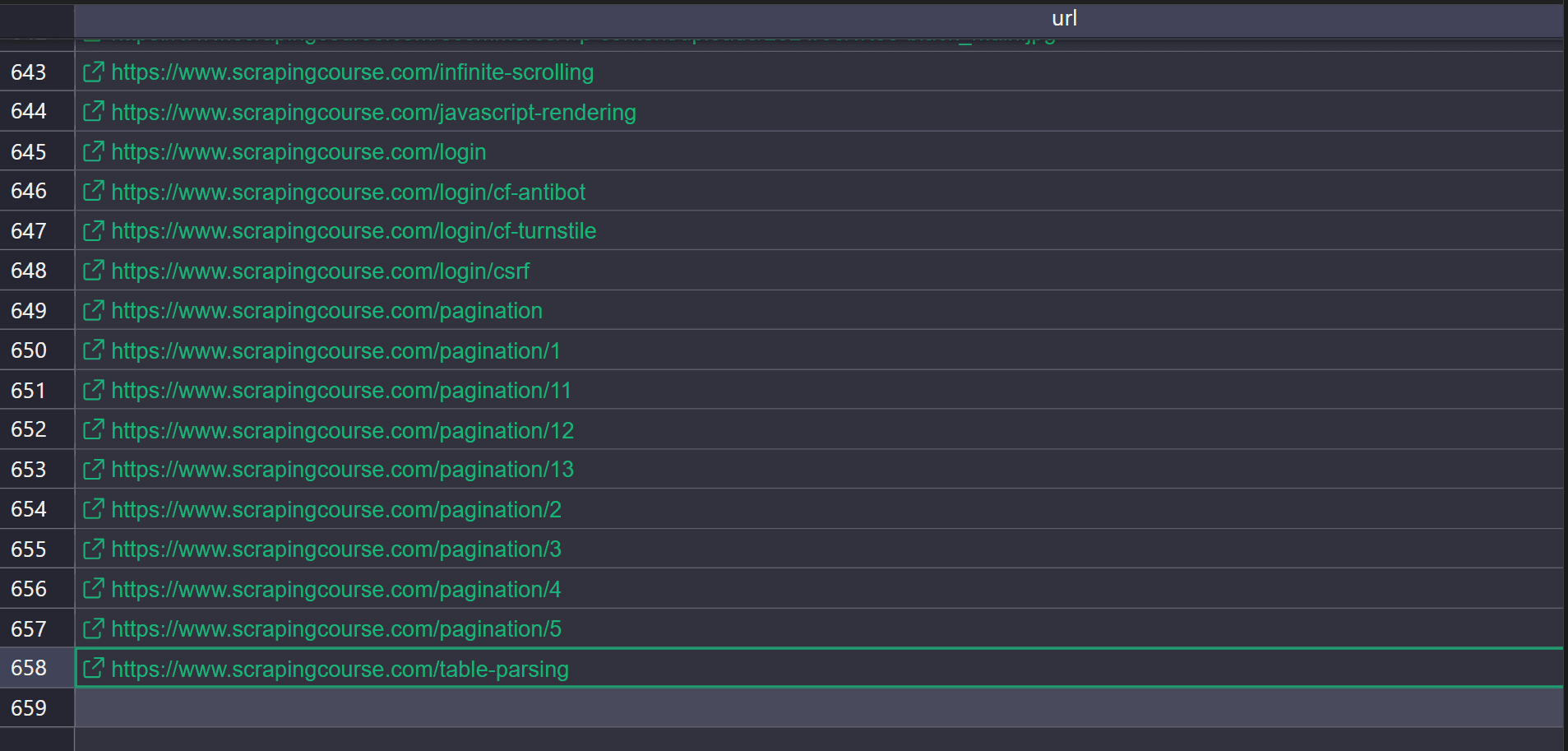
The scraper found 658 URLs from the Scrapingcourse domain.
The crawler failed to fetch all URLs because some pages require JavaScript rendering, and others are protected by anti-bot systems. For JS-rendered sites, you can switch the fetch step to a browser automation tool like Selenium or Playwright so a real browser runs the JavaScript and updates the DOM before you extract links.
The trade-off is that headless browsers like Selenium and Playwright still look like automation to many anti-bot systems, so you hit 403 forbidden errors and challenge pages more often.
Crawling using a custom scraper is useful when you want to crawl a site you understand well, need fine-grained filters for which URLs to keep, and can maintain the crawler. However, it's not reliable for crawling JavaScript-heavy or highly protected targets at scale, or for keeping up with layout changes and new anti-bot rules.
7. Use a Web Scraping API to Find all URLs
Not all websites provide clean access to their URLs. Some rely on heavy JavaScript, strict rate limits, or anti-bot systems that block basic crawlers from finding URLs. On those sites, a web scraping API is often the best option because it handles JavaScript rendering and automatic anti-bot bypass.
A web scraping API like Zenrows Fetch manages JavaScript rendering, proxy rotation, browser fingerprints, anti-bot bypass, and retries during crawling for you. It also lets you extract data using CSS selectors, and returns structured JSON, yielding a list of URLs or fields rather than raw HTML.
To see how it works, let's find all URLs on the Scrapingcourse JavaScript rendering page. Sign up for Zenrows, open the Request Builder, and paste the target URL into the URL field. Then set the mode to Adaptive Stealth Mode. In the CSS extractor section, add this selector.
"links": "a[href] @href"
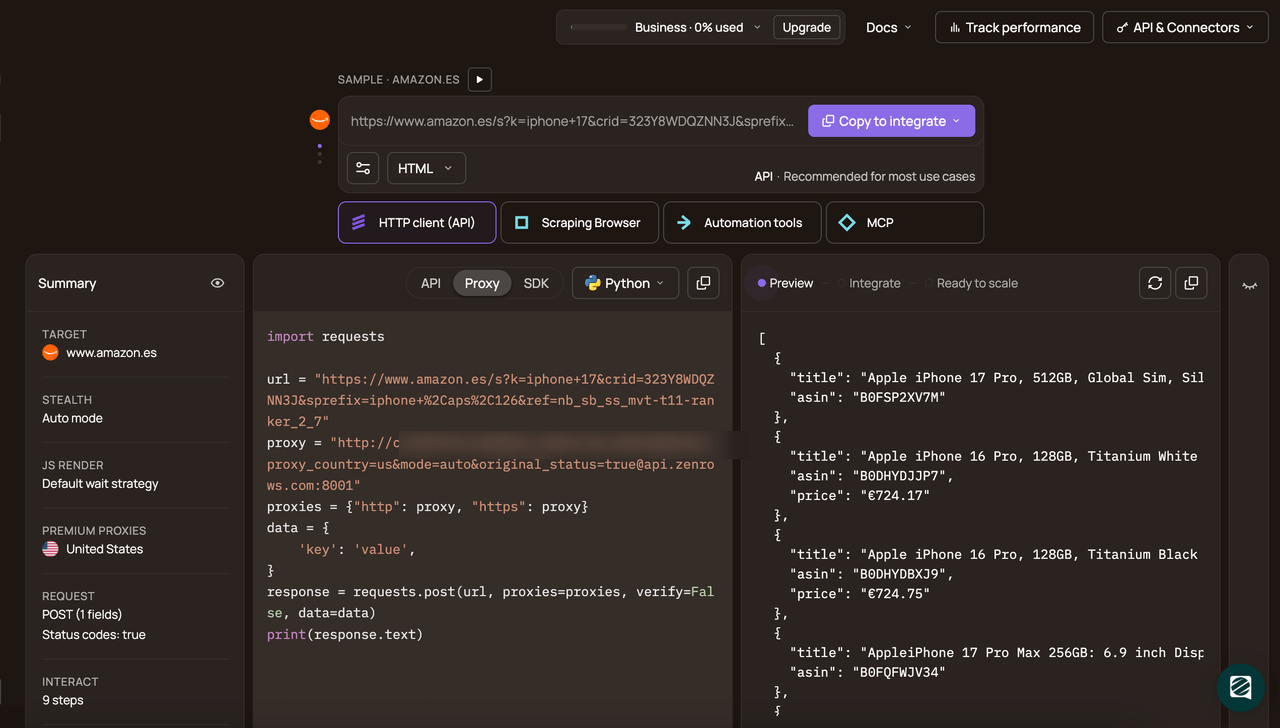
Then choose your programming language, for example, Python, pick API as the connection mode, and copy the generated code.
# pip install requests
import requests

url = 'https://www.scrapingcourse.com/javascript-rendering'
apikey = '<YOUR_ZENROWS_API_KEY>'
params = {
    'url': url,
    'apikey': apikey,
	'mode': 'auto',
	'css_extractor': """{"links":"a[href] @href"}""",
}
response = requests.get('https://api.zenrows.com/v1/', params=params)
print(response.text)
When you run the code, the output is as follows.
{
  "links": [
    "https://scrapingcourse.com/ecommerce/product/chaz-kangeroo-hoodie",
    "https://scrapingcourse.com/ecommerce/product/teton-pullover-hoodie",
    <!-- other URLs omitted for brevity -->
    "https://scrapingcourse.com/ecommerce/product/grayson-crewneck-sweatshirt",
    "https://scrapingcourse.com/ecommerce/product/ajax-full-zip-sweatshirt"
  ]
}
Now switch the target URL to the antibot challenge one that the custom crawler failed to fetch earlier. When you run the code, the output should be similar to this. This is because the target page has only one URL.
{
  "links": [
    "https://www.scrapingcourse.com"
     ]
}
Congratulations 🎉 You’ve fetched all URLs behind JavaScript-rendered and anti-bot-protected pages.
Crawling with web scraping APIs is the best option when you want to find URLs on JavaScript-heavy or protected sites at scale, while keeping discovery stable as defenses change. However, they're paid tools and may be overkill if the target site doesn't use anti-bot protection, and you only need a quick tool to find all the URLs from a domain.
Conclusion
In this article, you learned why a complete URL list matters and how missing URLs can quietly break scraping runs. You also learned different ways to find all URLs on a site or domain.
If you’re collecting URLs at scale across many sites, self-hosted crawlers and manual anti-bot tuning won’t stay reliable for long as targets change. A web scraping API like Zenrows Fetch is a better option because it handles JavaScript rendering, proxy rotation, anti-bot bypass, and structured JSON extraction behind a single endpoint.
Try Zenrows for free or speak with sales!
FAQ
What’s the fastest way to find all URLs on a website?
The fastest way is to use the site’s sitemap and extract every URL from it. But sitemaps often don’t list every page, so if you want to map the full site, a web scraping API is usually faster because it can handle JavaScript rendering and bypass anti-bot checks, so URL discovery doesn’t stall on 403 errors.
Why doesn’t sitemap.xml include every URL?
Sitemaps are curated. Many sites only list canonical, SEO-relevant pages and skip search results, filter combinations, internal tools, or legacy sections. Others are outdated or misconfigured, so new pages never get added, which is why you should treat sitemaps as a starting point, not the only source of URLs.
How do you find URLs on JavaScript-heavy sites?
If links only appear after JavaScript runs, HTML-only extraction misses them because those links aren’t in the initial response. In that case, use a browser automation tool such as Selenium or a web scraping API to retrieve the URLs.
How do I avoid crawl traps?
To avoid crawl traps, block URL patterns that generate near-infinite combinations, such as faceted filters, calendars, and internal search result pages. Put hard limits in your crawler, including max depth, max pages, and strict allow and deny rules for query parameters, because these patterns can multiply URL counts.