
How to Scrape Google Maps Data
Learn to scrape Google Maps listing data, including location, ratings, contact details, and more. Scale your Google Maps scraper without limitations.



Scraping Google Maps lets you extract location-based data, including business ratings, pricing, reviews, contact information, and more. But how can you approach it without risking being blocked by Google's anti-bot measures?
In this article, you'll learn the step-by-step techniques of creating a reliable, scalable Google Maps scraper that handles top technicalities, such as anti-bot evasion and dynamic behavior like infinite scrolling.
What Data Types Can You Extract From Google Maps?
Google Maps allows users to discover physical businesses within a given geographical area. It reveals location coordinates, business information, data points on how customers have experienced these businesses, and more. Scraping Google Maps data is relevant to different use cases, depending on your goal.
Related: How to Build a Reliable Contact Scraper for B2B Lead Generation
We've categorized the data points you can scrape from Google Maps into example use cases in the table below:
| Data Type | Use Cases |
|---|---|
| Customer reviews and ratings, owner responses, questions and answers | Sentiment analysis, competitive analysis, market research, reputation management, recommender system |
| Business contact information and address, social links, business hours | Lead generation, business verification |
| Location coordinates, directions, and route and traffic information | General logistics, route planning, delivery optimization |
| Pricing data and payment methods | Price comparison, budget applications |
| Street views, User photos, 360° images | Virtual visual tours, real-estate neighborhood intelligence |
| Nearby places | Demand and supply personalization, location-based marketing |
| Timezone data | Personalized customer call scheduling and notifications |
Now, let's scrape data from Google Maps in the next section.
Skip the blocks. Try Zenrows free and get clean web data without the anti-bot fight.
Scrape Google Maps Data with Zenrows
In this tutorial, you'll first scrape Google Maps listings (specifically hotels in New York) using Zenrows Fetch. You'll then extract specific data from each result, including names, addresses, phone numbers, prices, and ratings.
Zenrows is an all-in-one web scraping solution that lets you extract data from any website at scale without getting blocked. With zero manual effort, Zenrows enables you to scrape Google Maps without being blocked by reCAPTCHA, JavaScript challenges, or other anti-bot measures. This auto-scaled, auto-managed infrastructure lets you focus on outcomes and decision-making rather than wasting time on bug fixes and anti-detection measures.
Prerequisites
You'll need the following tools for this Google Maps scraping tutorial:
- A Zenrows account: To get started, sign up for free on Zenrows and get your API key.
- Python: This tutorial uses Python. Download and install the latest version from Python's download site if you haven't done so already.
- Requests: You'll also need Python's Requests library for HTTP requests.
Install the Requests library using pip:
pip3 install requests
Once you've set up these requirements, you're ready to build a Google Maps scraper.
Step 1: Get a Google Places Search URL
The first step is to get the URL of the places you want to search. When you launch Google Maps, you can search for specific places or business listings within a particular location.
To get the listing URL, use the Google Maps search bar to search for "hotels in New York." Google Maps will list all the hotels around New York, including their business information.
Once the listing loads, look at your browser's search bar, and you'll see the search URL of that specific query. Copy this URL and paste it into your scraper script.
Here's a formatted version of the search URL for the "hotels in New York" query:
search_url = "https://www.google.com/maps/search/hotels+in+new+york/"
Open that URL directly in your browser, and you'll see it loads the requested places.
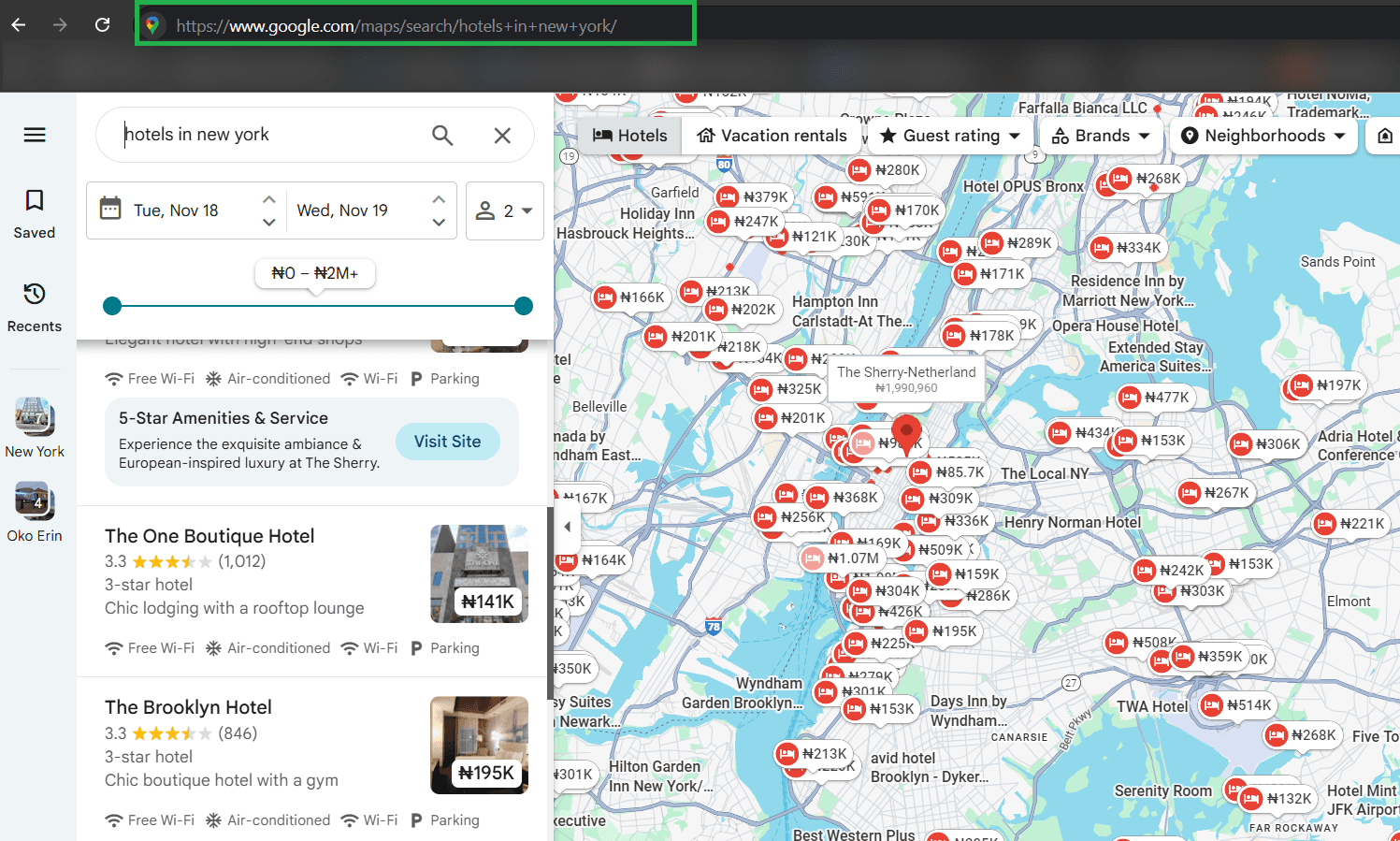
Each Google Maps search result has its own URL. For instance, clicking a listing in the search results displays its information.
You'll send a request to the generated search URL to extract the link leading to each hotel's listing page. But first, configure your scraping parameters on Zenrows.
Step 2: Define Your Scraping Parameters
The next step is to build a basic scraping request from Zenrows.
Build your request parameters by going to the Zenrows Fetch Request Builder. Paste the Google Maps listing URL in the link box. Then, activate Premium Proxies and JS Rendering for a high success rate. Since the search is within the US, select the United States as your proxy country.
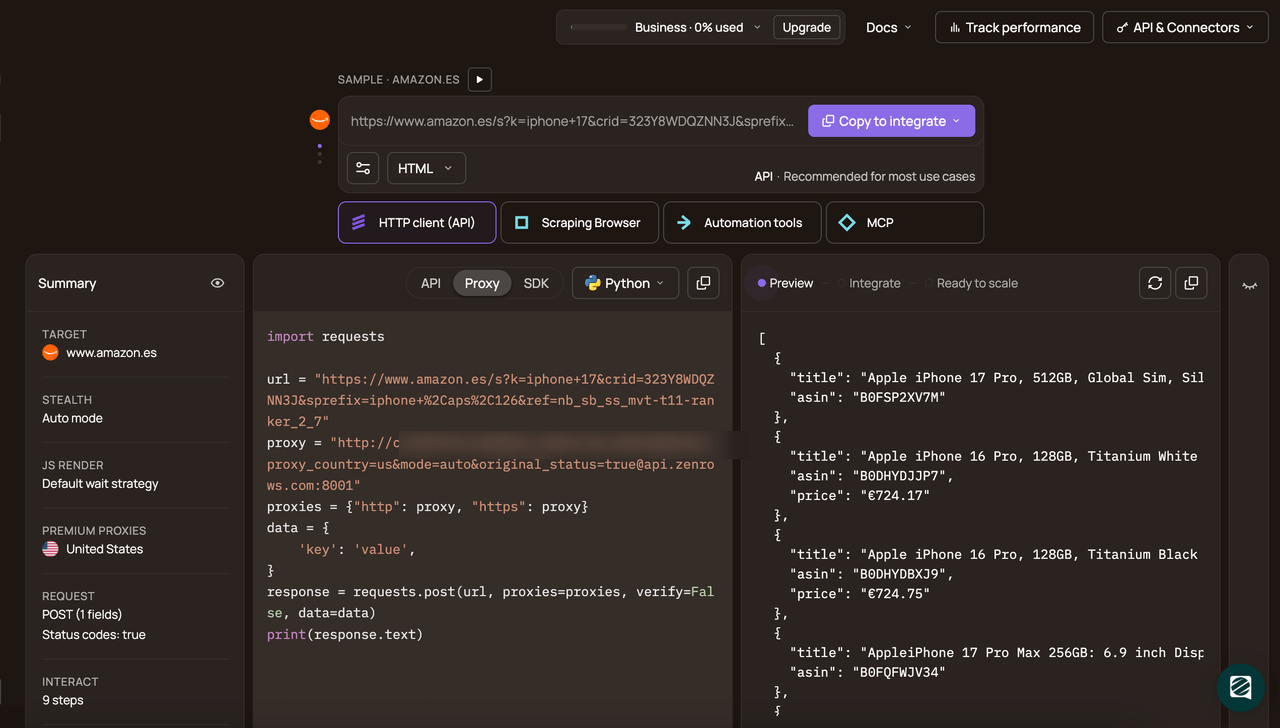
Select Python as your programming language and choose the API connection mode. Copy and paste the generated code into your scraper script.
Here's the generated code:
# pip3 install requests
import requests

url = "https://www.google.com/maps/search/hotels+in+new+york/"
apikey = "<YOUR_ZENROWS_API_KEY>"
params = {
    "url": url,
    "apikey": apikey,
    "js_render": "true",
    "premium_proxy": "true",
    "proxy_country": "us",
}
response = requests.get("https://api.zenrows.com/v1/", params=params)
print(response.text)
Next, you'll modify the above code to scrape Google Maps listings.
Step 3: Scrape Google Maps Places
To scrape data from the Google Maps listings, you'll first need to scrape their individual URL.
Modify the generated code by inserting it into a listing_scraper function that accepts a url parameter. The function returns the data in JSON format:
# ...

# get hotel listings from search results page
def listings_urls_scraper(url):
    params = {
        "url": url,
        "apikey": apikey,
        "js_render": "true",
        "premium_proxy": "true",
        "proxy_country": "us",
    }
    response = requests.get("https://api.zenrows.com/v1/", params=params)
    return response.json()
Next, use Zenrows css-extractor feature to parse and extract the required data from the target site using CSS selectors.
As seen in the browser DevTools inspection, the CSS selector of the element containing the URLs is .a.hfpxzc:
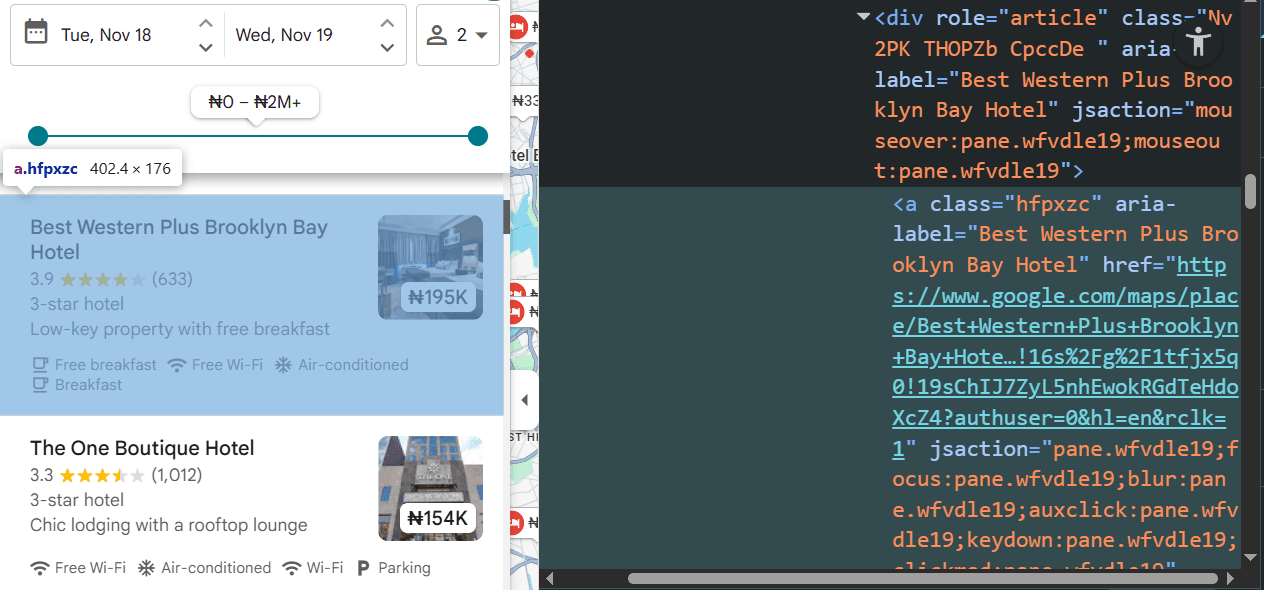
Note
The CSS selectors used in this article might change at the time of reading. Ensure you double-check to see that you're targeting the correct one.
You'll scrape the URLs by targeting the href attribute of this element. Add Python's built-in json package to your imports, as you'll use it to convert parameters like css_extractor and js_instructions into JSON strings. Then, define the CSS selector, stringify it, and add it to params as css_extractor:
# ...
import json

# scrape hotel listing URLs from search results page
def listings_urls_scraper(url):
    # ...

    # define CSS selector for URL extraction
    css_selector = {"url": "a.hfpxzc @href"}

    # add css_extractor to params
    params["css_extractor"] = json.dumps(css_selector)
    # ...
Since Google Maps requires infinite scrolling to expose more listings, you'll also use the js_instructions parameter to automate scrolling within the listing section. You'll need to write a custom JavaScript that focuses the listings section and scrolls within it. Here's the scrolling js_instruction:
{
    "evaluate": "var el=document.querySelectorAll('.m6QErb.DxyBCb.kA9KIf.dS8AEf.XiKgde.ecceSd')[1]; if(el){ el.scrollTop += el.scrollHeight; }"
}
The above instruction only simulates a one-time vertical scroll. To scroll continuously, execute the infinite-scrolling instruction for a specified number of iterations. Then, gradually load more content with each scroll by adding a reasonable wait time per instruction. You can achieve this by appending js_instructions to a list on each iteration and adding the instructions to the params:
# ...

# scrape hotel listing URLs from search results page
def listings_urls_scraper(url):
    # ...

    # scrolling parameters
    scrolls = 10
    wait_time = 2000
    js_instructions = []

    # generate scroll instructions per iteration
    for _ in range(scrolls):
        js_instructions.append(
            {
                "evaluate": "var el=document.querySelectorAll('.m6QErb.DxyBCb.kA9KIf.dS8AEf.XiKgde.ecceSd')[1]; if(el){ el.scrollTop += el.scrollHeight; }"
            },
        )
        js_instructions.append({"wait": wait_time})

    # add js_instructions to params
    params["js_instructions"] = json.dumps(js_instructions)

    # ...
Finally, execute the listings_urls_scraper function to extract Google Maps listing URLs:
# ...
print(listings_urls_scraper(search_url))
Combine the code snippets, and your code should look like the following at this point:
# pip3 install requests
import requests
import json

apikey = "<YOUR_ZENROWS_API_KEY>"

# search URL for hotels in New York
search_url = "https://www.google.com/maps/search/hotels+in+new+york/"


# scrape hotel listing URLs from search results page
def listings_urls_scraper(url):
    params = {
        "url": url,
        "apikey": apikey,
        "js_render": "true",
        "premium_proxy": "true",
        "proxy_country": "us",
    }

    # define CSS selector for URL extraction
    css_selector = {"url": "a.hfpxzc @href"}

    # add css_extractor to params
    params["css_extractor"] = json.dumps(css_selector)

    # scrolling parameters
    scrolls = 10
    wait_time = 1000
    js_instructions = []

    # generate scroll instructions per iteration
    for _ in range(scrolls):
        js_instructions.append(
            {
                "evaluate": "var el=document.querySelectorAll('.m6QErb.DxyBCb.kA9KIf.dS8AEf.XiKgde.ecceSd')[1]; if(el){ el.scrollTop += el.scrollHeight; }"
            },
        )
        js_instructions.append({"wait": wait_time})
    # add js_instructions to params
    params["js_instructions"] = json.dumps(js_instructions)

    response = requests.get("https://api.zenrows.com/v1/", params=params)
    return response.json()

print(listings_urls_scraper(search_url))
The above code simulates infinite scrolling using Zenrows' js_instructions and outputs the desired listing URLs, as shown:
{
    "url": [
        "https://www.google.com/maps/place/Holiday+Inn+Express+Newark+Airport+%E2%80%93+Elizabeth+by+IHG/data=!4m10!3m9!1s0x89c2529567254419:0x6bd284da13718e93!5m2!4m1!1i2!8m2!3d40.684595!4d-74.194036!16s%2Fg%2F11rbknw97k!19sChIJGUQlZ5VSwokRk45xE9qE0ms?authuser=0&hl=en&rclk=1",

        # ... omitted for brevity ...,
        "https://www.google.com/maps/place/Paramount+Times+Square+-+A+Generator+Hotel/data=!4m10!3m9!1s0x89c258543f40379b:0xae966f416e2d9099!5m2!4m1!1i2!8m2!3d40.759535!4d-73.9870088!16s%2Fm%2F03gq7v4!19sChIJmzdAP1RYwokRmZAtbkFvlq4?authuser=0&hl=en&rclk=1",
    ]
}
Great job! You've extracted the hotel listing URLs from Google Maps. You'll now scrape data from each page in the next section.
Step 3: Extract Specific Data: Name, Phone, Address, Ratings, and More
Loading any of the extracted URLs in a browser opens a dedicated page detailing more information about that listing. Here's what a hotel's listing page looks like on Google Maps:
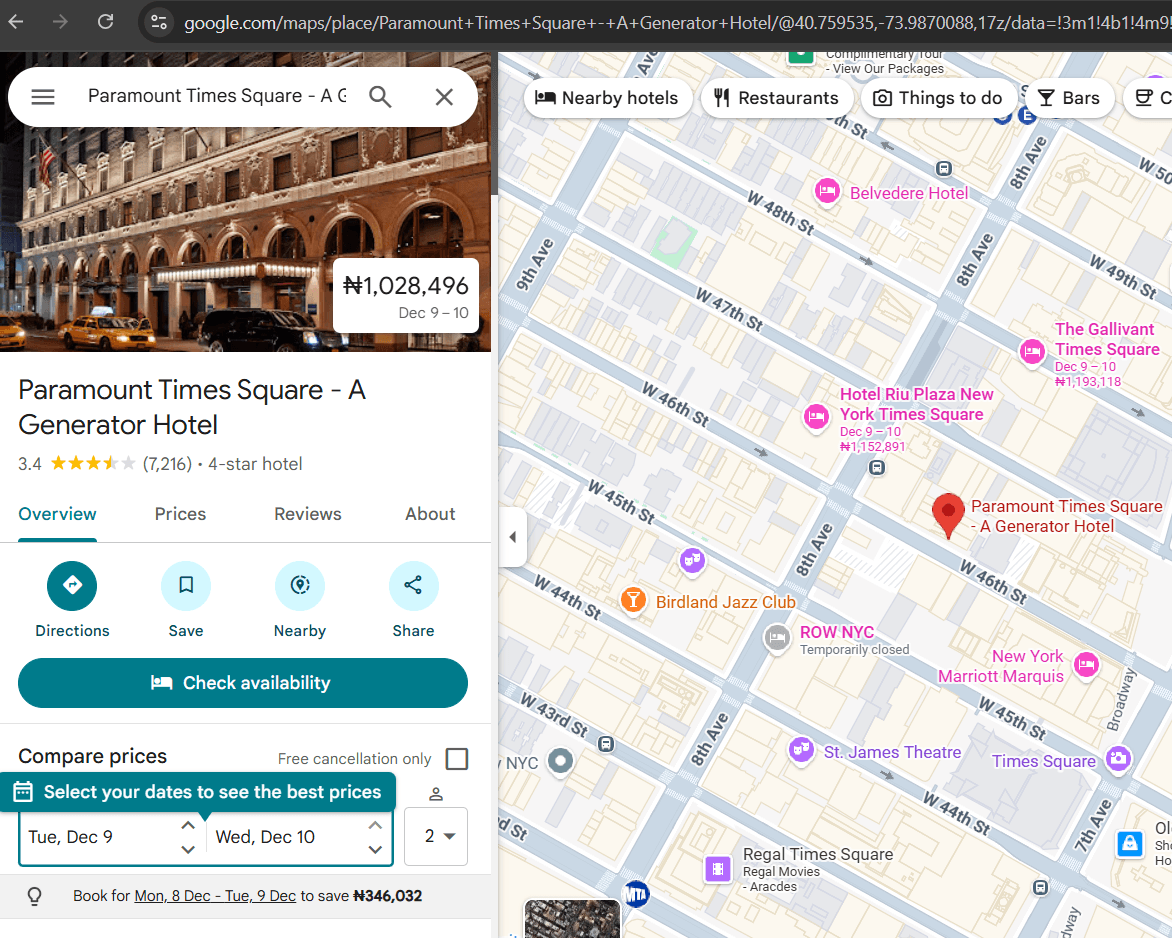
Next, define the CSS selectors of the elements you want to scrape. You can obtain the CSS selectors by inspecting a listing page in the browser's DevTools.
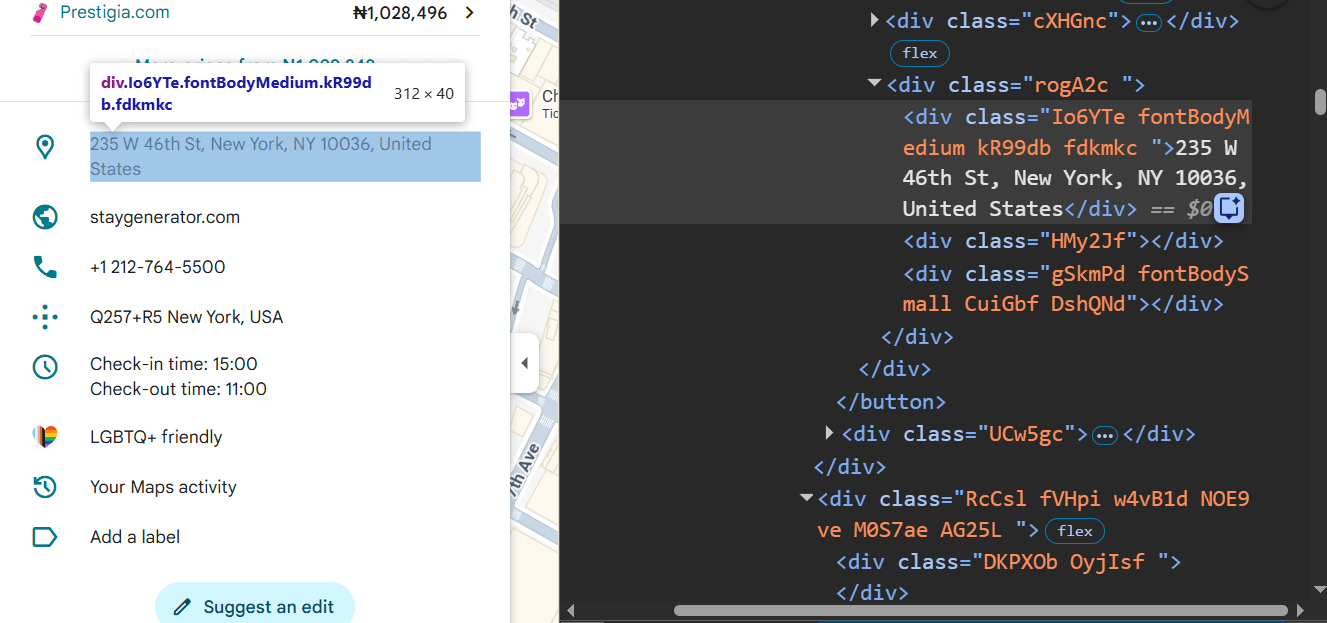
You'll extract specific data points, including ratings, pricing, check-ins and outs, address, phone number, and more from each page.
Obtain the CSS selector for each target element and add it to a css_selectors dictionary. Here's what the CSS selectors look like:
css_selectors = {
    "name": "h1.DUwDvf.lfPIob",
    "address": ".RcCsl:nth-child(3) .Io6YTe",
    "phone": ".RcCsl:nth-child(5) .Io6YTe",
    "website_url": ".RcCsl:nth-child(4) a.CsEnBe @href",
    "check_in_out": ".RcCsl:nth-child(7) .Io6YTe",
    "ratings": ".ceNzKf @aria-label",
    "number_of_ratings": ".F7nice > span:nth-of-type(2)",
    "price": "div.dkgw2 span.fontTitleLarge.Cbys4b",
    "hotel_star": "span.mgr77e",
}
Next, create a listing_page_scraper function and define your request parameters within it. As the ratings element is highly dynamic, we've included a wait_for parameter to wait for it before scraping.
# ...
# function to scrape business data from each URL
def listing_page_scraper():
    # set up request parameters
    params = {
        "apikey": apikey,
        "js_render": "true",
        "premium_proxy": "true",
        "proxy_country": "us",
        "wait_for": ".ceNzKf",
    }
Specify your CSS selector dictionary, convert it to a JSON string, and add it to the params:
# ...
# function to scrape business data from each URL
def listing_page_scraper():
    # ...

    # define CSS selectors for data extraction
    css_selectors = {
        "name": "h1.DUwDvf.lfPIob",
        "address": ".RcCsl:nth-child(3) .Io6YTe",
        "phone": ".RcCsl:nth-child(5) .Io6YTe",
        "website_url": ".RcCsl:nth-child(4) a.CsEnBe @href",
        "check_in_out": ".RcCsl:nth-child(7) .Io6YTe",
        "ratings": ".ceNzKf @aria-label",
        "number_of_ratings": ".F7nice > span:nth-of-type(2)",
        "price": "div.dkgw2 span.fontTitleLarge.Cbys4b",
        "hotel_star": "span.mgr77e",
    }

    # add css_extractor to params
    params["css_extractor"] = json.dumps(css_selectors)
Obtain the listing URLs from the listings_urls_scraper function. Iterate over each URL to scrape its content. Append the extracted data to an empty listing_data list and return the entire data:
# ...

# function to scrape business data from each URL
def listing_page_scraper():
    # ...

    # get listing URLs
    urls = listings_scraper(search_url)["url"]

    # list to hold listing data
    listing_data = []

    # iterate over each URL and scrape listing data from Google Maps
    for url in urls:

        params["url"] = url

        response = requests.get("https://api.zenrows.com/v1/", params=params)
        data = response.json()

        listing_data.append(data)
    return listing_data
Execute the listing_page_scraper function and assign its return value to a data variable. You'll notice that the number of ratings (number_of_ratings) is wrapped in parentheses. You can apply basic formatting to remove it, as done below.
# ...

# execute the scraping process
data = listing_page_scraper()

# clean the number_of_ratings field
for item in data:

    number_of_ratings = item.get("number_of_ratings", "")
    item["number_of_ratings"] = number_of_ratings.replace("(", "").replace(")", "")
You're done with the scraping logic. Let's save the scraped data in the next step.
Step 4: Save the Extracted Data
Storing the data allows you to save it for further analysis, cleaning, sharing, or referencing. You can store the data locally or virtually on a dedicated database, Excel, or CSV file. We'll save it in a CSV file in this tutorial.
Add the csv package to your imports and update your code with the following block to store your Google Maps data in a CSV file:
# ...
import csv

# ...
# save the data to a CSV file
with open("listing_data.csv", "w", newline="", encoding="utf-8") as csvfile:
    fieldnames = data[0].keys() if data else []
    writer = csv.DictWriter(csvfile, fieldnames=fieldnames)

    writer.writeheader()
    for row in data:
        writer.writerow(row)
Finally, combine all the code snippets from all the steps, and you'll get the following complete code:
# pip3 install requests
import requests
import json
import csv

apikey = "<YOUR_ZENROWS_API_KEY>"

# search URL for hotels in New York
search_url = "https://www.google.com/maps/search/hotels+in+new+york/"

# scrape hotel listing URLs from search results page
def listings_urls_scraper(url):
    params = {
        "url": url,
        "apikey": apikey,
        "js_render": "true",
        "premium_proxy": "true",
        "proxy_country": "us",
    }

    # define CSS selectors for data extraction
    css_selector = {"url": "a.hfpxzc @href"}

    # add css_extractor to params
    params["css_extractor"] = json.dumps(css_selector)

    # scrolling parameters
    scrolls = 10
    wait_time = 1000
    js_instructions = []

    # generate scroll instructions per iteration
    for _ in range(scrolls):
        js_instructions.append(
            {
                "evaluate": "var el=document.querySelectorAll('.m6QErb.DxyBCb.kA9KIf.dS8AEf.XiKgde.ecceSd')[1]; if(el){ el.scrollTop += el.scrollHeight; }"
            },
        )
        js_instructions.append({"wait": wait_time})
    # add js_instructions to params
    params["js_instructions"] = json.dumps(js_instructions)

    response = requests.get("https://api.zenrows.com/v1/", params=params)
    return response.json()

# function to scrape business data from each URL
def listing_page_scraper():
    # set up request parameters
    params = {
        "apikey": apikey,
        "js_render": "true",
        "premium_proxy": "true",
        "proxy_country": "us",
        "wait_for": ".ceNzKf",
    }

    # define CSS selectors for data extraction
    css_selectors = {
        "name": "h1.DUwDvf.lfPIob",
        "address": ".RcCsl:nth-child(3) .Io6YTe",
        "phone": ".RcCsl:nth-child(5) .Io6YTe",
        "website_url": ".RcCsl:nth-child(4) a.CsEnBe @href",
        "check_in_out": ".RcCsl:nth-child(7) .Io6YTe",
        "ratings": ".ceNzKf @aria-label",
        "number_of_ratings": ".F7nice > span:nth-of-type(2)",
        "price": "div.dkgw2 span.fontTitleLarge.Cbys4b",
        "hotel_star": "span.mgr77e",
    }

    # add css_extractor to params
    params["css_extractor"] = json.dumps(css_selectors)

    # get listing URLs
    urls = listings_urls_scraper(search_url)["url"]

    # list to hold listing data
    listing_data = []

    # iterate over each URL and scrape business data from Google Maps
    for url in urls:

        params["url"] = url

        response = requests.get("https://api.zenrows.com/v1/", params=params)
        data = response.json()

        listing_data.append(data)
    return listing_data

# execute the scraping process
data = listing_page_scraper()

# clean the number_of_ratings field
for item in data:

    number_of_ratings = item.get("number_of_ratings", "")
    item["number_of_ratings"] = number_of_ratings.replace("(", "").replace(")", "")

# save the data to a CSV file
with open("listing_data.csv", "w", newline="", encoding="utf-8") as csvfile:
    fieldnames = data[0].keys() if data else []
    writer = csv.DictWriter(csvfile, fieldnames=fieldnames)

    writer.writeheader()
    for row in data:
        writer.writerow(row)
The above code simulates infinite scrolling to scrape Google Maps hotel listing URLs, visits each URL, and scrapes its data into a CSV file, as shown:
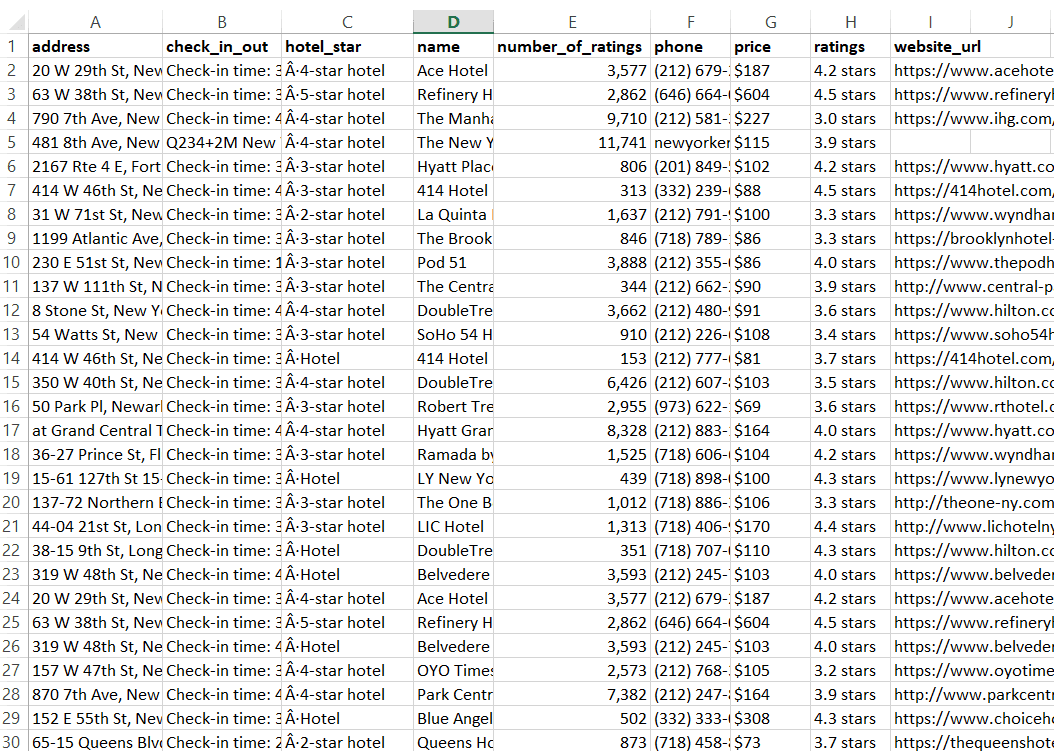
Congratulations! 🎉 You just built a Google Maps scraper with Python and Zenrows. You've set the pace for consistent, scalable, and uninterrupted Google Maps scraping.
Conclusion
You've learned the step-by-step techniques for scraping Google Maps, including implementing infinite scrolling, extracting specific Google Maps listing data, and saving it to a CSV file.
Since Google often deploys CAPTCHA and other anti-bot measures to block scrapers, the best way to successfully scrape Google Maps data is to use a web scraping service like Zenrows, as shown in this tutorial. Zenrows is your one-stop solution to effortlessly scrape any website at scale without getting blocked.
Try Zenrows for free now or speak with sales!
FAQ
Why scrape Google Maps Data?
Google Maps hosts a wealth of valuable business data, such as locations, contact details, reviews, ratings, business hours, and more. Scraping Google Maps allows businesses to:
- Analyze competitors and market trends.
- Generate sales leads and enrich CRM data.
- Optimize logistics and delivery routes.
- Monitor reputation through reviews and ratings.
- Discover new business opportunities and locations.
By extracting and analyzing this data, organizations can make informed decisions, improve their services, and gain a competitive edge.
Is it legal to scrape Google Maps data?
It's legal to scrape publicly available data that doesn't require authentication, such as Google Maps listings. However, always use scraped data responsibly, avoid infringing on intellectual property, and ensure compliance with local and regional data protection laws (such as GDPR). It’s also vital to follow ethical scraping best practices while scraping data from Google Maps.
Do I need proxies to scrape Google Maps?
Proxies are recommended when scraping Google Maps, as they increase anonymity and help you bypass restrictions, such as request rate limits.
Additionally, if you're looking to scrape Google Maps data for a specific region, it's best to use a proxy service with geolocation. Web scraping solutions like Zenrows include rotating premium proxies with built-in geolocation support out of the box.
How do I avoid getting blocked when scraping Google Maps?
The best way to avoid getting blocked and build a reliable Google Maps scraper is to mimic real user behavior and use advanced stealth techniques as much as possible. Managing these measures manually at scale can be challenging.
However, ready-made, auto-managed, auto-scaled scraping solutions, such as Zenrows, automatically bypass anti-bot measures and support the scraping of dynamic content. Using such solutions enables you to create a scalable Google Maps scraping system that doesn't get blocked.