
How to Scrape Google Reviews
Learn to scrape Google Reviews data from Google Maps, including review text, ratings, and more. Bypass detection and extract review data at scale.



Google Reviews reveal invaluable insights into customers' views and perceptions of a business. And scraping Google Reviews data is a smart way to access its wealth of information at scale.
In this article, you'll learn how to scrape Google Reviews from Google Maps and see how to scale up extraction to several listing pages using the best scraping approach.
- Scrape Google Maps Reviews from a single listing page.
- Scale up Google Maps Reviews to multiple pages.
Where to Find Google Reviews to Scrape
The best place to find Google Reviews is on business listing pages on Google Maps. Reviews have a dedicated section on each Google Maps listing.
To locate user reviews of a business, open the Google Maps listing page and click "Reviews". Scroll down infinitely on the Reviews panel, and you'll see the reviews.
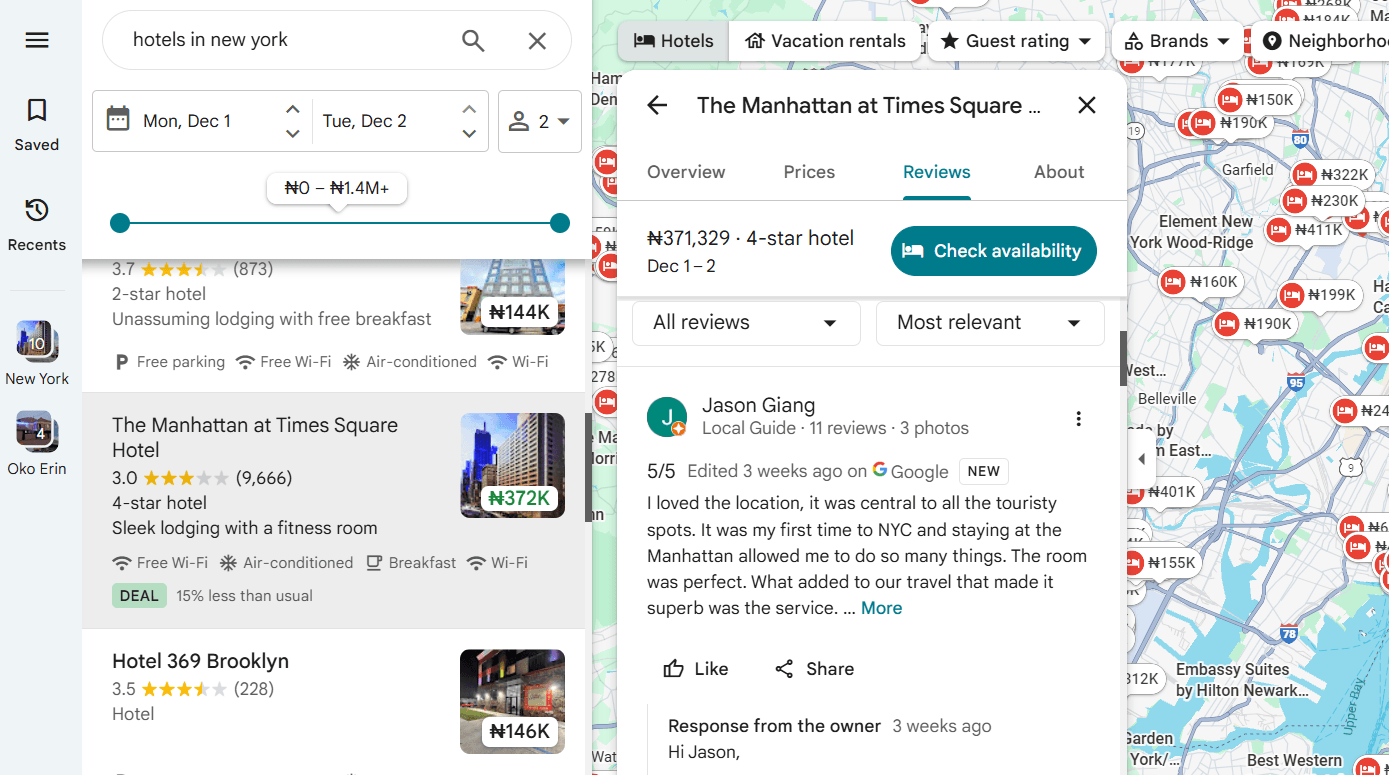
Since users must scroll infinitely to reveal more customer reviews on Google Maps, you need to design your scraping logic to scroll within the reviews panel. This enables you to extract reviewers' names, review texts, and other details that may be hidden behind the scroll bar.
Related: Dynamic Web Page Scraping With Python: A Guide to Scrape All Content
You'll learn how to go about the scraping logic in the next section.
Scraping Reviews from a Google Maps Listing Page
In this tutorial, you'll build a Google Reviews scraper using Python and Zenrows Fetch. You'll first extract reviews from a single hotel listing page, then scale to extract more reviews from a list of URLs.
Zenrows is an all-in-one web scraping solution that lets you extract data from any website at scale without getting blocked. Zenrows enables you to scrape Google Maps Reviews without being blocked by reCAPTCHA, JavaScript challenges, or other anti-bot measures with zero manual effort. Its auto-scaled, auto-managed infrastructure lets you focus on outcomes and decision-making rather than wasting time on bug fixes and anti-detection measures.
Before we begin the tutorial, let's go through the requirements.
Skip the blocks. Try Zenrows free and get clean web data without the anti-bot fight.
Prerequisites
To follow this tutorial, ensure the following prerequisites are up and ready:
- A Zenrows account: First, sign up for free on Zenrows and get your API key.
- Python: We'll use Python in this tutorial. Download and install the latest version from Python's download site if you haven't done so already.
- Python's Requests: For HTTP requests.
Install the Requests library using pip:
pip3 install requests
Once all requirements are set, you're ready to scrape Google Maps Reviews. Let's start with the scraping parameters.
Step 1: Configure Scraping Parameters
To define your request parameters, go to the Zenrows Request Builder.
Paste the Google Maps listing URL in the link box. Then, activate Premium Proxies and JS Rendering for a high success rate. Since the search is within the US, select the United States as your proxy country.
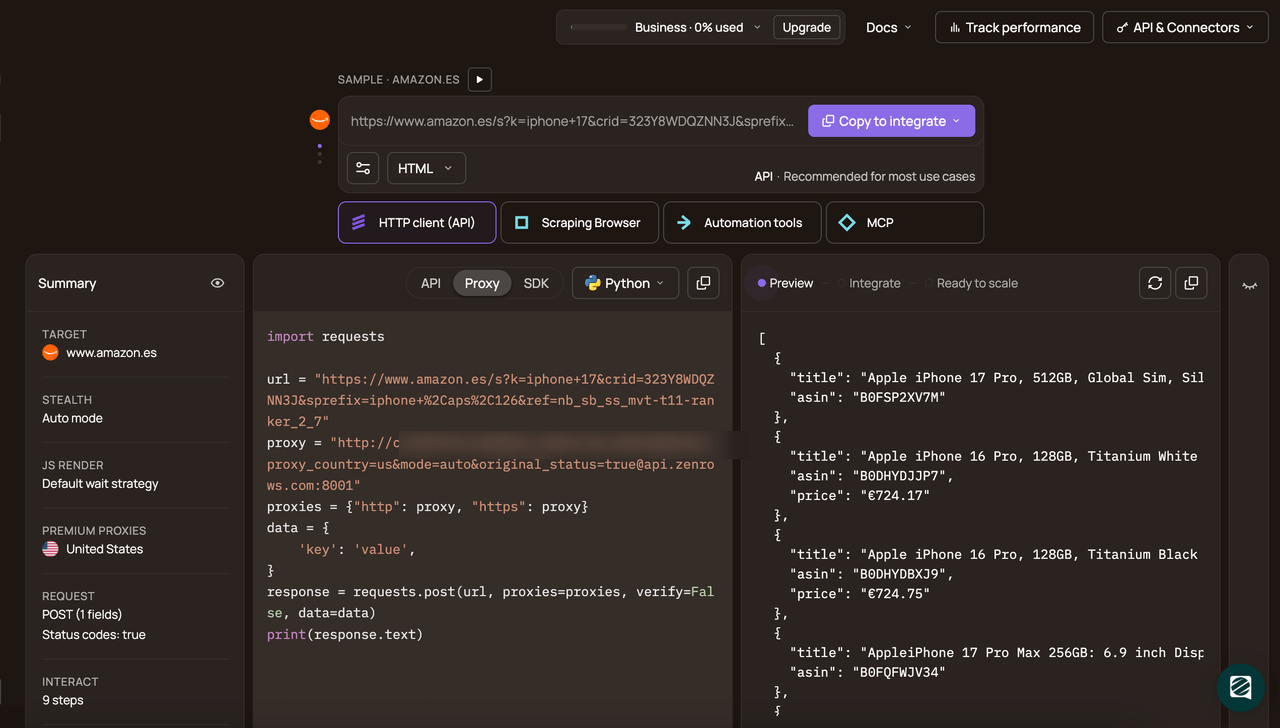
Select Python as your programming language and choose the API connection mode. Copy and paste the generated code into your scraper script.
Here's the generated code:
# pip3 install requests
import requests

url = "https://www.google.com/maps/place/The+Manhattan+at+Times+Square+Hotel/@40.7622856,-74.2710315,11z/data=!3m1!5s0x89c258f9ba587e33:0x6992b0beff04f494!4m19!1m5!2m4!1shotels+in+new+york!5m2!5m1!1s2025-12-01!3m12!1s0x89c258f88254f2c3:0xe0e14597c5400022!5m3!1s2025-12-01!4m1!1i2!8m2!3d40.7622856!4d-73.9826404!9m1!1b1!15sChJob3RlbHMgaW4gbmV3IHlvcmuSAQVob3RlbKoBRhABKgoiBmhvdGVscygAMh4QASIas7781G-_ZdYeWYHjFju5UE9i8TlxnkQeKrAyFhACIhJob3RlbHMgaW4gbmV3IHlvcmvgAQA!16s%2Fg%2F1hhg_3mgs?entry=ttu&g_ep=EgoyMDI1MTExNy4wIKXMDSoASAFQAw%3D%3D"
apikey = "<YOUR_ZENROWS_API_KEY>"
params = {
    "url": url,
    "apikey": apikey,
    "js_render": "true",
    "premium_proxy": "true",
    "proxy_country": "us",
}
response = requests.get("https://api.zenrows.com/v1/", params=params)
print(response.text)
Let's modify the above code to extract review data from the target page.
Step 2: Scrape Google Reviews from a Single Listing
Since listings have similar HTML layouts, extracting reviews from one of them lets you build a scraping logic that can be applied to several other pages whenever you decide to scale up.
Create a reviews_scraper function and insert the generated code into it. This function accepts a URL parameter and returns the scraped data in JSON format. We've also included a 2500-millisecond generic wait parameter to allow web page elements to load before data extraction:
# ...

def reviews_scraper(url):
    params = {
        "url": url,
        "apikey": apikey,
        "js_render": "true",
        "premium_proxy": "true",
        "proxy_country": "us",
        "wait": 2500,
    }
    response = requests.get("https://api.zenrows.com/v1/", params=params)
    return response.json()
We'll use Zenrows' css_extractor to parse and extract the review data.
So, obtain the CSS selectors for the review data by inspecting the target page elements. In this case, you'll extract the company name, the reviewer's name and details, summary, and the review text.
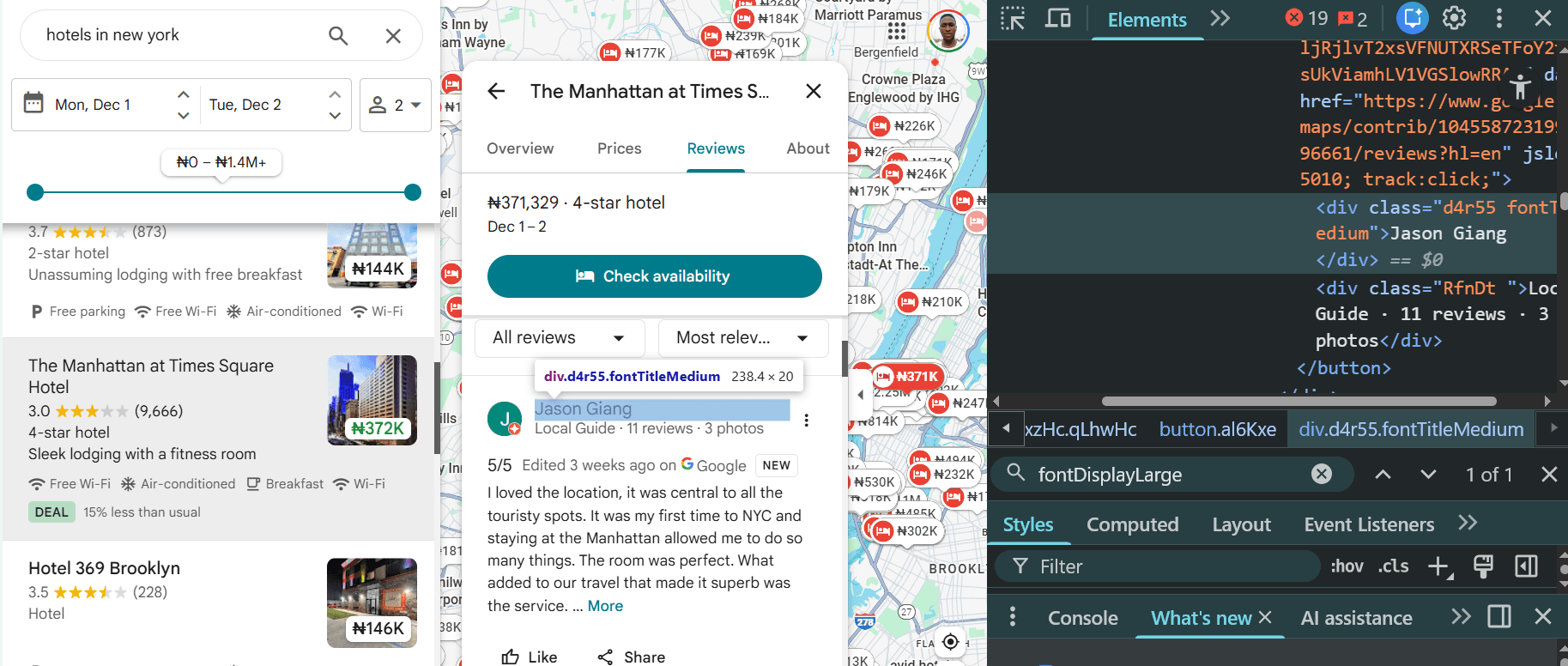
Note
The CSS selectors used in this article might change at the time of reading. Double-check that you're targeting the correct one.
Define the CSS selectors in a css_selectors dictionary, as shown below. Here's what the CSS selector for each target element looks like in the dictionary:
css_selector = {
    "business_name": "title",
    "reviewer": ".d4r55.fontTitleMedium",
    "review_text": ".MyEned",
    "reviewer_details": ".RfnDt",
    "Summary_rating": ".fontDisplayLarge",
}
Update the function with the CSS selector dictionary, as shown:
# ...
def reviews_scraper(url):
    # ...
    # define CSS selectors for data extraction
    css_selector = {
        "business_name": "title",
        "reviewer": ".d4r55.fontTitleMedium",
        "review_text": ".MyEned",
        "reviewer_details": ".RfnDt",
        "Summary_rating": ".fontDisplayLarge",
    }

    # ...
The next step is to click the Reviews tab to open the customer reviews panel. The Reviews element is highly nested, so we've simulated a click on it using js_instructions. The instruction also waits for 3000 milliseconds to allow elements to load after clicking:
# ...
def reviews_scraper(url):
    # ...

    # click "Reviews" tab
    js_instructions = [
        {"evaluate": "document.querySelectorAll('.LRkQ2')[2].click();"},
        {"wait": 3000},
    ]

    # ...
Simulate vertical scrolling within the Reviews panel by appending a 10-iteration scroll instruction to the existing js_instructions array. Each instruction simulates a wait time to allow elements to appear after each scroll. This enables you to scrape content hidden behind the scroll bar:
# ...

def reviews_scraper(url):
    # ...

    # set up scrolling instructions
    scrolls = 10
    wait_time = 2000

    for _ in range(scrolls):
        js_instructions.append(
            {
                "evaluate": "var el=document.querySelectorAll('.m6QErb.DxyBCb.kA9KIf.dS8AEf.XiKgde')[2]; if(el){ el.scrollTop += el.scrollHeight; }"
            }
        )
        js_instructions.append({"wait": wait_time})
    # ...
The review texts also hide user-generated content behind a "More" button, which shortens the text during extraction. Since you want the whole review text, add another js_instructions to click the "More" button in each text to reveal hidden texts:
# ...

def reviews_scraper(url):
    # ...

    # click "More" for each review text
    js_instructions.append(
        {
            "evaluate": "var reviewEls = document.querySelectorAll('.jftiEf');reviewEls.forEach(function(reviewEl) {var moreBtn = reviewEl.querySelector('.w8nwRe.kyuRq');if (moreBtn) {moreBtn.click();}});"
        }
    )
    # wait after clicking "More"
    js_instructions.append({"wait": 2000})

    # ...
Import Python's json package. Then, add the js_instructions and css_extractor to the params as JSON strings:
# ...

def reviews_scraper(url):
    # ...

    # add js_instructions to params
    params["js_instructions"] = json.dumps(js_instructions)

    # add css_extractor to params
    params["css_extractor"] = json.dumps(css_selector)

    #...
Finally, specify the target URL and execute the reviews scraper function:
# ...

# get reviews data
url = "https://www.google.com/maps/place/The+Manhattan+at+Times+Square+Hotel/@40.7622856,-74.2710315,11z/data=!3m1!5s0x89c258f9ba587e33:0x6992b0beff04f494!4m19!1m5!2m4!1shotels+in+new+york!5m2!5m1!1s2025-12-01!3m12!1s0x89c258f88254f2c3:0xe0e14597c5400022!5m3!1s2025-12-01!4m1!1i2!8m2!3d40.7622856!4d-73.9826404!9m1!1b1!15sChJob3RlbHMgaW4gbmV3IHlvcmuSAQVob3RlbKoBRhABKgoiBmhvdGVscygAMh4QASIas7781G-_ZdYeWYHjFju5UE9i8TlxnkQeKrAyFhACIhJob3RlbHMgaW4gbmV3IHlvcmvgAQA!16s%2Fg%2F1hhg_3mgs?entry=ttu&g_ep=EgoyMDI1MTExNy4wIKXMDSoASAFQAw%3D%3D"


review_data = reviews_scraper(url)
print(review_data)
Now, combine the snippets, and you'll get the following complete code:
import requests
import json

apikey = "<YOUR_ZENROWS_API_KEY>"


def reviews_scraper(url):
    params = {
        "url": url,
        "apikey": apikey,
        "js_render": "true",
        "premium_proxy": "true",
        "proxy_country": "us",
        "wait": 2500,
    }
    # define CSS selectors for data extraction
    css_selector = {
        "business_name": "title",
        "reviewer": ".d4r55.fontTitleMedium",
        "review_text": ".MyEned",
        "reviewer_details": ".RfnDt",
        "Summary_rating": ".fontDisplayLarge",
    }

    # click "Reviews" tab
    js_instructions = [
        {"evaluate": "document.querySelectorAll('.LRkQ2')[2].click();"},
        {"wait": 3000},
    ]

    # set up scrolling instructions
    scrolls = 10
    wait_time = 2000

    for _ in range(scrolls):
        js_instructions.append(
            {
                "evaluate": "var el=document.querySelectorAll('.m6QErb.DxyBCb.kA9KIf.dS8AEf.XiKgde')[2]; if(el){ el.scrollTop += el.scrollHeight; }"
            }
        )
        js_instructions.append({"wait": wait_time})

    # click "More" for each review text
    js_instructions.append(
        {
            "evaluate": "var reviewEls = document.querySelectorAll('.jftiEf');reviewEls.forEach(function(reviewEl) {var moreBtn = reviewEl.querySelector('.w8nwRe.kyuRq');if (moreBtn) {moreBtn.click();}});"
        }
    )
    # wait after clicking "More"
    js_instructions.append({"wait": 2000})

    # add js_instructions to params
    params["js_instructions"] = json.dumps(js_instructions)

    # add css_extractor to params
    params["css_extractor"] = json.dumps(css_selector)

    response = requests.get("https://api.zenrows.com/v1/", params=params)
    return response.json()


# get reviews data
url = "https://www.google.com/maps/place/The+Manhattan+at+Times+Square+Hotel/@40.7622856,-74.2710315,11z/data=!3m1!5s0x89c258f9ba587e33:0x6992b0beff04f494!4m19!1m5!2m4!1shotels+in+new+york!5m2!5m1!1s2025-12-01!3m12!1s0x89c258f88254f2c3:0xe0e14597c5400022!5m3!1s2025-12-01!4m1!1i2!8m2!3d40.7622856!4d-73.9826404!9m1!1b1!15sChJob3RlbHMgaW4gbmV3IHlvcmuSAQVob3RlbKoBRhABKgoiBmhvdGVscygAMh4QASIas7781G-_ZdYeWYHjFju5UE9i8TlxnkQeKrAyFhACIhJob3RlbHMgaW4gbmV3IHlvcmvgAQA!16s%2Fg%2F1hhg_3mgs?entry=ttu&g_ep=EgoyMDI1MTExNy4wIKXMDSoASAFQAw%3D%3D"

review_data = reviews_scraper(url)
print(review_data)
The above code returns the review data, as shown:
{
    "business_name": "The Manhattan at Times Square Hotel",
    "review_text": [
        "I loved the location, it was central to all the touristy spots. It was ...",
        "The only good thing about this place is the location. I paid ...,
        # ... omitted for brevity
    ],
    "reviewer": [
        "Jason Giang",
        "Theresa Ruiz",
        # ...omitted for brevity,
    ],
    "reviewer_details": [
        "Local Guide · 11 reviews · 3 photos",
        "Local Guide · 18 reviews",
        #... omitted for brevity
    ],
    "reviewer_rating": [
        "5/5",
        "1/5",
        # ... omitted for brevity
    ],
}
Great! You've just scraped customers' reviews from a Google Maps listing page, completing the initial step to building a scalable Google Maps scraper.
In the next section, you'll see how to scale this Google Reviews scraping logic to several Google Maps listing pages.
Scraping Google Reviews from Multiple Google Maps Listings
You'll now scale the previous single-page Google Reviews scraper by applying its logic to multiple hotel listings (for example, "a list of hotels in New York"). You'll first extract the URLs of each listing page, then scrape review data from each using the previously defined single-page scraping logic.
The target Google Maps listing page looks like this when opened via the browser:
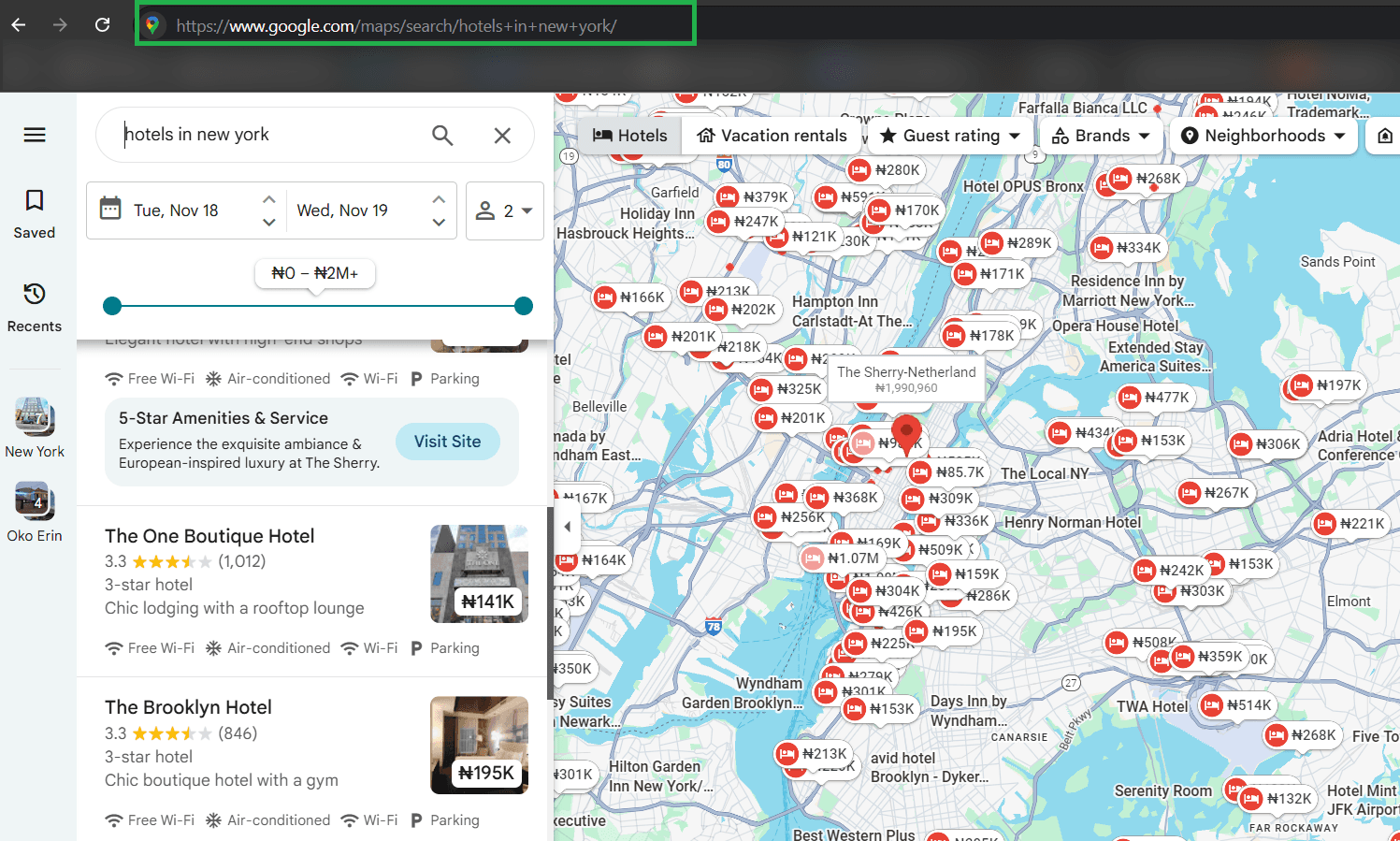
Clicking each listing and going to the Reviews section reveals the review data you want. You'll simulate that action in the next sections.
Step 1: Extract Listing URLs
The first step is to extract the URL leading to each listing page.
Create a new listings_urls_scraper function and pass your request parameters, maintaining the US as the proxy country:
# ...

def listings_urls_scraper(url):
    params = {
        "url": url,
        "apikey": apikey,
        "js_render": "true",
        "premium_proxy": "true",
        "proxy_country": "us",
    }
Inspecting one of the listing URLs reveals that individual business pages are inside an a tag with the class .a.hfpxzc.
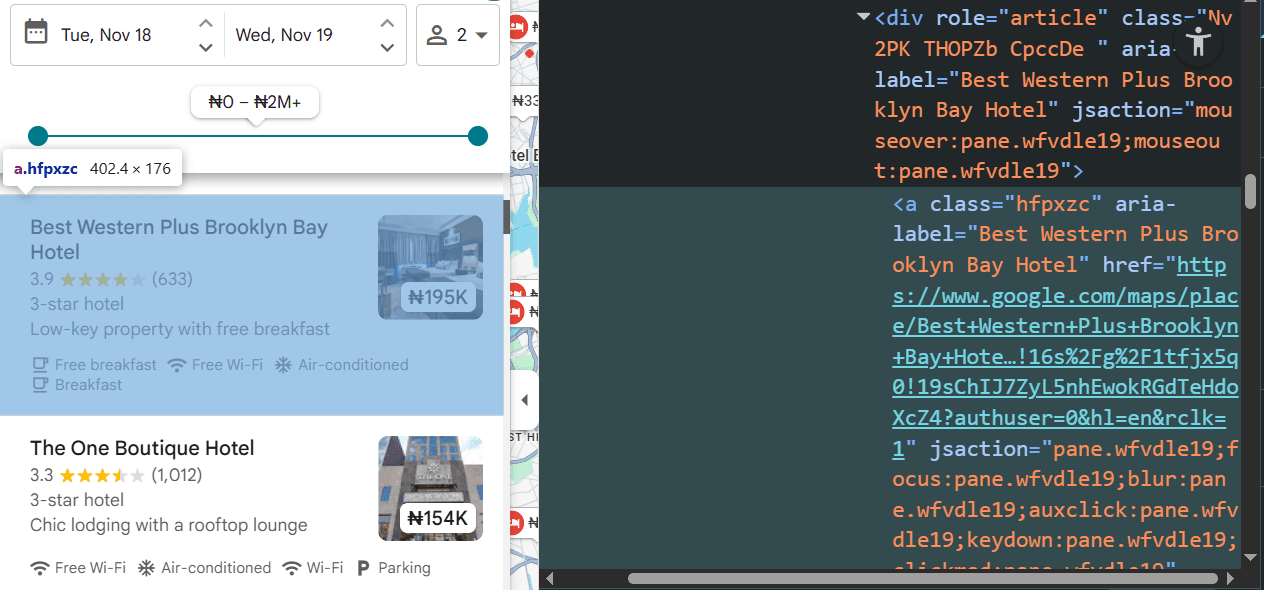
Define this CSS selector (css_selector) in a dictionary:
# ...

def listings_urls_scraper(url):
    # ...

    # define CSS selectors for data extraction
    css_selector = {"url": "a.hfpxzc @href"}
Since the Google Maps places page renders content dynamically with infinite scrolling, simulate a fixed number of scrolls (5-time scroll, in this case) within the listing result panel using Zenrows' js_instructions. Include a wait time per scroll to allow elements to load after each scrolling action. Then, append the scroll instructions to the empty js_instructions array:
# ...

def listings_urls_scraper(url):
    # ...

    # define CSS selectors for data extraction
    css_selector = {"url": "a.hfpxzc @href"}

    # scrolling parameters
    scrolls = 5
    wait_time = 1000
    js_instructions = []

    # generate scroll instructions per iteration
    for _ in range(scrolls):
        js_instructions.append(
            {
                "evaluate": "var el=document.querySelectorAll('.m6QErb.DxyBCb.kA9KIf.dS8AEf.XiKgde.ecceSd')[1]; if(el){ el.scrollTop += el.scrollHeight; }"
            },
        )
        js_instructions.append({"wait": wait_time})
Add js_instructions to the request parameters. Similarly, include css_selectors in the parameters as css_extractor. Make your scraping request and return the data in JSON format. Then, execute the listings_urls_scraper function:
# ...

def listings_urls_scraper(url):
    # ...

    # add js_instructions to params
    params["js_instructions"] = json.dumps(js_instructions)

    # add css_extractor to params
    params["css_extractor"] = json.dumps(css_selector)

    response = requests.get("https://api.zenrows.com/v1/", params=params)
    return response.json()

print(listings_urls_scraper(search_url))
Combine the snippets, and you'll obtain the following complete code:
# pip3 install requests
import requests
import json

apikey = "<YOUR_ZENROWS_API_KEY>"

# search URL for hotels in New York
search_url = "https://www.google.com/maps/search/hotels+in+new+york/"

# scrape hotel listing URLs from search results page
def listings_urls_scraper(url):
    params = {
        "url": url,
        "apikey": apikey,
        "js_render": "true",
        "premium_proxy": "true",
        "proxy_country": "us",
    }

    # define CSS selectors for data extraction
    css_selector = {"url": "a.hfpxzc @href"}

    # scrolling parameters
    scrolls = 10
    wait_time = 1000
    js_instructions = []

    # generate scroll instructions per iteration
    for _ in range(scrolls):
        js_instructions.append(
            {
                "evaluate": "var el=document.querySelectorAll('.m6QErb.DxyBCb.kA9KIf.dS8AEf.XiKgde.ecceSd')[1]; if(el){ el.scrollTop += el.scrollHeight; }"
            },
        )
        js_instructions.append({"wait": wait_time})

    # add js_instructions to params
    params["js_instructions"] = json.dumps(js_instructions)

    # add css_extractor to params
    params["css_extractor"] = json.dumps(css_selector)

    response = requests.get("https://api.zenrows.com/v1/", params=params)
    return response.json()

print(listings_urls_scraper(search_url))
The above code scrolls through the listings and returns their URLs, as shown:
{
    "url": [
        "https://www.google.com/maps/place/Holiday+Inn+Express+Newark+Airport+%E2%80%93+Elizabeth+by+IHG/data=!4m10!3m9!1s0x89c2529567254419:0x6bd284da13718e93!5m2!4m1!1i2!8m2!3d40.684595!4d-74.194036!16s%2Fg%2F11rbknw97k!19sChIJGUQlZ5VSwokRk45xE9qE0ms?authuser=0&hl=en&rclk=1",

        # ... omitted for brevity ...,
        "https://www.google.com/maps/place/Paramount+Times+Square+-+A+Generator+Hotel/data=!4m10!3m9!1s0x89c258543f40379b:0xae966f416e2d9099!5m2!4m1!1i2!8m2!3d40.759535!4d-73.9870088!16s%2Fm%2F03gq7v4!19sChIJmzdAP1RYwokRmZAtbkFvlq4?authuser=0&hl=en&rclk=1",
    ]
}
Now that you have the URL for each listing page, the next step is to pass them as the target URL in the previous single listing page scraper.
Step 2: Scrape Google Maps Reviews from Each Listing URL
To request each listing URL and scrape Google Reviews from it, obtain the URLs from the listings_urls_scraper function. Create an empty list to collect the Google Reviews data. Loop through the URLs to scrape reviews from each. Then, append the scraped data to the empty list and print the result:
# ...

# obtain the listing URLs
listing_urls = listings_urls_scraper(search_url)["url"]

# list to hold reviews data
review_data = []

# scrape reviews from each listing URL
for listing_url in listing_urls:
    reviews = reviews_scraper(listing_url)
    review_data.append(reviews)

print(review_data)
Let's go ahead and save the data.
Step 4: Save Google Reviews Data
Storing the scraped data lets you persist it for referencing, sharing, or further cleaning and analytics. You can save Google Reviews data to a remote or local database, CSV, Excel, or JSON.
Since the data is text-heavy, we'll save it to a JSON file in this case:
# ...

# save scraped data to JSON file
with open("scraped_results.json", "w", encoding="utf-8") as f:
    json.dump(review_data, f, ensure_ascii=False, indent=2)
Merge all the snippets. Here's the final code:
# pip3 install requests
import requests
import json


apikey = "<YOUR_ZENROWS_API_KEY>"

# search URL for hotel listings in New York
search_url = "https://www.google.com/maps/search/hotels+in+new+york/"


# scrape hotel listing URLs from search results page
def listings_urls_scraper(url):
    params = {
        "url": url,
        "apikey": apikey,
        "js_render": "true",
        "premium_proxy": "true",
        "proxy_country": "us",
    }

    # define CSS selectors for data extraction
    css_selector = {"url": "a.hfpxzc @href"}

    # scrolling parameters
    scrolls = 10
    wait_time = 1000
    js_instructions = []

    # generate scroll instructions per iteration
    for _ in range(scrolls):
        js_instructions.append(
            {
                "evaluate": "var el=document.querySelectorAll('.m6QErb.DxyBCb.kA9KIf.dS8AEf.XiKgde.ecceSd')[1]; if(el){ el.scrollTop += el.scrollHeight; }"
            },
        )
        js_instructions.append({"wait": wait_time})

    # add js_instructions to params
    params["js_instructions"] = json.dumps(js_instructions)

    # add css_extractor to params
    params["css_extractor"] = json.dumps(css_selector)

    response = requests.get("https://api.zenrows.com/v1/", params=params)
    return response.json()


def reviews_scraper(url):
    params = {
        "url": url,
        "apikey": apikey,
        "js_render": "true",
        "premium_proxy": "true",
        "proxy_country": "us",
        "wait": 2500,
    }
    # define CSS selectors for data extraction
    css_selector = {
        "business_name": "title",
        "reviewer": ".d4r55.fontTitleMedium",
        "review_text": ".MyEned",
        "reviewer_details": ".RfnDt",
        "reviewer_rating": ".DU9Pgb span.fontBodyLarge.fzvQIb",
    }

    # click "Reviews" tab
    js_instructions = [
        {"evaluate": "document.querySelectorAll('.LRkQ2')[2].click();"},
        {"wait": 3000},
    ]

    # set up scrolling instructions
    scrolls = 10
    wait_time = 2000

    for _ in range(scrolls):
        js_instructions.append(
            {
                "evaluate": "var el=document.querySelectorAll('.m6QErb.DxyBCb.kA9KIf.dS8AEf.XiKgde')[2]; if(el){ el.scrollTop += el.scrollHeight; }"
            }
        )
        js_instructions.append({"wait": wait_time})

    # click "More" for each review text
    js_instructions.append(
        {
            "evaluate": "var reviewEls = document.querySelectorAll('.jftiEf');reviewEls.forEach(function(reviewEl) {var moreBtn = reviewEl.querySelector('.w8nwRe.kyuRq');if (moreBtn) {moreBtn.click();}});"
        }
    )
    # wait after clicking "More"
    js_instructions.append({"wait": 2000})

    # add js_instructions to params
    params["js_instructions"] = json.dumps(js_instructions)

    # add css_extractor to params
    params["css_extractor"] = json.dumps(css_selector)

    response = requests.get("https://api.zenrows.com/v1/", params=params)
    return response.json()


# obtain the listing URLs
listing_urls = listings_urls_scraper(search_url)["url"]

# list to hold reviews data
review_data = []

# scrape reviews from each listing URL
for listing_url in listing_urls:
    reviews = reviews_scraper(listing_url)
    review_data.append(reviews)

# save scraped data to JSON file
with open("scraped_results.json", "w", encoding="utf-8") as f:
    json.dump(review_data, f, ensure_ascii=False, indent=2)
The code returns the following scraped_results.json file in your project root directory:
[
    {
        "business_name": "DoubleTree by Hilton Hotel Newark Airport - Google Maps",
        "review_text": [
            "Pros: staff was great from the front desk down to the folks ..."
            # ... omitted for brevity
        ],
        "reviewer": [
            "lucas câmara",
            # ... omitted for brevity
        ],
        "reviewer_details": [
            "Local Guide · 38 reviews · 1 photo",
            # ... omitted for brevity
        ],
        "reviewer_rating": [
            "3/5",
            # ... omitted for brevity
        ],
    },
    # ... omitted for brevity,
    {
        "business_name": "Pod Brooklyn Hotel - Google Maps",
        "review_text": [
            "Didn't have much expectation given room layouts however was pleasantly...",
            # ... omitted for brevity
        ],
        "reviewer": [
            "chris webster",
            # ... omitted for brevity
        ],
        "reviewer_details": [
            "4 reviews",
            # ... omitted for brevity
        ],
        "reviewer_rating": [
            "5/5",
            # ... omitted for brevity
        ],
    },
]
Congratulations! 🎉You just built a Google Reviews Scraper with Zenrows. You now know how to scrape Google Reviews with Python and are ready to collect data at scale without getting blocked.
Conclusion
You've learned step-by-step how to scrape Google product reviews, including how to scale to several listing pages.
Recall that Google's CAPTCHA often challenges and blocks scrapers and can cause your scraper to fail. This makes scraping Google Reviews challenging without the right approach. And that's why we recommend using a web scraping solution, such as Zenrows, to bypass CAPTCHA and other anti-bot measures, especially when scaling. Zenrows is your one-stop solution for scraping any website, without limitations.
Try Zenrows for free now or speak with sales!
FAQ
Is it legal to scrape Google reviews?
Scraping public data is generally legal, as long as you don't violate local data privacy rules. That said, it's essential to avoid scraping private data, such as information behind login walls. Additionally, even if you've scraped public Google Reviews data, avoid misusing it and ensure you adequately follow web scraping best practices.
Why Scrape Google reviews?
Here are some common reasons and use cases for scraping Google Reviews data:
- Sentiment analysis: Understand how users perceive a product or service.
- Brand reputation management: Address negative feedback and enhance public perception.
- Competitive analysis: Monitor your competitors' customer engagement to offer personalized alternatives.
- Product recommendation: Recommend the best product in the market based on customer feedback.
- Customer management: Identify and resolve trending customer pain points.
- Product improvement: Optimize your product offering based on customer feedback.
- Demand forecast: Analyze customer demand from reviews and predict their needs ahead of competitors.
How can I scrape Google Reviews?
To extract data from Google Reviews, it's essential first to select the best tool for the job. A web scraping API, such as Zenrows, does the job perfectly, bypassing potential blocks and JavaScript rendering issues.
After deciding on the web scraping tool to use, determine the business category you want to target and search for it on Google Maps. Copy that category's URL and write a scraping logic to extract the links of each business that appears under it. Then, modify your scraping logic to follow each listing URL and scrape Google Reviews data for each listing.
Will I get blocked for scraping Google Reviews?
Google Maps Reviews are highly dynamic, using techniques like infinite scrolling to prevent regular HTTP clients from accessing their content. Although you might solve this challenge with open-source browser automation tools, Google will eventually discover and block you after a few requests. That's because Google also deploys anti-bot measures and CAPTCHA challenges to block automated requests.
The most reliable way to scrape Google Maps Reviews without getting blocked is to use a web scraping solution like Zenrows.