
Web Scraping with Camoufox to Bypass Anti-bots
Camoufox is a fingerprint-spoofing browser built to get past anti-bot systems. How to set it up, configure it, and scrape protected pages with it.



If you want to scrape any website without restrictions, you’ll first have to get past the anti-bot systems built to stop you. Camoufox, a fingerprinting bypass library, features evasion techniques that can help you avoid bot detection.
In this article, you'll learn how to scrape with Camoufox, including using its stealth features to bypass anti-bot measures. You'll also see the solution that works at scale.
What Is Camofoux?
Camoufox is an open-source fingerprinting evasion Python library built on top of the Firefox browser. Under the hood, Camoufox applies a range of anti-fingerprinting techniques. These include spoofing the audio context and WebGL fingerprints to prevent unique device identification.
It also features shadow root bypass, allowing interaction with encapsulated page elements. Additionally, Camoufox modifies browser network properties, such as the User Agent, WebDriver status, and platform information, among others, to further evade detection.
That said, the library offers many more evasion techniques to help improve anonymity and avoid anti-bot detection during scraping.
Camoufox Features
Camoufox has some key features that make it a good web scraping tool for bypassing anti-bot detection:
Compatibility with Playwright's API
Camoufox adapts to Playwright's API, making it easy to integrate with your existing Playwright scraper without any extra learning curve.
Human-like Cursor Movements
Under the hood, Camoufox imitates real user actions, such as random mouse movements, scrolling, hovering, and more. This humanizes your automated requests, reducing the chances of anti-bot detection.
Session Persistence
Camoufox's session management is essential for performing login actions, and even more valuable when bypassing anti-bot measures. For instance, with this feature, you can scrape Cloudflare's cookies and use them to bypass detection in subsequent requests.
Fingerprint injection
Camoufox applies specific fingerprints to your request, making it appear as though they're coming from a real browser or device.
Geo-location and proxy support
With support for geo-located proxy setup through its geoip feature, you can provide your proxy address, and Camoufox will automatically use the proxy’s location details, such as longitude, latitude, and timezone, to spoof the WebRTC IP accordingly.
Skip the blocks. Try Zenrows free and get clean web data without the anti-bot fight.
How to Scrape With Camofoux
In this section, you'll see how to scrape with Camoufox by extracting product details from the E-commerce Challenge page. Begin by installing the library and downloading its browser binaries.
Install the Required Tools and Libraries
Before we begin, ensure you've installed the latest version of Python, if you haven't already done so.
Next, install Camoufox using pip:
pip3 install -U camoufox[geoip]
Then, download Camoufox browser binaries and fingerprint evasions:
camoufox fetch
Once the Camoufox browser binaries are installed, you're ready to scrape with Camoufox.
Scrape Data Using Camofoux
As mentioned earlier, Camoufox uses Playwright's API, supporting both synchronous and asynchronous techniques. This means you can execute user actions, including clicking, scrolling, hovering, typing and more.
We'll use the synchronous method in this tutorial and scrape an e-commerce site.
To begin, import Camoufox and initiate a browser in headless mode. Set up a new page and open the target website:
# pip3 install -U camoufox[geoip]
from camoufox.sync_api import Camoufox

#  scrape ecommerce product data
with Camoufox(headless=True) as browser:

    # open the target page
    page = browser.new_page()
    page.goto("https://www.scrapingcourse.com/ecommerce/")
Obtain the parent elements containing the product data you want to scrape. Then, loop through each element to extract product names (.product-name) and prices (.price). Append the scraped data to an empty array and print the result:
# ...
#  scrape ecommerce product data
with Camoufox() as browser:

    # ...

    # extract product data
    products = page.locator(".product")

    product_data = []

    for product in products.all():
        data = {
            "title": product.locator(".product-name").inner_text(),
            "price": product.locator(".price").inner_text(),
        }
        product_data.append(data)

    print(product_data)

    page.wait_for_timeout(20000)
    page.close()
Combine the snippets, and you'll get the complete code below:
# pip3 install -U camoufox[geoip]
from camoufox.sync_api import Camoufox

#  scrape ecommerce product data
with Camoufox(headless=True) as browser:

    # open the target page
    page = browser.new_page()
    page.goto("https://www.scrapingcourse.com/ecommerce/")

    # extract product data
    products = page.locator(".product")

    product_data = []

    for product in products.all():
        data = {
            "name": product.locator(".product-name").inner_text(),
            "price": product.locator(".price").inner_text(),
        }
        product_data.append(data)

    print(product_data)

    page.wait_for_timeout(20000)
    page.close()
The code outputs the expected data as shown:
[
    {"title": "Abominable Hoodie", "price": "$69.00"},
    # ... omitted for brevity
    {"title": "Artemis Running Short", "price": "$45.00"},
]
Great! Your Camoufox scraper works. That's a simple website without protection. What if the website uses an anti-bot measure?
Next, you'll see how Camoufox handles anti-bot evasion.
Using Camoufox Stealth Mode
Bypassing anti-bot measures with Camoufox isn't fully automatic and still requires human involvement.
The library relies on session persistence to reuse cookies from previously solved challenges in future requests. This means you must manually solve a challenge the first time you access a protected website to obtain the necessary cookies to bypass it for subsequent visits.
While this approach is unsustainable in large-scale scraping, it can be handy for prototyping or testing your scraping logic against a protected website.
Let's apply the Camoufox anti-detect browser mode to scrape the Antibot Challenge page.
Step 1: Solve the Initial Challenge Manually
The first step is to open the protected target site using Camoufox's non-headless (GUI) mode and manually solve the anti-bot challenge to access the page. This requires clicking the anti-bot checkbox or engaging a puzzle challenge, depending on the anti-bot's requirement.
This step scrapes and writes the anti-bot's solution cookies into a dedicated folder, so Camoufox can use them to access the protected page in subsequent visits.
To achieve the above, configure Camoufox for fingerprinting evasion and human imitation.
Open the Camoufox browser in non-headless mode. Then, pass its stealth parameters into your browser instance as done below. This includes specifying Windows as the operating system, setting humanize to True, and persisting the session with persistent_context=True. The user_data_dir argument ensures the cookies are written in a user_data directory:
# pip3 install -U camoufox[geoip]
from camoufox.sync_api import Camoufox
import time

# initialize Camoufox browser with evasion settings
with Camoufox(
    headless=False,
    humanize=True,
    os="windows",
    persistent_context=True,
    user_data_dir="user_data",
) as browser:
    # open the target page
    page = browser.new_page()
    page.goto("https://www.scrapingcourse.com/antibot-challenge/")

    time.sleep(10)

    page.wait_for_timeout(20000)
    page.close()
Once the target site launches, solve its anti-bot challenge by manually clicking the checkbox:
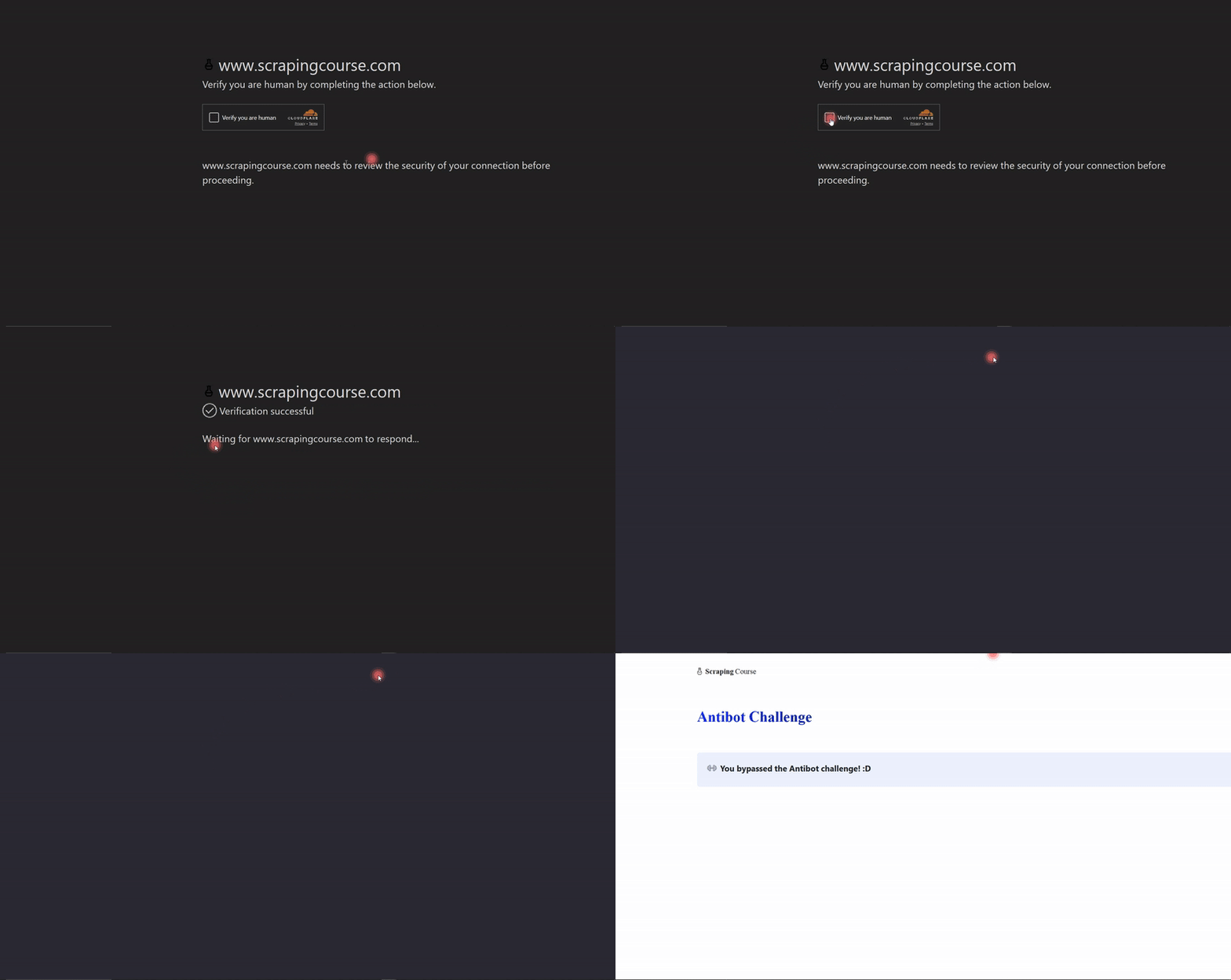
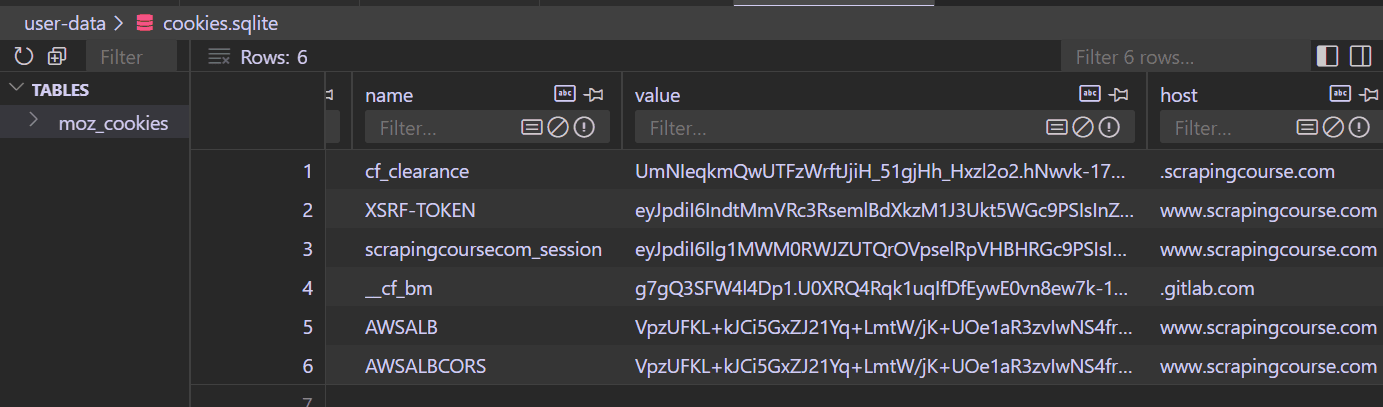
This action will create a user_data folder within your codebase. Camoufox stores the solution cookies in that folder. For instance, the cookies are stored inside a cookies.sqlite file in the case of Cloudflare. Opening cookies.sqlite using a VS Code SQLite viewer shows the following cookies, including the cf_clearance cookie, which is essential for bypassing Cloudflare:
Time to use these solution cookies to bypass subsequent challenges.
Step 2: Pass the Solution Cookies to Evade Detection
Now, let's scrape the same anti-bot challenge page by persisting the stored solution cookies.
Maintain the same Camoufox configurations. Feel free to use headless mode this time. Launch the target site and print its content:
# pip3 install -U camoufox[geoip]
from camoufox.sync_api import Camoufox
import time

# initialize Camoufox browser with evasion settings
with Camoufox(
    headless=True,
    humanize=True,
    os="windows",
    persistent_context=True,
    user_data_dir="user-data",
) as browser:
    # open the target page
    page = browser.new_page()
    page.goto("https://www.scrapingcourse.com/antibot-challenge/")

    time.sleep(10)

    page.content()

    page.wait_for_timeout(20000)
    page.close()
If the request goes through, you should see the following HTML response:
<html lang="en">
<head>
    <!-- ... -->
    <title>Antibot Challenge - ScrapingCourse.com</title>
    <!-- ... -->
</head>
<body>
    <!-- ... -->
    <h2>
        You bypassed the Antibot challenge! :D
    </h2>
    <!-- other content omitted for brevity -->
</body>
</html>
Nice! Your Camoufox scraper bypassed the anti-bot challenge. Keep in mind that despite its stealth capabilities, Camoufox still has limitations worth considering before using it for large-scale scraping.
Camofoux's Limitations
Your Camoufox scraper might've bypassed the protected page, but anti-bot evasion goes beyond the initial manual intervention it requires to obtain solution cookies.
The stored cookies often expire, especially in situations where scalable, continuous, or scheduled scraping is required. When cookies expire or the anti-bot mechanism changes, you’ll need to solve challenges manually again, interrupting the scraping flow.
Additionally, solution cookies are often tied to a specific IP address or user-agent. Changing any of these, such as rotating proxies, can invalidate the session and require manual solving again. Camoufox also carries a high risk of detection after a couple of requests, as anti-bots often flag and block multiple session reuses.
And since Camoufox is open-source, it will likely struggle to keep up with frequent anti-bot security updates. While Camoufox appears to bypass anti-bots at first glance, its limitations make it unsuitable for real-life projects, where consistent automated access to data is required.
Avoid Getting Blocked
The best way to avoid Camoufox's limitations and scrape at scale without getting blocked is to use a web scraping solution, such as Zenrows Fetch.
Zenrows auto-bypasses all anti-bot measures and automatically adapts to anti-bot updates, eliminating the need for manual interventions. This auto-scaled, auto-managed infrastructure lets you focus on core data refinement and analytics, rather than wasting time and resources managing piles of solution cookies and debugging intermittent failures. Zenrows also features a headless browser, making it a suitable replacement for Playwright or Camoufox.
To see how Zenrows works, let's use it to scrape the Anti-bot Challenge page.
Sign up to open the Zenrows Request Builder. Paste the target URL in the link box, and activate Premium Proxies and JS Rendering.
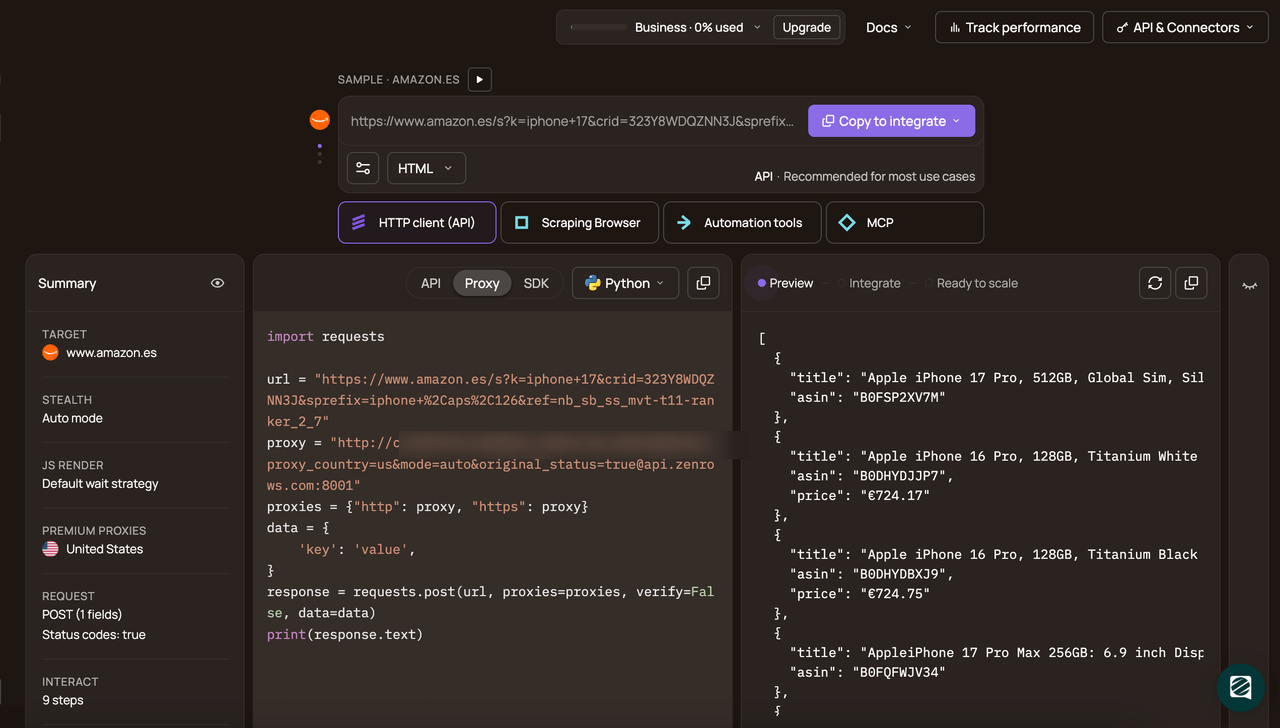
Choose Python as your programming language and select the API connection mode. Copy and paste the generated code into your scraper file:
Here's the generated code:
# pip3 install requests
import requests

url = "https://www.scrapingcourse.com/antibot-challenge/"
apikey = "<YOUR_ZENROWS_API_KEY>"
params = {
    "url": url,
    "apikey": apikey,
    "js_render": "true",
    "premium_proxy": "true",
}
response = requests.get("https://api.zenrows.com/v1/", params=params)
print(response.text)
The above code outputs the protected site's HTML, as shown:
<html lang="en">
<head>
    <!-- ... -->
    <title>Antibot Challenge - ScrapingCourse.com</title>
    <!-- ... -->
</head>
<body>
    <!-- ... -->
    <h2>
        You bypassed the Antibot challenge! :D
    </h2>
    <!-- other content omitted for brevity -->
</body>
</html>
Congratulations! 🎉Your scraper just got more efficient with Zenrows. You can now confidently scrape any website without worrying about blocks.
Conclusion
You've learned how to scrape with Camoufox, including how its stealth capabilities can help you evade detection for small-scale or single scraping needs.
Remember that while Camoufox provides decent stealth capabilities, its approach is unmanageable and unscalable. To scrape any website reliably without limitations, we recommend using Zenrows, an all-in-one scraping solution that guarantees consistent success.
Try Zenrows for free now or speak with sales!
FAQ
Is Camoufox compatible with Playwright?
Yes, Camoufox is fully compatible with Playwright. It adapts Playwright’s APIs so that you can use it just like the standard Playwright library. Switching your Playwright codebase to Camoufox usually requires only minor adjustments to imports and browser setup.
Can I scrape dynamic pages with Camoufox?
Yes, you can scrape dynamic pages with Camoufox. Since it operates through a browser instance using Playwright’s API, Camoufox allows you to execute user actions and interact with dynamic content just as you would with the regular Playwright library.
Is Camoufox enough for bypassing anti-bots?
While Camoufox can help bypass anti-bot measures by evading browser fingerprinting and automating user actions, it often requires manual intervention to solve initial challenges and maintain session cookies. This can be limiting for fully automated or large-scale scraping tasks.
What is the best alternative to Camoufox?
Popular open-source alternatives to Camoufox include tools like Scrapling and SeleniumBase, which offer flexibility for custom scraping workflows. However, if you need a scalable, hands-off solution, an auto-managed web scraping platform like Zenrows is the superior choice. Zenrows provides fully automated anti-bot bypass, intelligent proxy management, and reliable access to protected sites, making large-scale data collection effortless. Additionally, Zenrows integrates with the most popular scraping technology stacks.