
A Comprehensive Guide to List Crawling: 2026 Tutorial
Master list crawling in Python. Extract data from paginated lists, infinite scroll, and load more pages with practical code examples.



Struggling to scrape product or job lists without missing some of the items?
Many sites spread those lists across pagination, “Load more” buttons, infinite scroll, JavaScript, and anti-bot checks. If your script only hits the first page, your dataset stays incomplete.
This tutorial focuses on list crawling with Python Requests and BeautifulSoup, Playwright, and a scraping API. You’ll learn how to recognise list layouts, choose the right method for each one, and collect items reliably.
What Is List Crawling?
List crawling is the process of extracting structured items from pages that present data in repeated blocks, such as product cards, job rows, directory entries, or table records. You treat the page as a list and extract the same fields from each item using consistent rules.
The workflow is similar across many sites. You identify the repeating container, map each field, such as title, price, rating, or URL, to selectors within that block, and then traverse all states of the list using pagination, offsets, cursors, or scrolling. Full-site crawling prioritizes broad link coverage across a site, while list crawling focuses on one or more list templates and extracts repeated records in a structured way.
Common Use Cases for List Crawling
List crawling appears in many projects that rely on structured data rather than one-off page grabs. The main cases revolve around product catalogs, jobs, business leads, and content feeds.
Collecting Data from E-Commerce and Marketplaces
In e-commerce and marketplaces, list crawling extracts product data from category and search pages. Each product card exposes fields such as name, price, stock status, rating, brand, and product URL, which you can use for price monitoring, catalog analysis, or competitor tracking.
Tracking Jobs on Boards and Hiring Platforms
On job boards and hiring platforms, search results form job lists with a predictable layout. Each entry holds a title, company, location, salary range, posting date, and details URL, which you can feed into analytics, dashboards, or alerting flows that watch for new roles.
Building Lead Lists from Directories and Review Sites
Business directories and review sites list companies or venues in repeated blocks. A typical row contains the name, address, category, rating, review count, and website, so list crawling is a direct way to build lead lists or local research datasets without opening every profile.
Analysing Content Feeds, Archives, And “Best X” Posts
Content feeds, archives, and "best X" articles also behave like lists. Each item links to an article or profile and often includes a title, short description, date, and URL, which you can store as rows for later search, ranking, or downstream processing.
All these cases share the same pattern. A repeated layout for items and a mechanism to reveal more results.
Skip the blocks. Try Zenrows free and get clean web data without the anti-bot fight.
Types of List Crawling
The main difference between list pages is how they reveal more items. Once you spot which pattern you are dealing with, the crawl logic becomes much easier to design and test.
Paginated List Crawling
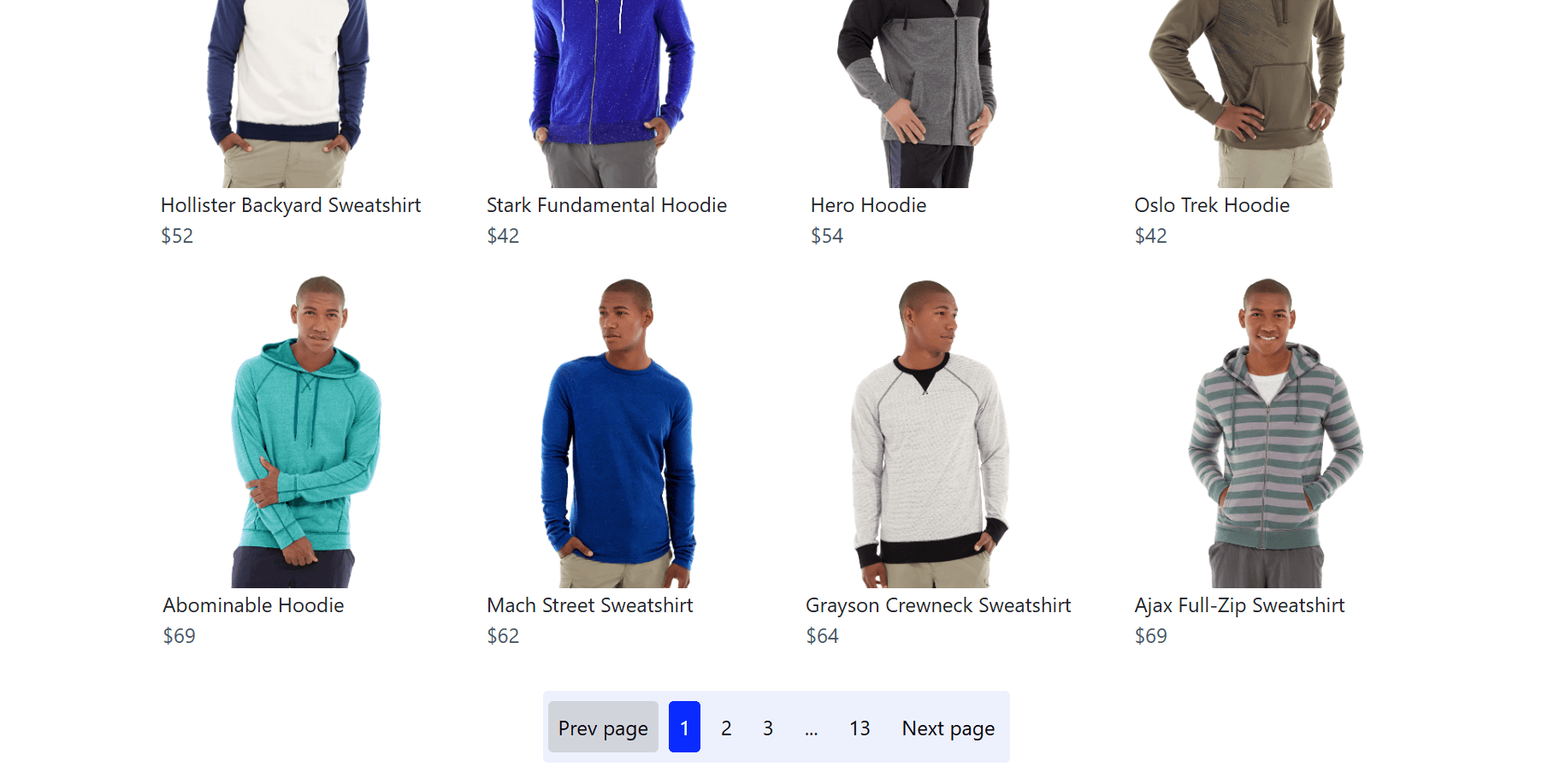
Pagination splits results across multiple pages. The page number might appear in the URL, or the site might use an offset or start parameter, or a “Next” link. A paginated crawl loops through pages until the next link disappears, the page returns zero items, or the page index stops advancing.
Load More List Crawling
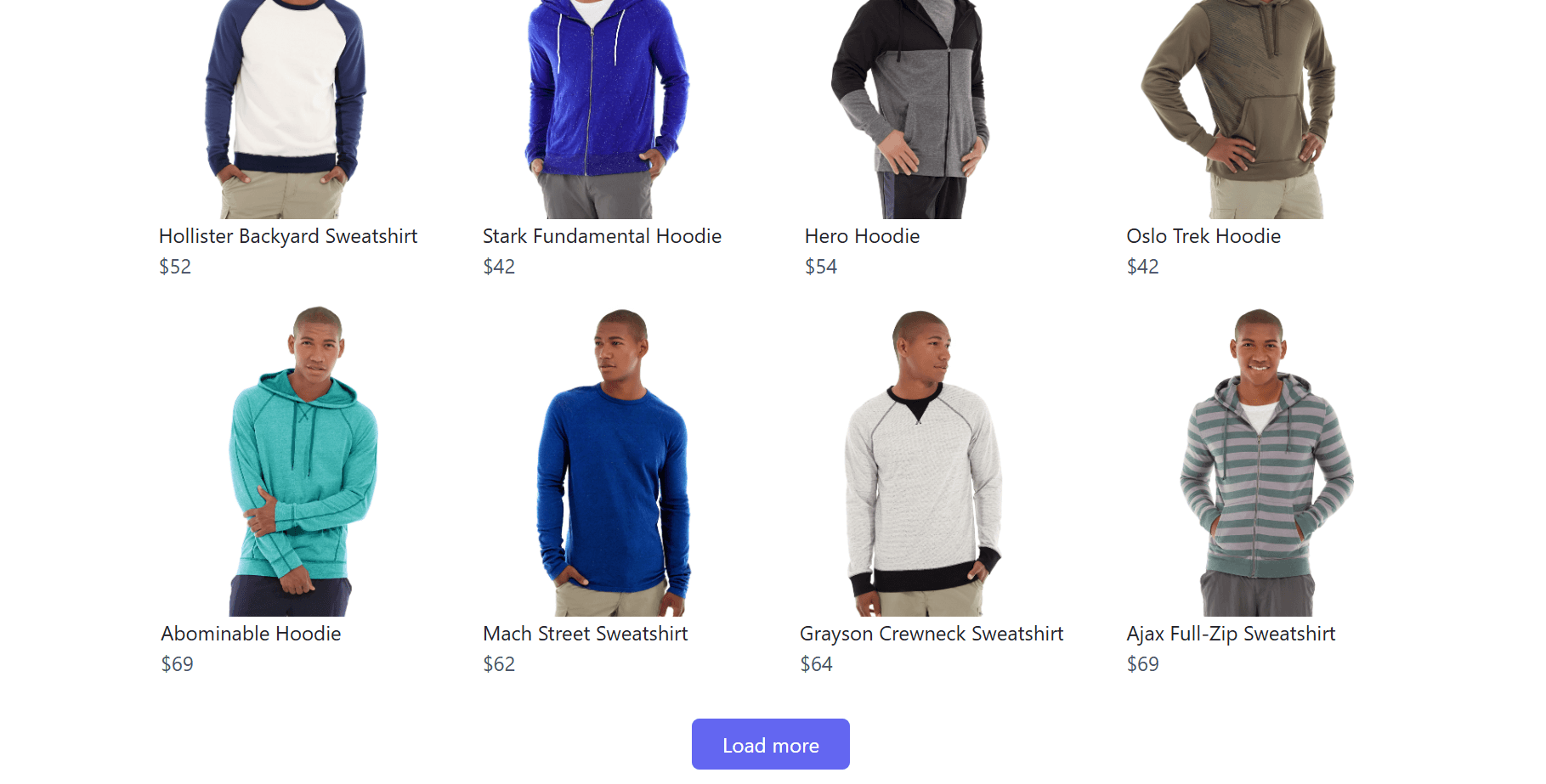
Load more pages, keep the same URL, and append items when you click a button. You can handle this with a headless browser that clicks the button until it disappears or stops returning new items. Another option is to open DevTools, click the button, and replay the background request that returns the next batch of results, often using an offset or cursor.
Infinite Scroll List Crawling
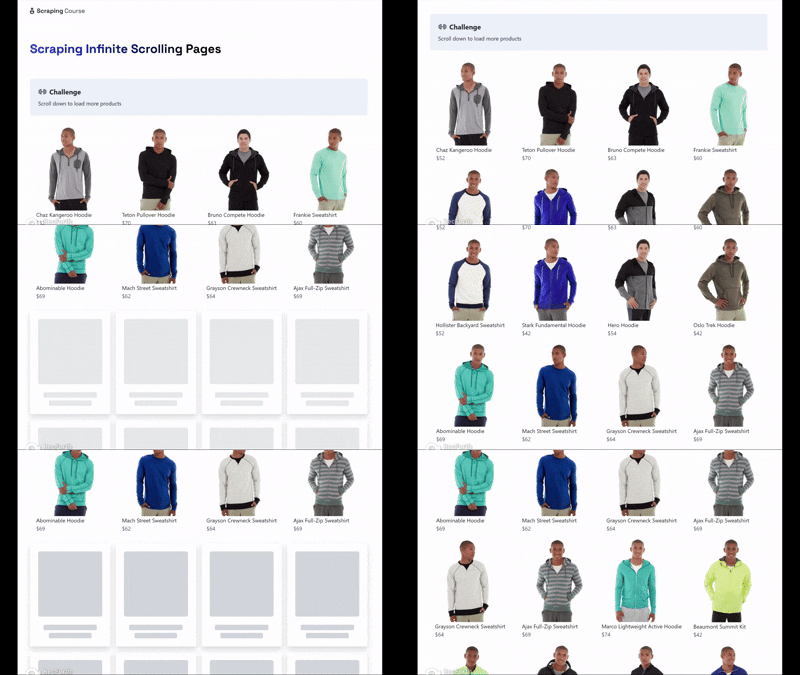
Infinite scroll loads more items as you scroll to the bottom. In a browser-based crawl, you scroll, wait for new items, track the count, and stop when the count stops increasing. If the site loads items through background requests, you can also capture those requests in DevTools and iterate over the same endpoint until it returns an empty page or an exhausted cursor.
Table-Based List Crawling
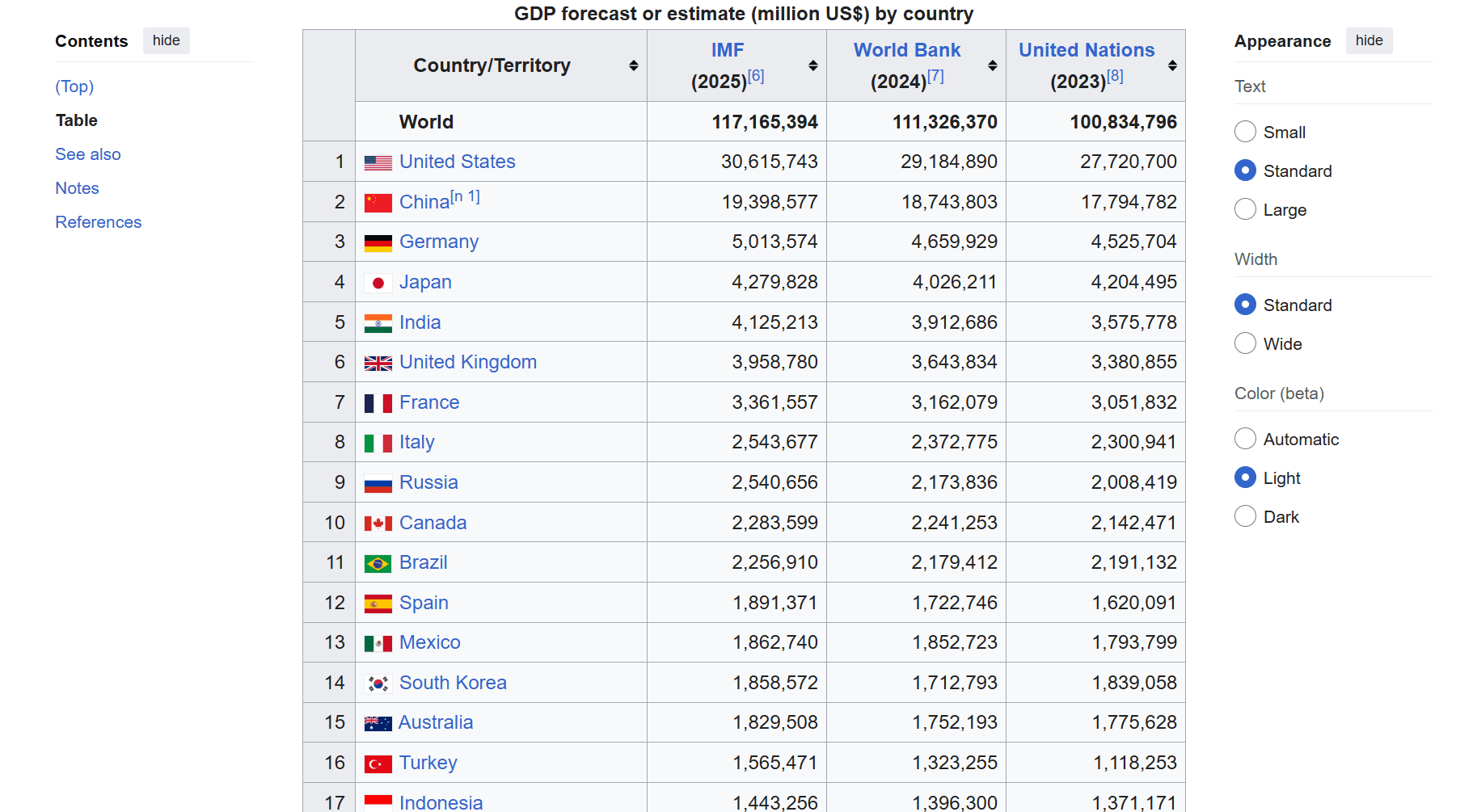
Tables and table-like grids represent lists where each row is one record. The crawl targets the repeating row element, then maps each cell to a field name based on position or headers. Many modern sites also render “tables” with divs and CSS grid, so the reliable approach is still to identify the repeating row container and extract fields from consistent child elements.
Search Result List Crawling
Internal search pages add one more variable. Results depend on the query, filters, and sort order, and each combination can produce a different list. A crawl here tracks the query parameters explicitly, then paginates or scrolls through results for each combination you care about, using the same stop conditions you would use for pagination or infinite scroll.
The type of list you’re dealing with determines which list-crawling method will work best.
Choosing the Right List Crawling Approach
List crawling usually starts with the lightest tool that can load the full list. If the items are already in the HTML, an HTTP client plus an HTML parser is enough. If the list only appears after JavaScript and interactions, a headless browser fits better. If you keep running into CAPTCHA, 403 responses, or frequent blocks once you scale, a scraping API is the option.
| Approach | Use It When | What You Get | Tradeoffs |
|---|---|---|---|
| Python HTTP Client and HTML Parser | A normal GET returns HTML that already contains the full set of items on the page, and pagination is a URL change through page numbers, offsets, or a Next link. | Fast requests, simple deployments, and straightforward parsing. | Breaks when items are injected by JavaScript and don’t exist in the response HTML. You also have to handle anti-bot checks, retries, and proxy strategy yourself. |
| Headless Browser | Items only appear after JavaScript runs, scrolling, clicking Load more, or applying client-side filters. | A rendered DOM plus the ability to click, scroll, and observe the network requests that load more results. | Resource-heavy, lower concurrency, and more operational work. Headless runs can be brittle, and anti-bots can still block automation with challenge pages, CAPTCHAs, 403/429, etc., so scaling becomes an infrastructure problem. |
| Scraping API Solution | You need list crawling to keep working under anti-bot checks at scale. You also want a service to handle proxies, rendering, and anti-bot work. | A single endpoint that can fetch pages with the right network and rendering behavior, plus managed proxy rotation and anti-bot handling. | It shifts the hard parts to the service, but you still need to define pagination, stopping rules, and the fields you want to extract. |
Next, you’ll see how to implement each method step by step.
Method 1: Basic List Crawling With Requests and BeautifulSoup
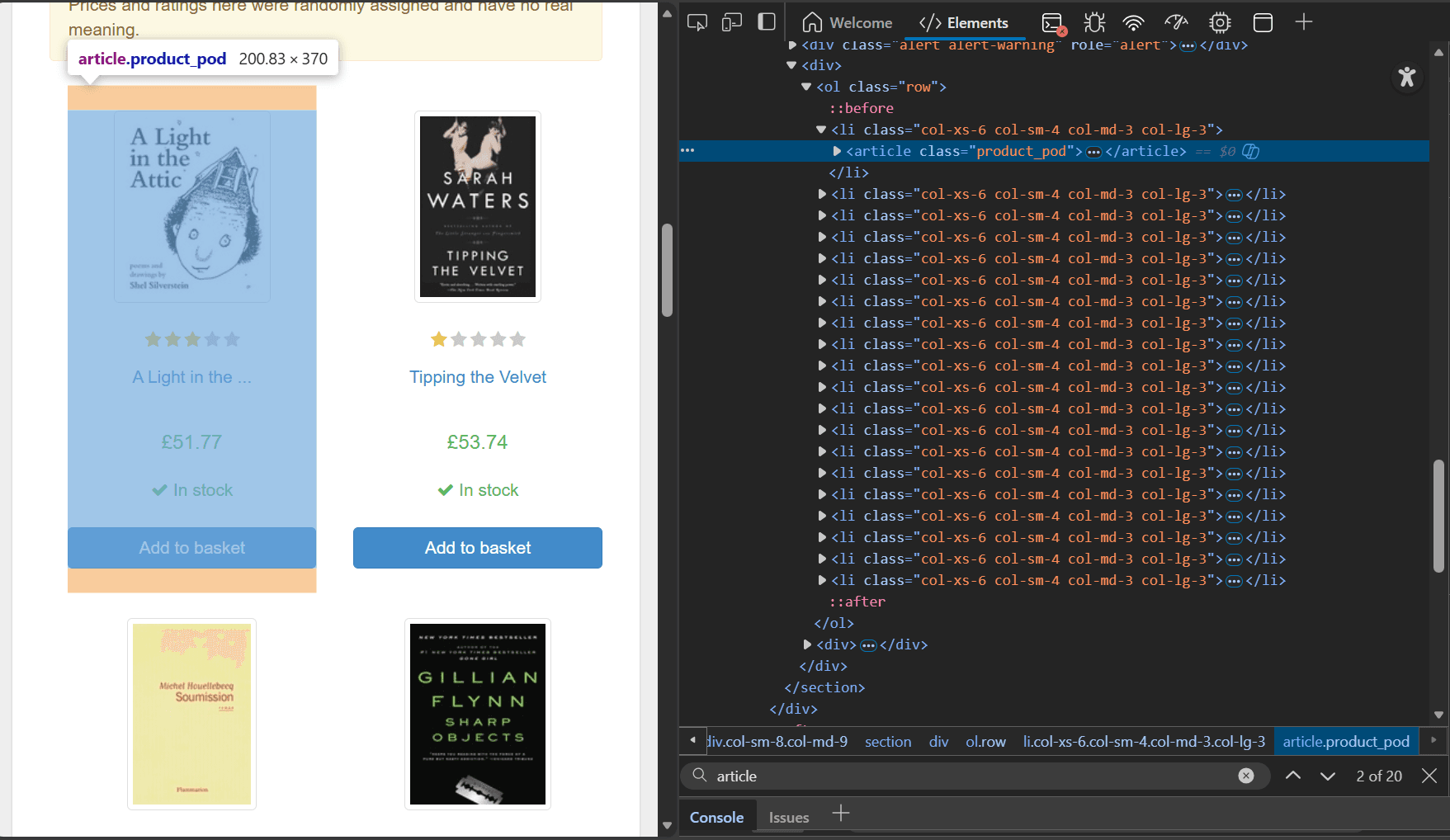
For this section, you'll use Books to Scrape as the list-crawling target. Open it in your browser first, then right-click any book card and select Inspect. In the Elements panel, you should see the same wrapper repeated for every book. On this site, each item is an article element with the class product_pod, which is what your parser will target.
Now, confirm you can see that same markup in the response your script will request. Open DevTools, go to the Network tab, reload the page, click the main document request, then open the Response tab. Search for product_pod to verify the list items are present in the HTML response.
Once you have the selectors, install the required dependencies using pip.
pip3 install requests beautifulsoup4
Then create a script that crawls a specified number of pages, extracts the same fields from each book card, follows the Next link, and writes the output to CSV.
import csv
import time
from urllib.parse import urljoin

import requests
from bs4 import BeautifulSoup

BASE_URL = "https://books.toscrape.com/"


def crawl_books(max_pages: int = 3):
    # start from the first list page
    url = BASE_URL
    all_items = []
    page = 1

    # keep crawling until we run out of pages or hit max_pages
    while url and page <= max_pages:
        print(f"[PAGE {page}] GET {url}")

        # fetch the page html
        resp = requests.get(url, timeout=10)
        print(f"[PAGE {page}] status {resp.status_code}")
        resp.raise_for_status()

        # parse the response html
        soup = BeautifulSoup(resp.text, "html.parser")
        items = []

        # each book is one repeated card: article.product_pod
        for card in soup.select("article.product_pod"):
            link_el = card.select_one("h3 a")
            price_el = card.select_one("p.price_color")
            rating_el = card.select_one("p.star-rating")

            # skip cards missing required fields
            if not link_el or not price_el:
                continue

            # title is stored in the link title attribute
            title = link_el.get("title", "").strip()

            # turn relative href into an absolute url
            detail_url = urljoin(url, link_el.get("href", "").strip())

            # price is visible text
            price = price_el.get_text(strip=True)

            # rating is stored as a css class: star-rating Three, etc
            rating = ""
            if rating_el:
                classes = rating_el.get("class", [])
                rating = " ".join(c for c in classes if c != "star-rating")

            items.append(
                {
                    "title": title,
                    "price": price,
                    "rating": rating,
                    "detail_url": detail_url,
                }
            )

        print(f"[PAGE {page}] found {len(items)} items")

        # stop if the page returns no items
        if not items:
            print("[CRAWL] no items on this page, stopping.")
            break

        all_items.extend(items)

        # find and follow the next page link
        next_link = soup.select_one("li.next a")
        url = urljoin(url, next_link.get("href", "")) if next_link else None

        page += 1
        time.sleep(1.0)  # slow down requests

    print(f"[CRAWL] total items collected: {len(all_items)}")
    return all_items


def save_to_csv(rows, path: str):
    # exit early if there is nothing to write
    if not rows:
        print("[CSV] nothing to save")
        return

    # use keys from the first row as csv columns
    fieldnames = list(rows[0].keys())

    # write a header row then all items
    with open(path, "w", newline="", encoding="utf-8") as f:
        writer = csv.DictWriter(f, fieldnames=fieldnames)
        writer.writeheader()
        writer.writerows(rows)

    print(f"[CSV] wrote {len(rows)} rows to {path}")


if __name__ == "__main__":
    # crawl three pages and save them to a csv file
    books = crawl_books(max_pages=3)
    save_to_csv(books, "books_list.csv")
This script loops through list pages by following li.next a, which is the pagination link on this site. On each page, it targets the repeated item container using article.product_pod, then extracts the same fields from each card and stores them as dictionaries. Finally, it writes all collected dictionaries to books_list.csv.
When you run the code, the output will look like this:
[PAGE 1] GET https://books.toscrape.com/
[PAGE 1] status 200
[PAGE 1] found 20 items
[PAGE 2] GET https://books.toscrape.com/catalogue/page-2.html
[PAGE 2] status 200
[PAGE 2] found 20 items
[PAGE 3] GET https://books.toscrape.com/catalogue/page-3.html
[PAGE 3] status 200
[PAGE 3] found 20 items
[CRAWL] total items collected: 60
[CSV] wrote 60 rows to books_list.csv
Here is a snapshot of the saved CSV.
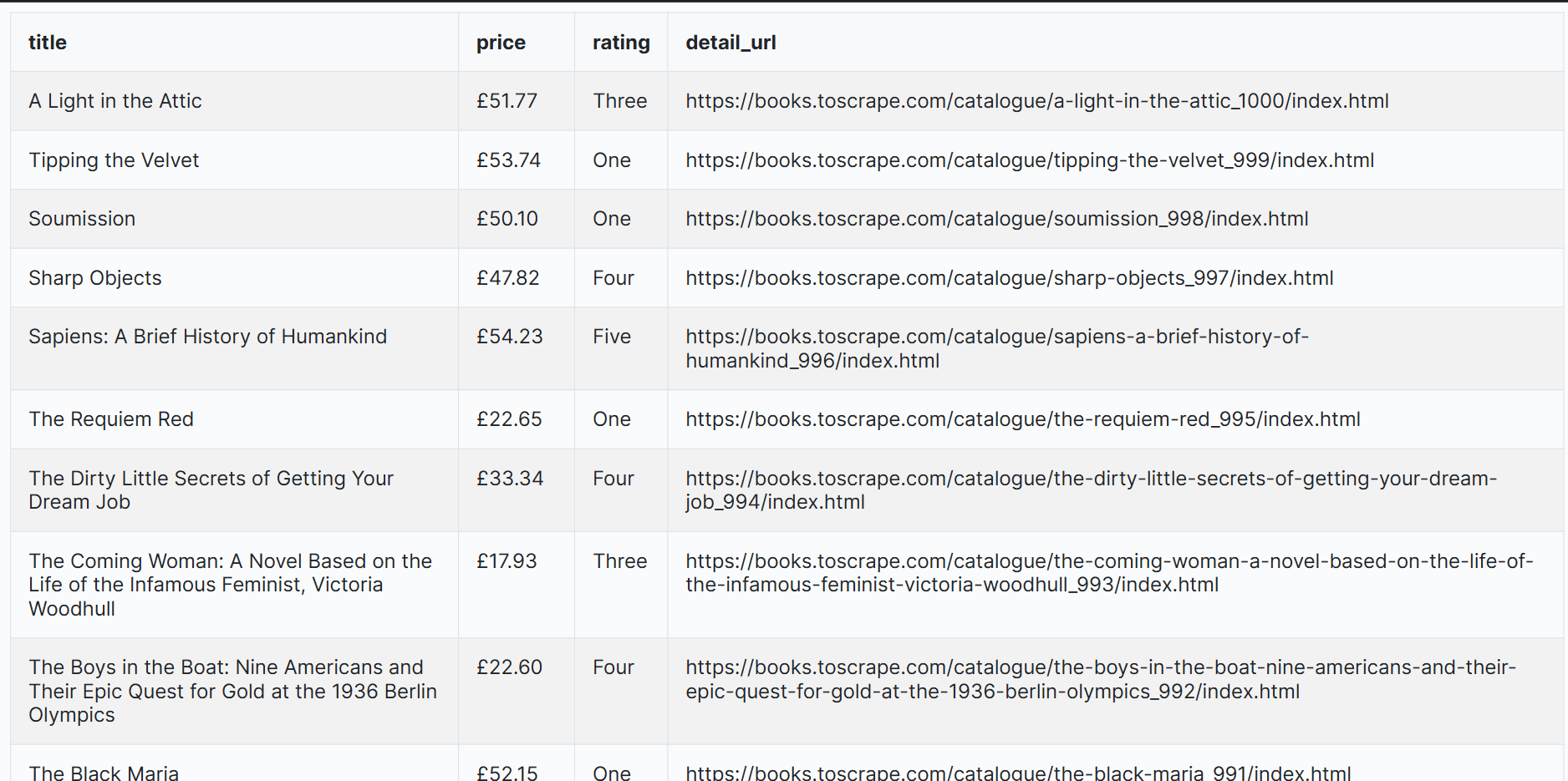
This method works because the full list is already present in the response HTML. The limit is that many real sites do not ship the full list this way. If the items only appear after JavaScript runs, or only load after you scroll or click a “Load more” button, a requests-based crawler will miss them. At that point, the better method is to use a headless browser.
Method 2: List Crawling With a Headless Browser
Open the target page, in this case, the ScrapingCourse Infinite Scrolling page, then check whether the items exist in the initial HTML. View the page source and compare it with the Elements panel. If the item cards only show up in Elements, JavaScript is building the list after the response loads.
To confirm, use View Source plus the Network tab to confirm whether more items come from background requests. Once you’ve verified that, use Inspect to extract the CSS selectors for the item container and the fields you want to collect.
For this article, you'll use Playwright as the headless browser. You can apply the same approach with other headless browser tools, such as Selenium or Puppeteer. The crawl loop stays the same. Only the API changes.
Install Playwright and download the browser binaries.
pip3 install playwright
python -m playwright install
Then, create a script that scrolls the page, waits for new items, stops when the item count stops increasing, extracts the final list from the rendered DOM, and writes it to CSV.
import csv
import time

from playwright.sync_api import sync_playwright

LIST_URL = "https://www.scrapingcourse.com/infinite-scrolling/"


def crawl_infinite_scroll(max_scrolls: int = 10):
    # start a playwright session and launch a headless browser
    with sync_playwright() as p:
        browser = p.chromium.launch(headless=True)
        page = browser.new_page()

        # open the list page and wait for the network to go idle
        page.goto(LIST_URL, wait_until="networkidle")

        # wait until at least one item is rendered
        page.wait_for_selector(".product-item")

        all_items = []
        last_count = 0

        # scroll in a loop to trigger more results
        for i in range(max_scrolls):
            # scroll to the bottom to load the next batch
            page.evaluate("window.scrollTo(0, document.body.scrollHeight)")
            time.sleep(1.5)  # give the page time to append new items

            # count rendered items after this scroll
            count = page.locator(".product-item").count()
            print(f"[SCROLL {i + 1}] items on page: {count}")

            # stop when scrolling does not add new items
            if count == last_count:
                print("[SCROLL] no new items, stopping.")
                break

            last_count = count

        # extract items from the final rendered dom
        for card in page.locator(".product-item").all():
            name = card.locator(".product-name").inner_text().strip()
            price = card.locator(".product-price").inner_text().strip()
            link = card.locator("a").first.get_attribute("href") or ""
            all_items.append({"name": name, "price": price, "url": link})

        browser.close()

    print(f"[CRAWL] total items collected: {len(all_items)}")
    return all_items


def save_to_csv(rows, path: str):
    # exit early if there is nothing to write
    if not rows:
        print("[CSV] nothing to save")
        return

    # use keys from the first row as csv columns
    fieldnames = list(rows[0].keys())

    # write a header row then all items
    with open(path, "w", newline="", encoding="utf-8") as f:
        writer = csv.DictWriter(f, fieldnames=fieldnames)
        writer.writeheader()
        writer.writerows(rows)

    print(f"[CSV] wrote {len(rows)} rows to {path}")


if __name__ == "__main__":
    # scroll up to ten times, then save extracted items
    products = crawl_infinite_scroll(max_scrolls=10)
    save_to_csv(products, "infinite_scroll_products.csv")
The code loads the page and waits for the first .product-item so it knows the list has rendered. It then scrolls up to max_scrolls times and stops when the .product-item count stops increasing, which signals the end of the list. Finally, it reads name, price, and url from each rendered card and writes the rows to CSV.
Running the code gives this output:
[SCROLL 1] items on page: 24
[SCROLL 2] items on page: 36
<!-- intermediate scrolls omitted for brevity ->
[SCROLL 10] items on page: 132
[CRAWL] total items collected: 132
[CSV] wrote 132 rows to infinite_scroll_products.csv
Open the saved CSV with any program of your choice.
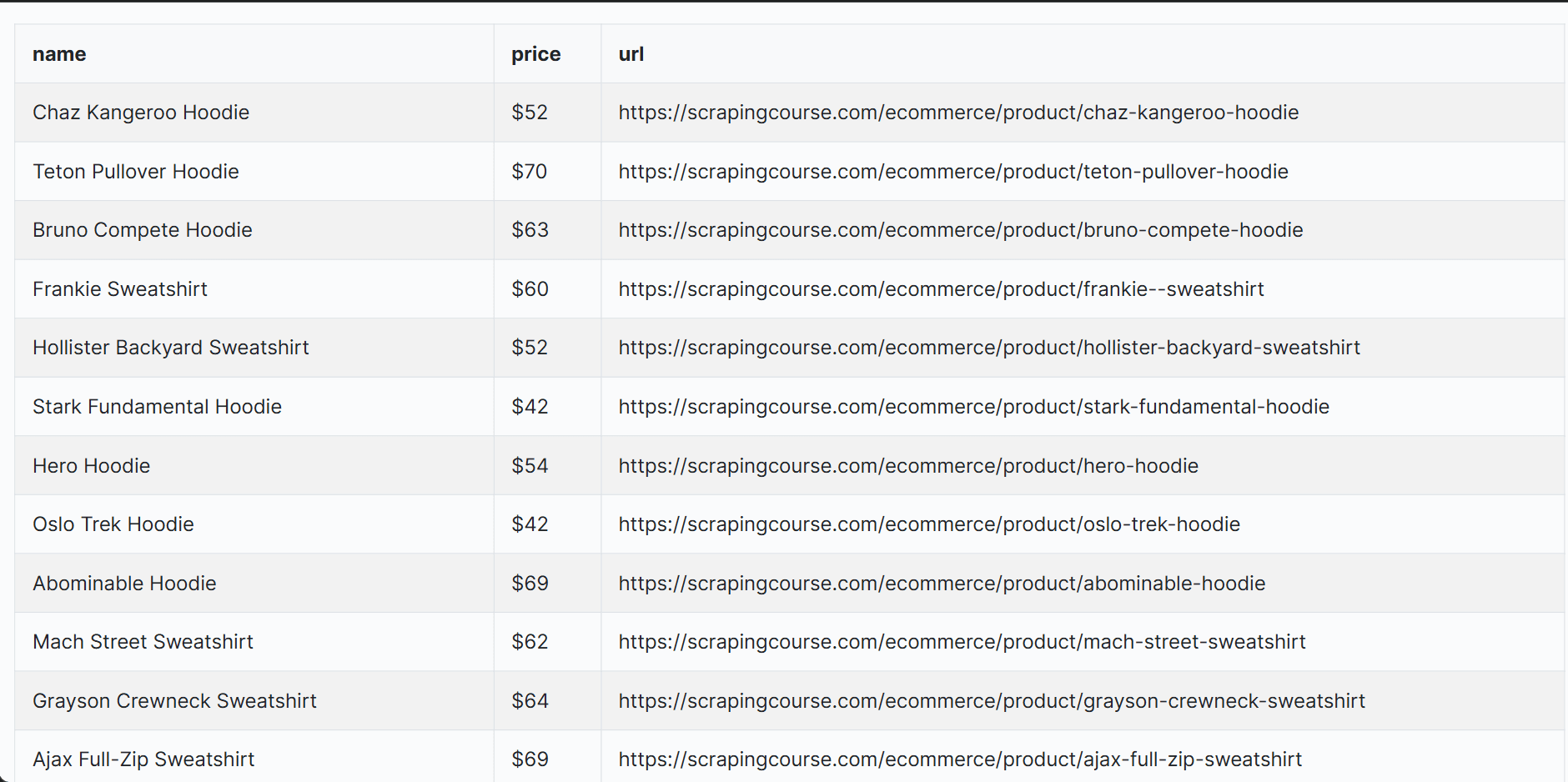
This example covers infinite scroll, but you can use the same headless browser structure for “Load more” lists and filter-driven search pages. The trigger changes. Instead of scrolling, you click the button or apply a filter, then wait until the item count increases.
Headless browsers work well for small list crawling jobs where you need JavaScript rendering and interactions. Once you scale, the cost shows up. Runs are slower and CPU-heavy, concurrency stays limited, and you still have to add proxies and session handling to keep success rates high.
Also, the scrapingcourse infinity scroll page is unprotected. On protected sites, you can run into CAPTCHA and other anti-bot checks that block automated traffic. At that point, a scraping API solution is the better fit.
Method 3: List Crawling With a Scraping API Solution
Scraping API solutions expose an endpoint that fetches target pages on your behalf, handles JavaScript rendering, manages proxy pools, applies anti-bot strategies, and returns either HTML or structured data. They sit between your crawler and the target site, so your code focuses on URLs, pagination, and extraction rules while the service focuses on reliable page access.
One of the best scraping API options for list crawling at scale is Zenrows' Fetch because it covers the common failure points in one endpoint.
It can render JavaScript pages, so lists that load after page execution still show up in the response. It routes through premium IPs with optional country targeting, which matters when listings change by region or when traffic gets blocked.
It also supports scripted interactions, so you can scroll or click "Load more" and wait for the list to finish loading before extraction. On supported sites, you can enable Autoparse to get structured JSON automatically. You can also configure CSS-based extraction rules that return JSON you can turn into rows and write to CSV.
To use it, sign up for Zenrows and open the Fetch Request Builder. Paste your list URL. Then, enable JavaScript Rendering and Premium Proxies.
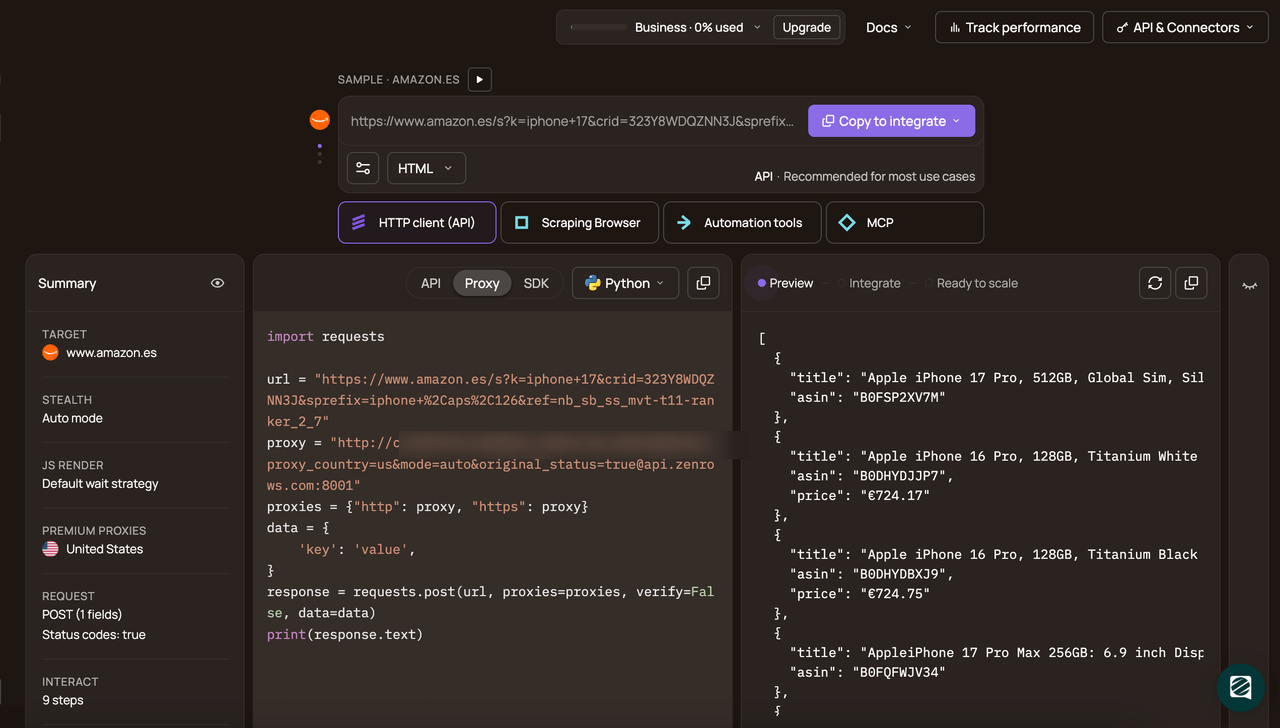
Pick Python in the code panel and choose the API connection mode. Then copy the generated code.
# pip install requests
import requests

url = "https://www.scrapingcourse.com/infinite-scrolling/"
apikey = '<YOUR_ZENROWS_API_KEY>'
params = {
    'url': url,
    'apikey': apikey,
    'js_render': 'true',
    'premium_proxy': 'true',
}
response = requests.get('https://api.zenrows.com/v1/', params=params)
print(response.text)
Run the code, and you’ll get the rendered HTML for the first set of products on the infinite scrolling page.
<html lang="en">
<head>
    <!-- ... -->
    <title>Infinite Scroll Challenge to Learn Web Scraping - ScrapingCourse.com</title>
    <!-- ... -->
</head>
<body>
    <!-- ... -->
    <div class="product-info">
        <span class="product-name">
            Chaz Kangeroo Hoodie
        </span>
    </div>
    <!-- ... -->
</body>
</html>
Now wrap the generated code in a scroll loop and add CSS selectors for extraction, so you can load more items and save the data in a CSV file.
# pip3 install requests
import csv
import json
import requests

ZENROWS_API_KEY = "<YOUR_ZENROWS_API_KEY>"
ZENROWS_ENDPOINT = "https://api.zenrows.com/v1/"
LIST_URL = "https://www.scrapingcourse.com/infinite-scrolling/"

MAX_SCROLLS = 10
WAIT_MS = 1200

def crawl_infinite_scroll(max_scrolls: int = MAX_SCROLLS):
    # choose the selectors you saw in DevTools for the list items and fields
    css_extractor = {
        "names": ".product-item .product-name",
        "prices": ".product-item .product-price",
        "urls": ".product-item a @href",
    }

    # scroll to trigger loading more items, then wait for the DOM to update
    js_instructions = [{"wait_for": ".product-item"}]
    for _ in range(max_scrolls):
        js_instructions.append({"evaluate": "window.scrollTo(0, document.body.scrollHeight);"})
        js_instructions.append({"wait": WAIT_MS})

    resp = requests.get(
        ZENROWS_ENDPOINT,
        params={
            "apikey": ZENROWS_API_KEY,
            "url": LIST_URL,
            "js_render": "true",
            "premium_proxy": "true",
            # run scrolling before extraction
            "js_instructions": json.dumps(js_instructions),
            # return extracted fields as json arrays
            "css_extractor": json.dumps(css_extractor),
        },
        timeout=60,
    )
    resp.raise_for_status()
    data = resp.json()

    # normalize extracted arrays
    names = [x.strip() for x in data.get("names", [])]
    prices = [x.strip() for x in data.get("prices", [])]
    urls = [x.strip() for x in data.get("urls", [])]

    print(f"[SCROLL] extracted items: {len(names)}")

    # merge arrays into one row per item
    rows = []
    for i in range(min(len(names), len(prices), len(urls))):
        rows.append({"name": names[i], "price": prices[i], "url": urls[i]})

    return rows

def save_csv(rows, path: str):
    # keep the output stable even if a run returns zero rows
    if not rows:
        print("[CSV] nothing to save")
        return

    with open(path, "w", newline="", encoding="utf-8") as f:
        w = csv.DictWriter(f, fieldnames=["name", "price", "url"])
        w.writeheader()
        w.writerows(rows)

    print(f"[CSV] wrote {len(rows)} rows to {path}")


if __name__ == "__main__":
    rows = crawl_infinite_scroll(max_scrolls=MAX_SCROLLS)
    save_csv(rows, "zenrows_infinite_scroll.csv")
The code scrolls the page a fixed number of times using js_instructions, then extracts names, prices, and urls with css_extractor. It groups the extracted arrays into rows and writes them to a CSV file.
When you run the code, the output is as follows:
[SCROLL] extracted items: 120
[CSV] wrote 120 rows to zenrows_infinite_scroll.csv
The generated CSV looks like this:
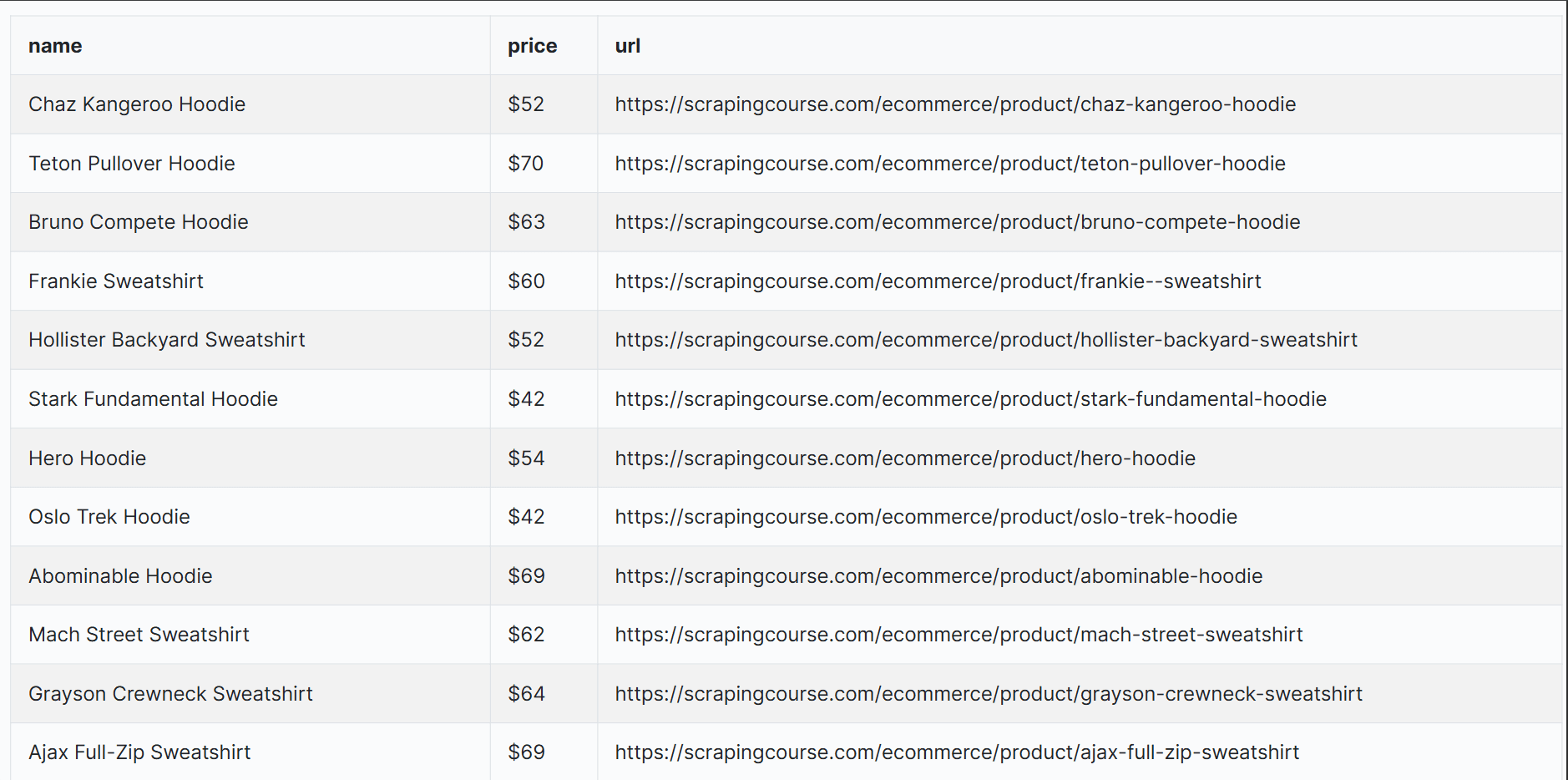
Congratulations 🎉. You’ve successfully extracted items from an infinite scrolling list through Zenrows.
You can reuse this approach on other sites, but you’ll need to adjust two things. Update how you advance the list, whether that’s page URLs, offsets, cursors, scrolling, or clicking “Load more”. Then update the css_extractor selectors to match the item card and fields on that site. Zenrows keeps the request layer the same, so you can focus on those two changes instead of rebuilding your stack for each target.
Conclusion
List crawling gets easier once you know how the list loads and what reveals the next batch of items. This guide showed three ways to do it with an HTTP client and HTML parsing, a headless browser, and a web scraping API.
In real projects, the hard part is keeping access stable as volume grows and targets tighten anti-bot checks. Zenrows' Fetch handles JavaScript rendering, proxy rotation, and anti-bot bypassbehind one endpoint, so you can keep your code focused on list logic and extraction.
Try Zenrows for free without a credit card!
FAQ
How is list crawling different from general web scraping?
List crawling extracts repeated items from list pages and iterates through the full list. General web scraping is broader and can target any page type, including detail pages.
How can I check if a website’s lists are practical to crawl?
Check if items exist in the raw HTML so an HTTP client with a parsing library like BeautifulSoup can extractthem. If items only appear after JavaScript runs, use a headless browser to render the page and interact with it. If you’re doing this at scale, use a web scraping API such as Zenrows to handle rendering, proxies, and blocks. Also, confirm there is a clear Next, offset, cursor, or repeatable background request.
What is the best way to handle pagination, infinite scroll, and “Load more” lists without missing items?
For pagination, follow the Next link or page or offset parameter until it ends. For infinite scroll and "Load more," use Playwright to scroll or click until the item count stops increasing, or replay the background request if it’s easy to reproduce. At scale, move the same loop to a web scraping API that handles proxies, rendering, and anti-bot blocks, then keep your selectors and stop rules the same.
How do I keep my list crawlers from getting blocked or rate-limited when I scale up?
Start with low concurrency and add delays plus backoff on 429 and 403 responses. If blocks persist, switch to a web scraping API with proxy rotation and rendering, and keep your pagination, stopping rules, and extraction selectors unchanged.