
How to Scrape with Patchright and Avoid Detection
Are you scraping with Playwright but getting blocked? Learn how Patchright can help you navigate anti-scraping measures, including the best solution.



Scraping with headless browsers like Playwright can be tough without the right stealth capabilities. Patchright offers browser patches designed to help you evade detection on protected sites. But how far can it really take you?
In this article, you'll learn how to use Patchright for web scraping and evaluate its effectiveness against anti-bot measures. You'll then see the singular technique that guarantees successful scraping at any scale.
What Is Patchright?
Patchright is an improved version of the standard Playwright library designed to evade anti-bot detection during scraping. The library is open-source and available in Python and Node.js.
Similar to stealth plugins like Playwright Stealth, Patchright patches Playwright's automation flags to make it less detectable. These include setting navigator.webdriver to False, changing the HeadlessChrome User Agent flag to Chrome, deactivating pop-up blocking, and more.
Patchright inherits Playwright's browser automation capabilities and APIs. It's simply a drop-in replacement for Playwright and doesn't require a fresh setup or an overhaul of your codebase if you already have a working Playwright web scraping script.
Let's scrape with Patchright to see how it works.
Skip the blocks. Try Zenrows free and get clean web data without the anti-bot fight.
Web Scraping with Patchright
In this section, you'll see how to use Patchright for scraping in Python by extracting product data from the E-commerce Challenge page. Let's start with the prerequisites.
Prerequisites
To get started with Patchright web scraping, you'll need to get the following ready:
Python: This tutorial uses the Patchright Python package. So, download and install the latest version of Python if you haven't already.
patchright: The main library required for stealth, browser automation, and scraping. There's a Patchright npm package for JavaScript, but we'll use the Python package in this tutorial.
Install Patchright using pip:
pip3 install patchright
To improve stealth, Patchright's developer also recommends using Chrome rather than the built-in Chromium instance. If Chrome isn't already installed on your machine, run the following command to install its binary:
patchright install chrome
Once the requirements are ready, let's begin.
Scrape Specific Data with Patchright
Like Playwright, Patchright supports both synchronous (.sync_api) and asynchronous (.async_api) API methods. We'll use the sync_api method in this tutorial.
Import the sync_patchright from Patchright's sync API. Initiate the browser in headless mode and create a new page. Then, open the target site:
# pip3 install patchright
from patchright.sync_api import sync_playwright

with sync_playwright() as p:
    # launch browser and open a new page
    browser = p.chromium.launch()
    page = browser.new_page()

    # navigate to target URL
    page.goto("https://www.scrapingcourse.com/ecommerce/")
Extract the parent elements of all the products (.product), loop through them to extract product names (.product-name) and prices (.price). Finally, append the scraped data to a placeholder list and print it:
# ...

with sync_playwright() as p:
    # ...

    # extract product data
    products = page.locator(".product")

    product_data = []

    for product in products.all():
        data = {
            "title": product.locator(".product-name").inner_text(),
            "price": product.locator(".price").inner_text(),
        }
        product_data.append(data)

    print(product_data)

    page.wait_for_timeout(20000)
    page.close()
Merge the snippets, and you'll have the following complete code:
# pip3 install patchright
from patchright.sync_api import sync_playwright

with sync_playwright() as p:
    # launch browser and open a new page
    browser = p.chromium.launch()
    page = browser.new_page()

    # navigate to target URL
    page.goto("https://www.scrapingcourse.com/ecommerce/")

    # extract product data
    products = page.locator(".product")

    product_data = []

    for product in products.all():
        data = {
            "title": product.locator(".product-name").inner_text(),
            "price": product.locator(".price").inner_text(),
        }
        product_data.append(data)

    print(product_data)

    page.wait_for_timeout(20000)
    page.close()
The above Patchright scraper outputs the following data:
[
    {"title": "Abominable Hoodie", "price": "$69.00"},
    # ... omitted for brevity
    {"title": "Artemis Running Short", "price": "$45.00"},
]
Bravo! You've scraped a website with Patchright Playwright, and that's a good way to start. However, the target is unprotected, so this isn't a test of Patchright's strength. In the next section, we'll explore Patchright's stealth capabilities by testing it on a real challenge site.
Using Patchright to Scrape a Protected Site
As seen in the previous section, the Patchright scraper follows a similar API standard to Playwright. That said, the core value that Patchright adds to your Playwright code is stealth capability, which aims to make your Playwright scraper less detectable.
To run Pathright's stealth mode, you need to launch the browser instance as a persistent context.
If dealing with an anti-bot measure, such as Cloudflare, which requires a solution cookie like cf_clearance, it's best to run the browser in non-headless (GUI) mode. This enables you to solve the anti-bot challenge manually and then scrape the cf_clearance cookie by storing it in a specified directory. Patchright automatically persists this solution cookie across multiple browser sessions to bypass subsequent anti-bot measures.
Let's see how effective Patchright's stealth mode is by scraping the Antibot Challenge page.
Launch the browser using persistent context in non-headless mode. Then, specify a directory to write solution cookies. Now, launch the target site with this setup:
# pip3 install patchright
from patchright.sync_api import sync_playwright
import time

with sync_playwright() as p:
    # launch the browser with persistent context and store cookie data
    browser = p.chromium.launch_persistent_context(
        user_data_dir="play-dir",
        channel="chrome",
        no_viewport=True,
        headless=False,
    )
    page = browser.new_page()

    # navigate to the antibot challenge page
    page.goto("https://www.scrapingcourse.com/antibot-challenge")

    # wait for some time to click through any challenges manually
    time.sleep(20)

    browser.close()
Execute the above code to interact manually with the CAPTCHA challenge.
The code above launches the browser in GUI mode as expected. But as seen in the result below, Patchrigh got stuck on the challenge page, which means you can't manually interact with CAPTCHA to get a solution token.
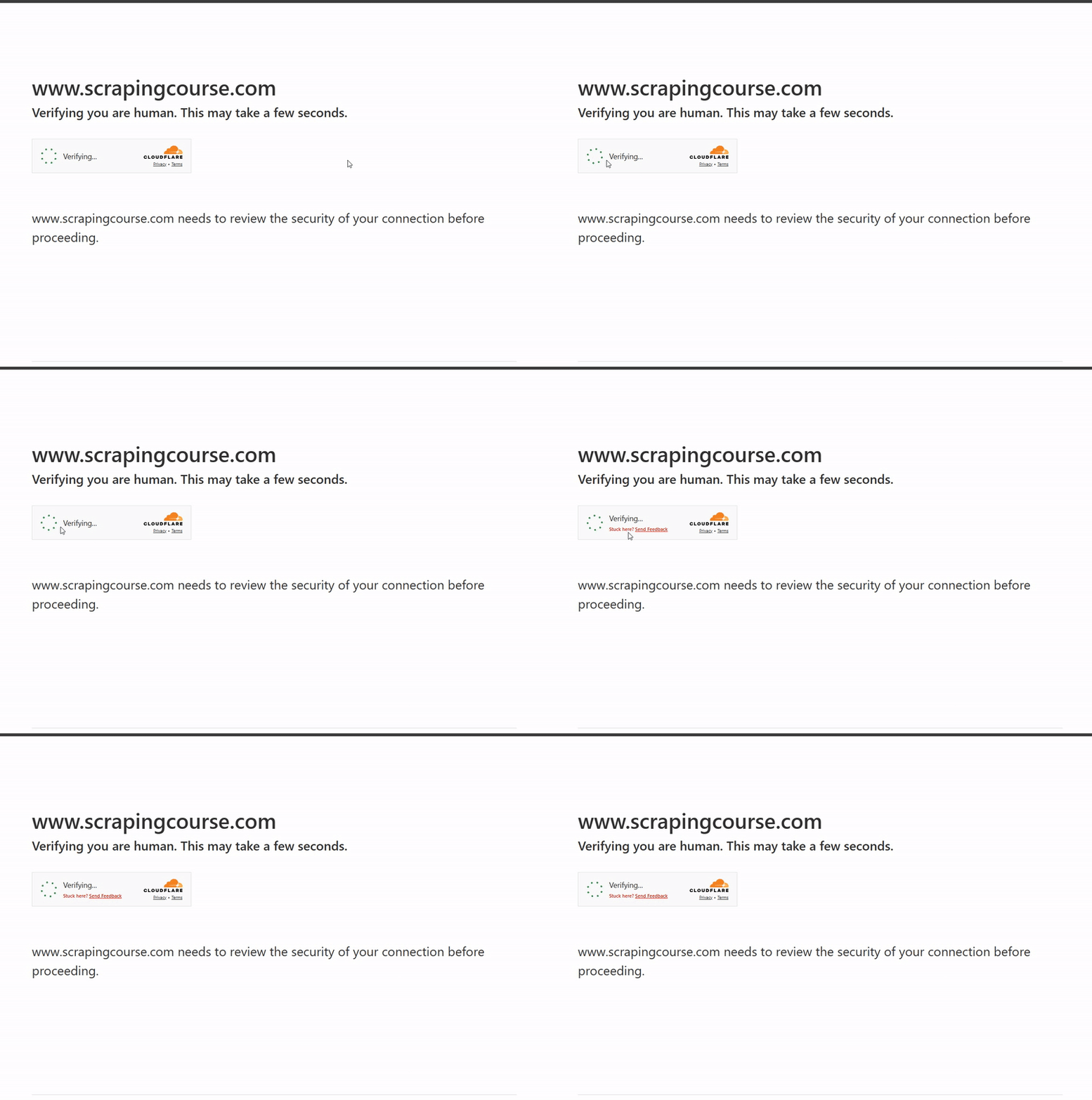
Patchright couldn't bypass the protection on the target site. Let's reveal some of its limitations in the next section to see why.
The Limitations of Patchright
While Patchright may work for basic anti-bot protections, it's obviously unsuitable for handling advanced anti-bot measures or serious, large-scale projects. Getting stuck on the anti-bot challenge page shows that Patchright's stealth mode can't bypass JavaScript challenges, which is crucial for evading detection.
Additionally, anti-bot developers always reverse-engineer open-source tools like Patchright to render them ineffective against their security systems.
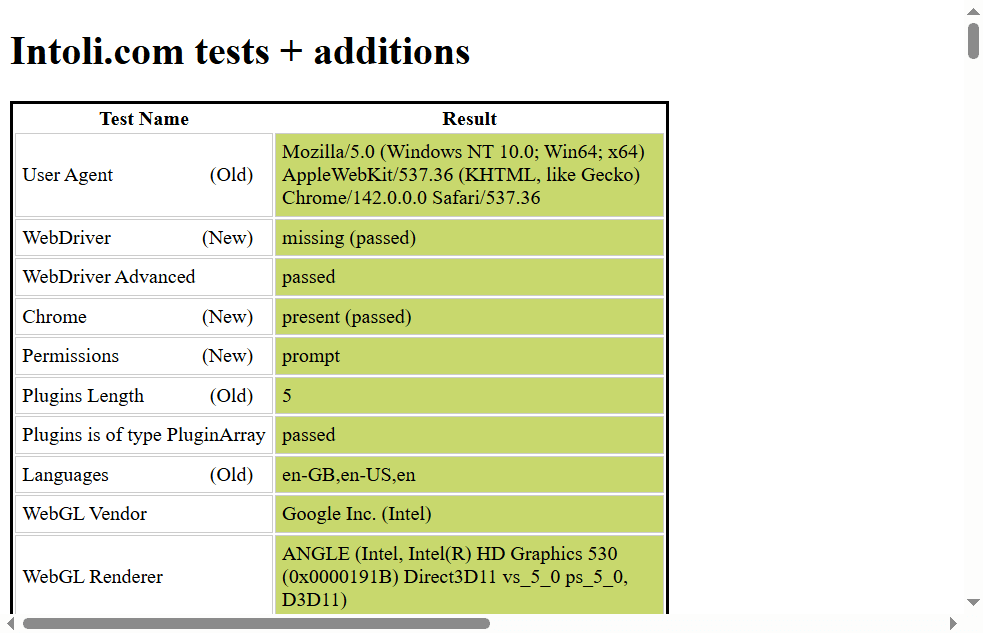
That said, on a fingerprinting test website like bot.sannysoft, Patchright shows adequate patching in GUI mode. To try it, simply replace the previous target URL with that of the fingerprinting test site and screenshot the page, as shown:
# ...

with sync_playwright() as p:
    # ...

    # navigate to the target page
    page.goto("https://bot.sannysoft.com")
    time.sleep(5)
    # take a screenshot of the page
    page.screenshot(path="screenshot.png")
    browser.close()
The library passes all the fingerprinting tests, as shown:
However, further testing on the same site using non-headless mode reveals a red flag in Patchright's fingerprinting. Simply remove headless=True from the browser option, and rerun the code. You'll see the following screenshot:
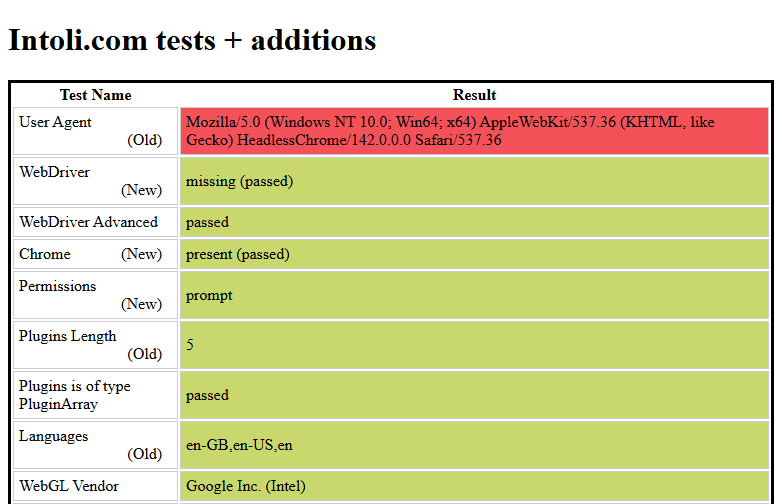
While the HeadlessChrome flag is expected when using standard automation browsers like Playwright in headless mode, it’s not a desirable attribute for stealth tools. Anti-bot systems run multiple detection tests behind the scenes, and this flag can be a major leakage point that tips them off to automation.
As seen with Patchright, anti-bots can still block stealth tools, even in non-headless (GUI) mode, as these tools often leak subtle automation clues. Anti-bot measures can detect minor anomalies in browser fingerprints, fonts, extensions, WebGL properties, and more, leading to detection and blocking.
These limitations can be overwhelming. But the good news is that you can bypass them. You'll see how to achieve that in the next section.
Avoid Getting Blocked
You can spend hours or even days patching your scraper manually to bypass blocks and still get no results. Even if your evasion techniques work for a while, you'll likely still get blocked, as frequent manual tweaks can become unmanageable with frequent anti-bot updates.
The best way to bypass anti-bot measures reliably with zero manual tweaks or configuration is to use a web scraping solution, such as Zenrows Fetch.
Zenrows provides all the toolkits you need to scrape even the most protected websites at scale without getting blocked. It automatically adapts to anti-bot updates, eliminating time-wasting, resource-intensive manual interventions. With Zenrows managing all the technicalities of anti-bot evasion, JavaScript rendering, and proxy rotation behind the scenes, you can focus on decision-making rather than endless debugging and intermittent scraping failures.
Zenrows also has headless browser features, making it a suitable replacement for Playwright or Patchright.
To see how Zenrows works, let's use it to scrape the Anti-bot Challenge page that previously blocked your Patchright scraper.
Sign up to open the Zenrows Request Builder. Paste the target URL in the link box, and activate Premium Proxies and JS Rendering.
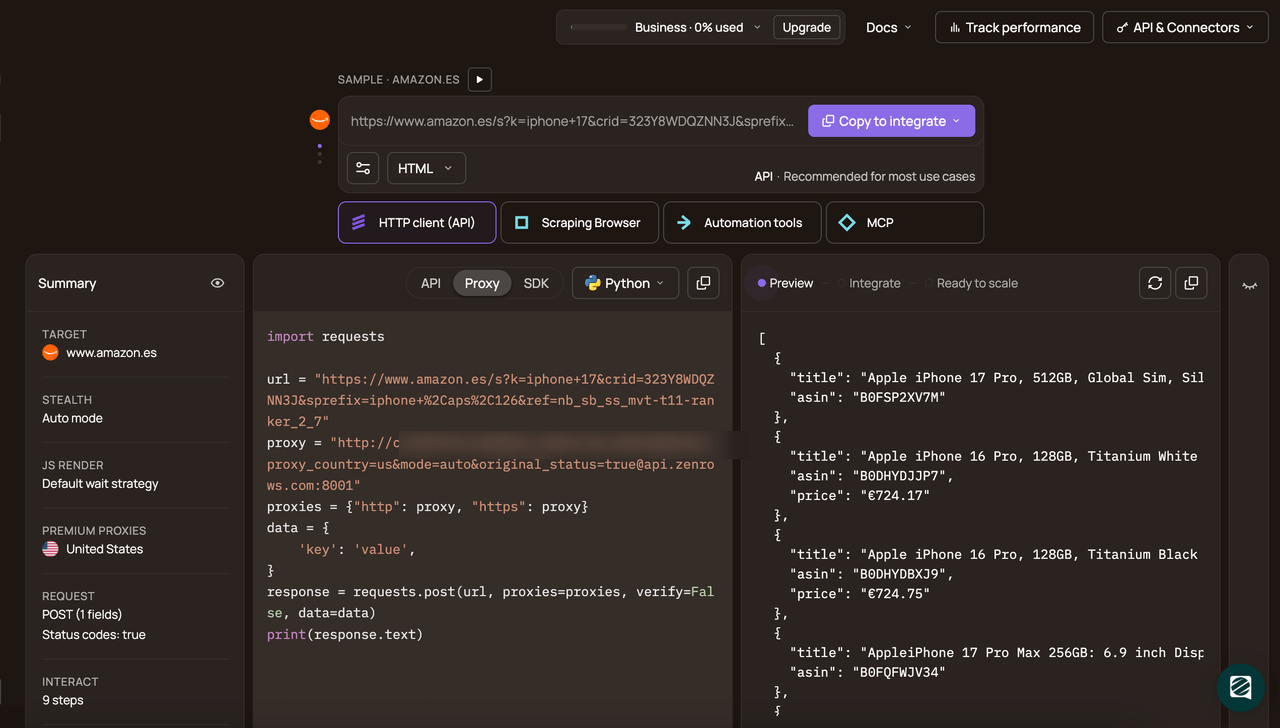
Choose Python as your programming language and select the API connection mode. Copy and paste the generated code into your scraper file:
Here's the generated code:
# pip3 install requests
import requests

url = "https://www.scrapingcourse.com/antibot-challenge/"
apikey = "<YOUR_ZENROWS_API_KEY>"
params = {
    "url": url,
    "apikey": apikey,
    "js_render": "true",
    "premium_proxy": "true",
}
response = requests.get("https://api.zenrows.com/v1/", params=params)
print(response.text)
The above code outputs the protected site's HTML, as shown:
<html lang="en">
<head>
    <!-- ... -->
    <title>Antibot Challenge - ScrapingCourse.com</title>
    <!-- ... -->
</head>
<body>
    <!-- ... -->
    <h2>
        You bypassed the Antibot challenge! :D
    </h2>
    <!-- other content omitted for brevity -->
</body>
</html>
Congratulations! 🎉 You've just set up a scraper that reliably bypasses anti-bot measures. You're ready to scrape at any scale without limitations.
Conclusion
You've learned how to scrape with Patchright and seen how it works, including its limitations. Bypassing anti-bot measures goes beyond browser patching and surface evasion techniques. It requires continuous strategies that only specialized premium solutions can deliver.
Since open-source stealth tools like Patchright are unreliable for consistent anti-bot bypass and real-world scraping, we recommended using an all-in-one solution like Zenrows. With Zenrows, you'll bypass blocks and reliably scrape any website with ease.
Try Zenrows for free now or speak with sales!
FAQ
Can Patchright bypass anti-bot measures?
Although Patchright patches the standard Playwright library to increase stealth, it's still unreliable against the advanced anti-bot measures that most target sites use. To bypass anti-bots reliably, you should use reliable scraping solutions like Zenrows.
Is Patchright a Python or Node.js library?
Patchright is available in both Python and Node.js, with installation guides for each. So, whether you've set up your Playwright scraper in Node.js or Python, you can replace it with Patchright to increase stealth.
Can I scrape dynamic websites with Patchright?
Yes, since Patchright extends Playwright's automation capabilities and API methods, you can execute JavaScript to simulate user interactions and scrape dynamic content.
What are the best alternatives to Patchright?
Some of the top open-source alternatives to Patchright include:
- SeleniumBase with Undetected ChromeDriver: A Selenium fork that can run an undetected ChromeDriver to evade anti-bot detection.
- Camoufox: A fingerprinting evasion library built on top of the Firefox browser.
- Scrapling: A web scraping library with stealth capabilities.
With that said, the best alternative to Patchright is an auto-scaled, auto-managed solution like Zenrows.