
How to Bypass AWS WAF
AWS WAF silently blocks web scraping. Learn the best tools and methods to bypass it and scrape without limitations.



Does your scraper run into 403 Forbidden errors or 202 Accepted responses with "x-amzn-waf-action: challenge" when scraping? That’s a sign AWS WAF anti-bot systems are blocking you.
In this article, you’ll learn:
- What AWS WAF is and how it detects bots.
- Why it’s so effective at blocking scrapers.
- The top tools and methods for bypassing AWS WAF.
- Step-by-step tactics, including tool benchmark to help you pick the best AWS bypass method.
Let's explore the AWS WAF and get your scraper unblocked!
Key Takeaways
- AWS WAF primarily blocks bots by requiring an encrypted session token stored in the
aws-waf-token cookie. Requests without this token receive an HTTP 202 response, but with a challenge header. - Bypass strategies must address five distinct layers: IP reputation, rate limiting, token validation, JavaScript telemetry, and TLS/HTTP2 Fingerprinting.
- Standard HTTP libraries like Python's Requests are instantly flagged because they cannot execute the
challenge.jsscript required to generate valid session tokens. - Our 2026 benchmarks identify SeleniumBase (UC Mode) as the most effective open-source stealth browser for bypassing AWS WAF, achieving an 89% success rate on cold starts and 94% when reusing authenticated profiles.
- Reusing a browser profile where a human has previously solved a challenge significantly increases AWS WAF bypass success rates (from 11% to 82% for tools like Playwright Stealth).
What Is AWS WAF and How Does It Work?
AWS WAF is a managed web application firewall from Amazon Web Services that inspects HTTP and HTTPS requests before they reach the target site. It usually sits in front of CloudFront distributions, Application Load Balancers, or API Gateway, so every request to a protected endpoint passes through AWS WAF at the edge rather than hitting the origin server directly.
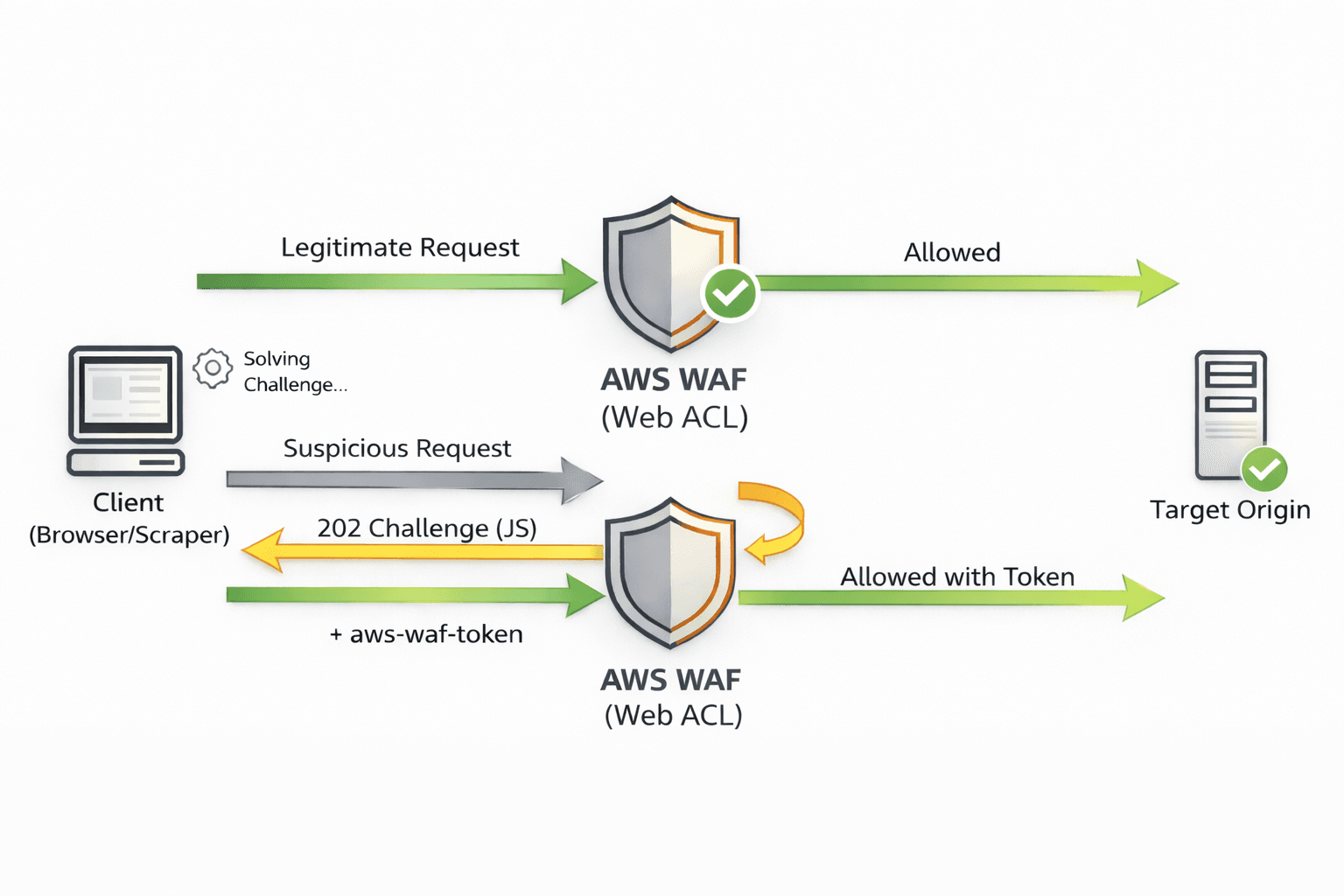
The main configuration unit is a Web ACL (Web Access Control List). A Web ACL contains an ordered list of rules that inspect properties such as IP address, URL path, query parameters, headers, cookies, body fields, overall request size, and request rate. For each request, AWS WAF walks through those rules in order and applies the first matching action, such as allowing the request, blocking it with an error or custom page, or rate-limiting it once a particular threshold is reached.
AWS WAF also includes built-in anti-bot systems. Anti-bots tell the browser to load AWS WAF’s JavaScript, which runs silent checks on the browser environment, cookies, timing, and fingerprint signals, then scores the session as human or bot traffic. When those checks pass, AWS WAF issues an encrypted session token, and the browser stores it in the aws-waf-token cookie.
The browser sends that cookie with subsequent requests, and AWS WAF uses it as evidence that the session has passed recent checks. If a request hits a rule that expects a valid token but arrives without one, or with an expired one, AWS WAF returns an HTTP 202 response with the x-amzn-waf-action: challenge header instead of forwarding the request to the origin.
Skip the blocks. Try Zenrows free and get clean web data without the anti-bot fight.
What Makes AWS WAF Challenging To Bypass
AWS WAF doesn’t rely on one signal to classify traffic as human or automated. It combines several anti-bot checks. The main ones are:
- IP reputation and geo rules: Managed rule groups and custom rules can block or throttle traffic from flagged IP ranges, specific hosting networks, or regions the target doesn’t want. If your scraper runs from common datacenter IPs or the wrong country, AWS WAF blocks it before any other bypass technique takes effect.
- Rate limiting and anomaly detection: Rate limits don’t have to be beased on IP address only. Rules can aggregate by IP, cookie, header, or a custom key, and trigger when request volume exceeds a threshold or when requests arrive in patterns that don’t match normal browsing, such as tight traffic bursts or perfectly even intervals.
- Token-based session validation: AWS WAF can require an encrypted session token stored in the
aws-waf-tokencookie. Requests that arrive without a valid token, or with an expired one, are blocked or redirected to a challenge instead of being forwarded to the origin, even if the rest of the request looks fine. - JavaScript integrations and telemetry: Some protections depend on checks that assume a real browser over HTTPS. They rely on browser behavior and environment data, not just raw HTTP. A plain HTTP client that never behaves like a browser keeps failing those checks and keeps getting challenged instead of seeing the real page HTML.
- Browser and Transport Layer Security (TLS) signatures: Even with correct headers, the client can still be fingerprinted at the TLS level. TLS handshakes, HTTP behavior, and headless browser fingerprints different from those of real Chrome or Firefox can flag your scraper as automated, triggering throttling, challenges, or full blocks.
Generating realistic headers or rotating IPs alone isn’t enough. A bypass needs to run real JavaScript where needed, handle tokens correctly, and respect AWS WAF’s rate and behavior expectations. An HTTP client like Python's Requests can't handle these requirements on its own.
For instance, let's see how the WAF behaves when we try to access a protected page with a plain HTTP client like Requests.
Start by installing requests.
pip3 install requests
Then fetch the Binance Bitcoin price page with a normal HTTP request.
import requests

URL = "https://www.binance.com/en/price/bitcoin"

HEADERS = {
    "User-Agent": (
        "Mozilla/5.0 (Windows NT 10.0; Win64; x64) AppleWebKit/537.36 "
        "(KHTML, like Gecko) Chrome/145.0.7632.76 Safari/537.36"
    ),
    "Accept": (
        "text/html,application/xhtml+xml,application/xml;q=0.9,image/avif,image/webp,image/apng,*/*;q=0.8,"
        "application/signed-exchange;v=b3;q=0.7"
    ),
}

resp = requests.get(URL, headers=HEADERS, timeout=60, allow_redirects=True)
print(resp.text)
When you run the code, the output is as follows.
<html lang="en">
<head>
  <!-- ... -->
  <script src="https://<subdomain>.token.awswaf.com/<...>/challenge.js"></script>
  <!-- ... -->
</head>
<body>
  <div id="challenge-container"></div>

  <noscript>
    <h1>JavaScript is disabled</h1>
    In order to continue, we need to verify that you're not a robot.
    Enable JavaScript and reload the page.
  </noscript>

  <!-- other content omitted for brevity -->
</body>
</html>
The output shows that AWS WAF blocked the request. This is because HTML loads challenge.js from a token.awswaf.com subdomain. Also, the noscript block warning about proving you’re not a robot confirms you’re seeing an AWS WAF challenge page.
Let's now see how to bypass AWS WAF when scraping.
Method #1: Use a Stealth Browser To Bypass AWS WAF
A stealth browser is a browser setup that hides obvious automation signals, such as WebDriver flags and predictable JavaScript fingerprints. It runs a full browser over HTTPS, executes JavaScript, accepts and sends cookies, and keeps session state and tokens alive across multiple navigations. That makes anti-bots like AWS WAF more likely to treat your scraper as a normal browser session instead of automated traffic.
To find the best stealth browser recommendation, we ran 100 iterations against the Binance Bitcoin price page, which is protected by AWS WAF. The benchmark included SeleniumBase in Undetected-Chromedriver (UC) mode, Camoufox, and Playwright Stealth.
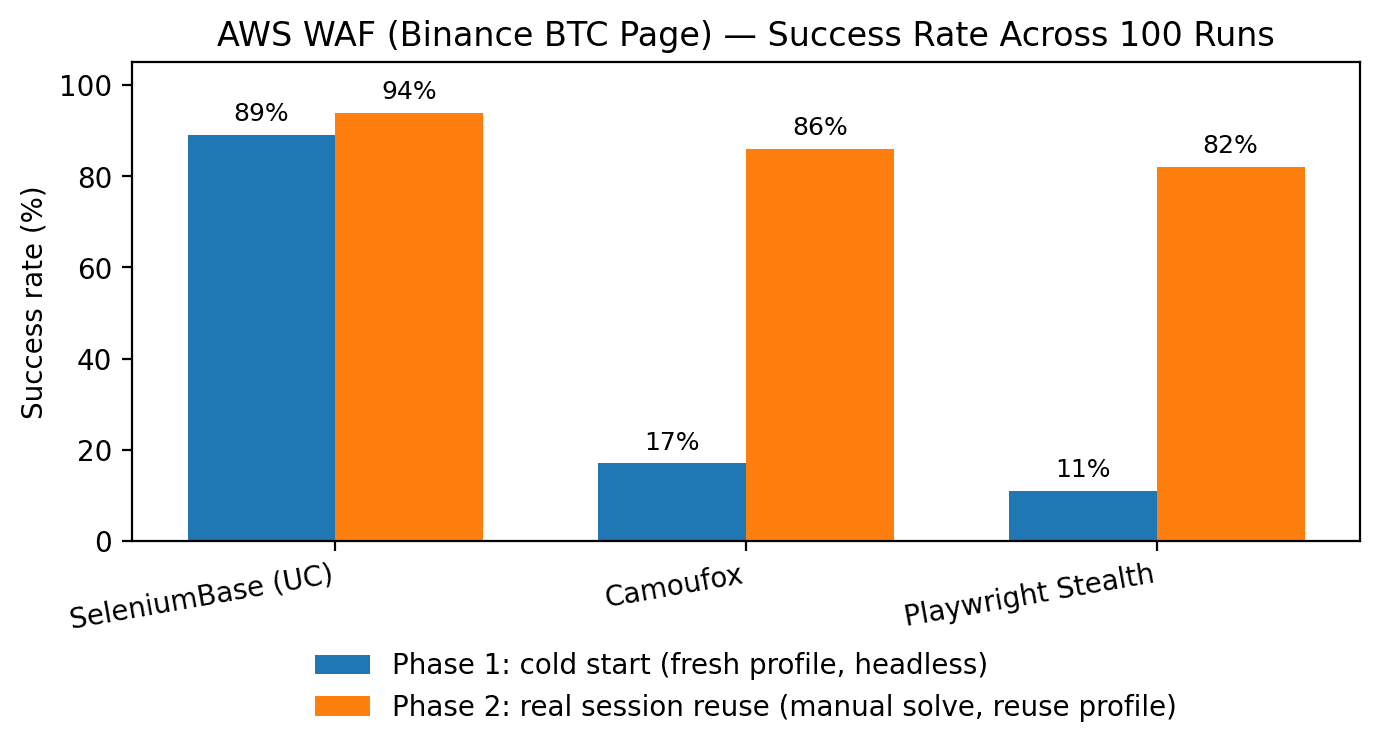
The test had two phases. In the first phase, each run was a cold start: the script launched a headless browser with a fresh profile, with no existing cookies or WAF tokens. Under these conditions, SeleniumBase UC mode reached an 89% success rate, Camoufox 17%, and Playwright Stealth 11%.
In the second phase, the test reused a real browser session. The script first opened the page in a visible browser window, a human solved the challenge once, and AWS WAF set its cookies and tokens in that profile. The benchmark then reused that same profile in headless mode for the 100 measured runs. In this phase, SeleniumBase UC reached 94% success, Camoufox 86%, and Playwright Stealth 82%. Across both phases, SeleniumBase UC consistently achieved the highest success rate.
Since SeleniumBase in UC mode surpassed the other sampled tools, let's see how to use it to bypass AWS WAF.
How To Bypass AWS WAF Using SeleniumBase and Undetected ChromeDriver
SeleniumBase is an improved version of the standard Selenium library. When used in the Undetected ChromeDriver mode, it hides automation signals to bypass anti-bot detection.
To begin, install SeleniumBase using pip:
pip3 install seleniumbase
Use SeleniumBase in UC mode to open the same Binance URL, wait for the script#__APP_DATA element that holds the Binance page’s JSON payload after AWS WAF has allowed the request, and then save the full HTML.
import json
from pathlib import Path
from seleniumbase import Driver
from selenium.webdriver.common.by import By
from selenium.webdriver.support.ui import WebDriverWait

URL = "https://www.binance.com/en/price/bitcoin"
OUT_HTML = Path("binance_price_bitcoin.html")

# Set `headless=False` if you want to see the browser window.
driver = Driver(uc=True, headless=True)
try:
    # Open the URL using SeleniumBase's UC reconnect helper.
    driver.uc_open_with_reconnect(URL, reconnect_time=4)

    # Wait for the JSON payload script tag, then parse it.
    WebDriverWait(driver, 60).until(lambda d: d.find_element(By.CSS_SELECTOR, "script#__APP_DATA"))
    payload = driver.find_element(By.CSS_SELECTOR, "script#__APP_DATA").get_attribute("textContent") or ""
    app_data = json.loads(payload)

    # Save the full HTML for inspection (it can be large).
    try:
        html = driver.get_page_source()
    except Exception:
        html = getattr(driver, "page_source", "") or ""
    OUT_HTML.write_text(html, encoding="utf-8")

    print("Title:", driver.title)
    print("Saved HTML:", str(OUT_HTML), "bytes=", OUT_HTML.stat().st_size)
finally:
    driver.quit()
Note
The CSS selectors used in the above code might change. We recommend inspecting the target page element to ensure the CSS selectors are still valid before running your scraper.
When you inspect the saved HTML, you should now see the real Binance price page instead of the challenge HTML.
<html lang="en" dir="ltr">
<head>
<meta charset="utf-8">
<title>Bitcoin Price Today | BTC to USD Live Price, Market Cap & Chart</title>
<meta name="description" content="1 Bitcoin currently costs $68,499.71, down 1.4% in the last 24h. Convert BTC to USD with our instant crypto converter and view price trends.">
<!-- other meta, link, and script tags omitted for brevity -->
</head>
<body>
<!-- ... -->
<h2>Price of Bitcoin Today</h2>
<div>
The live price of Bitcoin is $68,499.71 per (BTC / USD) with a current market cap of $1,369.31B USD.
24-hour trading volume is $39.80B USD. BTC to USD price is updated in real-time.
Bitcoin is -1.4% in the last 24 hours with a circulating supply of 19.99M.
</div>
<!-- other content omitted for brevity -->
</body>
</html>
Great! The response contains the actual Binance Bitcoin price page content rather than an AWS WAF challenge page.
Although stealth browsers work well for debugging, research, and small-scale scraping, they become hard to manage at scale. The reason is that each stealth run starts a full Chrome process with its own memory, CPU, and network overhead, and you still have to keep the browser version in sync, maintain proxies. You also need to update configurations whenever AWS WAF rules change, or your scraper may break unexpectedly.
Method #2: Web Scraping API to Bypass AWS WAF
A web scraping API is a hosted service that helps you manage your scraping requests with minimal code and configurations.
A good example is Zenrows Fetch, which has a 99.93% success rate when bypassing anti-bot protections. It features JavaScript rendering, proxy rotation with geo-targeting, Adaptive Stealth Mode, automatic anti-bot bypass (including AWS WAF), and multiple output formats such as HTML, JSON, Markdown, and screenshots.
Zenrows provides a scalable scraping infrastructure and enables human interaction with zero memory overhead. You send the target URL, and the API returns the rendered HTML or a structured output.
Let's see how Zenrows handles bypassing AWS WAF by scraping the Binance Bitcoin price page.
Sign up for Zenrows, then open the Fetch Request Builder. Paste the target URL into the URL field, enable Adaptive Stealth Mode.
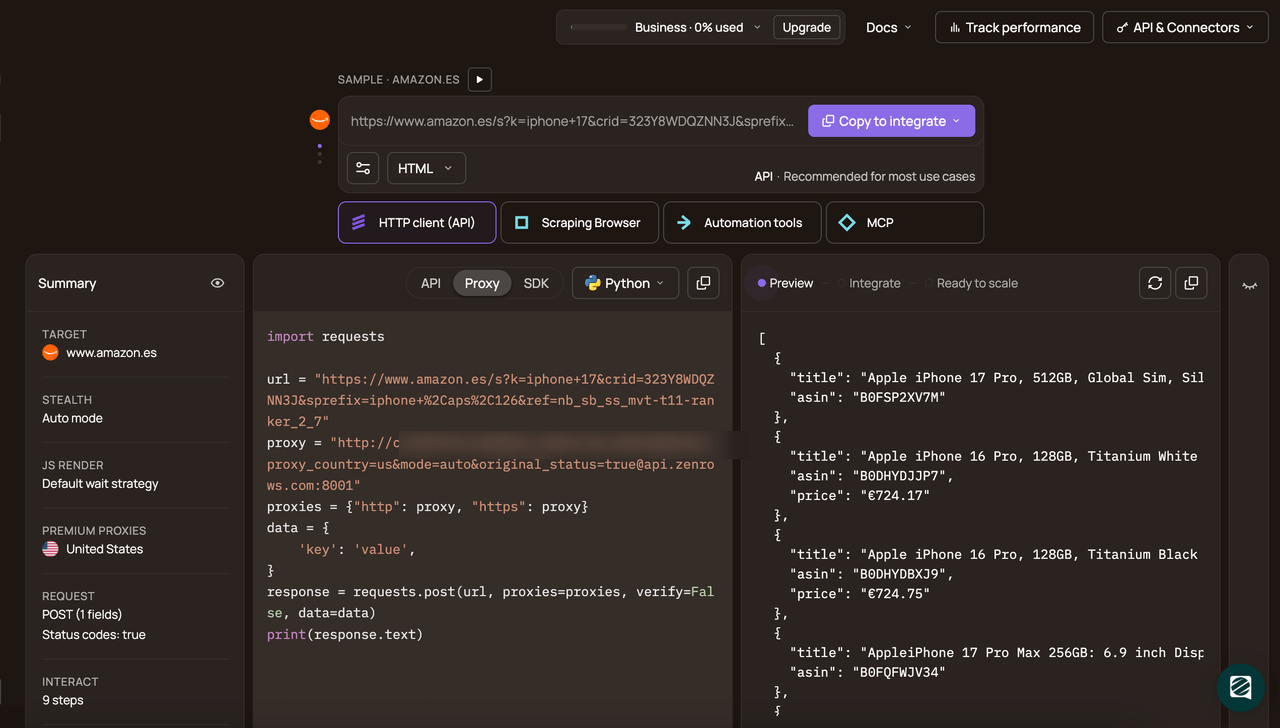
Select your programming language (Python in this case), and finally choose API as the connection mode.
Copy and run the generated code.
# pip install requests
import requests

url = "https://www.binance.com/en/price/bitcoin"
apikey = "YOUR_ZENROWS_API_KEY"

params = {
    "url": url,
    "apikey": apikey,
    "mode": "auto",
}

response = requests.get("https://api.zenrows.com/v1/", params=params, timeout=60)
print(response.text)
When you run this code, the output is as follows.
<html lang="en" dir="ltr">
<head>
<meta charset="utf-8">
<title>Bitcoin Price Today | BTC to USD Live Price, Market Cap & Chart</title>
<meta name="description" content="1 Bitcoin currently costs $68,499.71, down 1.4% in the last 24h. Convert BTC to USD with our instant crypto converter and view price trends.">
<!-- other meta, link, and script tags omitted for brevity -->
</head>
<body>
<!-- ... -->
<h2>Price of Bitcoin Today</h2>
<div>
The live price of Bitcoin is $68,499.71 per (BTC / USD) with a current market cap of $1,369.31B USD.
24-hour trading volume is $39.80B USD. BTC to USD price is updated in real-time.
Bitcoin is -1.4% in the last 24 hours with a circulating supply of 19.99M.
</div>
<!-- other content omitted for brevity -->
</body>
</html>
Congratulations! 🎉 You’ve bypassed all anti-bots and scraped content protected by AWS WAF using Zenrows.
Conclusion
In this article, you’ve learned what AWS WAF is, how its anti-bot checks block scrapers, and how to bypass it while scraping.
When scraping at scale, a web scraping API like Zenrows Fetch is the better choice because it runs browsers and proxies for you, handles anti-bot systems such as AWS WAF behind a single endpoint, and lets you focus on scraping the data you need instead of maintaining scraping infrastructure.
Try Zenrows for free or speak with a sales representative!
FAQ
How does AWS WAF detect scrapers?
AWS WAF detects scrapers by combining several signals: IP reputation and geo rules, request rates and bursts, token checks like aws-waf-token, and browser fingerprints from TLS and JavaScript. If those don’t look like a normal browser session, AWS WAF blocks, rate limits, or keeps serving challenge pages, so you need either a stealth browser or a web scraping API like Zenrows Fetch to pass those checks.
What is the most reliable way to bypass AWS WAF while scraping?
The most reliable way to bypass AWS WAF is to use a web scraping API such as Zenrows Fetch, which handles browsers, proxies, and anti-bot logic (including AWS WAF) behind a single endpoint. A stealth browser like SeleniumBase UC can work for a few specific targets, but it will start breaking at scale.
How do proxies and IP rotation help bypass AWS WAF?
Proxies and IP rotation spread requests across many IPs, reduce per-IP rate pressure, and let you match the target’s expected regions, which helps with basic IP blocks and rate limits. They don’t fix missing tokens or bad browser fingerprints, so you usually combine them with a real browser setup or use a web scraping API like Zenrows that already bundles premium rotating proxies with anti-bot handling.