
Web Scraping for Competitive Price Intelligence
Learn how to scrape competitor prices across Amazon, Walmart, and eBay in Python. Covers anti-bot bypass, JS rendering, geo-targeting, and cross-marketplace comparison.



TL;DR: Scraping a price once is not price intelligence. You need product identity, seller data, and snapshots over time to track changes across marketplaces. The main obstacles are anti-bot protection, JS-rendered prices, and regional pricing. This article builds a Python scraper that pulls live listings from Amazon, eBay, and Walmart, stores append-only snapshots, and prints a cross-marketplace price comparison on each run.
According to PwC, 69% of consumers say comparing prices influences whether they engage with a brand. Pricing also affects how offers are surfaced to buyers on marketplaces. Amazon, for example, monitors seller prices against other prices available to customers, including prices from retailers outside Amazon. If an offer is not priced competitively, it may become ineligible for the Featured Offer.
In this article, you’ll learn what competitive price intelligence is, how it works, and how to scrape, standardize, and compare pricing data across major marketplaces.
What Is Competitive Price Intelligence?
Competitive price intelligence is the ongoing process of collecting and comparing competitor pricing data across marketplaces. It tracks the same product across sellers, marketplaces, and time. That makes it easier to see price gaps, promotions, seller changes, and stock shifts. The data only becomes useful after you standardize it and match products across sources.
Benefits of Competitive Price Intelligence
Marketplace offers don't stay fixed for long. Here are the main reasons this data is worth tracking closely.
- Proactive response to price changes: Prices on marketplaces can fluctuate multiple times a day, especially for popular products. Competitive price intelligence helps you spot price changes earlier, make decisions faster, and set up alerts for price gaps and seller changes. That way, you're not discovering them after the market has already moved.
- Protect profit margins: Pricing a product too low without context means giving up the margin you could have held. Pricing it above comparable listings without knowing it costs you sales. Price intelligence gives you the reference point to see where your offer stands against competing listings and adjust accordingly.
- Win price-sensitive customers: On marketplaces, buyers compare multiple offers for the same product before completing a purchase. If your listing is priced above comparable offers, those buyers move to a competitor. Consistent competitor price scraping keeps your offer priced in line with what buyers are actually choosing.
- Reduce manual monitoring overhead: Checking prices manually across several marketplaces doesn't scale as your product count or market coverage grows. A price scraper automates that collection, and dashboards give your team a single view of where prices stand across all targets at any point.
Related: Best Price Intelligence Tools for 2026
Competitive price intelligence tells you when to reprice a product, when to hold, and when a competitor's move is worth responding to.
What Data Should You Scrape for Competitive Price Intelligence
For price intelligence to work, every data record needs to cover three things: product identity, seller attribution, and price history.
| Data field | Description | Why it matters |
|---|---|---|
| Product identifier | Start with a stable identifier such as SKU, MPN, ASIN, or the marketplace product URL | Let's you match the same item across sources instead of treating each listing as separate |
| Current price | Capture the listed price shown on the page | Gives you the baseline price you'll use for competitor comparison |
| Discounted or promotional price | Track sale prices, coupons, and temporary discounts separately from the regular price | Useful for separating temporary deals from the regular price trend |
| Stock status | Record whether the item is in stock, out of stock, or available in limited quantities | Adds context when a competitor lowers the price due to inconsistent availability |
| Seller information | Capture the seller or merchant name tied to the price listing | Identifies who is selling at that price |
| Marketplace source | Store the exact URL of the listing | Pinpoints exactly where the listing lives so you can verify it against the source |
| Timestamp | Save when the data was collected | Records when the price was captured, so you can tell whether it has moved between runs |
Start with the fields that match your immediate monitoring goals. You can expand your data collection as your needs become clearer, but make sure the core fields like product identifier, price, seller, and timestamp are in place from the start.
Skip the blocks. Try Zenrows free and get clean web data without the anti-bot fight.
Common Challenges in Competitive Price Scraping
When scraping prices across marketplaces, you’ll run into challenges that affect data quality, consistency, and comparability.
Reliability Under Anti-Bot Protections
Regular price scraping tools fall under automated traffic and are often blocked or throttled before they reach the data source. This is because marketplaces score and classify incoming requests as human or automated, blocking requests that exhibit bot signals, such as browser fingerprint mismatches, WebDriver automation flag in the navigator field, etc. That makes competitor price-scraping results inconsistent, as some requests return pricing data while others return empty fields.
JavaScript Rendering and Dynamic Content
A price scraper without JavaScript rendering support mostly returns empty price fields. That happens because marketplace prices, seller offers, and stock status aren't loaded in the initial HTML the server sends. They load after the page renders through additional requests the browser makes in the background, so a scraper that doesn't wait for those requests captures the page before those fields are populated.
Localized Pricing and Regional Availability
A price scraper that doesn't account for regional pricing captures only a single local-market view of competitor prices. That snapshot misses how prices, currencies, discounts, and availability change across regions. So tracking competitor prices across markets requires routing each request through proxies in the country you want to monitor.
Scale and Cost Predictability
Scaling a price scraper across multiple marketplaces requires maintaining separate scraping logic for each marketplace. Every site has its own anti-bot setup, IP ban thresholds, rate limits, and regional restrictions, so you have to write and maintain separate anti-bot bypass configurations and retry logic per source.
Anti-bot systems also update regularly, so configurations that worked previously can break without notice. As the number of products and marketplaces grows, the maintenance cycle runs continuously and becomes expensive to sustain.
The best way to bypass these limitations is to use a managed web scraping solution. You'll see how it helps with working code in the next section.
How to Scrape Websites for Competitive Price Intelligence
In this tutorial, we will build a competitor price-scraping tool using Zenrows. Zenrows is a managed scraping API that handles scraping requests and returns the data your scraper needs.
It has a Fetch that handles anti-bot bypass internally and includes Adaptive Stealth Mode, which automatically selects the best request setup to scrape both protected and JavaScript-rendered marketplace pages at the lowest possible cost, so you don't need to tweak anti-bot evasion logic or configuration per site.
Zenrows also includes Premium Proxies with geo-targeting for location-based prices and regional stock views. It also supports multiple output formats, including HTML, JSON, Markdown, and screenshots, to match your use case.
The scraper will scrape the search result pages of Amazon, Walmart, and eBay for the query "MacBook Pro 14 m4 max". It'll then normalize results into a single schema, store historical snapshots, and compare price changes across marketplaces. We’re using three targets because price monitoring teams track the same product across multiple marketplaces, since prices can differ by platform.
Step 1: Set Up the Project
Sign up for Zenrows and open the Playground. Turn on Adaptive Stealth Mode, open its advanced settings, and set proxy_country to us so the scraper uses a US market view for pricing, currency, and stock status. You can change this to any other country you want to target.
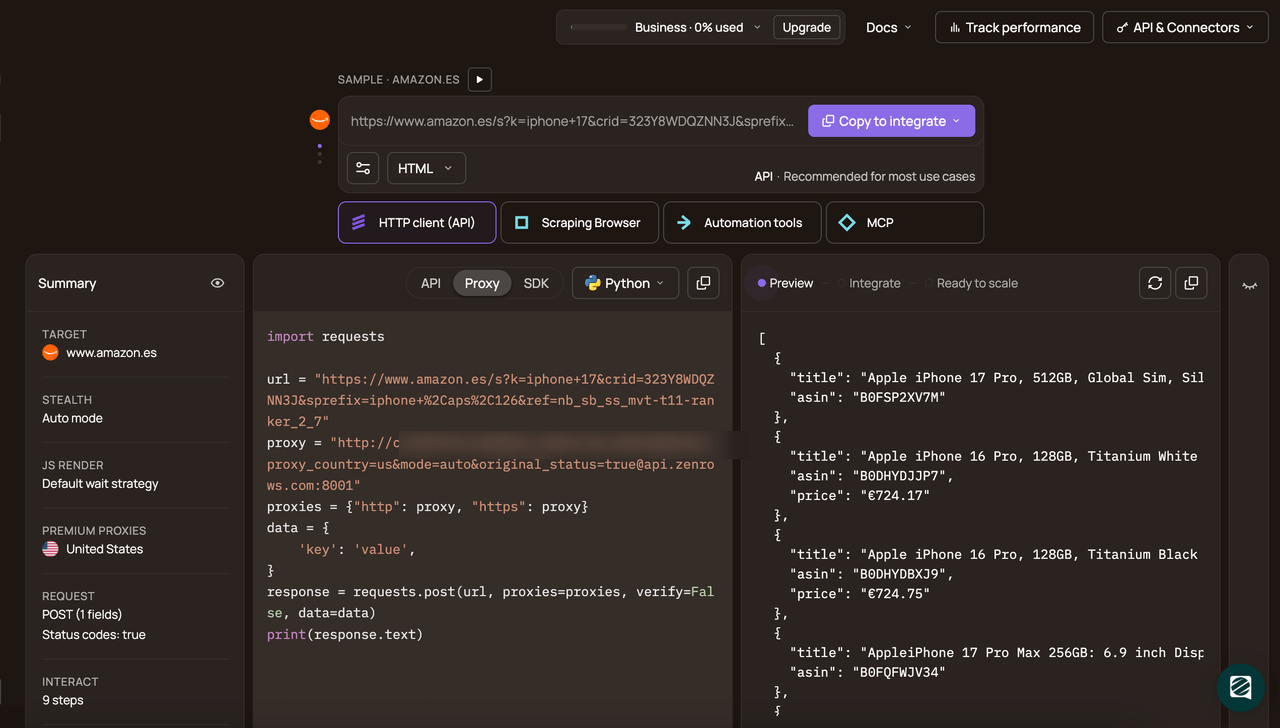
Then select Python as the language, choose API as the connection method, and copy the generated code.
# pip install requests
import requests

url = '<YOUR_TARGET_URL>'
apikey = 'YOUR_ZENROWS_API_KEY'
params = {
    'url': url,
    'apikey': apikey,
    'mode': 'auto',
    'proxy_country': 'us',
}
response = requests.get('https://api.zenrows.com/v1/', params=params)
print(response.text)
This is the base code the price scraper will use to send requests to Zenrows.
Finding and Testing CSS Selectors
A CSS selector tells the scraper which element on the page contains the data you want. For example, go to the Walmart search results page for "MacBook Pro 14 m4 max". Right-click the price element and select Inspect to open DevTools.
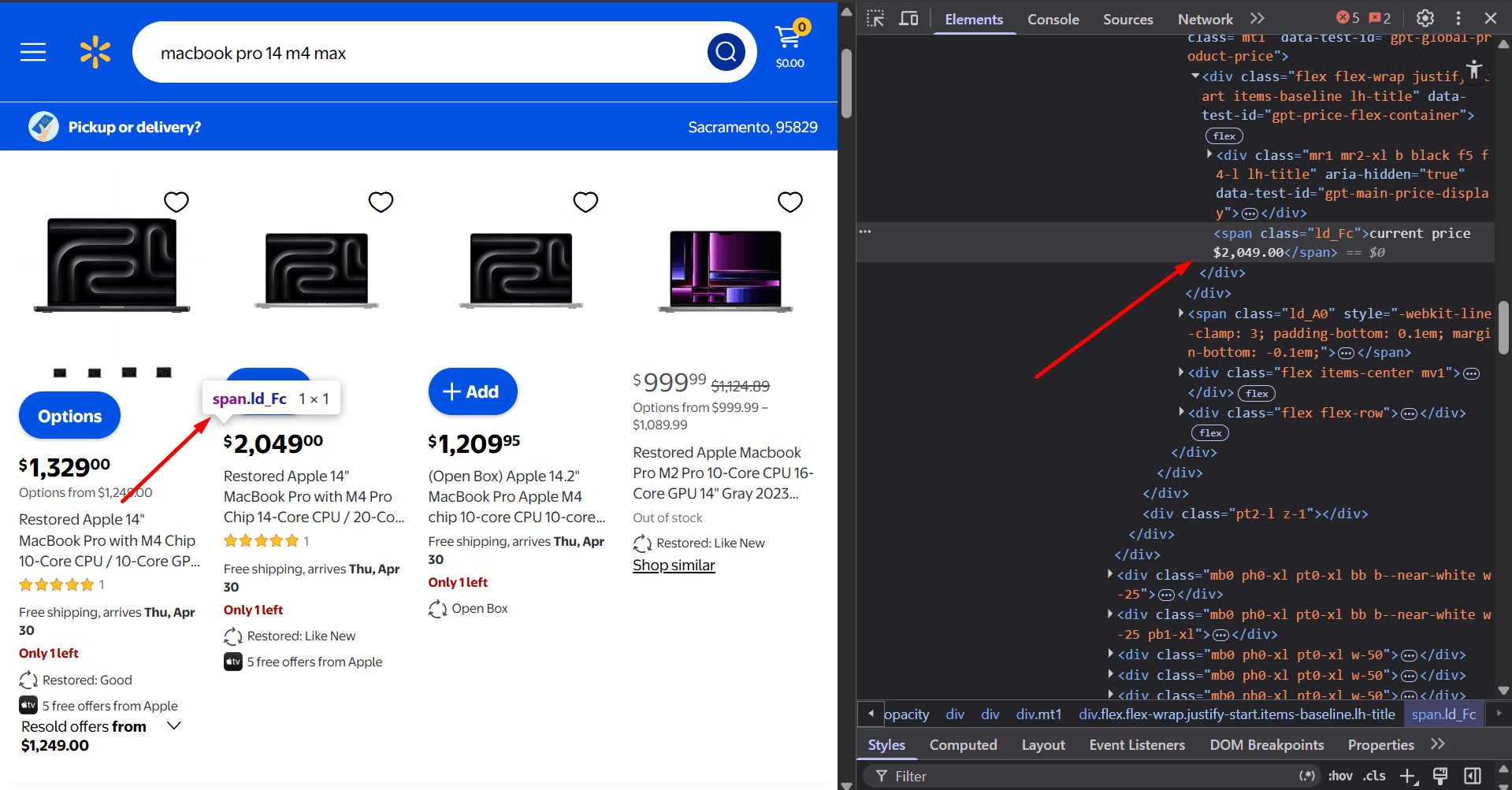
DevTools will highlight the element and show its class names and attributes. Use those to build a selector for that field. Repeat the same process until you have selectors for every field you want to extract. For this guide, we’ll scrape the product ID, title, and current price from each marketplace page.
Step 2: Import the Required Libraries and Configure the Price Scraper
Import the required libraries. You'll use these libraries to send scrape requests to Zenrows, format the search query URL, parse price strings, store scraped data, and timestamp each record.
# pip install requests
import csv
import json
import os
import re
from datetime import datetime, timezone
from urllib.parse import quote_plus
import requests
Next, define the scraper settings, output file, and record schema.
# ...
ZENROWS_API_KEY  = "<YOUR_ZENROWS_API_KEY>"
ZENROWS_BASE_URL = "https://api.zenrows.com/v1/"
SNAPSHOT_FILE    = "price_snapshots.csv"

# fields written to the CSV after every scrape run
SCHEMA_FIELDS = [
    "source",
    "product_id",
    "title",
    "current_price",
    "baseline_price",
    "price_change",
    "price_change_pct",
    "url",
    "timestamp",
]
SNAPSHOT_FILE is where each run appends its price-tracking data. SCHEMA_FIELDS defines the structure that every record must follow, which makes the output usable for price intelligence across the targets (Amazon, Walmart, and eBay, in this case).
Now add the selectors the e-commerce price scraper will use for each marketplace. These selectors tell Zenrows which fields to extract from each search result page.
# ...
# Amazon selectors
AMAZON_SELECTORS = {
    "product_ids":   "[data-component-type='s-search-result'] @data-asin",
    "titles":        "[data-component-type='s-search-result'] h2.a-size-medium.a-spacing-none.a-color-base span",
    "current_prices":"[data-component-type='s-search-result'] .a-price[data-a-size='xl'] .a-offscreen",
}

# eBay selectors
EBAY_SELECTORS = {
    "product_ids":   "ul.srp-results li.s-card[data-listingid] @data-listingid",
    "titles":        "ul.srp-results li.s-card[data-listingid] .s-card__title .su-styled-text",
    "current_prices":"ul.srp-results li.s-card[data-listingid] .su-card-container__attributes__primary .s-card__attribute-row:first-child .su-styled-text:first-child",
}
# Walmart selectors
WALMART_SELECTORS = {
    "product_ids":   "div[data-item-id][data-test-id='gpt-main'] @data-dca-id",
    "titles":        "div[data-item-id][data-test-id='gpt-main'] [data-automation-id='product-title']",
    "current_prices":"div[data-item-id][data-test-id='gpt-main'] [data-test-id='gpt-global-product-price'] .ld_Fc",
}
Note
CSS selectors can change when a site updates its layout or class names. Verify each selector in DevTools before running the scraper to confirm it still targets the correct field.
Each selector targets fields inside a single result card. That keeps each product ID paired with the correct title and price from the same listing.
Then define a function that sends a target page and selector set to Zenrows and returns the extracted fields as JSON.
# ...
def fetch_page(target_url: str, css_selectors: dict) -> dict:
    """request a page through ZenRows and return extracted fields as JSON."""
    response = requests.get(ZENROWS_BASE_URL, params={
        "apikey":        ZENROWS_API_KEY,
        "url":           target_url,
        "mode":          "auto",
        "proxy_country": "us",
        "css_extractor": json.dumps(css_selectors),
    })
    response.raise_for_status()
    return response.json()
Add helper functions to parse price values and maintain a consistent response shape before the scraper writes anything to CSV.
# ...
def parse_price(raw_text: str) -> float | None:
    #extract a float from any price string format.
    if not raw_text:
        return None
    match = re.search(r"\d[\d.]*", raw_text.replace(",", ""))
    return float(match.group()) if match else None


def get_field(field_array, index: int):
    # retrieve a value by index from a Zenrows field array.
    # this ensures both single-match and multi-match responses work the same way.
    if not field_array:
        return None
    if isinstance(field_array, str):
        return field_array if index == 0 else None
    return field_array[index] if index < len(field_array) else None


def to_list(value) -> list:
    # normalize a Zenrows field value
    if value is None:
        return []
    return value if isinstance(value, list) else [value]
parse_price() extracts a float from a raw price string and returns None if the string is empty or doesn't contain a number. get_field() returns None for any missing field, so the record is still saved with that field set to None rather than raising an index error. to_list() wraps a single-value response in a list so the rest of the scraper always works with a list, regardless of how many results a selector returns.
Step 3: Scrape Amazon Search Results
Go to Amazon and search for "MacBook Pro 14 m4 max". Copy the search results URL.
https://www.amazon.com/s?k=macbook+pro+14+m4+max
Amazon search results for a product query include accessories like cases, docks, and screen protectors alongside the actual product listings. Add a function that checks each result title returned by Zenrows against a list of accessory terms and skips any listing that matches, so the scraper only collects prices for the product you're targeting.
# ...
ACCESSORY_TERMS = (
    "case", "cover", "screen protector", "keyboard cover",
    "hard shell", "hub", "dock", "adapter", "privacy screen",
)


def is_primary_product(title: str, query: str) -> bool:
    # return True when a result matches the queried product, not an accessory.
    if not title:
        return False
    lowercased = title.lower()
    primary_term = query.split()[0].lower()
    return primary_term in lowercased and not any(
        term in lowercased for term in ACCESSORY_TERMS
    )
Then define an Amazon scraper function that builds the Amazon search URL, sends it through Zenrows, and turns the extracted fields into a single record per listing.
# ...
def scrape_amazon(query: str, max_results: int = 10) -> list:
   # scrape Amazon search results and return a list of price records.
    url       = f"https://www.amazon.com/s?k={quote_plus(query)}"
    extracted = fetch_page(url, AMAZON_SELECTORS)

    # each field comes back as a list aligned to the same card index
    product_ids    = to_list(extracted.get("product_ids"))
    titles         = to_list(extracted.get("titles"))
    current_prices = to_list(extracted.get("current_prices"))

    records = []
    for i, product_id in enumerate(product_ids[:max_results]):
        if not product_id:
            continue

        title = get_field(titles, i)

        # amazon mixes accessories into product search results, filter them out
        if not is_primary_product(title, query):
            continue

        records.append({
            "source":        "amazon",
            "product_id":    product_id,
            "title":         title,
            "current_price": parse_price(get_field(current_prices, i)),
            "url":           f"https://www.amazon.com/dp/{product_id}",
        })

    return records
This function loops through the results returned by Zenrows, pairs each product ID with its title and price, filters out accessories, and returns a structured record for each matching listing.
Step 4: Scrape Walmart Search Results
Go to Walmart and search for the same product ("MacBook Pro 14 m4 max"). Then copy the search results URL.
https://www.walmart.com/search?q=macbook+pro+14+m4+max
Walmart returns the current and previous prices in the same string. Create a function that ensures the Walmart price scraper retains only the current price before saving the data to a CSV file.
# ...
def parse_walmart_price(raw_text: str) -> float | None:
    #extract the current price from Walmart's combined price string.
    if not raw_text:
        return None
    return parse_price(raw_text.split(",")[0])
Next, create the Walmart scraper function.
# ...
def scrape_walmart(query: str, max_results: int = 10) -> list:
    # scrape Walmart search results and return a list of price records.
    url       = f"https://www.walmart.com/search?q={quote_plus(query)}"
    extracted = fetch_page(url, WALMART_SELECTORS)

    product_ids    = to_list(extracted.get("product_ids"))
    titles         = to_list(extracted.get("titles"))
    current_prices = to_list(extracted.get("current_prices"))

    records = []
    for i, product_id in enumerate(product_ids[:max_results]):
        if not product_id:
            continue

        records.append({
            "source":        "walmart",
            "product_id":    product_id,
            "title":         get_field(titles, i),
            "current_price": parse_walmart_price(get_field(current_prices, i)),
            "url":           f"https://www.walmart.com/ip/{product_id}",
        })

    return records
This function constructs the Walmart search URL, sends it to Zenrows for scraping, and iterates over each result to pair each product ID with its title and price. It uses parse_walmart_price to strip the previous price from Walmart's combined price string before returning the records.
Step 5: Scrape eBay Search Results
Go to eBay and search for "MacBook Pro 14 m4 max". Copy the search results URL.
https://www.ebay.com/sch/i.html?_nkw=macbook+pro+14+m4+max
eBay search results can include sponsored store tiles and other promoted placements. Let’s create an eBay scraper that fetches the results page and filters out those tiles before the records are saved.
# ...
def scrape_ebay(query: str, max_results: int = 10) -> list:
    # scrape eBay search results and return a list of price records.
    url       = f"https://www.ebay.com/sch/i.html?_nkw={quote_plus(query)}"
    extracted = fetch_page(url, EBAY_SELECTORS)

    product_ids    = to_list(extracted.get("product_ids"))
    titles         = to_list(extracted.get("titles"))
    current_prices = to_list(extracted.get("current_prices"))

    records = []
    for i, product_id in enumerate(product_ids[:max_results]):
        if not product_id:
            continue

        title = get_field(titles, i)

        # sponsored store tiles share the card structure but use this placeholder title
        if title and title.strip().lower() == "shop on ebay":
            continue

        records.append({
            "source":        "ebay",
            "product_id":    product_id,
            "title":         title,
            "current_price": parse_price(get_field(current_prices, i)),
            "url":           f"https://www.ebay.com/itm/{product_id}",
        })

    return records
This code scrapes the eBay target using Zenrows and iterates over each result, pairing each listing ID with its title and price. It skips any result whose title is "Shop on eBay", which is the placeholder eBay uses for sponsored store tiles.
Step 6: Normalize and Store the Data
Your price scraper can now return marketplace records. The next step is to turn those records into price tracking data you can save and compare over time.
Start by loading any existing snapshots from the CSV file.
# ...
def load_snapshots() -> list:
    # load the full price history from the CSV snapshot file.
    if not os.path.exists(SNAPSHOT_FILE):
        return []
    with open(SNAPSHOT_FILE, newline="", encoding="utf-8") as f:
        return list(csv.DictReader(f))
This function loads the full snapshot history if the file already exists. On the first run, it returns an empty list.
Next, build the baseline lookup. This uses the earliest recorded price for each product ID as the baseline price for that listing.
# ...
def load_baselines() -> dict:
    """
    build a {product_id: baseline_price} map from the earliest snapshot
    per product. Matched on product_id so each baseline is tied to the
    exact first observation of that specific listing.
    """
    snapshots = load_snapshots()
    earliest  = {}

    for record in snapshots:
        pid       = record.get("product_id")
        timestamp = record.get("timestamp")
        price     = record.get("current_price")

        if not pid or not timestamp or not price:
            continue

        # keep only the earliest record per product_id
        if pid not in earliest or timestamp < earliest[pid]["timestamp"]:
            earliest[pid] = {"timestamp": timestamp, "price": float(price)}

    return {pid: data["price"] for pid, data in earliest.items()}
This gives the price scraper a baseline price for each listing before a new run starts. That baseline is what later enables the computation of price change and price change percentage.
Now normalize each record before saving it.
# ...
def normalize(record: dict, baselines: dict) -> dict:
    #stamp with UTC time, attach baseline, calculate price change, enforce schema.
    record["timestamp"] = datetime.now(timezone.utc).isoformat()

    current = record.get("current_price")
    pid     = record.get("product_id")

    # use existing baseline or treat this as the first observation
    baseline = baselines.get(pid, current)

    if current is not None and baseline is not None:
        change     = round(current - baseline, 2)
        change_pct = round((change / baseline) * 100, 2) if baseline else 0.0
    else:
        change     = None
        change_pct = None

    record["baseline_price"]   = baseline
    record["price_change"]     = change
    record["price_change_pct"] = change_pct

    return {field: record.get(field) for field in SCHEMA_FIELDS}
This function adds the timestamp, baseline price, price change, and price change percentage to each record. It also rebuilds the record in the same schema order used by the CSV.
Finally, append the normalized records to the snapshot CSV file.
# ...
def save_snapshot(records: list):
    # append records to the CSV file, writing headers only on the first run.
    # append-only storage means each run adds rows without overwriting history,
    # giving you a full price timeline across multiple executions
    write_header = not os.path.exists(SNAPSHOT_FILE)
    with open(SNAPSHOT_FILE, "a", newline="", encoding="utf-8") as f:
        writer = csv.DictWriter(f, fieldnames=SCHEMA_FIELDS)
        if write_header:
            writer.writeheader()
        writer.writerows(records)
    print(f"Saved {len(records)} records → {SNAPSHOT_FILE}")
This code saves each run as a new snapshot rather than overwriting the previous data.
Step 7: Compare Price Data
Once the scraper has written a few snapshots, the next step is to compare the latest prices against the baseline for each listing. Define a function that filters matching records, keeps the most recent row for each source and product ID pair, and prints the results sorted by current price.
# ...
def compare_prices(keyword: str, snapshots: list):
    # print the latest price per source with change from baseline.
    matches = [
        r for r in snapshots
        if r.get("title") and keyword.lower() in r["title"].lower()
    ]

    # deduplicate to one record per (source, product_id) -- keep the most recent
    latest = {}
    for record in matches:
        key = (record["source"], record["product_id"])
        if key not in latest or record["timestamp"] > latest[key]["timestamp"]:
            latest[key] = record

    if not latest:
        print(f"No records found matching '{keyword}'")
        return

    # sort cheapest first so the best offer is always at the top
    print(f"\nPrice comparison -- '{keyword}'")
    print(f"{'Source':<10} {'Price':>12}  {'Baseline':>12}  {'Change':>10}  {'Change %':>9}  Title")
    print("─" * 95)

    for record in sorted(
        latest.values(),
        key=lambda r: float(r["current_price"]) if r.get("current_price") else float("inf"),
    ):
        current    = f"${float(record['current_price']):,.2f}"   if record.get("current_price")   else "N/A"
        baseline   = f"${float(record['baseline_price']):,.2f}"  if record.get("baseline_price")  else "--"
        change     = f"${float(record['price_change']):,.2f}"    if record.get("price_change")    else "--"
        change_pct = f"{float(record['price_change_pct']):.2f}%" if record.get("price_change_pct")else "--"
        source     = record["source"].upper()
        title      = (record.get("title") or "")[:36]
        print(f"{source:<10} {current:>12}  {baseline:>12}  {change:>10}  {change_pct:>9}  {title}")
This code turns stored snapshots into a cross-marketplace price comparison. It shows the latest price, the baseline price, the dollar change, and the percentage change for each matching listing.
Finally, create the entry point that runs the full price intelligence loop.
# ...
if __name__ == "__main__":
    query = "macbook pro 14 m4 max"
    print(f"Collecting price intelligence for: {query}\n")

    # load baselines before scraping so each record can be compared against
    # the first price ever recorded for that product_id
    baselines = load_baselines()

    all_records = []

    print("Scraping Amazon...")
    all_records.extend(scrape_amazon(query))

    print("Scraping eBay...")
    all_records.extend(scrape_ebay(query))

    print("Scraping Walmart...")
    all_records.extend(scrape_walmart(query))

    # deduplicate within the current batch before saving
    seen, deduped = set(), []
    for record in all_records:
        pid = record.get("product_id")
        if pid not in seen:
            seen.add(pid)
            deduped.append(record)

    # normalize enforces schema order, attaches baseline, and adds UTC timestamp
    normalized = [normalize(r, baselines) for r in deduped]
    save_snapshot(normalized)

    print(f"\nTotal records collected: {len(normalized)}")

    # load the full history and run the cross-marketplace comparison
    snapshots = load_snapshots()
    compare_prices("macbook pro", snapshots)
This block runs the full price intelligence loop. It loads the baseline prices, scrapes Amazon, eBay, and Walmart, removes duplicate listings from the current batch, normalizes the records, saves the snapshot, reloads the full history, and prints the latest price comparison.
Put the Code Together
Feel free to copy and run the following code. You only need to replace the API key with your Zenrows API key to get your price scraper up and running.
Note
CSS selectors can change when a site updates its layout or class names. Verify each selector in DevTools before running the scraper to confirm it still targets the correct field.
# pip install requests

import csv
import json
import os
import re
from datetime import datetime, timezone
from urllib.parse import quote_plus

import requests

ZENROWS_API_KEY  = "<YOUR_ZENROWS_API_KEY>"
ZENROWS_BASE_URL = "https://api.zenrows.com/v1/"
SNAPSHOT_FILE    = "price_snapshots.csv"

# fields written to the CSV after every scrape run
SCHEMA_FIELDS = [
    "source",
    "product_id",
    "title",
    "current_price",
    "baseline_price",
    "price_change",
    "price_change_pct",
    "url",
    "timestamp",
]

# Amazon selectors
AMAZON_SELECTORS = {
    "product_ids":   "[data-component-type='s-search-result'] @data-asin",
    "titles":        "[data-component-type='s-search-result'] h2.a-size-medium.a-spacing-none.a-color-base span",
    "current_prices":"[data-component-type='s-search-result'] .a-price[data-a-size='xl'] .a-offscreen",
}

# eBay selectors
EBAY_SELECTORS = {
    "product_ids":   "ul.srp-results li.s-card[data-listingid] @data-listingid",
    "titles":        "ul.srp-results li.s-card[data-listingid] .s-card__title .su-styled-text",
    "current_prices":"ul.srp-results li.s-card[data-listingid] .su-card-container__attributes__primary .s-card__attribute-row:first-child .su-styled-text:first-child",
}

# Walmart selectors
WALMART_SELECTORS = {
    "product_ids":   "div[data-item-id][data-test-id='gpt-main'] @data-dca-id",
    "titles":        "div[data-item-id][data-test-id='gpt-main'] [data-automation-id='product-title']",
    "current_prices":"div[data-item-id][data-test-id='gpt-main'] [data-test-id='gpt-global-product-price'] .ld_Fc",
}


def fetch_page(target_url: str, css_selectors: dict) -> dict:
    """request a page through ZenRows and return extracted fields as JSON."""
    # proxy_country=us locks currency to USD regardless of server location.
    response = requests.get(ZENROWS_BASE_URL, params={
        "apikey":        ZENROWS_API_KEY,
        "url":           target_url,
        "mode":          "auto",
        "proxy_country": "us",
        "css_extractor": json.dumps(css_selectors),
    })
    response.raise_for_status()
    return response.json()


def parse_price(raw_text: str) -> float | None:
    """extract a float from any price string format."""
    if not raw_text:
        return None
    match = re.search(r"\d[\d.]*", raw_text.replace(",", ""))
    return float(match.group()) if match else None


def get_field(field_array, index: int):
    """retrieve a value by index from a ZenRows field array."""
    # Zenrows returns a plain string when only one element matches a selector.
    # this guard ensures both single-match and multi-match responses work the same way.
    if not field_array:
        return None
    if isinstance(field_array, str):
        return field_array if index == 0 else None
    return field_array[index] if index < len(field_array) else None


def to_list(value) -> list:
    """normalise a ZenRows field value -- scalar or list -- to a list."""
    if value is None:
        return []
    return value if isinstance(value, list) else [value]


# extend this list to tune filtering for different product categories
ACCESSORY_TERMS = (
    "case", "cover", "screen protector", "keyboard cover",
    "hard shell", "hub", "dock", "adapter", "privacy screen",
)


def is_primary_product(title: str, query: str) -> bool:
    """return True when a result matches the queried product, not an accessory."""
    # marketplaces mix accessories into results for product queries.
    # this check keeps the dataset focused on actual product listings.
    if not title:
        return False
    lowercased   = title.lower()
    primary_term = query.split()[0].lower()
    return primary_term in lowercased and not any(
        term in lowercased for term in ACCESSORY_TERMS
    )


def scrape_amazon(query: str, max_results: int = 10) -> list:
    """scrape Amazon search results and return a list of price records."""
    url       = f"https://www.amazon.com/s?k={quote_plus(query)}"
    extracted = fetch_page(url, AMAZON_SELECTORS)

    # each field comes back as a list aligned to the same card index
    product_ids    = to_list(extracted.get("product_ids"))
    titles         = to_list(extracted.get("titles"))
    current_prices = to_list(extracted.get("current_prices"))

    records = []
    for i, product_id in enumerate(product_ids[:max_results]):
        if not product_id:
            continue

        title = get_field(titles, i)

        # amazon mixes accessories into product search results -- filter them out
        if not is_primary_product(title, query):
            continue

        records.append({
            "source":        "amazon",
            "product_id":    product_id,
            "title":         title,
            "current_price": parse_price(get_field(current_prices, i)),
            "url":           f"https://www.amazon.com/dp/{product_id}",
        })

    return records


def scrape_ebay(query: str, max_results: int = 10) -> list:
    # scrape eBay search results and return a list of price records.
    url       = f"https://www.ebay.com/sch/i.html?_nkw={quote_plus(query)}"
    extracted = fetch_page(url, EBAY_SELECTORS)

    product_ids    = to_list(extracted.get("product_ids"))
    titles         = to_list(extracted.get("titles"))
    current_prices = to_list(extracted.get("current_prices"))

    records = []
    for i, product_id in enumerate(product_ids[:max_results]):
        if not product_id:
            continue

        title = get_field(titles, i)

        # sponsored store tiles share the card structure but use this placeholder title
        if title and title.strip().lower() == "shop on ebay":
            continue

        records.append({
            "source":        "ebay",
            "product_id":    product_id,
            "title":         title,
            "current_price": parse_price(get_field(current_prices, i)),
            "url":           f"https://www.ebay.com/itm/{product_id}",
        })

    return records

def parse_walmart_price(raw_text: str) -> float | None:
    """extract the current price from Walmart's combined price string."""
    # Walmart returns 'current price $999.99, Was $1,124.89' in a single element.
    # splitting on the comma isolates the current price before parsing.
    if not raw_text:
        return None
    return parse_price(raw_text.split(",")[0])


def scrape_walmart(query: str, max_results: int = 10) -> list:
    """scrape Walmart search results and return a list of price records."""
    url       = f"https://www.walmart.com/search?q={quote_plus(query)}"
    extracted = fetch_page(url, WALMART_SELECTORS)

    product_ids    = to_list(extracted.get("product_ids"))
    titles         = to_list(extracted.get("titles"))
    current_prices = to_list(extracted.get("current_prices"))

    records = []
    for i, product_id in enumerate(product_ids[:max_results]):
        if not product_id:
            continue

        records.append({
            "source":        "walmart",
            "product_id":    product_id,
            "title":         get_field(titles, i),
            "current_price": parse_walmart_price(get_field(current_prices, i)),
            "url":           f"https://www.walmart.com/ip/{product_id}",
        })

    return records


def load_snapshots() -> list:
    # load the full price history from the CSV snapshot file.
    if not os.path.exists(SNAPSHOT_FILE):
        return []
    with open(SNAPSHOT_FILE, newline="", encoding="utf-8") as f:
        return list(csv.DictReader(f))


def load_baselines() -> dict:
    """
    build a {product_id: baseline_price} map from the earliest snapshot
    per product. Matched on product_id so each baseline is tied to the
    exact first observation of that specific listing.
    """
    snapshots = load_snapshots()
    earliest  = {}

    for record in snapshots:
        pid       = record.get("product_id")
        timestamp = record.get("timestamp")
        price     = record.get("current_price")

        if not pid or not timestamp or not price:
            continue

        # keep only the earliest record per product_id
        if pid not in earliest or timestamp < earliest[pid]["timestamp"]:
            earliest[pid] = {"timestamp": timestamp, "price": float(price)}

    return {pid: data["price"] for pid, data in earliest.items()}


def normalize(record: dict, baselines: dict) -> dict:
    #stamp with UTC time, attach baseline, calculate price change, enforce schema.
    record["timestamp"] = datetime.now(timezone.utc).isoformat()

    current = record.get("current_price")
    pid     = record.get("product_id")

    # use existing baseline or treat this as the first observation
    baseline = baselines.get(pid, current)

    if current is not None and baseline is not None:
        change     = round(current - baseline, 2)
        change_pct = round((change / baseline) * 100, 2) if baseline else 0.0
    else:
        change     = None
        change_pct = None

    record["baseline_price"]   = baseline
    record["price_change"]     = change
    record["price_change_pct"] = change_pct

    return {field: record.get(field) for field in SCHEMA_FIELDS}


def save_snapshot(records: list):
    """append records to the CSV file, writing headers only on the first run."""
    # append-only storage means each run adds rows without overwriting history,
    # giving you a full price timeline across multiple executions
    write_header = not os.path.exists(SNAPSHOT_FILE)
    with open(SNAPSHOT_FILE, "a", newline="", encoding="utf-8") as f:
        writer = csv.DictWriter(f, fieldnames=SCHEMA_FIELDS)
        if write_header:
            writer.writeheader()
        writer.writerows(records)
    print(f"Saved {len(records)} records → {SNAPSHOT_FILE}")


def compare_prices(keyword: str, snapshots: list):
    # print the latest price per source with change from baseline.
    matches = [
        r for r in snapshots
        if r.get("title") and keyword.lower() in r["title"].lower()
    ]

    # deduplicate to one record per (source, product_id) -- keep the most recent
    latest = {}
    for record in matches:
        key = (record["source"], record["product_id"])
        if key not in latest or record["timestamp"] > latest[key]["timestamp"]:
            latest[key] = record

    if not latest:
        print(f"No records found matching '{keyword}'")
        return

    # sort cheapest first so the best offer is always at the top
    print(f"\nPrice comparison -- '{keyword}'")
    print(f"{'Source':<10} {'Price':>12}  {'Baseline':>12}  {'Change':>10}  {'Change %':>9}  Title")
    print("─" * 95)

    for record in sorted(
        latest.values(),
        key=lambda r: float(r["current_price"]) if r.get("current_price") else float("inf"),
    ):
        current    = f"${float(record['current_price']):,.2f}"   if record.get("current_price")   else "N/A"
        baseline   = f"${float(record['baseline_price']):,.2f}"  if record.get("baseline_price")  else "--"
        change     = f"${float(record['price_change']):,.2f}"    if record.get("price_change")    else "--"
        change_pct = f"{float(record['price_change_pct']):.2f}%" if record.get("price_change_pct")else "--"
        source     = record["source"].upper()
        title      = (record.get("title") or "")[:36]
        print(f"{source:<10} {current:>12}  {baseline:>12}  {change:>10}  {change_pct:>9}  {title}")

if __name__ == "__main__":
    query = "macbook pro 14 m4 max"
    print(f"Collecting price intelligence for: {query}\n")

    # load baselines before scraping so each record can be compared against
    # the first price ever recorded for that product_id
    baselines = load_baselines()

    all_records = []

    print("Scraping Amazon...")
    all_records.extend(scrape_amazon(query))

    print("Scraping eBay...")
    all_records.extend(scrape_ebay(query))

    print("Scraping Walmart...")
    all_records.extend(scrape_walmart(query))

    # deduplicate within the current batch before saving
    seen, deduped = set(), []
    for record in all_records:
        pid = record.get("product_id")
        if pid not in seen:
            seen.add(pid)
            deduped.append(record)

    # normalize enforces schema order, attaches baseline, and adds UTC timestamp
    normalized = [normalize(r, baselines) for r in deduped]
    save_snapshot(normalized)

    print(f"\nTotal records collected: {len(normalized)}")

    # load the full history and run the cross-marketplace comparison
    snapshots = load_snapshots()
    compare_prices("macbook pro", snapshots)
When you run the price scraper for the first time, the saved snapshot looks like this.
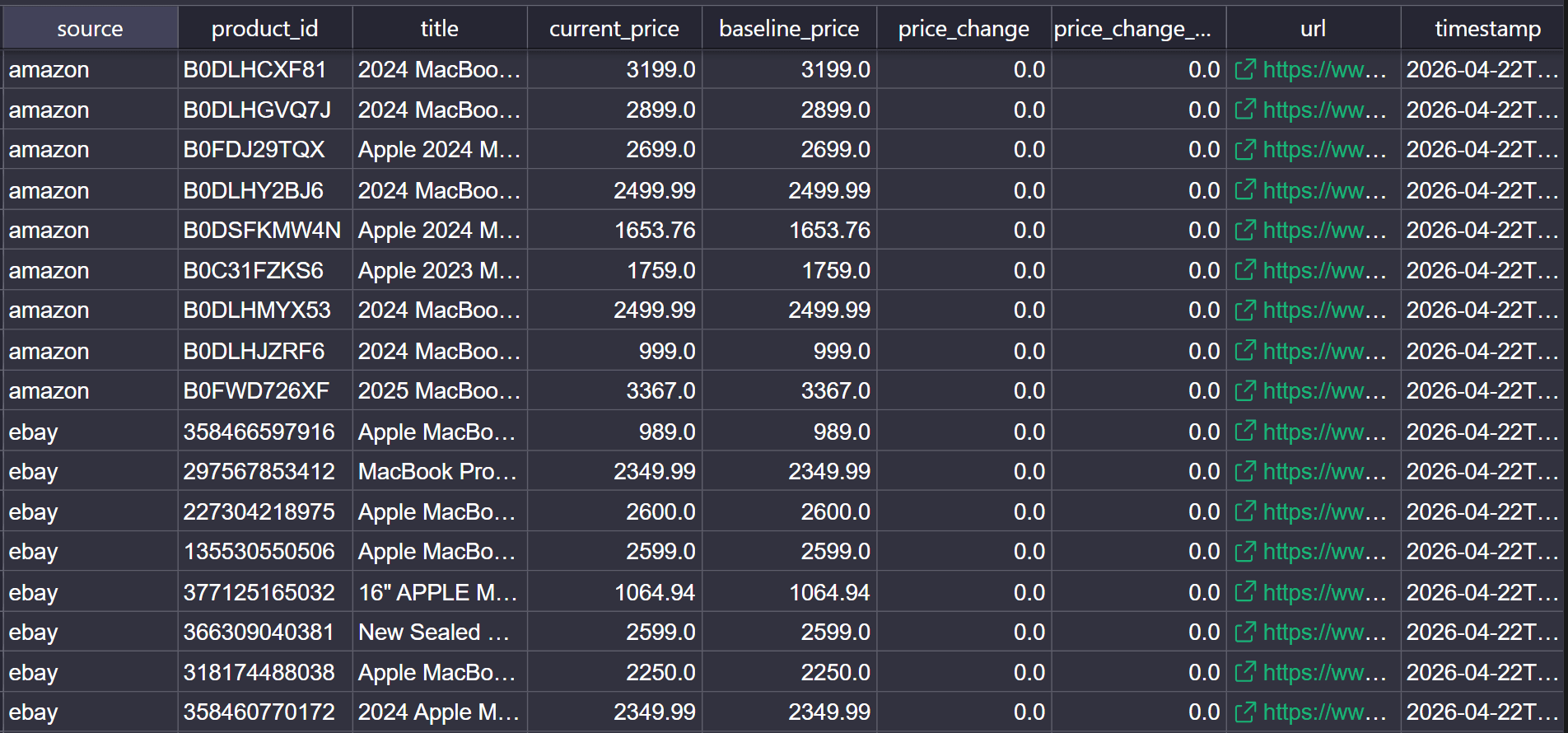
The cross-marketplace price comparison printed in the terminal looks like this.
Price comparison -- 'macbook pro'
Source            Price      Baseline      Change   Change %  Title
───────────────────────────────────────────────────────────────────────────────────────────────
EBAY            $989.00       $989.00       $0.00      0.00%  Apple MacBook Pro 14-inch M4 Max 36G
AMAZON          $999.00       $999.00       $0.00      0.00%  2024 MacBook Pro Laptop with M4 Max,
EBAY          $1,064.94     $1,064.94       $0.00      0.00%  16" APPLE MACBOOK PRO M4 MAX 8TB SSD
<!--rest of output omitted for brevity-->
Congratulations 🎉 Your price scraper successfully scraped live marketplace listings, saved a snapshot, and compared prices across marketplaces. You can now monitor competitor price changes over time.
If you want to see the change columns update, wait for marketplace prices to change and run the scraper again. The first run only establishes the baseline for each listing. Later runs compare the current price against the first recorded price, at which point price_change and price_change_pct start showing movement.
Here are sample results from a second run, 3 hours after the baseline snapshot.
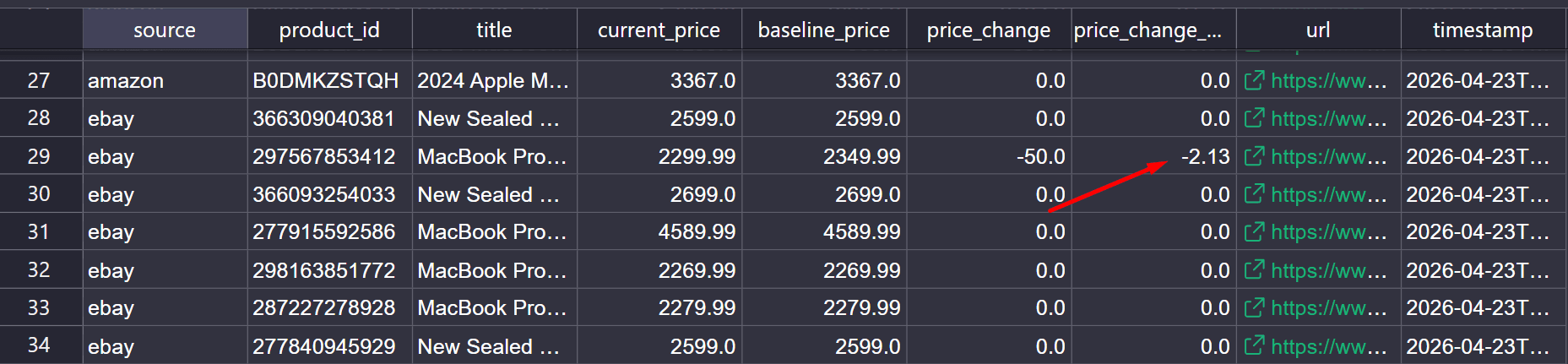
The eBay product in row 29 changed from $2,349.99 to $2,299.99 between runs, a -2.13% drop.
Conclusion
In this article, you’ve learned how to turn marketplace scraping into a repeatable price intelligence process. Competitive price intelligence doesn't come from scraping a product price once. It comes from scraping comparable records, storing snapshots over time, and using that history to track price changes across marketplaces.
That process becomes harder when pages are protected by anti-bot measures or market views differ across regions. Zenrows helps remove that overhead by handling anti-bot bypass, JavaScript rendering, proxy routing with geo-targeting, and flexible response formats in a single API.
Try Zenrows for free now or speak with sales!
FAQ
How often should you scrape competitor prices?
The frequency depends on how often prices change in your category. A daily schedule is a good starting point for most teams, since marketplace prices can change multiple times a day, especially for popular products. If you track fast-moving categories, short promotions, or high-volume listings, you may need to scrape more often so your price intelligence reflects what is actually live on the page.
What is the difference between a price scraper and competitive price intelligence?
A price scraper collects price data from pages. Competitive price intelligence uses that scraped data to do more. It standardizes records across marketplaces, stores snapshots over time, and uses that history to track price changes, seller changes, and market position.
How do you collect localized pricing data?
Use a scraping service that offers geo-targeting, such as Zenrows. The same product can have different prices, currencies, and stock statuses across regions. Therefore, you need to route the request through the country you want to track competitor prices and keep that market view consistent across runs.
Can I Scrape Prices from Amazon Without Getting Blocked?
Yes. But you'll need to use a scraping API that offers anti-bot bypass, such as Zenrows. Amazon uses AWS Web Application Firewall (WAF) to block automated requests. A scraping API handles that bypass internally, so your requests reach the page without triggering a block.
How Do I Handle Pagination When Scraping Search Results Pages?
The approach depends on how the site implements it. URL-based pagination uses a predictable query parameter, such as ?page=2, so you increment the value and send a new request for each page. Infinite scroll and "Load More" buttons require JavaScript rendering to trigger the next batch of results.
For example, you can handle this using JavaScript Instructions in Zenrows to scroll the page or click the "Load More" button and wait for the next batch to load.
What Happens When a CSS Selector Breaks After a Site Update?
When a CSS selector breaks, the scraper returns empty or incorrect values for the affected field. You'll need to open DevTools on the target page, re-inspect the field, and update the selector. That's also why you should verify your selectors before each run.
Can I Scrape Prices in Multiple Currencies or Regions?
Yes. But you'll need to use a scraping API that supports geo-targeting. A good example is Zenrows, which uses Premium Proxies to route requests through the target country. That gives you the price the marketplace serves to buyers in that region, including local currency and regional promotions.
Is Competitive Price Scraping Legal?
Yes. Collecting publicly available pricing data for competitive tracking is legal. Courts have upheld that scraping publicly accessible data does not violate the law.
How Many Marketplaces Should I Monitor for Competitor Price Scraping?
There's no specific number. Start with the marketplaces where your competitors are active and where your target buyers make purchase decisions. Confirm your pipeline is stable on those first, then expand coverage as your operation grows.