
Web Scraping with BrowserForge: Mimic a Real Browser
Learn how to mimic real browser headers and fingerprints with BrowserForge. Scrape under the radar without detection.



When scraping protected sites, you’ve probably run into 403 errors, CAPTCHA pages, or empty HTML, even though your code looks fine. That’s because these sites analyze the authenticity of your requests by scanning low-level browser runtime details and fingerprints. Without the right configuration, your scraper won’t pass these checks.
BrowserForge helps close that gap by generating realistic browser headers and fingerprints. In this article, you’ll see how to plug it into HTTP clients and stealth browsers, and when it’s better to rely on a managed scraping API solution.
What Is BrowserForge?
BrowserForge is a Python library that generates headers and fingerprints from real browsers, operating systems, and devices. It follows real-world traffic distributions to reflect authentic user configurations.
It can produce full HTTP header sets that look like genuine browser requests, including fields such as User-Agent, sec-ch-ua, Accept, and language preferences. BrowserForge also generates browser-level values like navigator properties, screen dimensions, and codec support, keeping them aligned with the chosen profile.
You can narrow the generator to specific browser families, OS types, devices, locales, or HTTP versions. This makes it useful for scrapers and automation tools that need realistic browser behavior without hand-tuning each header or fingerprint value.
How BrowserForge Makes Requests Look More Human
Trying simple tricks like swapping the User-Agent or shuffling a few headers often leads to detection. You end up with combinations that never show up in real traffic, such as a desktop header set glued to a mobile fingerprint or client hints that don’t match the browser engine.
BrowserForge takes a profile-based approach instead. It builds headers and browser properties from full profiles, so browser, OS, device, language, and HTTP version all line up.
Each profile is a browser fingerprint, a bundle of values that describes one browser and device as a single identity. It ties together the HTTP headers, client hints, and browser-facing values that anti-bot systems read in one pass. By keeping that fingerprint consistent, BrowserForge makes HTTP clients and headless browser tools look more like a single real browser session instead of a script stitching random values together.
Skip the blocks. Try Zenrows free and get clean web data without the anti-bot fight.
Getting Started with BrowserForge
Setting up BrowserForge is straightforward. You just have to install the package, create a generator, and ask it for one header.
Start by installing BrowserForge in your environment using pip:
pip3 install "browserforge[all]"
Then import the header generator and use it to create a header set.
from browserforge.headers import HeaderGenerator

# create a header generator with default settings
generator = HeaderGenerator()

# generate one realistic browser header set
headers = generator.generate()

print("generated headers:")
for key, value in headers.items():
    print(f"{key}: {value}")
When you run the script, the output should look similar to this:
generated headers:
sec-ch-ua: "Chromium";v="142", "Google Chrome";v="142", "Not_A Brand";v="99"
sec-ch-ua-mobile: ?0
sec-ch-ua-platform: "Windows"
Upgrade-Insecure-Requests: 1
User-Agent: Mozilla/5.0 (Windows NT 10.0; Win64; x64) AppleWebKit/537.36 (KHTML, like Gecko) Chrome/142.0.0.0 Safari/537.36
Accept: text/html,application/xhtml+xml,application/xml;q=0.9,image/avif,image/webp,image/apng,*/*;q=0.8,application/signed-exchange;v=b3;q=0.7
Sec-Fetch-Site: ?1
Sec-Fetch-Mode: same-site
Sec-Fetch-User: document
Sec-Fetch-Dest: navigate
Accept-Encoding: gzip, deflate, br, zstd
Accept-Language: en-US;q=1.0
Your exact values may differ because BrowserForge samples from real-world profiles, but the structure will be similar. You get a full User-Agent, client hints, detailed Accept values, and matching fetch metadata.
Using BrowserForge with Requests
In this section, you will first inspect the default requests headers. Then you will send the same test request with BrowserForge-generated headers, and finally, randomize the header fingerprint that BrowserForge generates for each request.
Seeing What Requests Sends by Default
Start by sending a simple GET request to https://httpbin.io/headers so you can see the headers that requests use out of the box.
import requests

url = "https://httpbin.io/headers"

# send a request with the default request headers
response = requests.get(url)

print("response json:")
print(response.json())
Here are the returned headers when the code runs.
response json:
{'headers': {'Accept': ['*/*'], 'Accept-Encoding': ['gzip, deflate, zstd'], 'Connection': ['keep-alive'], 'Host': ['httpbin.io'], 'User-Agent': ['python-requests/2.32.5']}}
These headers are short and clearly identify the client as python-requests/2.32.5. There are no client hints and no language settings, which makes it easy for anti-bots to spot you as a bot and block your request.
Now, let's see how you can make the requests library more realistic using modified headers from BrowserForge.
Using BrowserForge Headers With Randomized Fingerprints
So far, you’ve seen the default headers sent by requests and how BrowserForge modifies them to be more realistic. When scraping real sites, you also need to rotate fingerprints per request or small batch to reduce the chances of detection by anti-bot systems.
Create a script that generates a fresh BrowserForge header set for each request and sends it to two different anti-bot test pages.
from browserforge.headers import HeaderGenerator
import requests

base_url = "https://www.scrapingcourse.com"

paths = [
    "/antibot-challenge",
    "/cloudflare-challenge",
]

# Create a generator that can pick from several real browser setups
# This widens the pool of possible fingerprints
generator = HeaderGenerator(
    browser=("chrome", "firefox", "edge"),
    os=("windows", "macos", "linux"),
    device=("desktop", "mobile"),
    locale=("en-US", "en-GB", "de"),
    http_version=2,
)

for path in paths:
    url = f"{base_url}{path}"

    # Ask BrowserForge for a fresh, coherent header set for this request
    headers = generator.generate()

    for key, value in headers.items():
        print(f"  {key}: {value}")

    # Send the request with the generated headers
    response = requests.get(url, headers=headers, timeout=30)

    print("status code:", response.status_code)
    print("response body:")
    print(response.text)
The code above does three things. It creates a header generator that samples from several real browser, operating system, device, and locale combinations. For each path, it requests BrowserForge for a fresh header set and sends a request with that set to the antibot test page. Each request looks like a real browser visit, but the header fingerprint changes between calls.
You can extend the same approach for real scraping flows. Add product detail pages, related pages, or a paginated listing to the paths list and generate a new header set per request or small batch. That way, your crawl looks like traffic from different browser profiles, not one header set following every page.
When you run it, each request now goes out with a different header fingerprint, such as a new User-Agent, sec-ch-ua, and Accept-Language, etc., but both URLs still return the 403 forbidden error.
sec-ch-ua: "Chromium";v="142", "Microsoft Edge";v="142", "Not_A Brand";v="99"
  User-Agent: Mozilla/5.0 (Windows NT 10.0; Win64; x64) AppleWebKit/537.36 (KHTML, like Gecko) Chrome/142.0.0.0 Safari/537.36 Edg/142.0.0.0
<!-- other header fields omitted for brevity -->
status code: 403
response body:
<!DOCTYPE html><html lang="en-US"><head><title>Just a moment...</title><meta http-equiv="Content-Type" content="text/html; charset=UTF-8"><meta http-equiv="X-UA-Compatible" content="IE=Edge"><meta name="robots" content="noindex,nofollow"><meta name="viewport" content="width=device-width,initial-scal
<!-- rest of HTML omitted for brevity -->

#... omitted for brevity
This is because BrowserForge now makes the headers look like a real browser, but the site also checks JavaScript behavior, IP reputation, TLS fingerprints, and challenge flows that requests cannot handle.
To deal with those bot detection checks, you need a headless stealth browser that runs real JavaScript and applies BrowserForge-style fingerprints inside a full browser environment.
Using BrowserForge With a Stealth Browser
Headless browsers like Playwright and Selenium still expose automation clues through navigator fields, plugins, WebGL, audio context, and other low-level APIs.
A stealth browser adds another layer by reshaping those values to match real BrowserForge-style fingerprints, so both the network traffic and the in-page JavaScript environment look closer to a real user.
Camoufox does this by modifying Playwright's fingerprints on top of Firefox. To boost stealth, it also allows you to use BrowserForge fingerprints under the hood.
Note
We've chosen Camoufox with BrowserForge because BrowserForge's Playwright and Pyppeteer fingerprint injectors have been deprecated. The maintainer recommends using Camoufox if your project needs fingerprinted Playwright sessions.
Step 1: Install Camoufox and Download Its Browser
First, install Camoufox in the same environment as your scraper.
pip3 install "camoufox[geoip]"
Then download the Camoufox Firefox build and its evasion files:
python3 -m camoufox fetch
Once Camoufox and its patched Firefox build are installed, your environment is fully set up.
Step 2: Configure Camoufox’s Fingerprint Profile
Next, configure a profile that matches a realistic desktop setup. Camoufox can generate BrowserForge fingerprints automatically when you pass OS and screen constraints.
from camoufox.sync_api import Camoufox
from browserforge.fingerprints import Screen

ANTIBOT_URL = "https://www.scrapingcourse.com/antibot-challenge/"

# limit fingerprints to realistic desktop screens
screen = Screen(max_width=1920, max_height=1080)

camoufox_options = {
    "os": ("windows",),          # target windows fingerprints
    "screen": screen,            # constrain generated screen sizes
    "locale": "en-US",           # prefer English fingerprints
    "humanize": True,            # enable human-like cursor behavior
    "persistent_context": True,  # reuse the same browser profile
    "user_data_dir": "camoufox-profile",  # where cookies and storage are saved
}
This tells Camoufox to generate fingerprints based on real BrowserForge distributions for Windows desktop devices within that screen range, and to persist the session state (including cookies) inside the camoufox-profile directory.
Step 3: Create a Playwright-Compatible Context with this Profile
For the first run against a protected site, open the browser in non-headless mode so you can see and solve any anti-bot challenge.
from camoufox.sync_api import Camoufox
from browserforge.fingerprints import Screen

ANTIBOT_URL = "https://www.scrapingcourse.com/antibot-challenge/"

# set a desktop-like screen range
screen = Screen(max_width=1920, max_height=1080)

with Camoufox(
    os=("windows",),
    screen=screen,
    locale="en-US",
    humanize=True,
    headless=False,             # open a visible window
    persistent_context=True,    # keep profile and cookies between runs
    user_data_dir="camoufox-profile",
) as browser:
    # create a new page using the Camoufox + browserforge fingerprint
    page = browser.new_page()

    # load the protected URL
    page.goto(ANTIBOT_URL)

    # give the antibot system time to run its checks and show any challenge

page.wait_for_timeout(15_000)
Run the code. Once the target site launches and serves an antibot challenge, solve it manually.
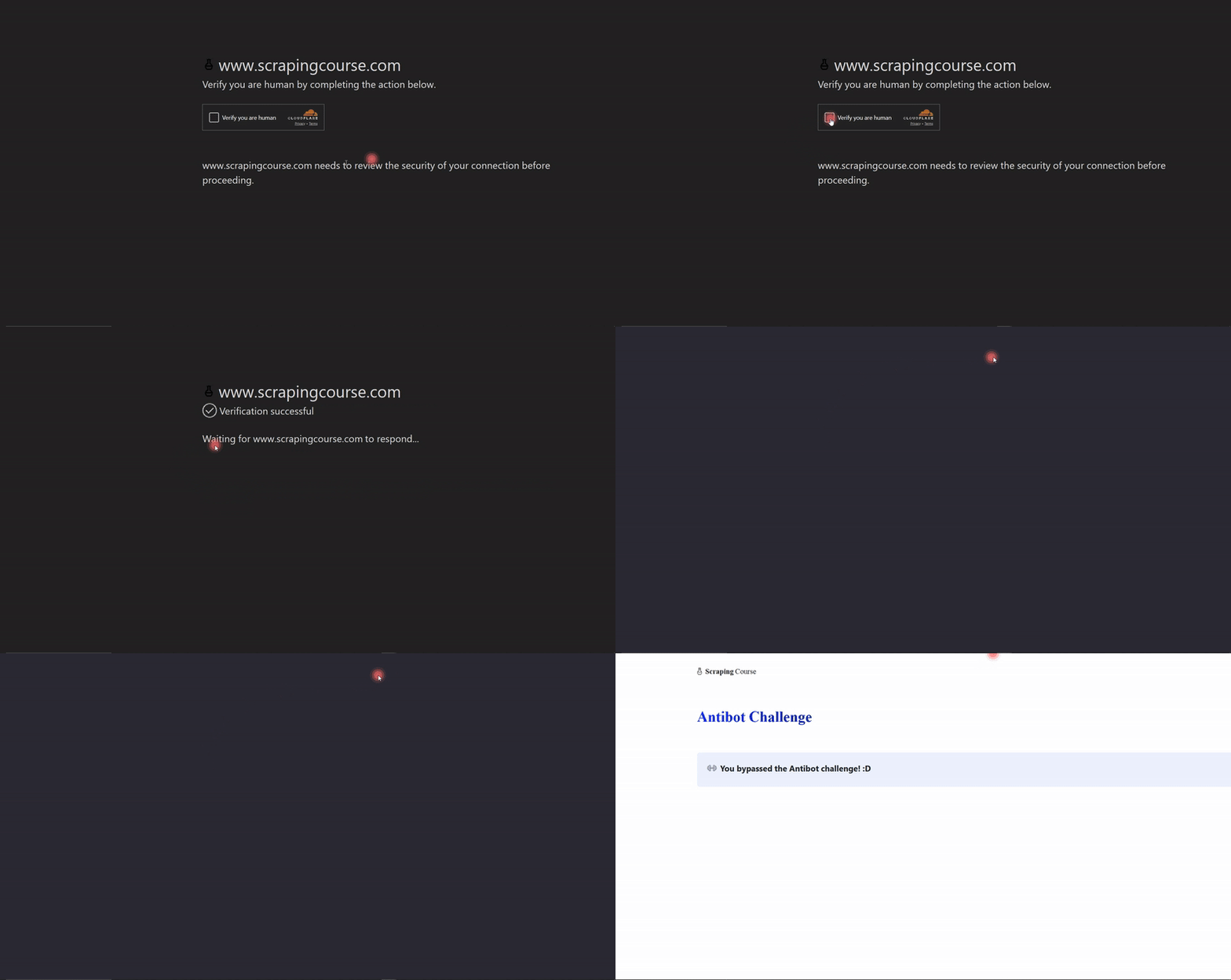
Camoufox will store the anti-bot solution cookies in the camoufox-profile directory as part of its persistent context.
Step 4: Use the Camoufox-Backed Context to Access a Protected Page
After you have solved the challenge once, you can reuse the same profile in headless mode. Camoufox will load the cookies and local storage from camoufox-profile and present them along with the BrowserForge fingerprint on the next visit.
from camoufox.sync_api import Camoufox
from browserforge.fingerprints import Screen

ANTIBOT_URL = "https://www.scrapingcourse.com/antibot-challenge/"

screen = Screen(max_width=1920, max_height=1080)

with Camoufox(
    os=("windows",),
    screen=screen,
    locale="en-US",
    humanize=True,
    headless=True,         # now run headless, reusing the same profile
    persistent_context=True,
    user_data_dir="camoufox-profile",
) as browser:
    page = browser.new_page()
    page.goto(ANTIBOT_URL, wait_until="networkidle")

    html = page.content()

    print(html)
When you run the above code and the cookies are still valid, and your IP and fingerprint match the earlier session, the response should look like this:
<!doctype html>
<html lang="en"><head>
    <meta charset="UTF-8">
    <meta name="viewport" content="width=device-width, initial-scale=1.0">
    <meta http-equiv="X-UA-Compatible" content="ie=edge">
    <title>Antibot Challenge - ScrapingCourse.com</title>
    <!-- HTML cut for brevity -->
</head>
<body>
    ...
    <h2 class="challenge-title text-xl font-bold" id="challenge-title" data-testid="challenge-title" data-content="challenge-title">
        You bypassed the Antibot challenge! :D
    </h2>
    <!-- rest of HTML cut for brevity -->
</body></html>
You can now see the normal page content instead of block page. Camoufox sent the same BrowserForge-style fingerprint plus the solution cookies that the WAF (Web Application Firewall) set earlier. This lets follow-up requests go through until the session expires.
The challenge of this approach is that cookies expire, rules change, and many providers tie those cookies to a specific IP range or User Agent. Once you start scraping on a schedule or at scale, you end up repeating the manual challenge step and watching sessions break when proxies rotate, or fingerprints drift.
This is where a managed scraping API becomes easier to work with.
Avoid Detection Completely with a Managed Scraping API
At this point, you have seen how far a self-hosted stack can go. BrowserForge fixes headers and fingerprints. Camoufox reshapes the browser environment and lets you reuse solution cookies. But you still have to manage proxies, maintain fingerprints, refresh expired cookies, and adjust scripts when anti-bot rules change. A managed scraping API takes that work off your plate.
One of the best scraping solutions is Zenrows. Its Fetch handles browsers, rotating proxies, browser-like headers, JavaScript rendering, and anti-bot bypass behind one endpoint. You send a single request and let Zenrows handle the site’s anti-bot systems.
Let's see how Zenrows performs against the anti-bot challenge on the same protected site we've been using.
Sign up and open the Fetch Request Builder, paste the target URL into the URL field. Enable JavaScript rendering and Premium Proxies.
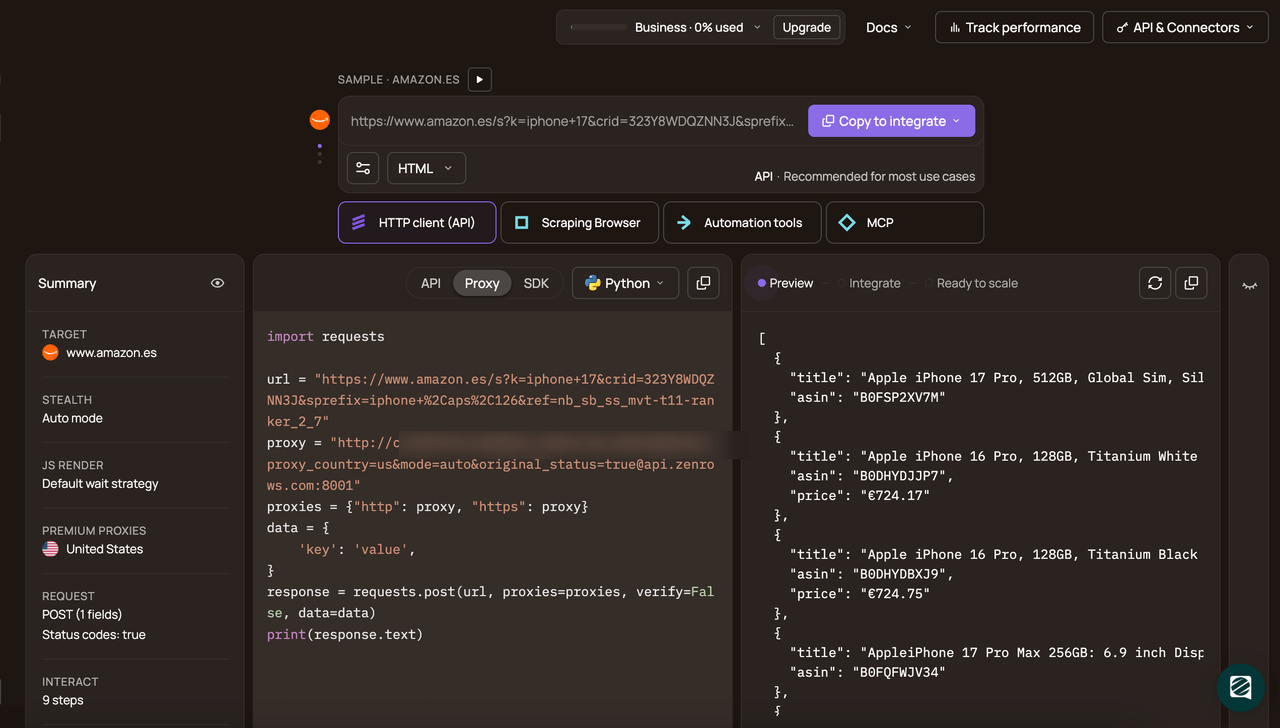
Then, choose Python as your programming language and select the API connection mode. Copy and paste the generated code into your scraper file.
The generated code looks like this:
# pip3 install requests
import requests

url = 'https://www.scrapingcourse.com/antibot-challenge/'
apikey = '<YOUR_ZENROWS_API_KEY>'
params = {
    'url': url,
    'apikey': apikey,
    'js_render': 'true',
    'premium_proxy': 'true',
}
response = requests.get('https://api.zenrows.com/v1/', params=params)
print(response.text)
When you run the code, the output is as follows:
<html lang="en">
<head>
    <!-- ... -->
    <title>Antibot Challenge - ScrapingCourse.com</title>
    <!-- ... -->
</head>
<body>
    <!-- ... -->
    <h2>
        You bypassed the Antibot challenge! :D
    </h2>
    <!-- other content omitted for brevity -->
</body>
</html>
Congratulations! 🎉 You’ve just bypassed the antibot challenge on ScrapingCourse using Zenrows’ Fetch.
Conclusion
In this guide, you learned how anti-bot systems analyze full browser fingerprints instead of just IPs or a User-Agent, and why plain HTTP clients or basic headless browsers quickly get blocked. You also walked through BrowserForge and Camoufox, saw how realistic headers with fingerprint patches can make your scraper harder to flag. However, that setup still struggles on protected pages once cookies expire or anti-bot rules change.
Keep in mind that this kind of self-hosted setup is unreliable at scale. To scrape any website reliably without getting blocked, we recommend using a managed scraping API, such as Zenrows. It provides auto-managed, auto-scaled infrastructure that bypasses anti-bot checks under the hood, so you can focus on extraction at scale rather than on infrastructure and scraper maintenance.
Try Zenrows for free now or speak with sales!
FAQ
Can BrowserForge or Camoufox guarantee that my scraper will not be detected?
No. They only make your headers, fingerprints, and browser environment look more like a real user. To reduce detection, you still need a managed scraping API like Zenrows, especially when you are scraping at scale.
How do I randomize BrowserForge fingerprints across requests?
To randomize BrowserForge fingerprints across requests, create a HeaderGenerator and call generate() for each request or small batch. Then pass those headers to your HTTP calls. With Camoufox, start a fresh Camoufox browser instance or use a different user_data_dir instead of a single persistent_context whenever you need a new fingerprint.
Do I still need proxies when I use BrowserForge and Camoufox?
Yes. Fingerprints help with how traffic looks, but not where it comes from. You still need a solid proxy setup to handle rate limits, bans, and geo restrictions, especially on strict or high-volume targets.