
Does your scraper keep getting blocked? It's no surprise. Many anti-bot systems detect web scrapers and block them. Are you wondering how to avoid getting blocked while scraping? We've got the answer for you.
Below, you'll find 14 techniques to help your scraper appear human and let you scrape without getting blocked.
Without further ado, let's begin!
1. Use Premium Proxies for Web Scraping
A proxy is an intermediary between you and the target website that makes your request seem to come from another location.
If your web scraper makes too many requests at once or tries to access content unavailable in your region, its IP address can be blocked by anti-bot measures. In that case, you need a proxy server to mimic another machine's IP address.
Based on pricing, there are two proxy categories: free and premium proxies. Free proxies have a short lifespan, making them unsuitable for real-world web scraping projects. Even if you rotate these proxies, you risk detection because you share limited IPs with many other proxy users. That said, you can still use them to test how to integrate proxies into your web scraper.
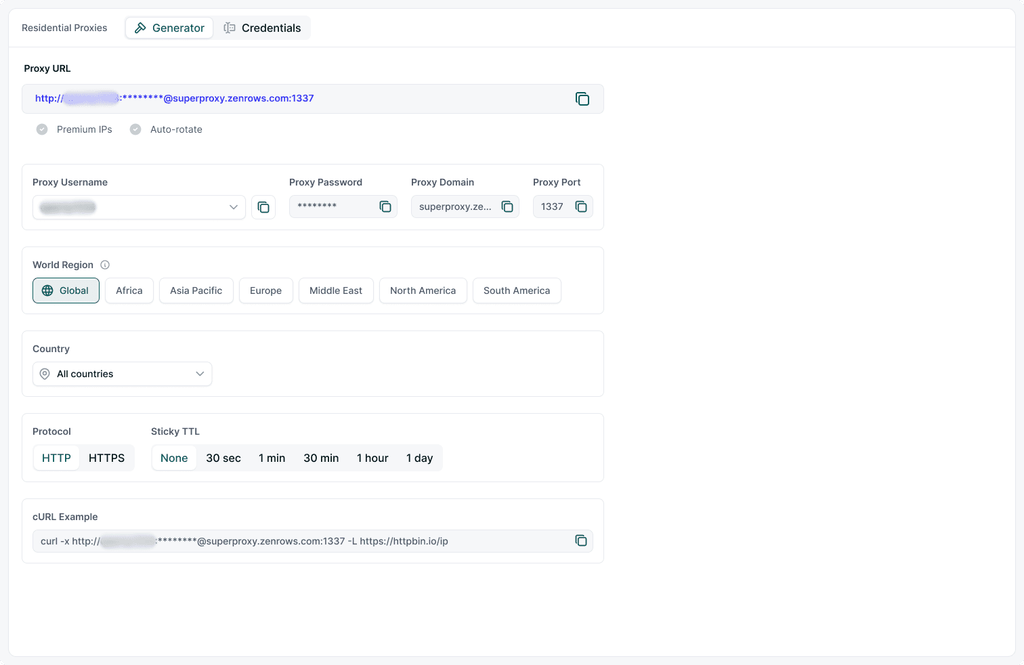
For the best web scraping experience without getting blocked, the recommended approach is to use premium web scraping proxies with residential IPs and an auto-rotating feature. These residential IPs offer greater stealth and are suitable for production-ready web scrapers, as they are assigned to daily internet users on internet service provider (ISP) networks.
When choosing a paid service, it's essential to ensure it offers all the features suitable for web scraping, such as IP auto-rotation and geo-targeting.
Providers like ZenRows offer auto-rotating premium proxies tailored for web scraping and crawling. The same plan gives you access to advanced features, such as flexible geo-targeting, anti-bot and CAPTCHA auto-bypass, and many more. ZenRows proxy is also easy to integrate into any web scraping tool.

2. Use Headless Browsers
To avoid being blocked when web scraping, you should interact with the target website as a regular user would. One of the best ways to achieve that is to use a headless web browser, an automated browser that runs without a graphical user interface.
Popular headless browsers, including Selenium, Playwright, and Puppeteer, let you emulate user actions, such as:
- Clicking a button or a link.
- Horizontal or vertical scrolling to scrape content from websites that load content with infinite scrolling.
- Hovering over an element.
- Dragging and dropping content across a web page.
- Resolving alerts.
- Filling forms interactively, which is often helpful for searching or automating login during scraping.
These features make headless browsers suitable for scraping JavaScript-rendered content and can increase the chances of detection through behavioral analysis. Their ability to execute JavaScript can also help bypass anti-bot checks, such as browser fingerprinting.
However, using a headless browser alone is usually insufficient against anti-bots. But you can boost their anti-bot bypass capability by adding proxies or replacing their User Agent.
Some headless browsers also have dedicated plugins to avoid anti-bot detection. For example, you can fortify Selenium with SeleniumBase and UndectedChromeDriver to bypass detection. You can also patch Puppeteer with the Puppeteer Stealth plugin to remove bot-like signals, such as automated WebDriver. Similarly, the Stealth plugin is available in Playwright.
Stealth plugins make you appear more like a human by removing obvious bot-like signals from your scraper. This increases your ability to bypass anti-bot detection during web scraping.
Read the following guides to learn more about how to avoid detection with popular headless browsers:
3. Set Real Request Headers
Request headers reveal metadata information about your request. They're one of the criteria that anti-bots check to detect bots. Anti-bots prioritize legitimate request headers, such as those sent by a real browser like Chrome.
However, the default request headers of most web scraping tools don't resemble those of a legitimate browser. They often contain bot-like parameters.
For example, Python's default Request headers look like the following, with many missing fields and bot-like signals like the python-requests/2.32.3 User Agent:
{
  "headers": {
    "Accept": [
      "*/*"
    ],
    "Accept-Encoding": [
      "gzip, deflate, br, zstd"
    ],
    "Connection": [
      "keep-alive"
    ],
    "Host": [
      "httpbin.io"
    ],
    "User-Agent": [
      "python-requests/2.32.3"
    ]
  }
}
The above header set is prone to anti-bot detection because a real browser won't send such request headers, so the anti-bot is likely to classify it as a bot.
Compare it with Chrome's default request headers below. You can check yours by opening https://httpbin.io/headers via your Chrome browser. You'll see that it includes all essential headers, including a valid User Agent string.
The website you're trying to scrape expects such a legitimate request header set:
{
    "headers": {
        "Accept": [
            "text/html,application/xhtml+xml,application/xml;q=0.9,image/avif,image/webp,image/apng,*/*;q=0.8,application/signed-exchange;v=b3;q=0.7"
        ],
        "Accept-Encoding": ["gzip, deflate, br, zstd"],
        "Accept-Language": ["en-US,en;q=0.9"],
        "Connection": ["keep-alive"],
        "Dnt": ["1"],
        "Host": ["httpbin.io"],
        "Referer": ["https://www.google.com/"],
        "Sec-Ch-Ua": [
            '"Not(A:Brand";v="8", "Chromium";v="144", "Google Chrome";v="144"'
        ],
        "Sec-Ch-Ua-Mobile": ["?0"],
        "Sec-Ch-Ua-Platform": ['"Windows"'],
        "Sec-Fetch-Dest": ["document"],
        "Sec-Fetch-Mode": ["navigate"],
        "Sec-Fetch-Site": ["cross-site"],
        "Upgrade-Insecure-Requests": ["1"],
        "User-Agent": [
            "Mozilla/5.0 (Windows NT 10.0; Win64; x64) AppleWebKit/537.36 (KHTML, like Gecko) Chrome/144.0.0.0 Safari/537.36"
        ],
    }
}
Customizing your scraper to use an actual browser header, like the one above, is one way to avoid being blocked while scraping. Most web scraping tools allow you to customize the request headers. You can set these headers with your scraping library so the target website treats it like a regular browser.
Check out our article on the most critical request headers for web scraping to learn how to handle your request headers appropriately.
You can also check our tutorial on setting the User Agent during web scraping to learn more about customizing specific header fields like the User Agent.
4. Outsmart Honeypot Traps
Some websites set up honeypot traps to lure bots into performing the wrong action. This could be a deception that leads to visiting the wrong link, interacting with the wrong element, or filling the wrong form field.
Honeypots are often hidden from ordinary users but are only visible to bots. Since a real user isn't expected to interact with these hidden links or elements, any activity detected on them is quickly flagged as automated and blocked. In some cases, the scraper might not even get blocked but be misled into extracting the wrong data.
Let's learn how to track the honey and avoid falling into its trap!
Since most basic honeypot traps are hidden links in the website's HTML, one way to detect them is to watch out for links with CSS properties that make elements invisible.
Below is a basic JavaScript snippet that returns the ratio of hidden to visible links on the target website. Open the target website via your browser, right-click anywhere on the page, and select Inspect. Then, go to the Console tab and run this code:
const linkFilter = () => {
    const allLinks = Array.from(document.querySelectorAll('a[href]'));
    console.log(`There are ${allLinks.length} total links`);

    const filteredLinks = allLinks.filter(link => {
        let linkCss = window.getComputedStyle(link);
        let isDisplayed = linkCss.getPropertyValue('display') !== 'none';
        let isVisible = linkCss.getPropertyValue('visibility') !== 'hidden';
        return isDisplayed && isVisible;
    });

    console.log(`There are ${filteredLinks.length} visible links`);
}

linkFilter();
You might see a result like the following, showing that the number of visible links is lesser than the total number of available ones. It means some links are hidden on that website, indicating the possible availability of a honeypot:
There are 13 total links
There are 10 visible links
Honeypot traps usually include tracking systems that fingerprint automated requests, allowing the website to identify similar requests in the future. Consequently, the target website can easily block your scraper from subsequent access to its content, even if it uses different IPs.
To avoid honeypots, your scraper shouldn't follow text links that match the website's background color or are deliberately hidden from users. Another fundamental way to avoid honeypot traps is to respect the robots.txt file.
5. Automate CAPTCHA Solving
CAPTCHAs are puzzles used to distinguish between humans and bots. You'll often encounter them when accessing sensitive sections of websites, such as user dashboards, reviews, product pages, etc.
The likelihood of CAPTCHA appearing depends on the CAPTCHA type and the website's implementation. While some CAPTCHAs appear whenever a user tries to open the protected page, others are only triggered when the challenge detects bot-like activity, such as web scraping.
A couple of CAPTCHA-solving services can help you remove CAPTCHAs after they appear. Some examples are 2Captcha and AntiCaptcha. These solvers employ real humans and charge per test solved. However, they're usually slow and expensive at scale.

The recommended approach is to bypass the CAPTCHA and prevent it from appearing. To do that, your web scraper needs to imitate human behavior with tools like headless browsers. That said, the most effective and reliable solution is to use paid services like web scraping APIs.
It's best to opt for a scraping API that offers auto-retries without charging for unsuccessful requests. That feature is handy in large-scale web scraping where the CAPTCHA appears multiple times due to heavy traffic. A solid example of such tools is ZenRows.
6. Avoid Fingerprinting
Fingerprinting collects specific hardware and software information, such as the operating system version, browser version, navigator fields, plugins, and more, to create a unique identifier for a machine or a browser.
During fingerprinting, communication between the client and server begins with a Transport Layer Security (TLS) handshake to exchange encrypted data.
This interaction starts with a "Client Hello" message, which includes supported TLS versions, an optional session ID, and cipher suites, among other settings. The server then responds with a "Server Hello" message detailing the selected settings for that session.
Most bots lack the mechanisms to perform the TLS handshake properly, leading to detection and subsequent blocking.
Fortunately, you can modify your scraper's TLS settings to mimic human behavior. You can also leverage tools like Curl Impersonate, which already replicates some of the browser's TLS layers. Read our article on bypassing TLS fingerprinting during scraping to learn more.
In addition to TLS fingerprinting, anti-bot systems implement other advanced fingerprinting techniques, such as browser fingerprinting and WebGL fingerprinting, as part of their detection mechanisms
You can follow the tips below to boost your chances of bypassing fingerprinting:
- Don't make the requests at the same time every day. Instead, send them at random times.
- Change IPs often.
- Use different request headers, including other User-Agents.
- Configure your headless browser to use different screen sizes, resolutions, and fonts.
- Use different headless browsers.
7. Extract Data Directly From Underlying APIs
Much of the information displayed on websites comes from APIs. This data is difficult to scrape because it's usually loaded dynamically via JavaScript after the user performs certain actions.
Let's say you're trying to collect data from posts on a website with an "infinite scroll." In this case, you can't scrape it like a static website because the results require your scraper to scroll continuously to the bottom of the page. You'll need a headless browser to automate the scrolling action on that page.
However, you can still use a static request tool to reverse engineer the API supplying the target data. This method also increases your chances of scraping behind possible anti-bot measures.
It involves intercepting incoming XHR (XMLHttpRequest) requests using an HTTP client such as Python's Requests or JavaScript's Axios. To do that, you'll need to use the network inspector of your preferred browser and check the XHR (XMLHttpRequest) from the Network tab.
After intercepting the API request, you can parse the response using libraries such as BeautifulSoup (Python) or Cheerio (JavaScript).
The shortcoming of this approach is that the API and the target site might share the same CDN. So, you can still get blocked since the API likely uses the same anti-bot protection as the target site.
To learn more, check out our detailed tutorial on scraping from infinite scrolling using the Requests library.
8. Stop Repeated Failed Attempts
One of the most suspicious situations for a webmaster is seeing a large number of failed requests. Initially, they may not suspect that a bot is the cause and start investigating.
However, if they detect that these errors are due to bot activities like web scraping, they'll block your web scraper. This scenario is common in large-scale web scraping, where multiple requests tend to fail due to changes in the website structure or network issues.
There are a couple of ways to prevent it:
- Use logs: Ensure you log failed scraping attempts and set up notifications to suspend scraping when a request fails.
- Monitor website changes: Check for possible changes in the website layout, such as changes in the class name or IDs. Then, adjust your scraper to accommodate the new website structure.
- Watch out for server latency: If the server response time suddenly becomes slower than usual, you're probably overloading it. Try reducing your request frequency to avoid getting noticed.
- Leverage page object model: Adopt automation testing techniques like the page object model to separate element selectors from your scraping logic. This technique lets you quickly locate and adjust the affected elements rather than searching your entire codebase.
With these methods, you can avoid triggering bot alarms and reduce your risk of being blocked while scraping.
9. Scrape Google Cache
One strategy for scraping without detection is to scrape the cached version of your target website. While Google no longer supports access to cached pages, you can still get old web page copies from Wayback machines such as the Internet Archive.
However, the disadvantage of this method is that cached website versions contain outdated data, which means you may not get the desired results.
Getting cached data from the Internet Archive is easy. Let's use it to get the cached version of an anti-bot-protected website like the G2 Reviews.
Paste the target URL into the link box and press Enter. You'll see a calendar with several snapshot dates. Select the most recent date and time to get the website's latest cached version.
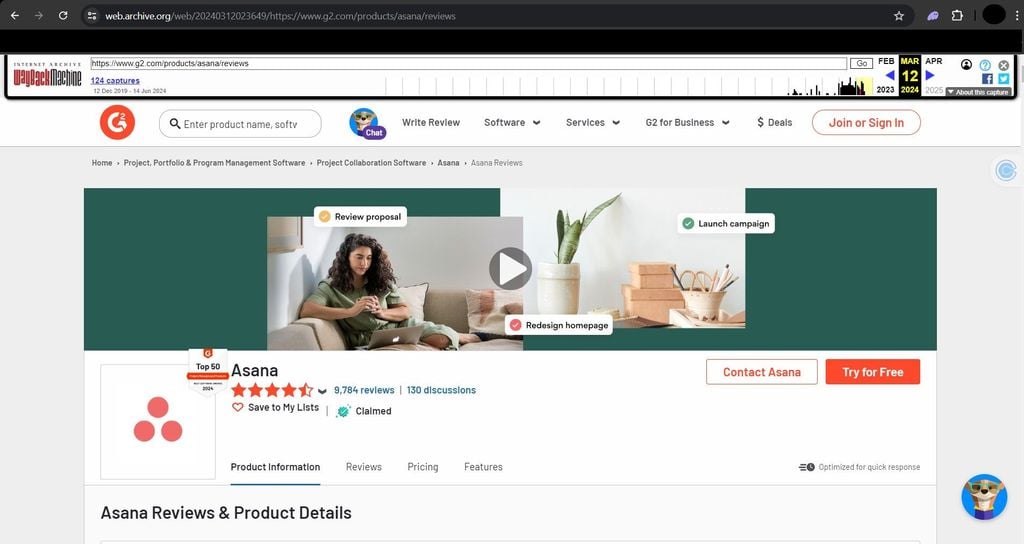
Once that page appears, use your scraper to request the archive's full URL and extract your desired data.
10. Randomize Request Rate
One of the most common consequences of sending multiple requests within a short interval is IP bans, which can be temporary or permanent, depending on the website's security measures. However, sending many requests is unavoidable in large-scale web scraping.
One way to stay safe is to regard the target website's request rules, such as rate limiting. Even if you rotate IPs, the security measure may use your request fingerprint to identify and block you once it detects unusual traffic.
Randomizing your request intervals helps you mimic human user behavior, reducing your chances of getting blocked. It involves implementing a random delay using methods like Python's time.sleep or JavaScript's setTimeout.
Another request randomization technique to mimic human behavior is exponential backoffs/delays. This technique involves pausing your scraping task for a specific period after a failed request. If the request fails again, the previous wait time increases exponentially and accumulates for subsequent failures.
11. Diversify Crawling Pattern
Most web scraping projects follow a specific pattern to extract data from the same website. This approach can result in anti-bot detection.
For example, clicking the same elements, using the same scroll height, and following a similar navigation pattern for every request puts you at risk of getting blocked. The recommended approach is to diversify your crawling pattern to resemble a human interaction.
To do that, you can perform random mouse hovering, click elements randomly, and scroll the page back and forth at various heights before scraping. This technique can keep anti-bots and underground challenges from monitoring user behavior, forcing them to treat your scraper as a human.
12. Follow Robots.txt Rules
The robots.txt file contains rules for how a website should be crawled. It usually specifies the pages that bots shouldn't crawl or index. It may also include request delay rules to limit requests and prevent server overload.
Following these rules makes your requests more ethical and can help prevent the web server from flagging you as a bot. You can check the robots.txt file of any website by appending a /robots.txt to the end of its URL.
For example, open the following URL via your browser to view G2's robots.txt file:
https://www.g2.com/robots.txt
Here's a sample result:
Sitemap: https://www.g2.com/sitemaps/sitemap_content_test.xml
Sitemap: https://www.g2.com/sitemaps/sitemap_index.xml.gz
Sitemap: https://www.g2.com/sitemaps/sitemap_index_compare.xml.gz

User-Agent: *
Disallow: /*?focus_review*
Disallow: /*&focus_review*
Disallow: /*?format=pdf*
Disallow: /*&format=pdf*
Disallow: /*/*/vote*
Disallow: /products/*/take_survey
Disallow: /products/*/leads/*
Disallow: /ahoy/
Disallow: /auth
Disallow: /batch
Disallow: /no_contact_leads/*

// ... omitted for brevity
Ignoring the robots.txt rule can result in instant IP bans and subsequent denial of access to the target website.
13. Reverse-engineer Anti-bot Systems
If your target website uses Cloudflare, Akamai, DataDome, PerimeterX, or a similar anti-bot service, you probably can't scrape the URL because it has blocked you. However, you can research and learn about the current detection methods of these anti-bots and outsmart them using reverse engineering.
Cloudflare, for example, uses different bot-detection methods. One of its most essential tools to block bots is the "waiting room". Even as a human, you should be familiar with this type of screen:
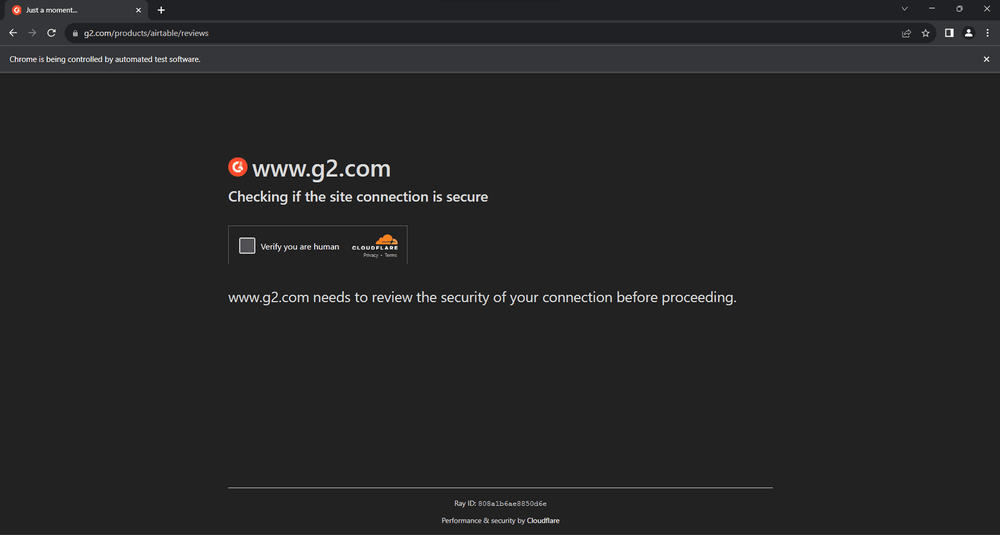
While waiting, JavaScript code runs under the hood to ensure the visitor isn't a bot. The good news is that this code runs on the client side, and you can tamper with it. However, it's obfuscated, and the script keeps changing.
Read our guide on bypassing Cloudflare, where we show you different anti-bot bypassing methods, including how to handle the waiting room. But be warned; it's a long and technically challenging process, requiring intense coding. The best way to automatically overcome any anti-bot protection and scrape without limitations is to use a web scraping API such as ZenRows.
14. Use a Web Scraping API (Recommended)
While this article includes other helpful bypass methods, they don't guarantee 100% success, especially when dealing with the most difficult anti-bots, such as Akamai, Cloudflare, and others.
The only way to scrape any website without getting blocked or interrupted, regardless of its anti-bot measures, is to use a web scraping API, such as the ZenRows Universal Scraper API. ZenRows automatically bypasses all CAPTCHAs and anti-bot measures under the hood, so you can focus on your scraping logic without worrying about getting blocked.
With ZenRows' Adaptive Stealth Mode, you get the most cost-effective, smartest setup for successful scraping at any scale. ZenRows also works with any programming language and acts as a headless browser for scraping dynamic websites. You only need a single API call to use it.
Let's show you how it works by scraping the Antibot Challenge page, a heavily protected website.
Sign up to open the Request Builder. Paste the target URL in the link box and activate the Adaptive Stealth Mode.
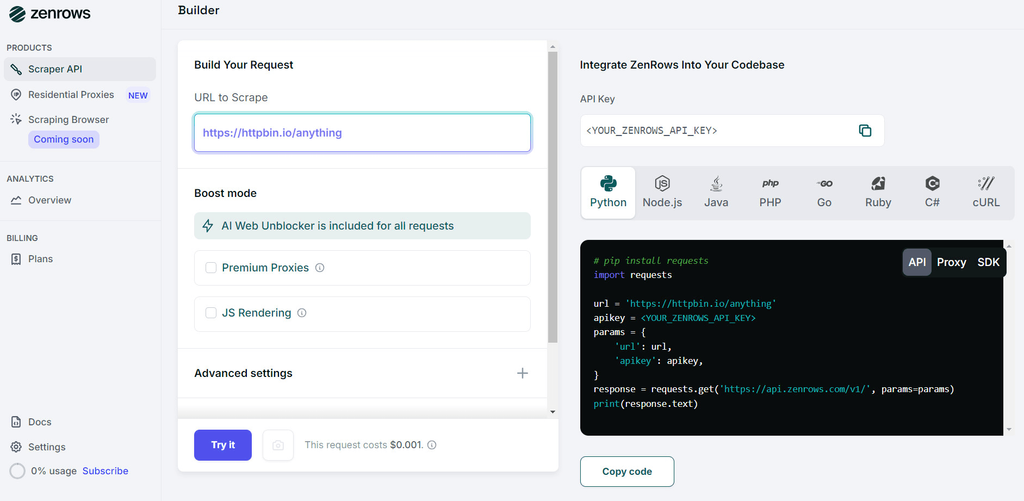
Select your favorite programming language (we'll use Python in this case), then choose the API connection mode. Copy the generated code and paste it into your scraper file.
The generated code should look like this:
# pip3 install requests
import requests

url = "https://www.scrapingcourse.com/antibot-challenge"
apikey = "<YOUR_ZENROWS_API_KEY>"
params = {
    "url": url,
    "apikey": apikey,
    "mode":"auto",
}
response = requests.get("https://api.zenrows.com/v1/", params=params)
print(response.text)
Integrating the above code into your web scraper prevents it from being blocked by complex anti-bot systems at scale.
Conclusion
You've learned 14 techniques to scrape without getting blocked. Keep in mind that some websites use multiple mechanisms to block you from scraping their content. Combining these methods to avoid being blocked increases the chance of success.
Let's recap the anti-block tips you've learned in this post:
| Anti-scraper block | Workaround | Supported by ZenRows |
|---|---|---|
| Requests limits by the anti-bots | Use premium proxies for web scraping, randomize request rate, and stop repeated failed attempts | ✅ |
| Datacenter IPs blocked | Use premium proxies for web scraping | ✅ |
| Cloudflare and other anti-bot systems | Diversify crawling pattern, Use API to your advantage, reverse-engineer anti-bot systems, scrape Google Cache | ✅ |
| Browser fingerprinting | Use headless browsers and set real request headers | ✅ |
| Honeypot traps | Outsmart honeypot traps by skipping invisible links and circular references | ✅ |
| CAPTCHAs on suspicious requests | Premium proxies, user-like requests, and diversifying crawling patterns | ✅ |
Remember that you can still get blocked even after applying these tips. But you can replace all the techniques and tools mentioned in this article with ZenRows, a complete web scraping toolkit that automatically bypasses all blocks, including CAPTCHAs and even the most sophisticated anti-bots.
Try ZenRows for free now or speak with sales!
Frequent Questions
How Do I Scrape a Website Without Being Blocked?
Websites employ various techniques to prevent bot traffic from accessing their pages. That's why you're likely to run into firewalls, waiting rooms, JavaScript challenges, and other obstacles while web scraping.
Fortunately, you can minimize the risk of getting blocked by trying the following:
- Use premium proxies for web scraping.
- Use headless browsers.
- Set real request headers.
- Outsmart honeypot traps.
- Automate CAPTCHA solving.
- Avoid fingerprinting.
- Use API to your advantage.
- Stop repeated failed attempts.
- Scrape Google cache.
- Randomize request rate.
- Diversify crawling pattern.
- Follow robots.txt rules.
- Reverse engineer anti-bot systems.
- Use a web scraping API.
Why Is Web Scraping Not Allowed?
Web scraping is legal but not always allowed because even publicly available data is often protected by copyright law and requires written authorization for commercial use. Luckily, you can scrape data legitimately by following the Fair use guidelines.
Also, a website may contain data protected by international regulations, like personal and confidential information, that requires explicit consent from the data subjects.
Can a Website Block You From Web Scraping?
Yes, if a website detects your tool is breaching the rules outlined in its robots.txt file or triggers an anti-bot measure, it'll block your scraper.
Some basic precautions to avoid bans are to use proxies with rotating IPs and to ensure your request headers appear natural. Moreover, your scraper should behave like a human as much as possible without sending out too many requests too fast.
Why Do Websites Block Scraping?
Websites have many reasons to prevent bot access to their pages. For example, many companies sell data, so they're doing that to protect their income. Security measures against hackers and unauthorized data use also ban all bots, including scrapers.
Another concern is that if misdesigned, scrapers can overload the site's servers with requests, causing monetary costs and disrupting the user experience.