
TL;DRThe fastest way to bypass Cloudflare is a managed scraping API. It automatically handles TLS fingerprinting, JS challenges, and Turnstile. For self-hosted setups, Camoufox and SeleniumBase UC Mode are the strongest open-source options. If you need full control at scale, you can reverse-engineer Cloudflare's JavaScript challenge directly; we cover that too.
About 20% of websites you need to scrape use Cloudflare, a hardcore anti-bot protection system.
To provide a definitive guide, our engineering team spent hundreds of hours and significant R&D hours deobfuscating Cloudflare's core orchestration scripts. We didn’t just want to bypass cloudflare. We wanted to understand the underlying logic of the challenge-response mechanism.
We’ve structured this cloudflare bypass guide to evolve from foundational network adjustments and stealth browsers to the deep-level reverse engineering required for high-volume, production-grade scraping infrastructure.
Key Takeaways
- Cloudscraper, Cfscrape, Puppeteer Stealth, and Playwright Stealth are all obsolete against modern Cloudflare security measures.
- The strongest open-source tools for Cloudflare bypass include Byparr (92.16%), FlareSolverr (90.38%), Camoufox (88.58%), and SeleniumBase UC Mode (80.76%). However, all are unscalable due to browser overhead.
- Once you solve a Cloudflare challenge, you can extract the
cf_clearancecookie and reuse it in lightweight HTTP requests without needing to spin up a full browser on every request. - Cloudflare's AI Labyrinth serves
200 OKresponses filled with fake AI-generated data. Always validate scraped content, and don't trust the status code alone. - DIY reverse engineering works but Cloudflare's encryption keys rotate periodically, making it a full-time maintenance task.
- For production scraping, a managed scraping API is the only approach that handles all bypass layers with zero maintenance overhead.
Quick Reference: Cloudflare Bypass Methods
The table below provides an overview of what works and what you should avoid for bypassing Cloudflare. Click any method to jump directly to its section.
| Method | Still Works | Success Rate | Complexity | Scale | Best For |
|---|---|---|---|---|---|
| Web Scraping API (e.g., ZenRows) | ✅ Yes | Very High | Easy | Very High | Production-grade scraping with zero infrastructure overhead |
| Camoufox | ✅ Yes | High | Moderate | Low | Turnstile-heavy targets |
| SeleniumBase UC Mode | ✅ Yes | High | Moderate | Low | Local debugging, testing |
| Cloudflare solvers (Byparr, FlareSolverr, Zendriver) | ✅ Yes | High | Moderate | Low | Self-hosted local setup |
| CAPTCHA solving Services (e.g. 2Captcha) | ✅ Yes | Medium | Hard | Low | Sites with active Turnstile challenge |
| Smart Proxies (residential) | ⚠️ Partial | Medium | Moderate | Mid | Geo-restriction and IP ban bypass only |
| Origin Server Direct Call | ⚠️ Partial | Low | Hard | Low | Scraping unprotected origins only |
| Reverse-Engineer JS Challenge | ✅ Yes | Very High | Very Hard | High | DIY production infrastructure |
| Cloudscraper / Cfscrape | ❌ No | Very Low | Easy | N/A | Avoid it, as it's now obsolete |
| Puppeteer Stealth, Playwright Stealth, Selenium Stealth (legacy) | ❌ No | Very Low | Easy | N/A | Avoid it. It's now obsolete. Use the recommended stealth browsers instead |
What Is Cloudflare?
Cloudflare is a content delivery and web security company. It provides a Web Application Firewall (WAF) to protect websites against security threats such as cross-site scripting (XSS), credential stuffing, and DDoS attacks.
According to Backlinko, over 24 million active websites use Cloudflare, making it the primary anti-bot solution behind many of the sites you might want to scrape. One of the core systems of Cloudflare's WAF is the Bot Manager, which blocks malicious bot traffic without impacting real users. While Cloudflare allows known crawlers like Googlebot, it treats any unknown bot traffic, including web scrapers, as a potential threat.
This means your scraper can be denied access regardless of your intent.
Cloudflare now deploys an AI-powered honeypot called AI Labyrinth that serves 200 OK responses filled with hallucinated data to waste your crawl budget. Unlike static honeypots, it adapts dynamically to bot behavior. Always implement entropy-based content validation to detect and discard fake responses. We cover this in detail in the How Cloudflare Detects Bots section.
Cloudflare Error Codes for Scraping: What They Mean and How to Fix Them
If you have ever tried to scrape a Cloudflare-protected site, you've likely ran into one of these errors. Here is what each one means and where to start:
| Error Code | Message | Root Cause | Fix |
|---|---|---|---|
| Cloudflare 1003 | Direct IP access not allowed | Request bypassed Cloudflare CDN and hit the origin IP directly | Route requests through the domain, not the raw IP |
| 1006 / 1007 / 1008 | Access denied | IP is blacklisted or flagged as malicious | Rotate to a clean residential proxy |
| 1009 | Access denied due to your region | Site has geo-restrictions enabled | Use a residential proxy from an allowed region |
| 1010 | Access denied due to suspicious browser signature | TLS or HTTP/2 fingerprint mismatch detected | Use a stealth browser or match your TLS fingerprint to your User Agent |
| 1015 | Rate limited | Too many requests from a single IP | Slow request rate and rotate proxies per session |
| 1020 | Access denied, request appears malicious | Bot behavior detected by Cloudflare WAF | See troubleshooting guide |
| 403 Forbidden | Access denied | General WAF block, often fingerprint or header mismatch | See troubleshooting guide |
| Turnstile CAPTCHA | Checking your browser | Active challenge triggered by suspicious traffic signal | Use a CAPTCHA solver service or a stealth browser with auto-solve paired with CAPTCHA proxies or extract and reuse cf_clearance |
| Waiting Room | Checking if the site connection is secure | JS challenge not solved | Solve the JS challenge with a third-party CAPTCHA solver or better use a managed scraping API |
The fixes above address the immediate cause of each error. For production scraping where reliability matters, a managed scraping API like ZenRows handles these errors automatically, without per-error configuration.
Why Standard Tools Fail Against Cloudflare
Before jumping into what works, it's important to understand why Cloudflare blocks the standard developer scraping tools you already use. The two most common starting points are HTTP clients such as Python's Requests and browser automation tools such as Playwright. Let's see the case for both on a Cloudflare-protected site to understand why they fail to bypass Cloudflare.
HTTP Clients: 403 Forbidden
Most developers start with a simple HTTP request:
# pip3 install requests
import requests
response = requests.get("https://scrapingcourse.com/cloudflare-challenge")
print(response.status_code)
Then, Cloudflare blocks the Requests library with a 403 forbidden error:
403
The Requests library fails instantly because it doesn't resemble a browser. By default, it sends a python-requests/2.x.x User Agent, which is an obvious bot signal to Cloudflare. It's also missing the headers that every real browser sends by default, and sends a TLS fingerprint that Cloudflare recognizes as a raw HTTP client rather than Chrome or Firefox. These cause Cloudflare to block it before any page content is even served.
This applies to any HTTP client regardless of programming language, including httpx, cURL, Axios and Got. They all fail for the same reasons unless you explicitly patch their fingerprints.
Headless Browsers: Detected and Blocked
Headless browsers like Playwright get further since they execute JavaScript like a real browser, but they also expose automation signals that Cloudflare detects immediately. If you make the following request:
# pip3 install playwright
# playwright install
from playwright.sync_api import sync_playwright
with sync_playwright() as p:
    browser = p.chromium.launch(headless=True)
    page = browser.new_page()
    page.goto("https://scrapingcourse.com/cloudflare-challenge")
    print(page.title())
    browser.close()
The result is a challenge page:
!DOCTYPE html>
<html lang="en-US">
<head>
    <title>Just a moment...</title>
    <meta http-equiv="Content-Type" content="text/html; charset=UTF-8">
    <!-- ... -->
</head>
<body>
    <!-- ... -->
    <h2 class="h2" id="challenge-running">
        Checking if the site connection is secure
    </h2>
    <!-- ... -->
</body>
</html>
Despite being a browser automation tool, Playwright got blocked by Cloudflare because it lacks the specific browser environment properties that Cloudflare's JS challenge queries at runtime. It also exposes bot-like fingerprints, such as the presence of WebDriver (navigator.webdriver = true) in the navigator field and HeadlessChrome User Agent in headless mode.
Method #1: Use Cloudflare Solvers
Cloudflare solvers are reverse proxies that sit between your scraper and the target site, ensuring your scraper doesn't make direct contact with Cloudflare. Basically, they spin up a browser, solve the Cloudflare challenge on your target, and return the required access cookies and tokens your scraper needs to proceed, such as the cf_clearance cookie.
Dedicated Cloudflare solvers are ideal for small- to medium-sized scraping tasks when you want a self-hosted solution.
Best Cloudflare Solvers
Cloudflare solvers are often phased out by Cloudflare security updates. But based on our recent benchmark, Byparr and FlareSolverr are the two strongest open-source Cloudflare solvers available right now. Zendriver also works but benchmarks significantly lower at 62.68%.
| Cloudflare Solver | Success Rate (%) | Best For |
|---|---|---|
| Byparr | 92.16 | Self-hosted setups prioritizing Turnstile success over speed |
| FlareSolverr | 90.38 | Self-hosted setups that don't mind tweaking configs |
| Zendriver | 62.68 | Small-scale scraping task looking to test a few protected URLs |
Byparr is a reverse proxy built on Camoufox, a patched Firefox build. In our controlled tests it maintained the highest success rate against Turnstile challenges, though it carries higher latency than Flaresolverr due to its deep-spoofing logic.
FlareSolverr was previously flagged as unreliable, but a recent update significantly improved its Cloudflare evasion logic. Our latest benchmarks show it now achieves a competitive success rate. It uses a highly patched combination of Selenium and Undetected ChromeDriver under the hood. That said, FlareSolverr doesn't currently support authenticated proxies, which restricts your IP rotation options and is worth factoring into your setup before committing to it.
Zendriver is a hard fork of Nodriver. At 62.68%, it's the weakest of the three benchmarked solvers, and it shows inconsistent behavior across challenge types. It handles embedded Turnstile in form fields reasonably well, but struggles with forced interstitial challenges. It's only worth exploring for small-scale tests, but not reliable enough for mid-scale use.
Open-Source Cloudflare Solvers Tools to Avoid for Scraping
Not all Cloudflare solvers are worth your development time and effort. These four are either obsolete or too unreliable for any serious project:
- Cloudscraper: Once a popular Python library for bypassing Cloudflare, now largely ineffective. Cloudflare's passive fingerprinting has caught up with its approach, and success rates are consistently low in our recent tests.
- Nodriver: In our isolated testing, it handles embedded Turnstile in form fields but fails on forced interstitial challenges without manual click intervention. But that's too narrow a use case to make it a reliable scraping tool. On top of that, it doesn't currently support Python 3.14, has several unresolved issues and shows low-maintenance signals from the project. Its fork, Zendriver, benchmarks at 62.68% success rate and is the more actively maintained option if you want to explore this approach.
- Cf-Clearance-Scraper: Depends entirely on extracting the
cf_clearancecookie, but even its cookie extraction logic often fail, and the setup is complex. - Cfscrape: An older Python library that shares the same core weaknesses as Cloudscraper. It's no longer maintained and is ineffective against modern Cloudflare challenges.
Method #2: Implement Fortified Headless Browser for Cloudflare Bypass
Standard headless browsers like Selenium, Playwright, and Puppeteer execute JavaScript as a real browser would, making them a natural starting point for scraping Cloudflare-protected sites. But out of the box, they expose automation signals that Cloudflare detects instantly. Stealth browsers fix that.
How Stealth Browsers Fix Bot Detection Signals
A stealth browser is a patched version of a standard headless browser that hides the signals Cloudflare's bot detection looks for. The most common leaks in standard headless browsers are:
navigator.webdriverset to true, a direct automation flag.- A
HeadlessChromestring in the User Agent instead of a real Chrome identifier. - Missing browser runtime environment properties that the Cloudflare JS challenge queries at runtime.
- TLS and HTTP/2 fingerprints that do not match the announced browser version.
Stealth browsers patch these automation signals at the browser level, not the request level, which is why they're more effective than simply spoofing request headers in an HTTP client. However, not all stealth browsers are equally effective in 2026.
Which Stealth Browser Should You Use to Bypass Cloudflare in 2026?
Below are the tools that actually work in 2026, based on our internal benchmarking.
| Stealth Browser | Success Rate (%) | Best For |
|---|---|---|
| Camoufox | 88.58 | High-security targets where success rate matters more than speed |
| SeleniumBase UC Mode | 80.76 | Local debugging and small-scale automation |
| Pydoll | 78.76 | Async-first Chromium automation without WebDrivers |
| Scrapling | 58.03 | Modern adaptive scraping with built-in stealth mode |
| Puppeteer Real Browser | 57.36 | Node.js projects needing a lightweight stealth option |
For the full benchmark methodology and per-target breakdown, see our guide on the top open-source stealth browsers for web scraping.
- Camoufox: A Firefox hard fork that spoofs fingerprint and behavioral leaks at the browser engine level. It achieved the highest success rate among open-source stealth browsers in our tests. The tradeoff is that it's actually the slowest option, making it unsuitable for high-volume scraping despite its accuracy.
- SeleniumBase in UC Mode: An automation library built on top of Selenium patched with evasion strategies via the Undetected ChromeDriver. SeleniumBase uses Selenium APIs, making it the most accessible stealth option for developers already familiar with Selenium.
- Pydoll: Takes an async-first approach and avoids traditional WebDriver protocols entirely, removing one of the most reliable bot detection signals. It sits in the mid-range for both success rate and speed.
- Scrapling's StealthyFetcher: An adaptive scraping library with a built-in stealth mode. At 58.03%, it's on the lower end, but its adaptive request logic makes it worth considering for targets where request patterns matter as much as fingerprinting.
- Puppeteer Real Browser: The strongest Node.js option in the benchmark at 57.36%. However, its lower success rate puts it firmly in the limited tier for serious Cloudflare bypass work.
How to Bypass Cloudflare with Camoufox
Below is a quick example of Camoufox bypassing the Cloudflare challenge page.
Camoufox opens the web page in non-headless (GUI) mode. Rather than trying to automate the Turnstile click by guessing element coordinates, which varies by device and site, we recommend clicking the checkbox manually on the first launch. Once you solve the challenge manually, Camoufox stores the cf_clearance cookie in its user_data directory. On subsequent visits, you can run Camoufox in headless mode and it will reuse that cookie automatically, skipping the challenge entirely for as long as the cookie remains valid.
# pip3 install -U camoufox[geoip]
# camoufox fetch

from camoufox.sync_api import Camoufox
import time

# initialize Camoufox browser with evasion settings
with Camoufox(

    # switch to headless mode for subsequent launches
    headless=False,
    humanize=True,
    os="windows",
    persistent_context=True,
    user_data_dir="user_data",

) as browser:

    # open the target page
    page = browser.new_page()
    page.goto("https://www.scrapingcourse.com/antibot-challenge/")

    time.sleep(10)

    page.wait_for_timeout(20000)

    page.close()
On first launch, Camoufox opens in GUI mode. Click the Turnstile checkbox manually. Once solved, the cf_clearance cookie is stored in the user_data directory and reused automatically on all subsequent headless runs.
How to Bypass Cloudflare in Python with SeleniumBase
SeleniumBase in UC Mode removes the automation flags, enabling your scraper to mimic a real browser. One key limitation is that its Cloudflare bypass capability relies on a GUI-click functionality, which only works in non-headless mode, limiting its usefulness in server environments. The following code sets up SeleniumBase in UC and headless modes and automatically solves the Cloudflare challenge by clicking the Turnstile CAPTCHA checkbox.
# pip3 install seleniumbase
from seleniumbase import Driver
# launch the WebDriver in UC mode
driver = Driver(uc=True)
driver.uc_open_with_reconnect(
    "https://www.scrapingcourse.com/cloudflare-challenge", reconnect_time=4
)

driver.sleep(10)

# click Turnstile CAPTCHA
driver.uc_gui_click_captcha()

# check Cloudflare bypass status
if driver.title != "Cloudflare Challenge - ScrapingCourse.com":
    print("Cloudflare bypass failed")
else:
    print("Cloudflare bypassed successfully")
driver.quit()
Here's the output:
Cloudflare bypassed successfully
SeleniumBase solved the Cloudflare challenge to access the page. Unlike Camoufox, it doesn't extract and reuse cookies but clicks the Turnstile CAPTCHA directly. One disadvantage is that it requires launching a browser GUI every time, which rapidly increases memory overhead and makes it unscalable.
Open-source stealth tools carry an inherent maintenance risk. Even tools that work today can fail tomorrow as Cloudflare updates its detection logic. The deprecated tools section below is proof of that.
Stealth Browsers to Avoid for Cloudflare Bypass
- Puppeteer Stealth (legacy plugin): The
puppeteer-extra-plugin-stealthpackage hasn't received a meaningful update in over three years. While it still installs and runs, Cloudflare's detection has specifically caught up with its patches, making it ineffective against modern challenges. Avoid using it in new projects. - Playwright Stealth: The original repository hasn't received a meaningful update since 2023. While the actively maintained Python fork improves on the original, it also fails to bypass Cloudflare. And our test confirmed that neither version works reliably against Cloudflare anymore.
- Selenium Stealth: The
selenium-stealthlibrary is no longer maintained and is now ineffective against modern Cloudflare challenges. SeleniumBase UC Mode is the correct replacement.
Method #3: Use Smart Proxies for Cloudflare Bypass
Proxies alone aren't enough to bypass Cloudflare's full protection stack. But they're essential for handling IP reputation blocks and geo-restrictions. Without a trusted IP, even a perfectly configured stealth browser will eventually fail Cloudflare's JS challenge mid-scraping.
Residential vs. Datacenter Proxies: Trust Score Differences
Cloudflare assigns every incoming IP a risk score based on factors like geolocation, ISP, and reputation history. Datacenter IPs and known VPN providers are well-known to Cloudflare, so they carry poor trust scores by default and are flagged almost immediately.
Web scraping residential IPs, on the other hand, belong to real ISPs and home networks. They carry significantly better trust scores for Cloudflare bypass and are far less likely to trigger Cloudflare WAF passive detection layer.
Use Sticky Sessions to Preserve Your Trust Score
Cloudflare tracks behavioral consistency across a session. If your IP changes when you're being challenged, the trust score resets and the challenge restarts. Sticky sessions lock your scraper to the same residential IP across an entire multi-step challenge flow, preserving the session state Cloudflare expects to see from a real user.
Use sticky sessions whenever your scraping task involves:
- Navigating multiple pages on a protected site.
- Form submission through a Turnstile-protected page.
- Maintaining a logged-in session after passing a challenge.
Leverage IPv6 Residential Proxies
For additional coverage, some providers offer IPv6 residential proxies. These can be useful because Cloudflare's reputation scoring for IPv6 address space is less mature than for IPv4. The sheer size of the IPv6 address pool means fewer addresses have been flagged or profiled, making IPv6 residential addresses a useful supplement when IPv4 residential IPs are being rate-limited or flagged.
That said, one important constraint is that IPv6 only works if the target site supports it. Check before building IPv6 rotation into your stack:
curl -6 https://targetsite.com
If the command returns a valid response, the site supports IPv6. Otherwise, if you get an error message like "Could not resolve host", the target likely doesn't support IPv6. Also note that not all proxy providers offer IPv6 residential networks, so verify with your provider before committing to their service.
Proxies Aren't a Standalone Solution for Cloudflare Bypass
For full Cloudflare bypass, you need to combine proxies with a stealth browser or a managed scraping API. This enables your scraper to handle Cloudflare's JS challenge, Turnstile CAPTCHA, TLS fingerprinting, and other detection techniques.
Method #4: Bypass Cloudflare CDN by Calling the Origin Server
Every request to a Cloudflare-protected site passes through Cloudflare's network first. If you can find the site's origin server IP address and communicate with it directly, you'll bypass Cloudflare entirely.
Directly calling the origin server to avoid Cloudflare is becoming increasingly unreliable because Cloudflare Tunnel now routes origin server traffic entirely through Cloudflare's network, removing any direct IP exposure. Additionally, modern WAFs like Cloudflare now use Authenticated Origin Pulls, meaning that if your request doesn't include a valid client certificate proving it passed through Cloudflare's network, the origin server will refuse to respond.
That said, another real challenge is that locating the origin server's IP address is often difficult. Even when found, your HTTP client may not satisfy the origin server's configuration requirements, resulting in active rejection of your request.
You can bypass Cloudflare's CDN this in two steps:
Step 1: Find the Origin IP Address
Cloudflare hides a site's DNS records but often incompletely. Internal services like mail servers, subdomains, or legacy infrastructure may still point directly to the origin IP. Some solutions that can give valuable information about a website's services and subdomains include:
- Shodan and Censys for scanning publicly accessible servers and services that may reveal origin IP addresses.
- CloudFlair and CloudPeler for Cloudflare-specific origin discovery.
Historical DNS records that sometimes predate Cloudflare protection are also worth looking into. Sites that added Cloudflare protection after their initial launch may have DNS records from before that change, which can reveal the origin IP. Services like SecurityTrails and ViewDNS.info let you query these historical records.
Once you obtain the origin IP address from internal services, the next step is to communicate directly with it behind Cloudflare's protection.
Step 2: Request Data From the Origin Server
Once you have a candidate origin IP, you can't simply paste it into a browser because multiple hosts may share that IP through virtual hosting, making it difficult for the server to determine which website you are trying to access. So the server needs a valid Host header to route your request correctly.
Tools like cURL let you specify a Host header when requesting the origin server's IP address. The following example tells the origin server to call the specified host (example.com) from a pool of several others sharing the same origin server IP address.
curl -H "Host: example.com" http://8.47.69.0
Alternatively, you can map the domain to the origin IP in your local hosts file (/etc/hosts). Keep in mind that this is unscalable because host file configuration across multiple machines is time-consuming:
http://8.47.69.0 targetsite.com
The above methods can force the target domain to route directly through the origin server, bypassing Cloudflare's DNS. However, this approach is unscalable across multiple machines and will fail if the origin server only accepts traffic from Cloudflare's IP ranges, which is increasingly common.
Method #5: Cloudflare Turnstile Bypass
The Cloudflare Turnstile is a non-interactive CAPTCHA that runs silently in the background when you visit a Cloudflare-protected page.
You'll encounter either of these two scenarios:
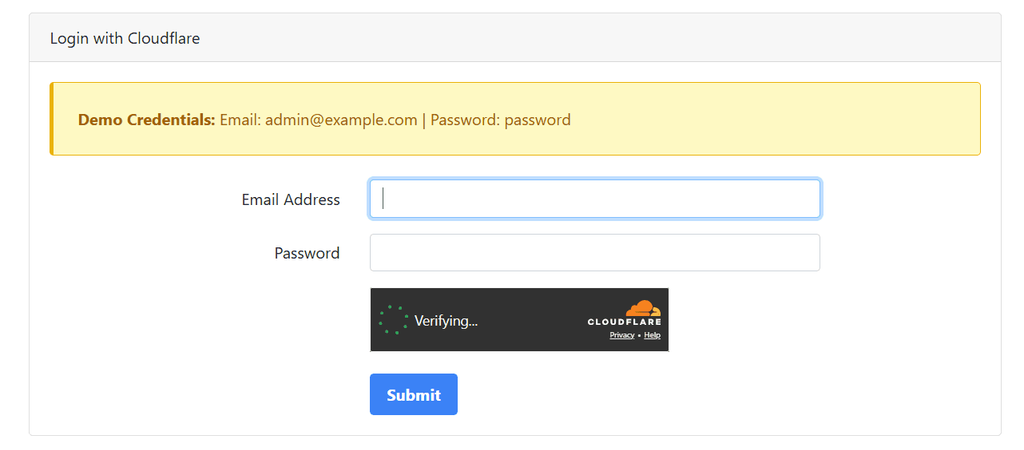
- Managed Turnstile: Embedded directly in a page element like a login form or checkout flow. In this case, the Cloudflare token is required to submit the form. Check an example out on this Turnstile Login Challenge form:
- Non-interactive Turnstile (interstitial): Runs as a full-page challenge before you can access any content. This is what you see in the Cloudflare waiting room. See an example on this Cloudflare Challenge page:
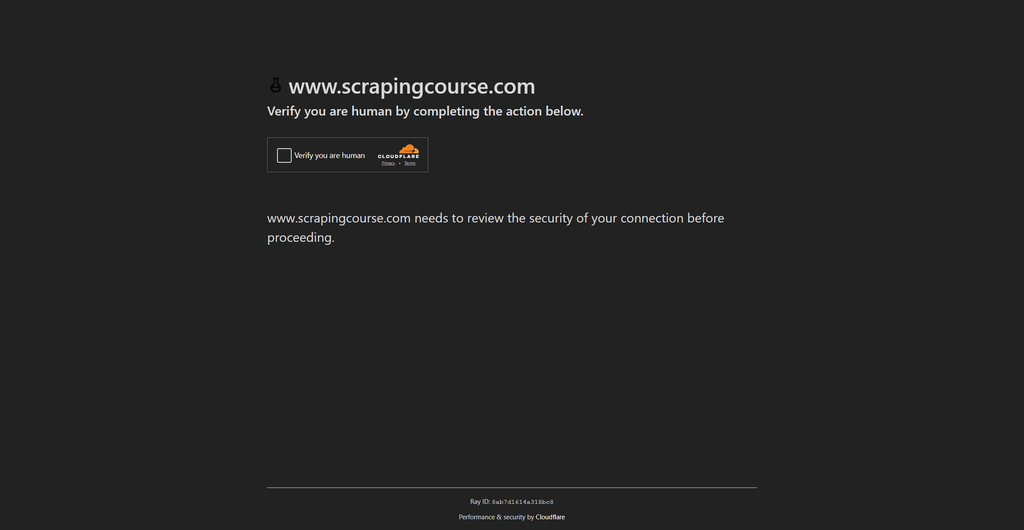
Unlike older image-based CAPTCHAs, Turnstile doesn't ask you to identify traffic lights or crosswalks. It analyzes browser signals, mouse behavior, and environment properties to determine if you're a real user, then issues a token your scraper needs to proceed.
When Does Cloudflare Turnstile Appear?
Cloudflare Turnstile appears in two configurations, depending on how the site administrator has set it up:
- Always-on mode: The Turnstile challenge runs on every visit regardless of how legitimate the traffic looks. You'll see this most often on login pages, checkouts, and high-value form submissions where the site owner can't afford to let any automated traffic through. Even a real browser from a clean residential IP will hit this challenge every time.
- Risk-triggered mode: Turnstile only activates when Cloudflare's scoring system flags the incoming traffic as suspicious. Clean residential IPs with proper headers and a matching TLS fingerprint may pass through without ever seeing the challenge.
Understanding which configuration you're dealing with is essential to determine your Cloudflare Turnstile bypass strategy.
For risk-triggered Turnstile bypass, fixing your fingerprint and proxy quality may be enough to avoid the challenge entirely. For always-on Cloudflare Turnstile bypass, you'll need either a cookie extraction approach or a CAPTCHA solver service regardless of how clean your setup is.
When Turnstile is solved successfully, Cloudflare issues a cf_clearance cookie, which grants access to the protected content. The default validity of the cf_clearance cookie is 30 minutes, though some sites configure shorter or longer windows.
How to Extract and Reuse the cf_clearance Cookie with Camoufox
Spinning up a full browser for every single request is expensive. As mentioned earlier, Camoufox automatically stores the cf_clearance cookie in its user_data directory after the first successful challenge. Once you solve the challenge manually and obtain the cf_clearance, Camoufox automatically reuses it to subsequently access the target site, even in headless mode.
However, to make your request more lightweight and avoid consuming memory with Camoufox's headless browser instance for each request, you can reuse the extracted cf_clearance cookie in an standard HTTP client by passing it as a session token.
The example code below spins up the challenge page for you to solve manually. Once solved, Camoufox stores the cf_clearance cookie in the user_data directory. It then extracts that cookie from the user_data SQlite database (cookies.sqlite), and passes it to a Python Requests' Session to access the page without needing to spin up any browser instance:
# pip3 install -U camoufox[geoip] requests
# camoufox fetch
from camoufox.sync_api import Camoufox
import sqlite3
import os
import requests

TARGET_URL = "https://www.scrapingcourse.com/cloudflare-challenge"
USER_DATA_DIR = "user-data"

# solve the challenge once and let Camoufox store the cookie
with Camoufox(
    headless=False,
    humanize=True,
    os="windows",
    persistent_context=True,
    user_data_dir=USER_DATA_DIR,
) as browser:
    page = browser.new_page()
    page.goto(TARGET_URL)
    user_agent = page.evaluate("navigator.userAgent")

    page.wait_for_timeout(20000)


# read cf_clearance directly from cookie.sqlite
cookie_db = os.path.join(USER_DATA_DIR, "cookies.sqlite")

conn = sqlite3.connect(cookie_db)
cursor = conn.cursor()
cursor.execute("SELECT value FROM moz_cookies WHERE name = 'cf_clearance'")
row = cursor.fetchone()
conn.close()

cf_clearance = row[0] if row else None
print(f"cf_clearance: {cf_clearance}")

# reuse the cookie in lightweight HTTP requests
if cf_clearance:
    session = requests.Session()
    session.headers.update(
        {"User-Agent": user_agent, "Cookie": f"cf_clearance={cf_clearance}"}
    )
    response = session.get(TARGET_URL)
    print(f"response status: {response.status_code}")
    print(response.text[:500])
else:
    print("cf_clearance not found.")
Here's the result, showing that Requests now reuses the cf_clearance cookie to successfully access the Cloudflare-protected site:
cf_clearance: WN6f2plr.4.FaV8Jfgh6kzt2lugDqGxxrPovJWewf7...
Response status: 200
<!DOCTYPE html>
<html lang="en">
<head>
    <!-- omitted for brevity -->
    <title>Cloudflare Challenge - ScrapingCourse.com</title>
The cf_clearance cookie is bound to the IP address and device fingerprint that solved the challenge. So, the User Agent and IP address in your HTTP requests must match the one used during the Camoufox session. Cloudflare validates the cookie against the original device fingerprint, so a mismatch will invalidate it immediately.
This approach works best when you're scraping multiple pages on the same protected domain within the cookie's validity window.
How to Bypass Cloudflare Turnstile with 2Captcha
For always-on Turnstile where cookie reuse isn't an option, CAPTCHA solver services like 2Captcha work by sending the challenge to real human solvers who return a valid token. Your scraper then injects that token into the page to proceed.
Using 2Captcha's Cloudflare Turnstile page as a demo, here's how to solve the Cloudflare Turnstile CAPTCHA on a demo page using 2Captcha with Selenium in Python. Replace <2Captcha_API_KEY> with your actual 2Captcha API key.
# pip3 install 2captcha-python selenium

from selenium import webdriver
from selenium.webdriver.common.by import By
from selenium.webdriver.chrome.options import Options
from selenium.webdriver.support.ui import WebDriverWait
from selenium.webdriver.support import expected_conditions as EC
import time
from twocaptcha import TwoCaptcha

# set up 2Captcha solver
solver = TwoCaptcha("<2Captcha_API_KEY>")

# set up the WebDriver in headless mode
options = Options()
options.add_argument("--headless")
driver = webdriver.Chrome(options=options)

# open the target site
url = "https://2captcha.com/demo/cloudflare-turnstile"
driver.get(url)

# wait for the page to load
time.sleep(5)

# extract the sitekey
sitekey_elem = driver.find_element(By.CSS_SELECTOR, ".cf-turnstile")
sitekey = sitekey_elem.get_attribute("data-sitekey")

# solve the captcha
result = solver.turnstile(sitekey=sitekey, url=url)
captcha_token = result["code"]

# wait for the page to be ready for interaction
time.sleep(2)

# insert the token into the textarea
textarea = driver.execute_script(
    "return document.querySelector('input[name=\"cf-turnstile-response\"]');"
)
driver.execute_script("arguments[0].value = arguments[1];", textarea, captcha_token)

# wait for the token to be set
time.sleep(2)

# get the check button element
check_button = driver.find_element(By.CSS_SELECTOR, 'button[data-action="demo_action"]')

# scroll to the button to ensure the check button is in view
driver.execute_script("arguments[0].scrollIntoView({block: 'center'});", check_button)
time.sleep(0.5)

# click the "Check" button
check_button.click()

# wait for either success or failure message
wait = WebDriverWait(driver, 10)
try:
    success = wait.until(
        EC.presence_of_element_located((By.CSS_SELECTOR, "p._successMessage_1ndnh_1"))
    )
    print(success.text)
except Exception:
    try:
        error = WebDriverWait(driver, 3).until(
            EC.presence_of_element_located((By.CSS_SELECTOR, "div._alertBody_bl73y_16"))
        )
        print(error.text)
    except Exception:
        print("Neither success nor error message appeared.")

driver.quit()
Limitations of CAPTCHA Solver Services
CAPTCHA solvers work but come with real tradeoffs worth knowing before you commit to them:
- Human solvers introduce latency: Average solve time for Turnstile via 2Captcha can take up to 5 to 15 seconds per challenge, and this adds up fast at scale.
- Solver services charge per solution: Turnstile solving cost becomes expensive quickly at high request volumes.
- Token validity windows are often short: If your scraper doesn't inject and submit the solution token fast enough after receiving it, the challenge resets.
- Not a full bypass: A solved Turnstile token doesn't help if Cloudflare's passive fingerprinting already flagged your IP or TLS fingerprint. CAPTCHA solving needs to be combined with clean web scraping proxies and proper headers to be effective.
For sites that only display Turnstile at certain hours or security levels, it's worth analyzing your target's behavior before adding a solver to your stack. If you can identify periods of lower protection, you may be able to avoid the CAPTCHA entirely by only scraping at those times. This can be off-peak hours like weekends, when the site is receiving less traffic.
That said, the best way to bypass CAPTCHA during scraping is to integrate a complete solution like ZenRows. It solves and bypasses the Cloudflare Turnstile CAPTCHA and all other CAPTCHAs, allowing you to scrape any website without getting blocked.
Method #6: Bypass Cloudflare Waiting Room and Reverse-engineer Its Challenge
Verify you are a human by completing the action below.
XXXXXXXX.com needs to review the security of your connection before proceeding.
If you see these messages, it means you couldn't bypass the Cloudflare waiting room and ran into this:
The target site used to demonstrate reverse engineering in this article might switch from Cloudflare to other anti-bot vendors in the future. However, focus on the techniques shown, as these can be applied to any Cloudflare-protected site. Also known as the Cloudflare JavaScript challenge or the Cloudflare I Am Under Attack page, this is Cloudflare's principal protection. To bypass Cloudflare bot protection, you need to skip the Cloudflare waiting room.
What Is Cloudflare Waiting Room?
If you've been looking for a way to bypass Cloudflare's human check, understanding this waiting period is crucial for accessing protected content.
When you visit a Cloudflare-protected site in your browser, you must first wait a few seconds in the Cloudflare waiting room. During that time, your browser solves challenges to prove you're not a robot. If you're labeled as a bot, you'll be given an "Access Denied" error, making a Cloudflare waiting room bypass essential for uninterrupted access. Otherwise, you'll be automatically redirected to the web page.
How Long Does It Take to Bypass Cloudflare Waiting Room?
You'll be placed in the waiting room for a few seconds. The exact time depends on the target's security level and how your scraper handles the tests. For highly protected sites, this process could take up to ten seconds.
Once the challenge is solved, you can browse the site.
How Do I Bypass Cloudflare's Waiting Room?
Ideally, you can bypass Cloudflare's waiting room by solving the JavaScript challenges and proving you're human.
Another approach is to analyze Cloudflare's JavaScript challenge to understand the algorithm responsible for generating the challenge and validating the response. This way, you can reverse-engineer the script.
What Is the Purpose of Bypassing Cloudflare's Waiting Room?
The purpose of bypassing the Cloudflare waiting room is to gain access to on-site data. Every request to a Cloudflare-protected URL encounters the waiting room, where it undergoes challenges before being redirected to the actual website. Your web scraper must undergo the same process.
Reverse-engineering the Cloudflare JavaScript Challenge
For this example, we will reverse-engineer the Cloudflare waiting room page as it appears on G2. Feel free to click the link and follow along!
Step 1: Check out the Network Log
Open up the developer tools in your browser and navigate to the "Network" tab. Then, leave them open and browse the G2 site.
After you're redirected from the challenge page to the actual site, you'll notice the following crucial requests (in chronological order):
- An initial GET to
https://www.g2.com/, with the response body as the waiting room's HTML. The HTML contains<script>tags containing an important anonymous function. This function does some initialization and loads the "initial challenge" script.
// The script from the waiting room HTML.
(function () {
	window._cf_chl_opt = {
		cvId: '2',
		cType: 'non-interactive',
		cNounce: '12107',
		cRay: '744da33dfa643ff2',
		cHash: 'c9f67a0e7ada3f3',
		/* ... */
	};
	var trkjs = document.createElement('img');
	/* ... */
	var cpo = document.createElement('script');
	cpo.src = '/cdn-cgi/challenge-platform/h/g/orchestrate/jsch/v1?ray=744da33dfa643ff2';
	window._cf_chl_opt.cOgUHash = /* ... */
	window._cf_chl_opt.cOgUQuery = /* ... */
	if (window.history && window.history.replaceState) {
		/* ... */
	}
	document.getElementsByTagName('head')[0].appendChild(cpo);
})();
This script rotates per request, so it may look slightly different if you follow along in your browser.
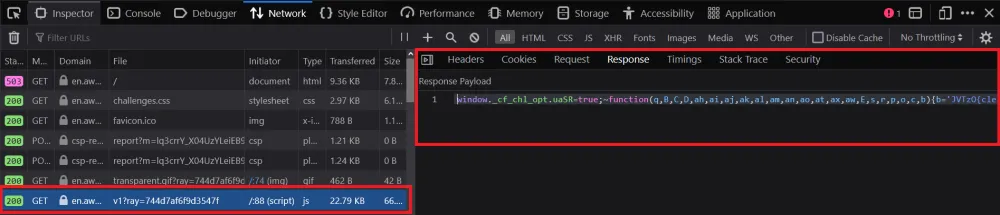
- A GET to the "initial challenge" script:
https://www.g2.com/cdn-cgi/challenge-platform/h/g/orchestrate/jsch/v1?ray=<rayID>, where<rayId>is the value ofwindow._cf_chl_opt.cRayfrom above. It returns an obfuscated JavaScript script, which you can view here. This script rotates changes on each request.
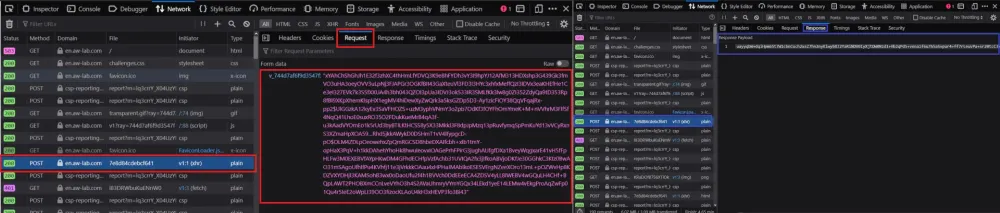
- A POST request to
https://www.g2.com/cdn-cgi/challenge-platform/h/g/flow/ov1/<parsedStringFromJS>/<rayID\>/<cHash>, where<parsedStringFromJS>is a string defined in the initial challenge script and<cHash>is the value ofwindow._cf_chl_opt.cHash. The request body is a URL-encoded payload of the format:v_<rayID>=<initialChallengeSolution>. The response body to this request seems to be a long base64-encoded string.
- A second POST request to
https://www.g2.com/cdn-cgi/challenge-platform/h/g/flow/ov1/<parsedStringFromJS>/<rayID>/<cHash>. The payload follows the same format as the previous request and, once again, returns a long base64-encoded string. This request is responsible for sending the solution to the second Cloudflare challenge.
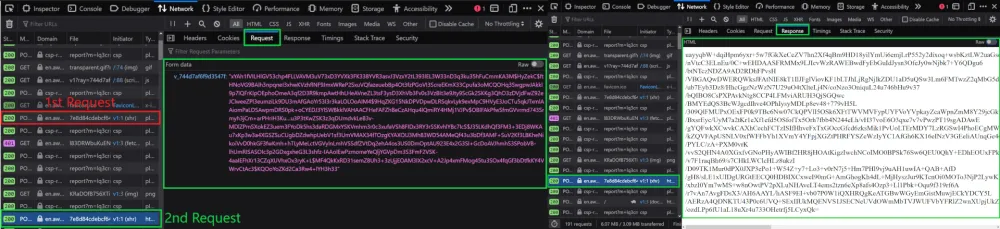
A final POST request to https://www.g2.com/, with some crypto form data in this format:
md: <string>
r: <string>
sh: <string>
aw: <string>
The response to this request provides us with the actual HTML of the target webpage and a cf_clearance cookie, which allows us to freely access the site without solving another challenge.
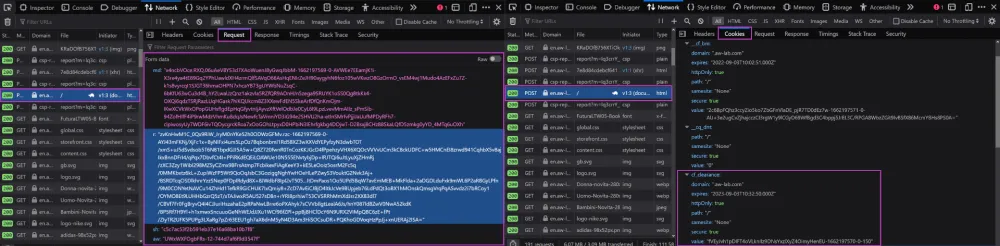
The request flow doesn't give us too much information, especially since all the data looks to be either encrypted or a random text stream. So, that rules out trying to black-box reverse engineer our way to a Cloudflare bypass.
This might leave you with even more questions than you started with. Where do these requests come from? What does the data in the payloads represent? What's the purpose of the base64 response bodies?
There's no better place to search for answers than the "initial challenge" script. Be warned, this is no walk in the park! If you're ready for the challenge, stick with us. We'll start with some dynamic analysis.
Step 2: Debug the Cloudflare JavaScript Challenge Script
Cloudflare's scripts are heavily obfuscated. It would be a nightmare to read the script as-is without any knowledge of its functionality.
Fortunately for us, at the time of writing this, Cloudflare doesn't use any kind of anti-debugging protection. Open up your browser's developer tools and set up an XHR/fetch breakpoint for all requests:
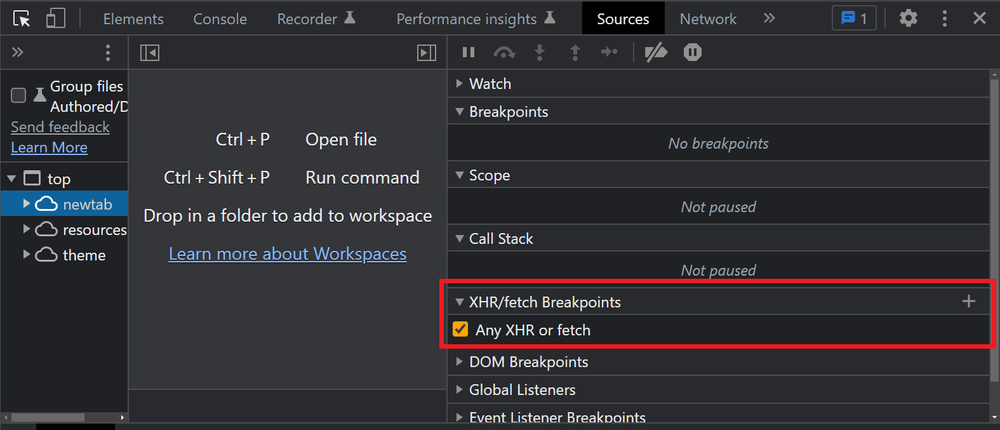
Be sure to clear your cookies so that Cloudflare will place you in the waiting room again. Keeping your developer tools open, navigate to G2.
You'll notice that within a few milliseconds after the "initial challenge" script loads, your XHR breakpoint gets triggered (before the first POST request is sent).

Now, you can see and access all the variables and functions in the current scope. However, you can deduce little from the variable values shown on-screen, and the code is unreadable.
Looking closely at the script, you'll notice that one function is called over a thousand times. In this example, that's the c function (though it might have a different name in your script). When called, there is always a single stringified hex number as the argument. Let's try running it in the DevTools console:
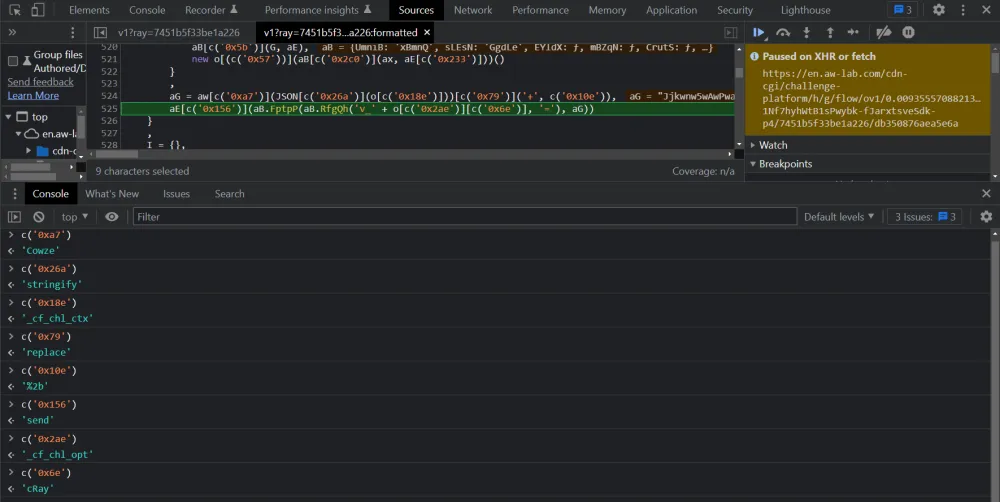
Wow! It appears that Cloudflare uses a string-concealing obfuscation mechanism. By running the function and replacing its calls with its return values, we can simplify the bottom two lines in the above screenshot to this:
// The simplified code
(aG = aw["Cowze"](JSON["stringify"](o["_cf_chl_ctx"]))["replace"]("+", "%2b")),
aE["send"](aB.FptpP(aB.RfgQh("v_" + o["_cf_chl_opt"]["cRay"], "="), aG));
Using the same technique of running code in the console, we can deduce that the variables o and aE represent window and an XMLHttpRequest instance, respectively. We can also convert bracket notation to dot notation to yield:
// The above code, even more simplified!
(aG = aw.Cowze(JSON.stringify(window._cf_chl_ctx)).replace("+", "%2b")),
	// aE = new XMLHttpRequest(), an XMLHttpRequest instance initialized earlier in the script
	aE.send(aB.FptpP(aB.RfgQh("v_" + window._cf_chl_opt.cRay, "="), aG));
It's not perfect, but the code is getting much easier to read. Simplifying all the string-concealing function calls would improve the script's readability. However, doing it manually would take an eternity. We'll tackle this challenge in the next section, but let's move on for now.
If you press the "continue until next breakpoint" button in your debugger, your browser will send the first post request. It will pause on the next breakpoint immediately after receiving a response:
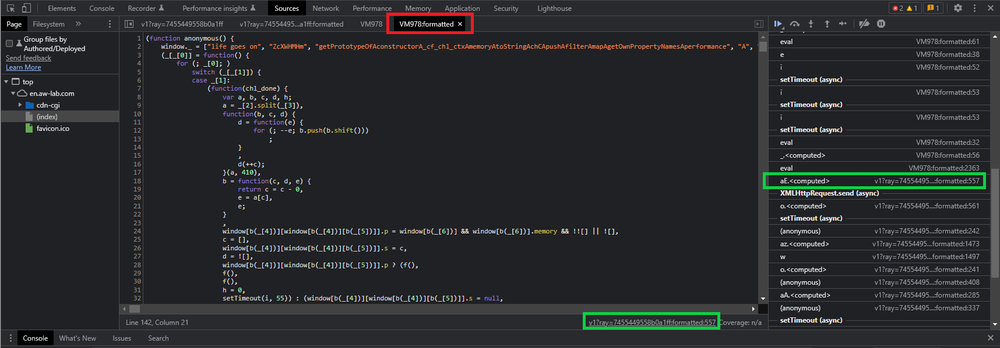
The debugger is paused in a completely different script. This new script is what we'll refer to as Cloudflare's "main" or "second" JavaScript challenge. But if you look at the network log, there was no GET request to this specific script! So, where did it come from?
Upon a closer look at the script, we can see that it's an anonymous function. The script name, in our case, is VM279. According to a thread on Stack Overflow, this second script is likely being evaluated within the initial challenge script, using eval or a similar method. We can confirm this because the call stack shows the Cloudflare "initial challenge" script as the initiator (See: green boxes in the screenshot).
If we click on the initiator, we can see where this script is being evaluated in the "initial challenge" script:
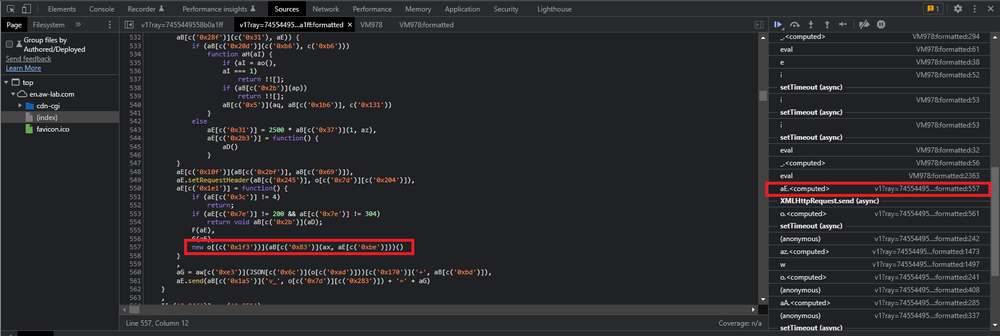
We'll use the same method of evaluating the c function calls to undo the string concealing and replacing o with window, which gives us this:
// The line of code that initiates the second JavaScript challenge

// Note: aE = new XMLHttpRequest(), an XMLHttpRequest instance initialized earlier in the script
new window.Function(aB.pgNsC(ax, aE.responseText))();
It appears that this function creates a new function based on the data contained in the responseText of the XMLHttpRequest from the previous breakpoint. Cloudflare probably uses some cipher to decrypt it into an executable script.
We've made some progress, but the Cloudflare scripts remain unreadable. Even with manual debugging, we won't be able to figure out much more. To initiate a Cloudflare bypass, we must understand it fully. And to do that, we need to deobfuscate it.
Matheus Canhizares, Senior Scraping Browser Engineer at ZenRows, says while the manual steps above are vital for identifying the type of obfuscation used, they aren't sustainable for production-scale scraping. We discovered that Cloudflare's encryption keys and challenge IDs, such as cRay and cvId, can rotate as frequently as every 30 minutes.
Step 3: Deobfuscate the Cloudflare JavaScript challenge script
While this method focuses on manual deobfuscation, we found that static methods fail in production. Cloudflare doesn't just obfuscate, it binds the challenge to the session. This is why we recommend an AST-based (Abstract Syntax Tree) transformation approach for production-level evasion.
Manually deobfuscating Cloudflare's challenge script will require significant effort. Cloudflare uses many obfuscation techniques in its code, and it would be impractical to cover them all in this article. Here's a non-exhaustive list of examples:
- String Concealing: Cloudflare removes all references to string literals. In the previous section, we saw that the c function acted as a string concealer.
- Control Flow Flattening: Cloudflare obscures the control flow of a program by emulating assembly-like JUMP instructions by using an infinite loop and a central switch statement dispatcher. Here's an example from the Cloudflare script:
// An example of control flow flattening from the Cloudflare script.
function Y(ay, aD, aC, aB, aA, az) {
	// The aB array holds a list of all the instructions.
	aB = "1|6|11|0|15|9|3|10"["split"]("|");

	// This is the infinite loop
	for (aC = 0; true; ) {
		// The below switch statement is the "dispatcher"
		// The value of the aB[aC] acts as an instruction pointer, determining which switch case to execute.
		// After each switch statement finishes executing, the instruction pointer is incremented by one to retrieve the next instruction.

		switch (aB[aC++]) {
			case "0":
				/* ... */
				continue;

			case "1":
				/* ... */
				continue;

			case "3":
				/* ... */
				continue;

			case "6":
				/* ... */
				continue;

			case "9":
				/* ... */
				continue;

			case "10":
				// Exit the function. This is the final switch case
				return aD;

			case "11":
				/* ... */
				continue;

			case "15":
				/* ... */
				continue;
		}

		break;
	}
}
- Proxy Functions: Cloudflare replaces all binary operations (
+,-,==,/, etc.) with function calls. This decreases code readability, as you constantly need to look up the definition of the extra functions. Here's an example:
// An example of proxy function usage

az = {};

// '+' operation proxy function
az.pNrrD = function (aB, aC) {
	return aB + aC;
};
// '-' operation proxy function
az.aZawd = function (aB, aC) {
	return aB - aC;
};
// '===' operation proxy function
az.fhjsC = function (aB, aC) {
	return aB === aC;
};

/* ... */

// Equivalent to ((1 + 3) - 4) === 0
- Atomic Operations: Especially in the main/second challenge script, Cloudflare converts simple strings or numeric literals into long, convoluted expressions, taking advantage of the atomic parts of JavaScript (unary expressions, math operations, and empty arrays). This technique bears a strong resemblance to JSFuck. Example:
// Believe it or not, this is equivalent to:
// a = 1.156310815361637
a =
	(!+[] +
		!![] +
		!![] +
		!![] +
		!![] +
		!![] +
		!![] +
		!![] +
		!![] +
		[] +
		(!+[] + !![] + !![] + !![]) +
		-~~~[] +
		(!+-[] + +-!![] + -[]) +
		(!+[] + !![] + !![] + !![] + !![] + !![] + !![] + !![]) +
		(!+[] + !![] + !![]) +
		(!+[] + !![] + !![] + !![] + !![] + !![] + !![] + !![] + !![]) +
		(!+[] + !![] + !![] + !![] + !![] + !![] + !![] + !![]) +
		-~~~[]) /
	+(
		!+[] +
		!![] +
		!![] +
		!![] +
		!![] +
		!![] +
		!![] +
		!![] +
		[] +
		-~~~[] +
		(!+[] + !![] + !![]) +
		(!+[] + !![] + !![] + !![] + !![] + !![] + !![] + !![]) +
		(!+[] + !![] + !![] + !![] + !![] + !![]) +
		(!+[] + !![] + !![] + !![] + !![] + !![] + !![]) +
		(!+[] + !![] + !![] + !![] + !![] + !![]) +
		(!+[] + !![] + !![] + !![] + !![] + !![]) +
		(!+[] + !![] + !![])
	);
What makes Cloudflare bypass hard is the script's obfuscation and dynamic nature. Each time you enter a Cloudflare waiting room, you'll face new challenge scripts.
If you want to create your own Cloudflare bypass, you'll need some highly specialized skills. The obfuscation of Cloudflare's challenge scripts is good enough that you can't just throw it in a general-purpose deobfuscator and get a readable output. You'll need to create a custom deobfuscator capable of dynamically parsing and transforming each new Cloudflare challenge script into human-readable code.
Try manipulating the script's abstract syntax tree.
In one of our internal tests, we observed that Cloudflare uses the cRay as a dynamic decryption key for the second-stage payload. Because these Ray IDs are unique per request and the encryption keys rotate every 30 minutes, static deobfuscation is useless.
As mentioned earlier, we recommend transitioning to an AST-based (Abstract Syntax Tree) transformation approach. It allows you to programmatically rebuild the decryption logic for every new cRay on the fly.
Once you've made a working dynamic deobfuscator, you'll be able to better understand all the checks Cloudflare's anti-bot performs on your browser and how to replicate the challenge-solving process.
In the next step, we'll analyze some active bot detection implementations from the deobfuscated Cloudflare script. Let's get to it!
Step 4: Analyze the Deobfuscated Script
Remember those cryptic payloads and base64 encoded response bodies? Now we can understand how they work!
Cloudflare's encryption
Recall the code snippet in which we determined that the response text was being used to evaluate the main/second challenge script:
// Note: aE = new XMLHttpRequest(), an XMLHttpRequest instance initialized earlier in the script
new window.Function(aB.pgNsC(ax, aE.responseText))();
In the end, aB.pgNsC was just a proxy wrapper for the ax function. The deobfuscated ax function looks like this:
ax = function (ay) {
	var aF;
	var aE = window._cf_chl_opt.cRay + "_" + 0;
	aE = aE.replace(/./g, function (_, aH) {
		32 ^= aE.charCodeAt(aH);
	});
	ay = window.atob(ay);
	var aD = [];
	for (
		var aB = -1;
		!isNaN((aF = ay.charCodeAt(++aB)));
		aD.push(String.fromCharCode(((aF & 255) - 32 - (aB % 65535) + 65535) % 255))
	) {}
	return aD.join("");
};
Can you guess what this function does? It's a decryption function!
Cloudflare encrypts the main/second challenge script with a cipher. Then, after the first POST request to solve the initial challenge, Cloudflare returns the encrypted second challenge script.
To actually execute the challenge, it's decrypted into a string with the ax function using window._cf_chl_opt.cRay as the decryption key. That string is then passed into the Function constructor to create a new function and executed with ()!
We also previously discussed Cloudflare's active bot detection techniques. Now, we can revisit a few of them to see their implementations!
CAPTCHAs
Here, we can see how Cloudflare loads a Turnstile instance:
(function() {
/*...*/

    function lt(e, a, r, o, c, u, g) {
        var b = "https://challenges.cloudflare.com";
        if (c) b = e["base-url"] || b;
        var l = u ? "h/" + u + "/" : "", h = g ? "?" + g : "";
        return `${b}/cdn-cgi/challenge-platform/${l}turnstile/if/ov2/av0/rcv${o}/${e}/${a}/${r.theme}/${r.size}${h}`;
    }
/*...*/

    var y = {
        turnstileLoadInitTimeMs: D(),
        scriptWasLoadedAsync: false,
        isReady: false,
        widgetMap: new Map()
    };
/*...*/

    var I = Kt(), z = I.params.get("onload");
    if (z) setTimeout(() => typeof window[z] === "function" ? window[z]() : x(`Unable to find onload callback '${z}'`), 0);

    window.turnstile = { ready: n => { if (typeof n !== "function") p('Expected a function', 3841); n(); y.isReady && n(); _t.push(n); }, execute: /*...*/, render: /*...*/, reset: /*...*/, remove: /*...*/, getResponse: /*...*/, isExpired: /*...*/ };
/*...*/

    window.addEventListener("message", R);
    document.readyState === "complete" || document.readyState === "interactive" ? setTimeout(ar, 0) : window.addEventListener("DOMContentLoaded", ar);
/*...*/
})();
Canvas fingerprinting
In this snippet, Cloudflare is creating an array of canvas fingerprinting functions for use later on in the script:
S = [
	/* ... */
	function (a3, a4, a5, af, ae, ad, ac, ab, aa, a9, a8, a7, a6) {
		a3.shadowBlur = 1 + O(L);
		a3.shadowColor = R[O(R.length)];
		a3.beginPath();
		ad = a4.width / H;
		ae = a4.height / H;
		a8 = ad * a5 + O(ad);
		a9 = O(ae);
		a3.moveTo(a8 | 0, a9 | 0);
		af = a4.width / 2 + O(a4.width);
		aa = O(a4.height / 2);
		ac = a4.width - a8;
		ab = a4.height - a9;
		a3.quadraticCurveTo(af | 0, aa | 0, ac | 0, ab | 0);
		a3.stroke();
		return true;
	},
	/* ... */
];
Timestamp tracking
There are many places in the script where Cloudflare queries the browser for timestamps. Here's an example:
k = new Array();
pt = -1;

/* ... */
if (window.performance.timing && window.performance.timing.navigationStart) {
	ns = window.performance.timing.navigationStart;
}
for (var j = 0; j < 10; j++) {
	k.push(Date.now() - ns - pt);
}
Event tracking
Here, we can see that Cloudflare adds EventListeners to the webpage to track mouse movements, mouse clicks, and key presses.
function x(aE, aD, aC, aA, az, ay) {
	aA = false;
	aE = function (aF, aG, aH) {
		p.addEventListener
			? p.addEventListener(aF, aG, aH)
			: p.attachEvent("on" + aF, aG);
	};
	aE("keydown", aB, aD);
	aE("pointermove", aB, aD);
	aE("pointerover", aB, aD);
	aE("touchstart", aB, aD);
	aE("mousemove", aB, aD);
	aE("click", aB, aD);
	function aB() {
		/* .. */
	}
}
Automated browser detection
Here are a few of the checks Cloudflare has to detect the use of popular automated browsing libraries:
function _0x15ee4f(_0x4daef8) {
	return {
		/* .. */
		wb: !(!_0x4daef8.navigator || !_0x4daef8.navigator.webdriver),
		wp: !(!_0x4daef8.callPhantom && !_0x4daef8._phantom),
		wn: !!_0x4daef8.__nightmare,
		ch: !!_0x4daef8.chrome,
		ws: !!(
			_0x4daef8.document.__selenium_unwrapped ||
			_0x4daef8.document.__webdriver_evaluate ||
			_0x4daef8.document.__driver_evaluate
		),
		wd: !(!_0x4daef8.domAutomation && !_0x4daef8.domAutomationController),
	};
}
Sandboxing detection
In this snippet, the script checks if it's running in a NodeJS environment by searching for the node-only process object:
(function () {
	SGPnwmT[SGPnwmT[0]] -= +(
		(Object.prototype.toString.call(
			typeof globalThis.process !== "undefined" ? globalThis.process : 0
		) ===
			"[object process]") ===
		false
	);
	/* ... */
});
To detect any modification of native functions (e.g., monkey patching, Cloudflare executes toString on them to check if they return the "[native code]" or not.
c = function (g, h) {
	return (
		h instanceof g.Function &&
		g.Function.prototype.toString.call(h).indexOf("[native code]") > 0
	);
};
Step 5: Put it all together
Let's reflect on what you've learned so far:
- The purpose of Cloudflare's anti-bot.
- The active and passive bot detection techniques Cloudflare uses.
- What is the Cloudflare waiting room/challenge page?
- How to reverse engineer the Cloudflare waiting room's request flow.
- How to deobfuscate the Cloudflare challenge scripts.
- How Cloudflare implements bot detection techniques in its JavaScript challenge.
Put it all together, and give bypassing Cloudflare a go!
Keep in mind that while building a custom AST-based solver is a valid engineering path, it requires constant maintenance. Every time Cloudflare shifts its orchestration logic or introduces a new challenge pattern, your team will be pulled away from your core product and back into the debugger. This is why we built ZenRows to consolidate this high-level R&D into a single API call.
Method #7: DIY Cloudflare Bypass
Building your own Cloudflare bypass is possible but it's a significant engineering commitment. A DIY bypass needs to defeat both layers of Cloudflare's detection, including passive fingerprinting and active bot detection via the JavaScript challenge.
Bypassing Cloudflare's Passive Bot Detection
- Use high-quality proxies: Rotate residential proxies per session and enable geo-targeting to match the target site's primary region. See Method #3 for full proxy configuration guidance. If you're still facing blocks, a specialized Cloudflare CAPTCHA proxy can help you bypass Cloudflare's waiting room.
- Match your full header set to a real browser: Send the complete header set a real browser sends, in the correct order. Missing headers, wrong order, and version mismatches are all flagged..
- Control your TLS and HTTP/2 fingerprints: Your TLS fingerprint must match your announced browser version exactly. Standard HTTP clients produce TLS fingerprints that don't match any real browser. For Python, Curl_cffi gives you low-level control over the TLS handshake:
# pip3 install curl-cffi
from curl_cffi import requests

response = requests.get(
    "https://www.scrapingcourse.com/cloudflare-challenge",
    impersonate="chrome",
)
print(response.status_code)
Note that Curl_cffi handles TLS and HTTP/2 fingerprinting only and won't solve Cloudflare's JS challenge or Turnstile since those require a real JavaScript runtime.
Remember, passive bot detection is Cloudflare's first layer of defense. You'll be blocked immediately if your activity is labeled suspicious by the passive anti-bot system. However, slipping past them may allow you to skip over the active bot protection checks.
Bypassing Cloudflare's Active Bot Detection
- Reconstruct the challenge-solving logic: This requires understanding Cloudflare's waiting room request flow and deobfuscated JavaScript as covered in Method #6. The key steps are identifying what checks Cloudflare performs, their execution order, and replicating the encryption and decryption of Cloudflare's payloads. Use an AST-based transformation approach rather than manual deobfuscation since Cloudflare's encryption keys rotate frequently.
- Collect real device data: Canvas fingerprinting depends on hardware and low-level software that's nearly impossible to replicate algorithmically. Collect fingerprint data from real user devices and inject it into your solver. It's best to host a lightweight collector on a high-traffic page to build a diverse enough pool to avoid detection through fingerprint reuse.
- Use automated browsers/sandbox the script: If you want to avoid reconstructing the challenge logic entirely, you can execute Cloudflare's JS challenge directly inside a real browser or a sandboxed environment like JSDOM. As mentioned, though, the tradeoff is performance since running a browser is significantly slower than a request-based solver. Note that Cloudflare specifically checks for sandboxed environments, so you can't skip deobfuscating the challenge scripts even when sandboxing. You need to understand and patch the sandboxing detection checks before they run.
The Maintenance Reality
A working DIY bypass isn't a one-time build. Cloudflare updates its challenge scripts, rotates encryption keys, and deploys new detection logic continuously, so every update is a potential breakage point for your bypass logic.
Based on our reverse engineering work, here's what ongoing maintenance looks like in practice:
- Challenge script updates: Cloudflare's orchestration scripts change frequently. So, your AST-based deobfuscator needs to handle new obfuscation patterns as they appear.
- Encryption key rotation: The periodic
cRayrotation means your decryption logic needs to be stateless and request-aware, not relying on cached keys. - Per-domain ML model changes: As covered in the detection section, Cloudflare's per-domain models evolve based on real traffic patterns. A bypass that works on one target may need tuning for another.
- Browser version updates: When Chrome or Firefox releases a new version, TLS fingerprints and environment API checks change, so your impersonation layer needs to stay current.
Method #8: Bypass Cloudflare WAF at Scale with a Scraping API
Bypassing Cloudflare with self-hosted approaches work at low volume. At production scale, the same tools that bypass Cloudflare reliably on a single machine start breaking down for the following predictable reasons.
Heavy Browser Instance Cost
Every stealth browser instance runs a full browser under the hood, resulting in huge memory consumption per concurrent session. Beyond memory, stealth browsers are slow. Our recent benchmark shows the execution cost per bypass:
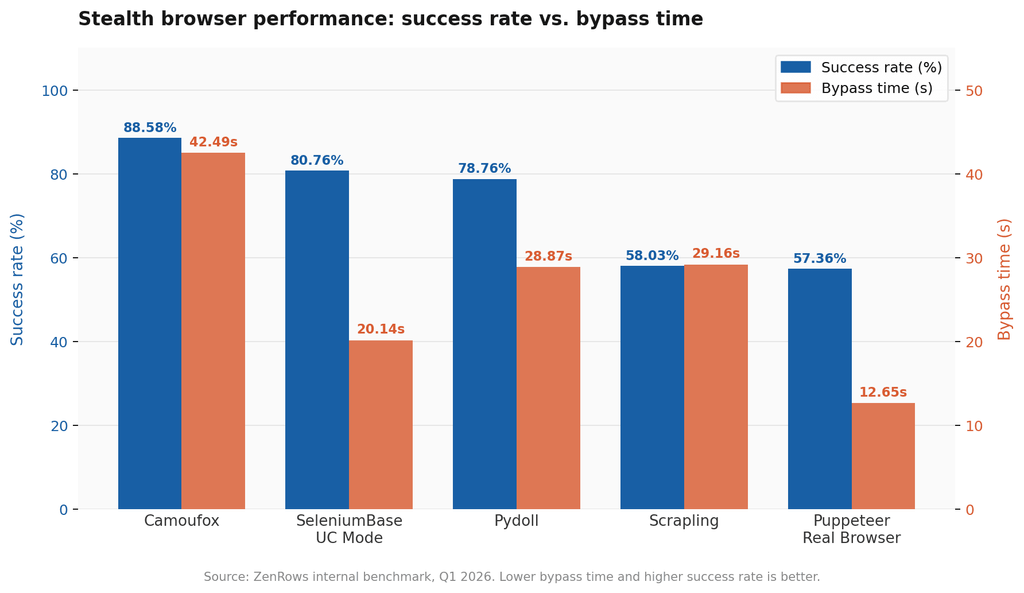
Camoufox leads on success rate at 88.58% but but is inherently slow, making it unfit for high-concurrency scraping. Puppeteer Real Browser is the inverse, as it's significantly faster than other stealth tools. However, it has the lowest success rate at 57.36%. This data shows that every stealth browser carries a significant performance overhead that compounds at scale.
Session Isolation
Cloudflare tracks behavioral patterns across sessions. If multiple sessions share the same browser profile, cookies, or fingerprint data, Cloudflare correlates them and flags the entire batch. Each concurrent session needs a fully isolated browser profile, its own proxy, and a unique fingerprint. A single misconfiguration, like two sessions sharing the same cf_clearance cookie, can cause cascading blocks across your entire scraping operation.
Version Pinning
Stealth browsers require careful version pinning since browser updates can silently break patch layers. For instance, Camoufox and SeleniumBase both require locked browser versions in your container images and a monitoring layer to detect bypass failures before they silently break your pipeline.
Proxy Management at Scale
Proxy rotation actually goes beyond just writing the rotation logic. Rotating proxies at scale requires tracking which IPs have been flagged, managing cooldown periods, balancing load across your proxy pool, handling authentication, and ensuring session-to-proxy consistency so Cloudflare doesn't see a session jumping between IPs mid-challenge. This looks simple, but it's challenging to manage as your scraper captures more pages.
Self-Managed vs. Managed Scraping APIs for Cloudflare WAF Bypass
Whether hosted locally or on the cloud, self-managed scraping infrastructure adds many operational layers that a managed scraping API abstracts away entirely. Before deciding between both options for Cloudflare WAF bypass, here are the key decision factors worth noting:
| Infrastructure | RAM/Session | Success Rate | Maintenance | Best For |
|---|---|---|---|---|
| Self-Managed Stealth Browsers | High | High | High | Small teams, low volume |
| K8s Browser Fleet | High | High | Very high | Large teams with DevOps capacity |
| Self-Managed Proxies | Minimal | Medium | Medium | IP rotation only, not full bypass |
| Manual Reverse Engineering | None | Potentially very high: depends on the team's expertise | Very high | Teams with dedicated scraping engineers |
| Managed Scraping API (e.g. ZenRows) | None | Very high: Zero maintenance | None | Production, any volume |
Overall, a managed scraper API is the easiest and most reliable for most teams. It handles all the technical aspects of bypassing Cloudflare, including proxy management, fingerprinting evasion, global accessibility, and JavaScript rendering at scale with zero maintenance overhead.
Check how we break it down in our eBook on DIY scraping vs. scraping API to learn more.
Bypassing Cloudflare at Scale with ZenRows
Cloudflare frequently updates its security measures, and none of the previous methods guarantees reliable success.
The easiest and most reliable way to deal with Cloudflare and put all the advanced technical hurdles behind you is to use a web scraping API, such as the ZenRows Universal Scraper API. ZenRows provides all the necessary tools to scrape any website at scale without being blocked. It uses cutting-edge technology to bypass all of Cloudflare's detection methods under the hood, allowing you to focus on your scraping logic rather than figuring out how to evade anti-bot measures.
With ZenRows' Adaptive Stealth Mode, you get the optimal configuration required to achieve success at the lowest possible cost. This mode enables your scraper to automatically adapt to the site's anti-bot measures as they evolve, and it requires zero maintenance overhead.
All you need is a single API call to have ZenRows bypass Cloudflare protection and obtain your desired data.
To see how ZenRows works, let's use it to access the Cloudflare Challenge page, a website heavily protected by Cloudflare.
Sign up and go to the Universal Scraper API Playground. Paste the target URL in the link box and activate Adaptive Stealth Mode.
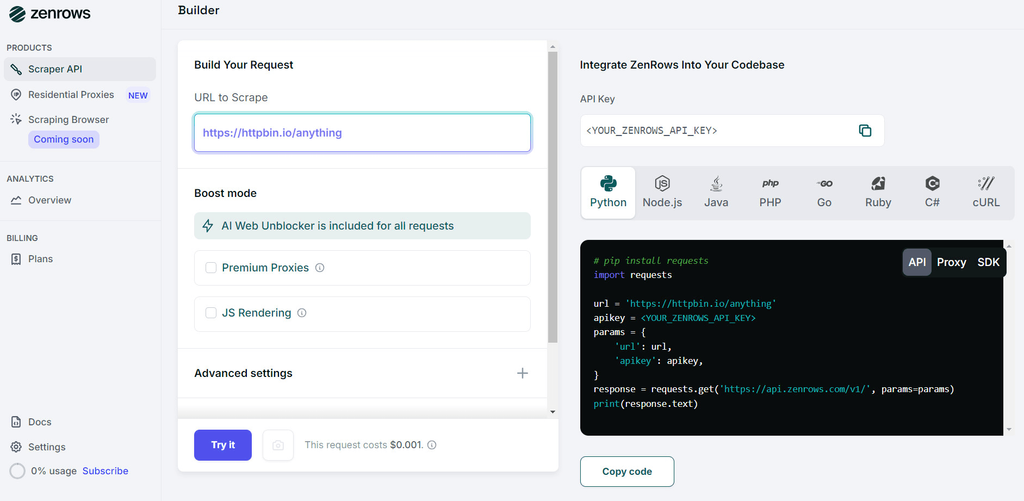
Select your preferred language and choose the API connection mode. Click "Run & Preview Result" to execute the code inside the Playground. You can also copy and paste the generated code into your scraper file to run it locally.
Here's the generated code for Python:
# pip3 install requests
import requests


url = "https://www.scrapingcourse.com/cloudflare-challenge"

apikey = "<YOUR_ZENROWS_API_KEY>"

params = {
   "url": url,
   "apikey": apikey,
   "mode": "auto",
}

response = requests.get("https://api.zenrows.com/v1/", params=params)

print(response.text)
The above code outputs the target website's full-page HTML, proving you've bypassed Cloudflare:
<html lang="en">
<head>
    <!-- ... -->
    <title>Cloudflare Challenge - ScrapingCourse.com</title>
    <!-- ... -->
</head>
<body>
    <!-- ... -->
    <h2>
        You bypassed the Cloudflare challenge! :D
    </h2>
    <!-- other content omitted for brevity -->
</body>
</html>
The output confirms a successful Cloudflare bypass. ZenRows handled the TLS fingerprinting, JS challenge, and Turnstile automatically behind a single API call.
Troubleshooting Cloudflare Blocks
Use the scenarios below to diagnose and fix the most common Cloudflare blocking issues.
Blocked with a 1020 or 403 Error
Your IP reputation, TLS fingerprint, or request headers triggered Cloudflare's WAF.
- Switch to a clean residential proxy with geo-targeting enabled.
- Make sure your request headers match a real browser's full set.
- If using an HTTP client, your TLS fingerprint is likely the issue. Switch to a stealth browser or a scraping API.
Rate-Limited by Cloudflare (Error 1015) or Error 429
Too many requests from the same IP in a short window.
- Rotate proxies per session using sticky sessions.
- Add randomized delays between requests.
- Respect Retry-After headers if the server returns them.
Stuck in a Turnstile Loop
The Turnstile token is either being injected into the wrong field or expiring before submission.
- Confirm the token is injected into
cf-turnstile-response. - Reduce the delay between solving and submitting, tokens expire quickly.
- Make sure your IP and fingerprint match the session that solved the challenge.
Headless Browser Got Blocked
Your browser is leaking automation signals Cloudflare detects at runtime.
- Switch to Camoufox or SeleniumBase UC Mode.
- Avoid blocking block images, JavaScript, or stylesheets, as Cloudflare loads these to run its checks.
- If possible, run in non-headless mode on first launch.
Residential Proxies Getting Blocked
Your IPs have been flagged due to overuse, shared pool exhaustion, or a geo-mismatch.
- Switch to a fresh IP pool or a different provider.
- Use geo-targeting to match the target site's primary region.
- Use sticky sessions to avoid IP-hopping mid-challenge.
How Does Cloudflare Detect Bots?
Cloudflare's detection methods can be passive or active. Passive bot detection techniques use backend fingerprinting tests, while active detection techniques rely on client-side analyses.
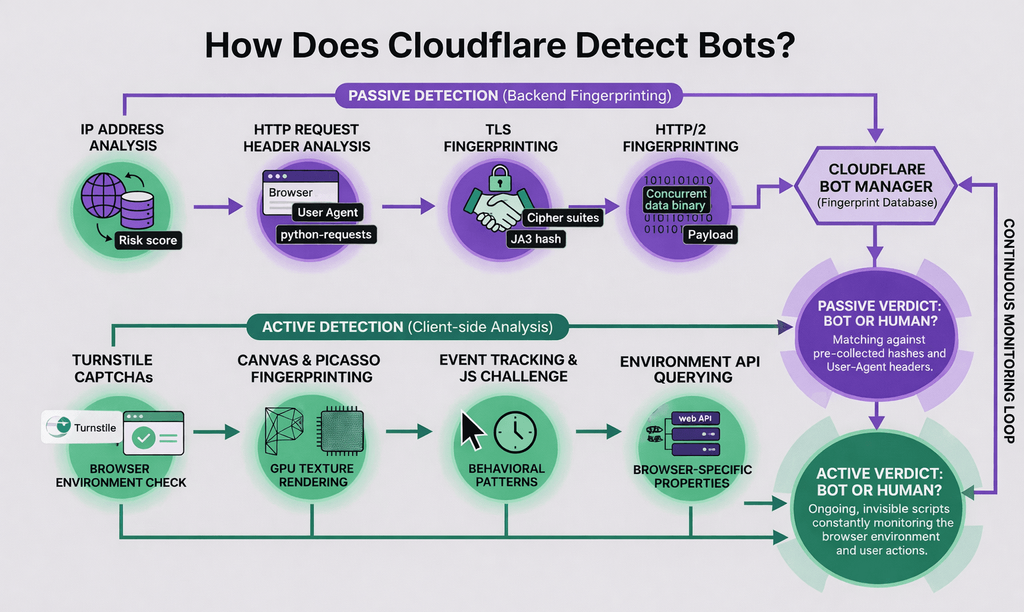
Cloudflare Passive Bot Detection Techniques
Here's a non-exhaustive list of passive bot detection techniques that help Cloudflare detect web scrapers:
IP Address Analysis
Every user's IP address carries a risk score based on factors such as geolocation, ISP, and reputation history. Datacenter IPs and known VPN providers score poorly by default because they're associated with automated traffic. Residential IPs from real ISPs score significantly better since they belong to real home networks.
Beyond IP type, Cloudflare also evaluates whether the IP has appeared in previous abuse reports, whether it's part of a known proxy or Tor exit node, and whether it originates from a region the target site doesn't serve. A clean residential IP from the wrong country can still trigger a block if the site has geo-restrictions configured.
HTTP Request Header Analysis
Cloudflare inspects the full set of request headers for signals that don't match a real browser. A non-browser User Agent like python-requests/2.x.x gets flagged immediately. But it goes deeper than that.
Real browsers send a specific set of headers in a specific order. Missing headers, wrong header order, mismatched header combinations, and outdated field values are all detection signals. For example, including Sec-CH-UA-Full-Version-List with a Firefox User Agent gets flagged because Firefox doesn't support that header. Cloudflare knows exactly which headers each browser version sends and in what order, and it checks your request against that fingerprint database.
TLS Fingerprinting
TLS implementation typically differs between operating systems, browsers, browser versions, and HTTP clients. This means fingerprint is unique to every TLS client during a TLS handshake based on cipher suites, extensions, elliptic curves, and their order. Cloudflare computes this fingerprint using methods like JA3, JARM, and CYU and cross-references it against a database of known clients. If your TLS fingerprint matches a raw HTTP client rather than a real browser, you're blocked before the page loads.
For example, Chrome 121 on Windows 10 has a specific TLS fingerprint that differs from Chrome 121 on macOS, Chrome 120 on Windows, and every other configuration. Cloudflare doesn't just check whether your fingerprint exists in its database, but also checks whether your fingerprint matches your announced User Agent. A mismatch between the two is an immediate red flag.
According to Matheus Canhizares, Senior Scraping Browser Engineer at ZenRows, most devs think tweaking the request headers is enough. It’s not. When we reverse-engineered the JA3 handshake, we found that Cloudflare was flagging 'impossible' combinations, such as a Chrome 144 header paired with a TLS stack that didn't support the Generate Random Extensions And Sustain Extensibility (GREASE) mechanism. If your cipher suite order doesn't match your announced browser version to the millisecond, you're dead on arrival.
HTTP/2 Fingerprinting
HTTP/2 extends the previous HTTP/1.1 protocol with new parameters in the binary frame layer, including SETTINGS frames, window update values, and header compression tables. Each client implements these differently, producing a unique fingerprint that Cloudflare checks the same way it checks TLS.
TLS and HTTP/2 fingerprinting work together as a layered check. Passing TLS fingerprinting but failing HTTP/2 fingerprinting can still result in blocking. Of all passive detection techniques, these HTTP/2 and TLS fingerprinting are the most technically challenging to control in request-based scrapers because they operate below the HTTP layer and require deep access to the client's networking stack to manipulate correctly.
Cloudflare Active Bot Detection Techniques
When you visit a Cloudflare-protected website via your local browser, checks are constantly running on the client side to determine if you're a robot. Here's a list of some of the active methods Cloudflare uses:
JavaScript Challenge and Event Tracking
Cloudflare injects invisible event listeners into the protected page to continuously monitor mouse movements, clicks, key presses, scroll patterns, and timing intervals. The challenge runs in the background and is invisible to the user.
This detection technique leverages the fact that real users behave unpredictably, moving the mouse in irregular curves, pressing wrong keys, scrolling at varying speeds, and interacting with the page in ways that are hard to replicate algorithmically. Bots, on the other hand, follow static, repeatable patterns, such as clicking the same element at the same interval, scrolling at a fixed rate, filling forms rapidly without typos. Cloudflare's scoring system identifies these patterns and flags them as bot behavior even when the bot is running inside a real browser.
Canvas Fingerprinting (Google Picasso)
Cloudflare uses Google's Picasso fingerprinting method to identify device classes. The browser is instructed to render a specific canvas image and the output is hashed to produce a fingerprint. That fingerprint reflects the combined output of the GPU, the OS font rendering engine, and the browser's image processing pipeline.
Because the fingerprint depends on hardware and low-level software, it's extremely difficult to spoof. A variation in any layer, the GPU model, the font hinting algorithm, or the anti-aliasing settings, produces a different fingerprint. This helps Cloudflare distinguish between device classes even when other signals have been patched. You can see canvas fingerprinting in action at BrowserLeaks' live demo.
Jesse Sommeling, Full Stack Developer at ZenRows, hints that Cloudflare's Canvas fingerprinting method (Picasso) isn't just checking if you can draw a circle. It measures the exact subpixel anti-aliasing of your OS's font-rendering engine. We found that in headless Linux environments, the lack of hardware-accelerated GPU textures is a massive 'I am a bot' signal that basic stealth plugins often miss.
Environment API Querying
A browser has hundreds of Web APIs that can be used for bot detection. We can split them up into four general categories:
- Browser-specific APIs: These specifications may exist in one browser but not in another. For example,
window.chromeis a property that only exists in a Chrome browser. If your request indicates that you're using a Chrome browser but you send a Firefox User Agent, Cloudflare will flag it as a bot and block it. - Timestamp APIs: Cloudflare uses timestamp APIs, such as
Date.now()orwindow.performance.timing.navigationStart, to track a user's speed metrics. The Bot Manager will block your request if these timestamps aren't legitimate. For example, browsing quickly or a mismatched navigationStart timestamp can tell Cloudflare you're a bot. - Automated browser detection: Cloudflare queries the browser for automated web browser properties. For example, the
window.document.__selenium_unwrappedorwindow.callPhantomproperty indicates the usage of Selenium or PhantomJS, respectively. The presence of these properties in your scraper can result in being blocked. - Sandboxing detection: Sandboxing refers to the process of emulating a browser in a non-browser environment. Cloudflare implements checks to prevent solving its challenges with emulated browser environments, such as JSDOM in NodeJS. For example, the detection script may look for the process object, which only exists in NodeJS. It can also detect if functions have been modified by using
Function.prototype.toString.call(functionName)on the suspected function.
Cloudflare Turnstile CAPTCHA
One of the client-side detection measures that Cloudflare employs is the Cloudflare Turnstile CAPTCHA. It's a non-interactive challenge that runs under the hood to detect bots by analyzing signals such as browser environment, operating system, mouse movements, clicks, and more.
As earlier stated, whether or not Cloudflare displays the Turnstile CAPTCHA depends on a few factors, such as:
- Site configuration: A website administrator may choose to enable the Turnstile challenge every time, occasionally, or never at all.
- Risk level: Cloudflare may serve a Turnstile CAPTCHA only if the traffic is suspicious.
That distinction matters for scrapers because it determines whether cookie reuse is enough or whether active CAPTCHA solving is required.
Per-Customer Machine Learning Models (2025 Update)
One of the most significant changes to Cloudflare's detection stack in 2025 is the introduction of per-domain machine learning models. Cloudflare now trains domain-specific models based on the behavioral patterns of legitimate traffic for each protected site.
This has a direct implication for scrapers because a bypass configuration that works perfectly on one Cloudflare-protected site may fail on another, even if both use the same Cloudflare security level. For instance, the ML model for a high-traffic e-commerce site has seen millions of real user sessions and will detect subtle anomalies that a model trained on a smaller site might miss.
This is why success rates vary by target in our benchmarks, and why there's no single bypass configuration that works across all Cloudflare-protected sites. Tools like ZenRows moved with this update by adapting its bypass configuration per target rather than applying a fixed approach for all websites.
Cloudflare's AI Labyrinth
Cloudflare's AI Labyrinth is an active honeypot that serves 200 OK responses filled with AI-generated fake content to trap scrapers and waste their resources. Unlike traditional static honeypots that serve fixed decoy pages, AI Labyrinth generates content dynamically using generative AI, making it appear as if you were scraping real user-generated data. It continuously adapts its output to the bot's behavior, making it significantly harder to detect than traditional honeypots.
The practical risk is that your scraper can run for hours collecting data that looks structurally valid but is entirely fabricated. By the time you notice, you've wasted crawl budget, compute time, and potentially made decisions on hallucinated data.
To detect it, implement entropy-based content validation on your scraped output. Real pages have consistent structural patterns and internal coherence. AI Labyrinth content tends to be semantically plausible but structurally inconsistent, with unusual link graphs, mismatched internal references, and content that doesn't align with the site's known taxonomy. The most reliable detection method is cross-referencing a sample of scraped pages against known-good content from the same domain and flagging pages with anomalous structural signatures.
Conclusion
You've learned about Cloudflare's bot detection techniques and how to reverse engineer them. Bypassing Cloudflare in 2026 requires a layered approach, and there's no single tool or manual technique that works everywhere. Cloudflare's detection stack now combines passive fingerprinting at the network level, active JavaScript challenges, Turnstile CAPTCHA, per-domain machine learning models, and an AI-powered honeypot that serves fake data to waste your crawl budget.
These methods aren't Cloudflare-specific. You can also apply them to bypass other anti-bots such as Akamai and DataDome. If you'd like to learn more about it, read the following guides:
For most teams, the right answer is the one that matches your scale and maintenance tolerance. Start with the open-source tools if you're testing or running low volume and over to a managed scraping API when reliability can't be compromised.
If you're ready to skip the trial and error completely, ZenRows handles Cloudflare bypass automatically with a single API call.
Try ZenRows for free now or speak with sales!
Frequent Questions
How can I bypass Cloudflare?
The most reliable way to bypass Cloudflare when scraping is to use a managed scraping API, which handles TLS fingerprinting, JS challenge solving, and Turnstile CAPTCHA automatically. For self-hosted setups, Camoufox and SeleniumBase UC Mode are the strongest open-source options. For full production control, reverse-engineering Cloudflare's JS challenge is possible but requires significant ongoing maintenance.
How can I bypass Cloudflare with Python?
Use Curl_cffi with impersonate="chrome" to match browser TLS and HTTP/2 fingerprints for sites with passive detection only. For sites with active JS challenges or Turnstile, use Camoufox or SeleniumBase UC Mode for stealth browser automation, or call the use a scraping API for a fully managed solution.
How do I stop being blocked by Cloudflare?
Most Cloudflare blocks come from one of three sources: bad IP reputation, mismatched fingerprints, or automation signals in your browser environment. Use clean residential proxies with geo-targeting support, evade anti-bot checks with a stealth browser like Camoufox or SeleniumBase UC Mode. If you're still getting blocked after all three, the site likely has an always-on JS challenge or Turnstile that requires a dedicated scraping API.
How do I access a Cloudflare-blocked website?
If Cloudflare is blocking your scraper, the fix depends on which error you're seeing. A 403 or 1020 usually means IP or fingerprint issues. A Turnstile challenge requires a CAPTCHA solver or cookie reuse, while waiting room interstitial requires solving the JS challenge.
How can I disable Cloudflare?
You can't disable Cloudflare on a site you don't own. If you own the site and want to disable protection for specific routes or IPs, you can configure Cloudflare firewall rules in your dashboard to allow trusted IPs or bypass bot protection for specific paths.
What is the Cloudflare waiting room?
The Cloudflare waiting room is the interstitial challenge page that appears before you can access a protected site. It runs JavaScript challenges in the background to verify you're a real user. Bypassing it requires either solving the JS challenge, reusing a valid cf_clearance cookie, or using a managed scraping API that handles the challenge automatically at scale
Why did my Cloudflare bypass suddenly stop working?
Cloudflare regularly updates its challenge scripts and rotates encryption keys. If your bypass suddenly stopped working, check whether your stealth browser or solver has a pending update and verify your browser version is still pinned correctly.
Why is my IP blocked by Cloudflare?
Cloudflare blocks IP addresses for several reasons, and it's not always about request volume:
- Bot-like behavior: Making too many requests in a short window, using a non-browser User Agent, or sending requests with missing or mismatched headers all trigger Cloudflare's passive detection layer.
- Poor IP reputation: Datacenter IPs, known VPN providers, and Tor exit nodes carry low trust scores by default. Cloudflare flags them regardless of how well-behaved your requests are.
- Geo-restriction: Some sites restrict access to specific regions. Traffic originating outside those regions gets blocked even if the IP itself is clean.
- Blocklisted IP: Your IP may have been flagged from previous scraping activity or shared proxy use. A blocklisted IP will be rejected immediately regardless of your request quality.
The fix depends on the cause. Switch to a clean residential proxy with geo-targeting for IP reputation and geo-restriction issues.
How to Bypass Cloudflare human check?
Bypassing Cloudflare's human check requires mimicking legitimate browser behavior across every layer Cloudflare inspects. Here are the most effective methods:
- Use a stealth browser: Camoufox and SeleniumBase UC Mode patch automation signals like `navigator.webdriver` and canvas fingerprinting to replicate real browser behavior. These are the strongest open-source options for handling Cloudflare's human check.
- Reuse the cf_clearance cookie: Solve the challenge once with Camoufox, extract the `cf_clearance` cookie, and reuse it in lightweight HTTP requests for the duration of its validity window. This avoids spinning up a full browser on every request.
- Use a CAPTCHA solver service: For always-on Turnstile challenges, services like 2Captcha send the challenge to human solvers and return a valid token. Slow and costly at scale but reliable for low-volume use cases.
- Use a managed scraping API: This handles Cloudflare's human check automatically, including JS challenges and Turnstile CAPTCHA, with a single API call and no maintenance overhead.
How do I bypass Cloudflare's rate limit?
To bypass Cloudflare’s rate limiting, you can rotate IP addresses for each scraping request instead of relying on a single IP. This approach helps prevent your scraper from exceeding the allowed number of requests per IP address, which is especially important for large-scale data extraction. However, keep in mind that Cloudflare employs additional detection methods beyond rate limiting, including fingerprinting, behavioral analysis, JavaScript challenges, and many more. For the most reliable results, consider using a dedicated web scraping API designed to handle Cloudflare’s full range of anti-bot protections.